
Microsoft 365 Price Increases: What North West Businesses Need to Know Before July 2026
Business Basic and Business Standard are going up. Business Premium is not. Here is what changes, what you get, and why now might be the right time to rethink your licensing.
The Short Version
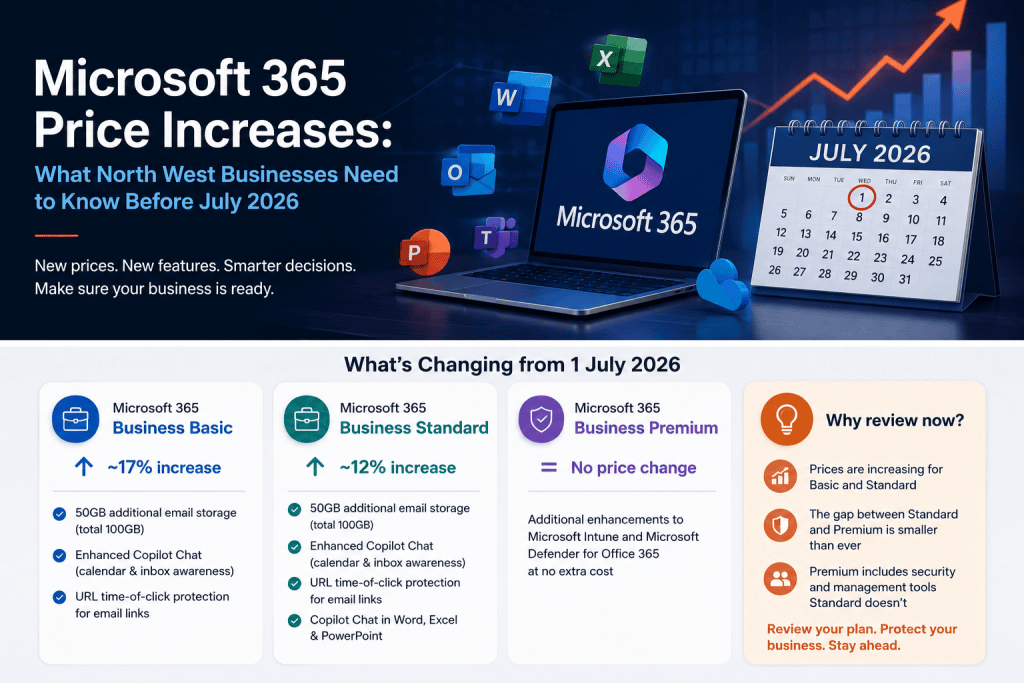
From 1 July 2026, Microsoft is raising prices across most of its commercial Microsoft 365 plans. Microsoft 365 Business Basic is increasing by approximately 17%. Microsoft 365 Business Standard is increasing by approximately 12%. Microsoft 365 Business Premium is not changing.
This article explains what is changing, what you are actually getting for the extra cost, and why the gap between Business Standard and Business Premium has narrowed to the point where upgrading your estate deserves serious consideration.
What Is Actually Changing
Microsoft has cited over 11,000 additional features added to the Microsoft 365 platform since its original launch as the basis for this update. The pricing change is not purely inflationary. Several new capabilities are being included in existing plan tiers from around August 2026.
Microsoft 365 Business Basic – 17% increase
Business Basic is the entry-level plan covering web and mobile versions of Office apps, Exchange email, Teams, SharePoint, and OneDrive. From July 2026, subscribers will receive 50GB of additional email storage per mailbox (taking the total to 100GB), enhanced Copilot Chat with calendar and inbox awareness, and URL time-of-click protection for email links – a basic phishing defence that checks whether a link is safe at the moment a user clicks it, not just when the email was delivered.
Microsoft 365 Business Standard – 12% increase
Business Standard includes desktop versions of the full Office suite alongside all Basic features. It receives the same storage uplift, Copilot Chat enhancements, and URL click protection. Microsoft is also expanding Copilot Chat’s reach into Word, Excel, and PowerPoint for Standard users. The features added are useful, but it is worth being clear: this plan still does not include endpoint protection, device management, or the advanced identity controls that come with Business Premium.
Microsoft 365 Business Premium – no price change
Business Premium remains unchanged. It also receives additional enhancements to Microsoft Intune and Microsoft Defender for Office 365 as part of the July 2026 update, at no extra cost. The price gap between Business Standard and Business Premium is now narrower than it has ever been.
The Case for Reviewing Your Plan Now
If your business is currently on Business Basic or Business Standard, you are about to pay more. That is not avoidable. What is avoidable is paying more for a plan that no longer represents the best value for your organisation.
With the Standard price rising by 12%, the cost difference between Standard and Premium has reduced to its lowest point. Businesses that have previously looked at Business Premium and decided it was too expensive relative to Standard should run that calculation again.
Before July 2026, the price difference between Business Standard and Business Premium was significant enough that many businesses accepted the security trade-off. That calculation has now shifted. Speak to Blowfish Technology before your renewal date and we will work through the numbers with you.
What Business Premium Includes That Standard Does Not
Business Premium is often described as a security and device management platform built on top of the productivity tools in Standard. That description understates what it actually gives you. Here is what is included that Standard does not cover.
Microsoft Intune – device management for your whole estate
Intune lets your IT team manage and secure every device used to access company data – Windows PCs, Macs, iOS and Android devices. You can enforce encryption, require screen locks, set minimum OS versions as a condition of access, remotely wipe a lost or stolen device, and deploy applications and updates without touching the machine. Without Intune, there is no centralised way to know whether the devices connecting to your business systems meet your security standards.
Microsoft Defender for Business – endpoint protection across all devices
Defender for Business provides next-generation antivirus, behavioural threat detection, and automated response to security incidents across Windows and Mac devices. It gives your IT team a single dashboard showing the threat status of every enrolled device. As a standalone product, Defender for Business costs approximately $3 per user per month. With Business Premium, it is included.
Microsoft Defender for Office 365 Plan 1 – advanced email protection
This goes beyond the basic spam and malware filtering included in all plans. Safe Attachments opens incoming email attachments in an isolated sandbox before delivery, so malicious files never reach your inbox. Safe Links rewrites URLs in emails and documents so they are re-checked at the point of click – closing the gap where a link is safe when sent but redirected to a malicious site by the time a user opens it. Anti-phishing policies use machine learning to detect impersonation attempts targeting your staff or brand.
Microsoft Entra ID Plan 1 – Conditional Access and identity protection
Conditional Access evaluates every login attempt against policies you define. You can require that a device is compliant before granting access to company data, block access from unfamiliar locations, and enforce multi-factor authentication across your organisation. Business Standard includes basic identity management. Business Premium includes the enterprise-grade version. For most cyber insurers, Conditional Access and MFA enforcement are now baseline requirements.
Microsoft Purview – data loss prevention and information protection
Purview lets you classify sensitive data, apply labels and encryption, and set policies that prevent accidental or deliberate sharing of information your business cannot afford to expose. If your business handles personal data, financial records, or commercially sensitive documents, this matters.
Modern Management for Your Devices
One of the practical differences that Business Premium enables, and that is often overlooked in licensing conversations, is modern device management. With Intune, your IT team can manage and configure every device in your estate remotely – without physical access, without relying on a traditional on-premises server infrastructure, and without depending on staff to manually configure their own machines.
For North West businesses with remote or hybrid teams, multiple sites, or staff who use personal devices for work, this changes how IT support is delivered. Policies apply automatically. Devices out of compliance can be flagged or restricted from access. New starters can have their devices configured and ready before they arrive. Leavers can have company data removed from any device, anywhere, within minutes.
This is what modern IT management looks like. It is included in Business Premium. It is not included in Basic or Standard.
Adding Microsoft 365 Copilot to Business Premium
If you are moving to Business Premium and want to take the next step, Microsoft 365 Copilot is available as an add-on. It brings AI-powered assistance directly into the applications your team uses every day.
The list price for Copilot Business sits at approximately £24.70 per user per month on an annual commitment in the UK (ex-VAT, list price, May 2026 – verify current pricing with your provider at point of purchase).
What Copilot adds to your team’s daily work
Copilot works inside Word, Excel, PowerPoint, Outlook, and Teams. In Word, it drafts documents, summarises long reports, and rewrites content for different audiences. In Excel, it analyses data, builds formulas, and surfaces patterns a user might miss in a large dataset. In PowerPoint, it generates presentation drafts from a brief or a document. In Outlook, it summarises email threads, drafts replies, and helps prioritise inboxes. In Teams, it summarises meeting content and actions for anyone who was not in the room.
What it means for your business in practice
The businesses seeing the clearest return from Copilot are those where staff spend significant time producing documents, handling email volume, preparing reports, or summarising information for colleagues or clients. For professional services firms, management businesses, or any team where writing and communication take up a meaningful part of the working day, the time savings are measurable. Copilot does not replace judgement or expertise. It reduces the time spent on the mechanical parts of producing output so your team can spend more time on the parts that actually need them.
Copilot works best when the underlying environment is well-managed and secure. Business Premium provides that foundation – which is one reason the combination of Business Premium and Copilot is a natural pairing rather than two separate decisions.
What to Do Before July 2026
The practical steps are straightforward, but they do require action before your renewal date.
If your subscription renews before 1 July 2026, you may be able to lock in current pricing for another term. If it renews after, the new prices will apply.
Many businesses are paying for more seats than they are actively using, or have staff on the wrong plan for their role. A licence review before July can reduce the total cost before the increase lands.
With Basic rising by 17% and Standard by 12%, the gap between Standard and Premium is closer than it has been. Factor in the security tools, device management, and advanced email protection that Premium includes – tools that would otherwise require separate purchases – and the number often changes.
If your team produces significant written output, handles large email volumes, or attends a high number of meetings, a Copilot pilot is worth evaluating as part of the same conversation.
Average call response
Same-day resolution
Within SLA
Talk to Blowfish Technology About Your Microsoft 365 Licences
We work with North West businesses to review Microsoft 365 licensing, identify savings, and build environments that are properly managed and secured. If your renewal is coming up, or you want to understand whether Business Premium is the right move for your team, get in touch before the July deadline.

The Blowfish Technology team. Managed IT, cloud services, software development and connectivity for North West businesses since 1999.