
Your business has fast broadband, yet Microsoft 365 takes too long to respond, VoIP calls break up during busy periods, and staff at one office complain that shared files open far more slowly than they do at another. Increasing the circuit speed may help, but it won't automatically solve congestion, latency, poor routing, or competing traffic.
That's the practical problem WAN optimisation addresses. It makes a wide area network use its available connections more intelligently, so critical applications receive the performance they need without treating every issue as a reason to buy more bandwidth. For UK SMEs with multiple offices, cloud workloads, remote users, and mixed urban and rural connectivity, that distinction matters.
Table of Contents
- Is Your Fast Internet Still Feeling Slow
- How WAN Optimisation Works Its Magic
- Six Signs Your Business Needs WAN Optimisation
- Choosing Your Implementation Model On-Prem vs SD-WAN vs Managed
- Measuring Success and Calculating ROI
- Your Next Steps With a Managed Service Provider
Is Your Fast Internet Still Feeling Slow
A North West engineering firm might have full-fibre broadband at its headquarters, a faster-than-before connection at its city office, and a more limited circuit at a rural workshop. All three sites can access Microsoft 365, hosted desktops, cloud backup, and VoIP, but users don't experience those services equally. The head office may work smoothly in the morning, then suffer when backups, large design files, video meetings, and normal cloud traffic compete for the same connection.
The speed test still looks reassuring. It measures the capacity of the access circuit under test conditions, not necessarily the experience of a user opening a remote application while other traffic is running. WAN optimisation makes the network work smarter, not bigger, by controlling how data moves between sites and towards cloud services.

Why bandwidth isn't the whole answer
Ofcom's 2025 data shows that 84% of UK SMEs had access to a gigabit-capable network, while rural SME full-fibre access was 58%, compared with 81% for urban SMEs. Those figures come from Ofcom's 2025 Connected Nations data, and they highlight the challenge for businesses with geographically dispersed sites. One office might have excellent access, while another still relies on a connection that needs careful traffic management.
Distance also affects interactive applications. A voice call, remote desktop session, or cloud database transaction involves repeated exchanges between the user and the service. Delay, packet loss, queueing, and jitter can make those exchanges feel slow even when the connection has substantial download capacity. A useful explanation of the causes is available in this guide to why business internet slows.
Practical rule: If users complain about a particular application rather than every application, investigate traffic behaviour and latency before automatically upgrading the circuit.
WAN optimisation can include application-aware prioritisation, compression, deduplication, caching, protocol improvements, and intelligent path selection. It won't repair a faulty circuit or replace a badly designed application, and it can't remove the physical distance between a site and a cloud platform. It can, however, ensure that a critical Teams call isn't treated the same way as a non-urgent backup upload.
How WAN Optimisation Works Its Magic
WAN optimisation is easier to understand when you stop thinking of it as one product. It's a group of techniques that reduce unnecessary data, manage contention, and improve the way applications communicate across a WAN.
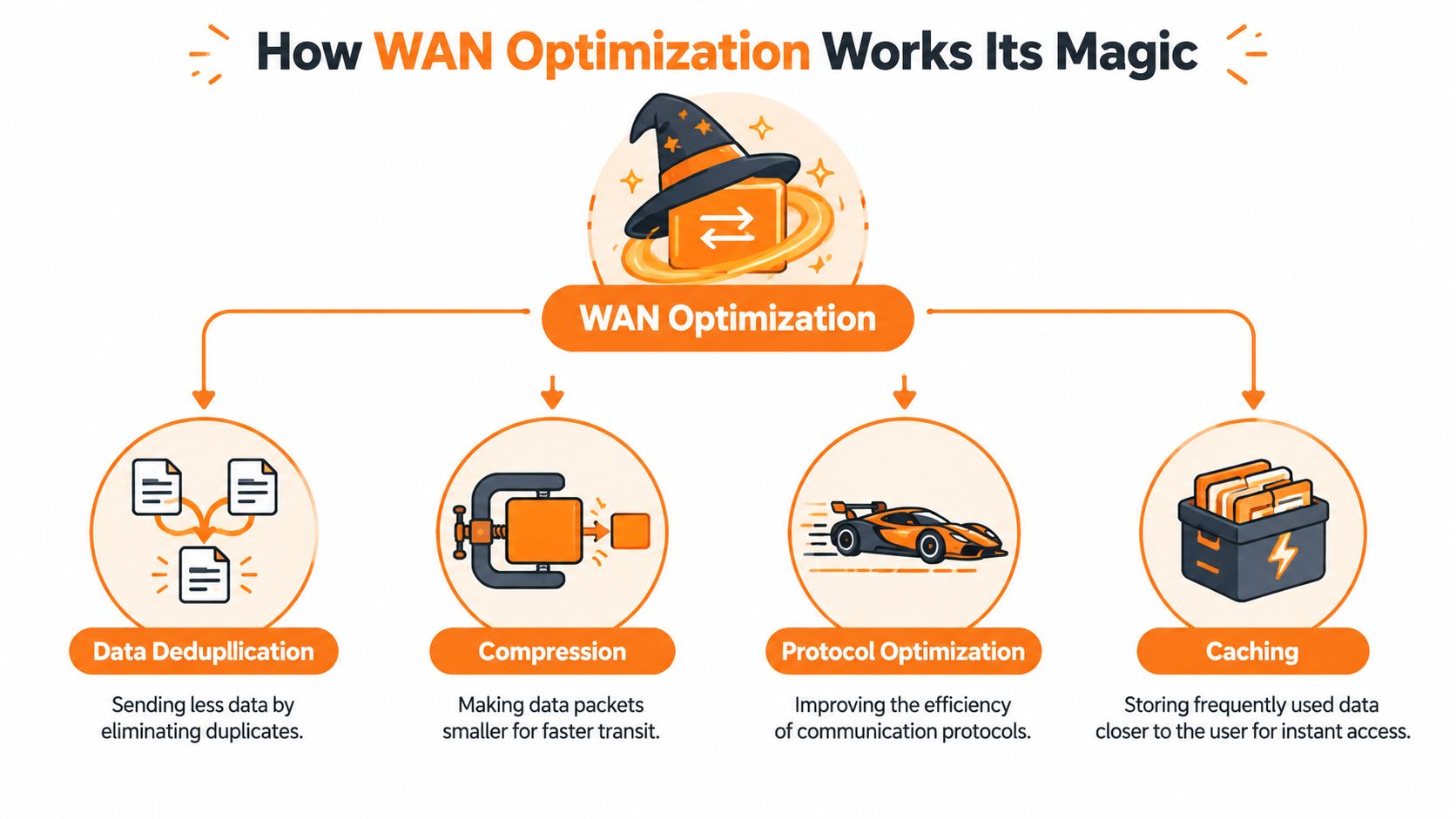
Four techniques with practical uses
Data deduplication removes repeated information before it crosses the link. If a branch repeatedly sends files containing the same blocks of data, the system can recognise what the receiving side already has and transmit only the new content. It's similar to sending the amendments to a document rather than mailing the whole document again.
Compression reduces the size of data in transit. Text-heavy files and repeated patterns often compress well, while already-compressed media may offer less opportunity. The benefit depends on the traffic type, so compression shouldn't be treated as a universal answer.
Traffic shaping and prioritisation create an orderly queue. Voice, video conferencing, remote desktop, and interactive SaaS sessions can receive priority over less time-sensitive transfers such as scheduled replication, thereby preventing a large upload from filling a connection and creating queueing delay for every other user.
Protocol optimisation reduces the overhead of applications that communicate through frequent exchanges. Some older protocols behave well on a local network but become inefficient across distance and variable latency. An optimisation layer can streamline those conversations, although modern cloud services may use encryption or provider-specific designs that limit what an appliance can inspect or change.
Caching stores frequently requested data closer to the people using it. A branch that repeatedly accesses the same approved file or software package may avoid fetching the complete content across the WAN every time. Caching is less useful for data that changes constantly, is individually encrypted, or is delivered directly from a cloud platform without a reusable local copy.
What works and what doesn't
The strongest deployments begin with traffic identification. Engineers should establish which applications matter, when congestion occurs, and whether the constraint is latency, packet loss, jitter, bandwidth, or the service itself. A policy that prioritises everything achieves nothing, because a priority queue only works when the business defines what deserves priority.
Encryption also changes the design. Microsoft 365, hosted applications, and modern security controls can prevent traditional inspection-based techniques from delivering their full benefit. In those cases, application-aware routing, quality-of-service policies, resilient links, and clear monitoring may provide more value than aggressive caching or protocol manipulation.
The SD-WAN and MPLS comparison is useful when deciding whether traffic control should sit within a wider connectivity architecture. WAN optimisation isn't magic, and it won't turn a poor service into a reliable one. It works when the selected technique matches the actual traffic and the provider measures the result.
UK broadband performance data reinforces why the design must consider latency as well as speed. The BT UK broadband performance report compares providers and shows why loaded latency should be assessed alongside throughput. A full-fibre service can offer strong capacity, yet latency may rise when concurrent uploads and backups put pressure on the connection.
Six Signs Your Business Needs WAN Optimisation
WAN optimisation deserves investigation when users experience repeatable application problems across sites, not just because a supplier offers a new appliance. These six symptoms are useful starting points for an internal review.
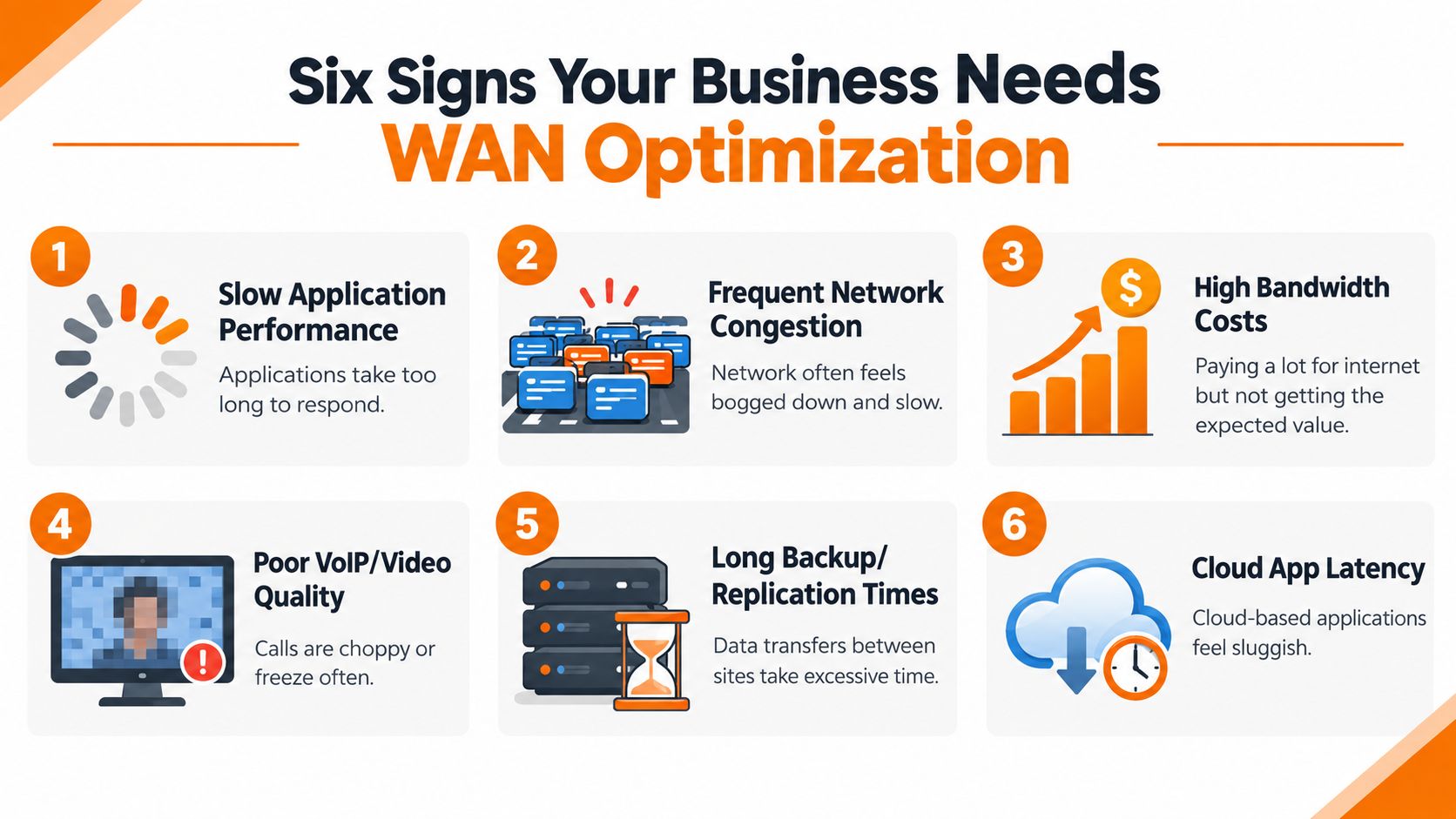
A practical diagnostic checklist
Cloud applications feel slow. Microsoft 365, hosted finance systems, customer relationship management platforms, and remote desktops may respond slowly even though general web browsing seems fine. Check whether the issue appears at particular sites, times, or during specific background transfers.
VoIP calls become unreliable. Choppy audio, delays, dropped calls, and video freezes usually point towards jitter, packet loss, queueing, or poor prioritisation. Buying more download capacity may not correct a path that treats voice traffic as an afterthought.
Files take too long to move between offices. Engineering drawings, production documents, legal bundles, and shared media can consume a link for long periods. Deduplication, compression, scheduling, or a better application path may reduce the impact, but teams should first check whether a cloud collaboration platform would remove the need for repeated site-to-site transfers.
Backups overrun their window. A backup that competes with business traffic can create a predictable morning slowdown. The answer may be traffic scheduling and prioritisation rather than a permanent circuit upgrade, particularly if the backup workload is bursty.
Bandwidth costs keep rising without resolving complaints. More capacity helps when the connection is saturated. It doesn't fix inefficient routing, unsuitable protocols, application-side delays, or a rural site whose service quality differs from the main office.
Remote workers have an inconsistent experience. Staff working from home or from customer locations depend on more than the office circuit. Centralised policy, resilient access, well-designed cloud routing, and application monitoring can help distinguish an office WAN problem from a home broadband or endpoint problem.
Ofcom's UK coverage data reports 91.25% gigabit coverage, while regional conditions still vary. The UK broadband coverage dataset therefore needs careful interpretation by multi-site organisations, particularly those operating across the North West. A national headline doesn't tell you whether the workshop, branch, or legal office has the same practical service as headquarters.
Look for patterns, not anecdotes: Record the application, site, time, user group, and concurrent activity. That evidence gives an engineer something actionable to test.
WAN optimisation is most appropriate when the business has identifiable contention or WAN inefficiency. It's less appropriate when the root cause is a failing access circuit, weak Wi-Fi, overloaded endpoints, a misconfigured firewall, or an application provider experiencing an outage.
Choosing Your Implementation Model On-Prem vs SD-WAN vs Managed
The implementation model determines who owns the equipment, who changes the policies, and who responds when performance deteriorates. For an SME, the right choice depends less on fashionable terminology and more on internal skills, site complexity, compliance requirements, and the need for predictable support.
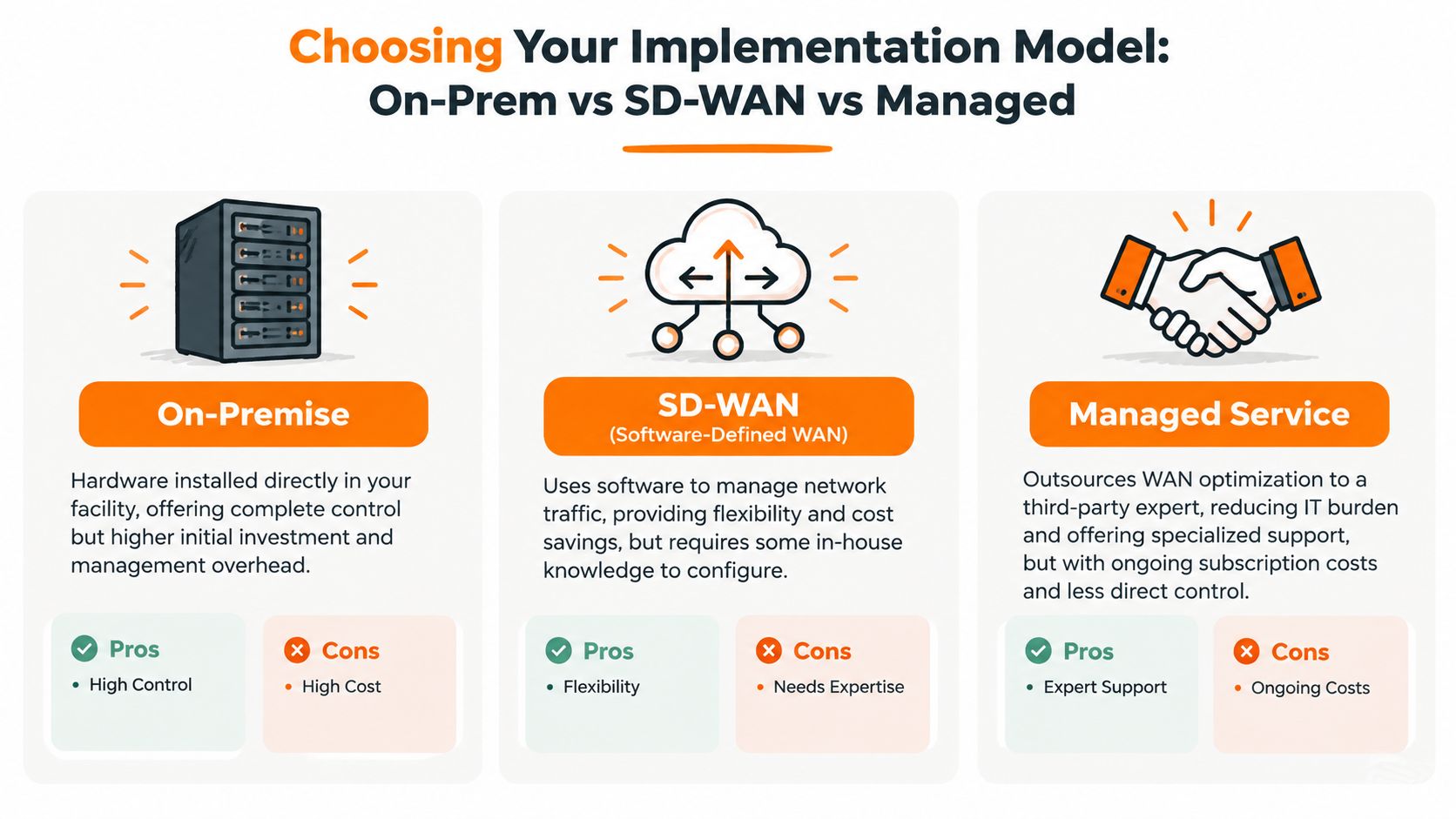
| Model | What it offers | Main trade-off |
|---|---|---|
| On-premises appliance | Physical control, local policy ownership, and direct visibility into the WAN edge | Capital expenditure, replacement planning, patching, monitoring, and internal support responsibility |
| SD-WAN | Software-defined policy, application-aware routing, and the ability to use multiple connections | Requires careful design, compatible underlay services, and enough in-house knowledge to manage policy safely |
| Managed service | Provider-led design, monitoring, incident response, and ongoing optimisation | Recurring service charges and less direct control over day-to-day changes |
On-premises appliances
An on-premises appliance can suit a business with a capable network team, stable site requirements, and a reason to keep WAN policy under direct control. It may provide strong local visibility and can integrate with existing firewalls and routing arrangements. The business still owns the operational burden, including software updates, hardware failure planning, configuration backups, and after-hours troubleshooting.
This model often looks attractive when the initial project is treated as the main cost. The longer-term question is whether the organisation can maintain the platform when the network, cloud estate, and security requirements change.
SD-WAN
SD-WAN is a broader architecture rather than a synonym for compression or caching. It can monitor available paths and steer applications according to policy and observed conditions. That makes it useful where a business has diverse connections, such as fibre, leased lines, wireless backup, or another access service.
SD-WAN doesn't automatically improve every application. A poor underlay remains poor, and badly written policies can create unexpected routing or security problems. The design must cover internet breakout, cloud access, failover, encryption, identity, monitoring, and change control.
Managed service
A managed service transfers much of the design and operational workload to a specialist. The provider should assess each site, document the intended traffic policy, monitor performance, manage incidents, and report against agreed service levels. This can be the most practical route for an SME whose internal IT team has more urgent responsibilities than tuning WAN policies.
The UK's connectivity history helps explain why this flexibility matters. The government-backed Superfast Broadband Programme background began in 2013, received £530 million in initial public funding, and had delivered subsidised superfast broadband to 4.8 million premises by December 2017. Its purpose included reducing the urban-rural connectivity gap, leaving many organisations with estates that still combine different access types.
Before choosing a provider, compare its proposed managed service with the cost of dedicated internet access, internal engineering time, equipment ownership, and the business cost of unresolved performance issues.
Measuring Success and Calculating ROI
A WAN optimisation project needs a baseline before anyone changes traffic policy. Otherwise, the business may confuse a new circuit, seasonal demand, application changes, or user perception with the effect of the optimisation work.
Start with a short list of technical and operational measures:
- Application response: Record how long key Microsoft 365 workflows, hosted desktops, file services, and transactional applications take to respond at each site.
- Latency and jitter: Measure the path used by voice, video, remote desktop, and other interactive services during quiet and busy periods.
- Packet loss and availability: Track whether interruptions or retransmissions affect specific links or applications.
- Transfer and backup windows: Note whether replication and backup activity overlaps with working hours.
- User-impact incidents: Categorise support tickets by site, service, and symptom rather than recording every complaint as “the internet is slow”.
Use a recognised performance reference
Ofcom's Connected Nations methodology classifies service quality using latency thresholds. It treats under 30 ms as very high performance, under 50 ms as high performance, and under 100 ms as good performance, as described in the Connected Nations 2024 report.
These thresholds aren't a promise that every application will perform perfectly within a band. They provide a useful reference for comparing sites and identifying whether critical traffic regularly moves into a less suitable range. Measure jitter and packet loss as well, because voice and remote desktop can remain unpleasant even when average latency looks acceptable.
A credible ROI case links a network measure to a business consequence. Lower queueing delay matters because users complete work with fewer interruptions, not because a dashboard displays a better colour.
Translate technical change into business value
Calculate the time employees spend waiting for applications, repeating failed transfers, reconnecting calls, or delaying work until a backup finishes. Use internal payroll assumptions and observed workflows rather than borrowed industry benchmarks. If optimisation prevents a bandwidth upgrade, record that as a deferred cost, but don't count it as a saving until the business confirms the upgrade would otherwise have been necessary.
Also include resilience and risk. A secondary path, application-aware failover, and clearer monitoring may reduce the disruption caused by a circuit fault, even if they don't produce a visible speed increase on an ordinary day. Review the results with finance and operational managers, then keep measuring after implementation so policies can be adjusted when applications or sites change.

Your Next Steps With a Managed Service Provider
Start with an assessment, not a product demonstration. Give the provider a site list, circuit details, cloud services, VoIP platform, backup schedule, known problem periods, and examples of affected applications. Ask the engineer to separate access faults from WAN design issues, local network weaknesses, endpoint problems, and service-provider incidents.
A useful assessment should show how traffic behaves at each location. It should identify which applications need low latency, which transfers can be scheduled, whether sites need failover, and how internet-bound cloud traffic will be secured and routed. The output should be a practical design, not a generic recommendation to “increase bandwidth”.
Questions worth asking
- How will you establish the baseline? Ask which measurements will be collected, how busy periods will be represented, and how the provider will distinguish latency, jitter, loss, and congestion.
- Who owns policy changes? Confirm whether your team can request changes, how those changes are approved, and how the provider prevents a new rule from disrupting another application.
- What does monitoring cover? Check whether the service watches circuits, application paths, failover events, device health, and user-impacting incidents.
- How are service levels reported? Request clear definitions for availability, response, restoration, escalation, and exclusions. A dashboard without agreed interpretation won't prove that the service is working.
- What happens when the underlay fails? Understand how the design uses secondary connections, how failover is tested, and who coordinates with the access carrier.
A managed provider should also explain what WAN optimisation won't solve. If the issue comes from weak internal Wi-Fi, an overloaded firewall, poor cloud architecture, or an application vendor, the remedy may sit outside the WAN edge. Honest scoping protects the business from paying for a technology that cannot address the actual fault.
For an overview of the wider responsibilities involved, review what a managed service provider does. The right partner will connect network decisions with Microsoft 365, security, backup, telephony, and business continuity rather than managing the WAN in isolation.
Blowfish Technology provides managed connectivity, SD-WAN design and implementation, cloud and Microsoft 365 support, VoIP, backup, and security services for UK SMEs. Visit Blowfish Technology to discuss a measured WAN assessment and a practical route to better application performance across your sites.
