
Your office probably already has a communication system. It just doesn't behave like one.
A fee earner replies to clients in Outlook. A director takes calls on a personal mobile. Engineers swap project updates in WhatsApp. Internal meetings happen in Zoom or Teams, depending on who sent the invite. Voicemails sit unheard. Nobody's fully sure where the latest customer conversation lives. When someone is off sick, the trail often disappears with them.
That setup feels normal in a lot of UK SMEs. It's also expensive, risky and hard to govern. In regulated sectors, it's worse than untidy. It creates blind spots around data handling, auditability and client confidentiality.
Cloud unified communications fixes that by bringing calling, messaging, meetings and collaboration into one managed environment. Not as an IT vanity project. As a practical way to cut friction, improve control and make the business look and operate like one organisation instead of five disconnected apps.
For legal firms, financial services businesses and engineering companies, the appeal isn't just convenience. It's control. You need staff to work anywhere without dragging sensitive conversations across unmanaged devices and consumer apps. You need resilience without a rack of ageing hardware in a comms cupboard. And you need to know that when a client calls, your team can answer professionally, securely and consistently.
Table of Contents
- Is Your Communication System Holding Your Business Back
- Decoding Cloud Unified Communications Architecture
- The Core Features That Power Modern Business
- The Business Case ROI and Strategic Benefits
- Navigating Security and Compliance Requirements
- Your Implementation and Vendor Selection Checklist
- Simplify and Scale with a Managed UC Partner
Is Your Communication System Holding Your Business Back
A common SME setup looks like this. Reception has a desk phone. Sales forwards missed calls to mobiles. Partners or directors use personal numbers because it's faster. Teams chat in whatever app was easiest to install. Video meetings happen on one platform, phone calls on another, and nobody enjoys checking three places for one conversation.
That works until it doesn't.
A client leaves a voicemail on the office line, then follows up by email, then calls a staff member's mobile. The matter is urgent, but the context is split across devices and inboxes. In a legal or financial environment, that's not just inefficient. It's a governance problem. In engineering, it can slow approvals, site decisions and issue resolution when information is trapped in private message threads.
The hidden cost of patchwork communications
The biggest problem isn't the monthly bill. It's the operational drag.
- Staff waste time switching tools: Every handoff adds delay, and every delay hits response times.
- Managers lose visibility: You can't improve call handling or client service if key conversations happen outside managed systems.
- Risk expands unnoticed: Personal mobiles, consumer apps and ad hoc forwarding make retention, monitoring and access control harder than they should be.
If your team needs a workaround to stay responsive, the system has already failed the business.
There's another pressure point many directors are dealing with right now. Legacy phone services are being retired, and businesses still relying on old-line telephony need a plan. If that's your position, get clear on what the PSTN switch off means for UK businesses before you leave the decision too late.
What good looks like instead
A proper cloud unified communications platform gives your team one business identity across devices and locations. Calls, chat, meetings, presence and shared contact handling sit in the same environment. Staff can work from the office, from home or on the road without dragging the business into personal apps and unmanaged devices.
For an SME director, that means three things. Fewer moving parts. Better oversight. A more professional client experience.
Decoding Cloud Unified Communications Architecture
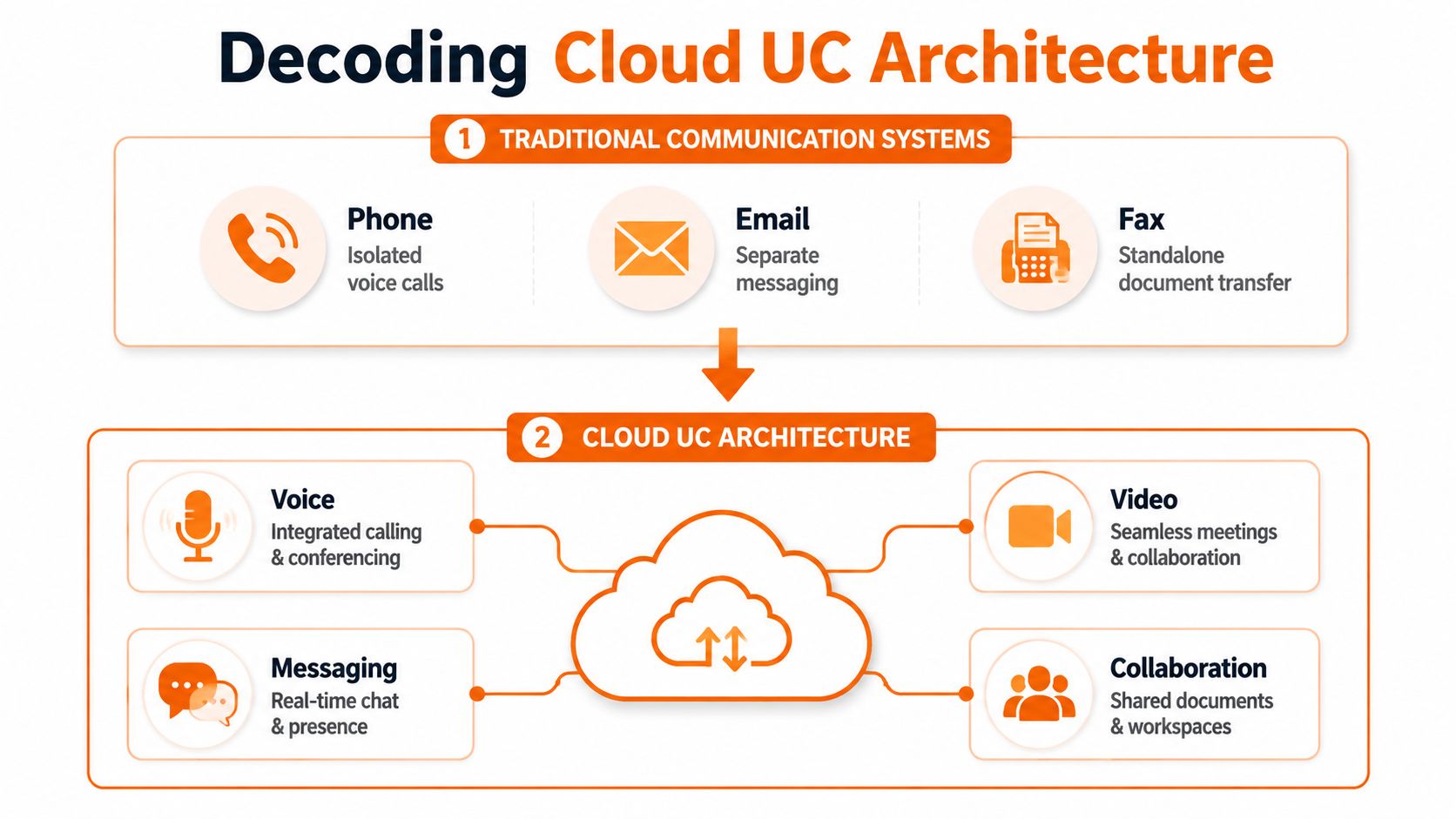
Traditional phone systems were built like a box of separate tools. One system handled calls. Another covered voicemail. Meetings lived somewhere else. Messaging was often just email. If you wanted remote working, mobile access or integration, you bolted extra pieces on and hoped they behaved.
Cloud unified communications replaces that mess with a digital office hub. The services still exist, but they sit on one platform and are delivered over the internet rather than anchored to a server in your building.
UCaaS and VoIP are not the same thing
A lot of buyers often get confused.
VoIP means voice calls travel over internet connectivity rather than traditional phone lines. It's the calling technology. Useful, but narrow.
UCaaS means Unified Communications as a Service. That's the broader cloud platform that bundles voice, video, messaging, presence, conferencing and often collaboration tools into one managed service. VoIP sits inside UCaaS. It isn't the whole thing.
A simple way to think about it:
| Term | What it means | Why it matters |
|---|---|---|
| VoIP | Internet-based calling | Replaces legacy telephony |
| UCaaS | Full cloud communications platform | Unifies how staff call, chat, meet and collaborate |
If you only buy “internet phones”, you may solve line rental and handset issues. You won't necessarily solve fragmented working.
How the architecture works in practice
The provider hosts the core communications platform in the cloud. Your users connect through apps on laptops and mobiles, desk phones if needed, and browser-based meeting tools. Admins manage users, permissions, call flows and policies through a central portal.
That matters because it changes where the complexity lives.
- No on-site PBX burden: You're not maintaining ageing comms hardware in the office.
- Central administration: IT or your managed provider can control users and policies in one place.
- Location independence: The service follows the user, not the desk.
A lot of businesses still compare cloud options against old PBX thinking. That leads to poor decisions. If you need a grounded comparison, this guide to cloud telephony vs PBX is worth reading before you shortlist anything.
Practical rule: Don't evaluate cloud unified communications as a phone replacement only. Evaluate it as your business communications operating model.
Why this architecture suits SMEs
SMEs rarely have the appetite for multiple overlapping systems, separate support contracts and hardware refresh cycles. They need a platform that's simple to consume, straightforward to govern and flexible enough to support hybrid work without special exceptions for every user type.
That's the key architectural benefit. Not jargon. Not cloud for cloud's sake. Fewer components to manage and fewer cracks for important conversations to fall through.
The Core Features That Power Modern Business
A good cloud unified communications platform isn't impressive because it has a long feature list. It's valuable because it removes daily friction in three places: calling, teamwork and customer handling.
Modern business telephony
Your phone system still matters. Clients judge responsiveness quickly, and many regulated firms still handle critical conversations by voice. The difference is that modern telephony should no longer depend on who's sitting near the right handset.
Useful features include:
- Auto-attendants: Calls reach the right team without a receptionist acting as a switchboard all day.
- Smart call routing: Firms can direct calls by department, time of day, office location or staff availability.
- Voicemail to email: Messages arrive where people already work, so they don't sit unheard on a separate system.
- Hunt groups and shared numbers: Clients call the business, not a person's private mobile, and the call can still reach available staff quickly.
For SMEs, these aren't luxury extras. They stop calls from dying in the wrong queue and help a small team sound organised.
If you're weighing what a practical hosted setup should include, this breakdown of hosted phone systems for business gives a useful baseline.
Seamless team collaboration
Most internal delay doesn't come from major outages. It comes from tiny communication gaps. Someone doesn't know whether a colleague is available. A file sits in the wrong email thread. A quick decision turns into a scheduled meeting because there's no shared workspace.
That's why integrated collaboration matters.
Presence indicators show who's available. Persistent chat keeps project conversations in one place. File sharing and meeting tools reduce the scatter of “final_v3_really_final” attachments. Staff can move from chat to call to video without changing platforms or losing context.
A practical example is the value of joining network and collaboration environments more tightly. For teams already using Cisco estates, this overview of Meraki Webex integration shows how connectivity and communications can work together more cleanly.
A messy inbox is usually a symptom of a messy communication model.
Enhanced customer interaction
Most SMEs don't need a full enterprise contact centre. They do need to stop handling customer calls like an afterthought.
Cloud unified communications often includes light contact-centre style capabilities that make a noticeable difference:
| Capability | Business effect |
|---|---|
| Call queues | Stops callers hitting engaged tones or random voicemail boxes |
| Shared call handling | Lets teams cover absences without manual forwarding |
| Basic reporting | Gives managers visibility into missed calls and bottlenecks |
| Recorded greetings and routing | Presents a more credible and consistent front to clients |
For legal, finance and engineering firms, this matters because service quality is part of risk management. If a client can't reach the right person, they don't care whether the issue was technical. They just see an unreliable firm.
The best platforms also support different working patterns without creating a different system for each. Front-office teams can keep desk phones if they want them. Mobile users can rely on apps. Directors can move between office and travel days while keeping one business identity. That's what modern communications should do. Adapt to the business without fragmenting it.
The Business Case ROI and Strategic Benefits
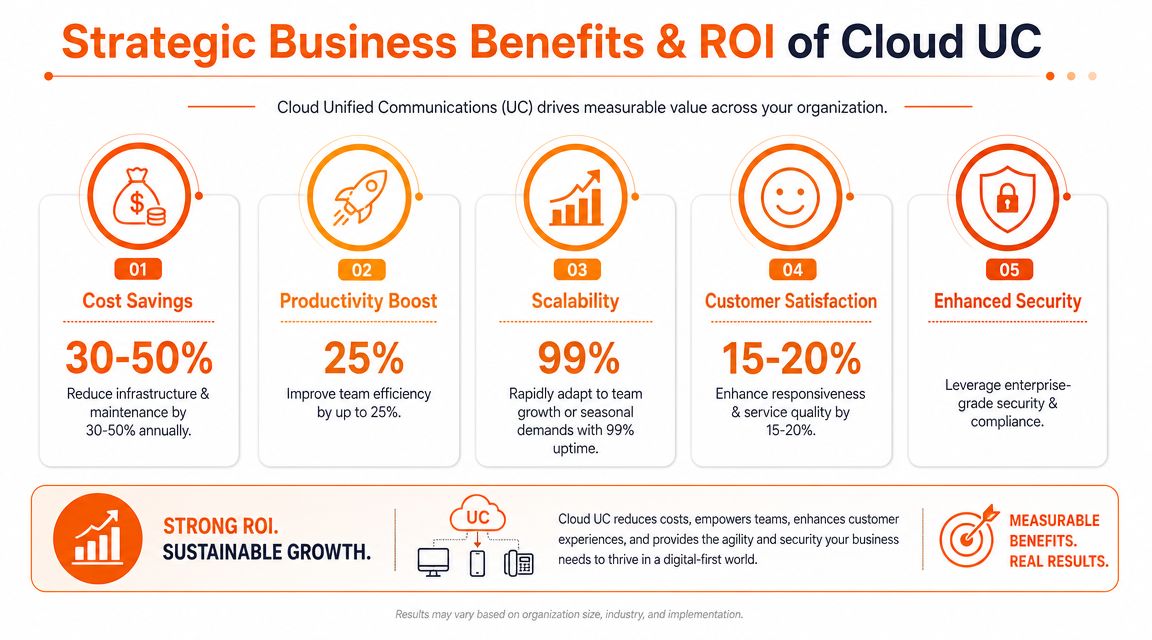
The strongest reason to move to cloud unified communications isn't fashion. It's that old communication setups waste money in places directors don't always track well, support overhead, duplicated tools, unmanaged mobile use and lost staff time.
A modern platform shifts communications into a service model that's easier to manage and easier to scale.
Early in the decision process, it helps to see the broad commercial picture.
Reduce overheads without shrinking capability
On-premise phone systems often create awkward spending. You pay to maintain hardware you'd rather retire, patch systems that no longer fit the business, and keep separate tools alive because the core platform can't do enough on its own.
Cloud delivery simplifies that. You move away from capital-heavy comms infrastructure and into a cleaner operating expense. You also reduce the temptation to keep buying side tools to patch around missing functionality.
That doesn't mean the cheapest licence wins. It means the total communication stack becomes easier to predict and govern.
A short explainer can help frame what directors should look for in commercial terms:
Increase team productivity
The value becomes strikingly apparent. When staff can call, message, meet and share context in one place, they spend less time chasing people and switching between disconnected apps.
There is one hard data point worth paying attention to. According to a 2025 Metrigy study, companies that successfully deploy unified communications see a 57% improvement in employee productivity and can reduce mobile telecommunication costs by up to 40% (Metrigy).
That finding lines up with what most directors already suspect. Communication friction isn't a soft issue. It shows up in slower approvals, missed callbacks, duplicated effort and preventable admin.
Build resilience into day-to-day operations
Business continuity is often discussed as if it only matters during a major incident. In reality, resilience shows up every week. A rail strike hits commuting. A manager works from home unexpectedly. One office loses connectivity for a period. A director needs to take client calls while travelling.
With cloud unified communications, the system isn't tied to one location in the same way. Users can keep working from approved devices and applications without the whole business depending on a single office setup.
That flexibility has a strategic effect as well. You can onboard users faster, support temporary changes in team structure and expand to additional sites without rebuilding your phone estate from scratch.
For SMEs, that's the key ROI story. Lower drag. Better continuity. A communication model that supports growth instead of holding it back.
Navigating Security and Compliance Requirements
For regulated SMEs, communications technology isn't just a productivity decision. It's part of your risk posture. If staff discuss client matters on personal mobiles, share sensitive documents in consumer apps or leave call records scattered across systems, you're making compliance harder than it needs to be.
That's why security and governance should sit near the top of your buying criteria, not at the end of procurement.

What regulated SMEs need to control
The details vary by sector, but the pressure points are familiar.
Legal firms need to protect confidential matter discussions and client identities. Financial services businesses often need tighter oversight of recordings, retention and access. Engineering firms may deal with commercially sensitive project information, supplier conversations and design decisions that shouldn't live in unmanaged message threads.
A secure cloud unified communications setup should help you answer questions like these:
- Where does communication data reside: You need clarity on hosting location and data handling arrangements relevant to your GDPR obligations.
- Who can access what: Role-based access and proper identity integration matter because not every user should see every record or recording.
- How are remote users protected: Home and mobile working shouldn't rely on trust alone. It should rely on policy, managed devices and controlled access.
If you're building the wider picture around communications security, these cloud security strategies for modern businesses are a sensible companion read.
Why cloud can improve your compliance posture
Some directors still assume cloud means less control. Usually the opposite is true, provided the platform and provider are chosen properly.
A managed cloud service can centralise records, standardise policy enforcement and reduce the use of shadow IT. It can also support features that matter in regulated settings, such as secure call recording, user-level permissions, logging and auditable admin changes.
The risky option isn't always the cloud platform. Often it's the status quo nobody has properly governed.
There's also a people issue here. When the approved system is clunky, staff create workarounds. When the approved system is easy to use across laptop, mobile and desk phone, adoption improves and policy becomes easier to enforce. Compliance isn't only about controls. It's about making the compliant route the practical route.
The questions directors should ask internally
Before you speak to vendors, get your own house in order:
| Question | Why it matters |
|---|---|
| Which conversations are business-critical or regulated | Helps define recording, retention and access requirements |
| Which teams use personal devices today | Exposes unmanaged risk and policy gaps |
| Which apps are staff using outside approved channels | Shows where shadow communication is already happening |
For regulated SMEs, cloud unified communications should reduce ambiguity. If the proposed service creates uncertainty around storage, access, audit or policy enforcement, reject it.
Your Implementation and Vendor Selection Checklist
Most communication projects don't fail because the platform is terrible. They fail because the migration was rushed, the design didn't reflect how people work, or the vendor vanished after the contract was signed.
Good implementation is disciplined. Good vendor selection is ruthless.
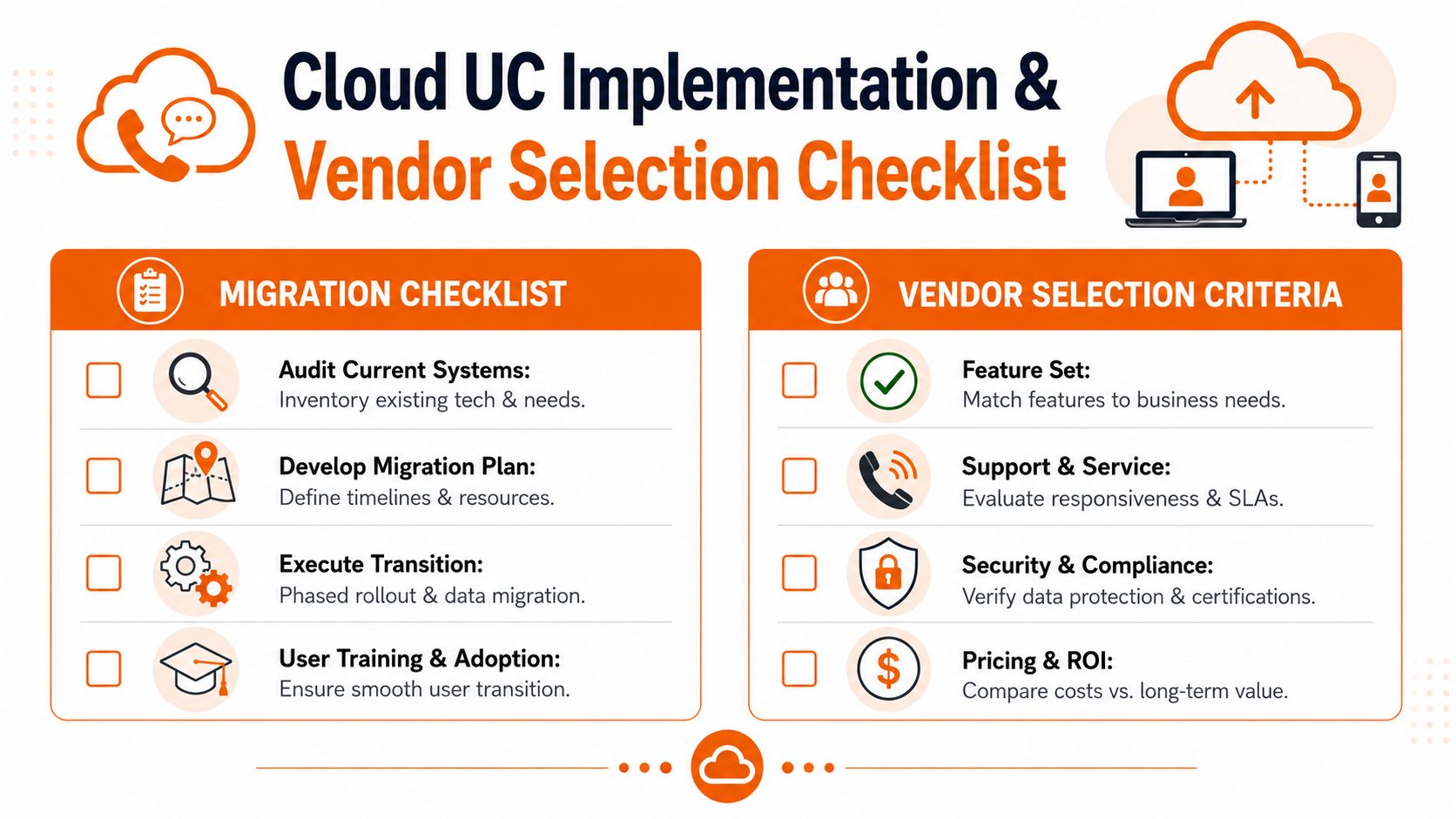
Migration checklist
Start with a working view of your current environment. Not the diagram from three years ago. The operative one.
Audit what exists now
List numbers, handsets, mobile dependencies, call flows, hunt groups, voicemail use, meeting tools and any line-of-business integrations. Include pain points by team, because finance, legal support and field engineers won't all use the system in the same way.Map user groups properly
A receptionist, fee earner, director and mobile engineer need different call handling rules. If you force everyone into one template, adoption drops quickly.Plan number porting early
Number migration can become the single most stressful part of the project if left too late. Treat it as a priority, not admin.Design call flows around the customer
Don't automatically copy the old phone tree because it already exists. Fix the dead ends, unclear menu options and voicemail black holes while you have the chance.
Director's shortcut: If nobody can explain your current call flow clearly on one page, redesign it before you migrate it.
Prepare training that matches real jobs
Users don't need a lecture on every button. They need to know how to transfer a call, join a meeting, use presence, pick up messages and work securely from mobile devices.Stage the go-live carefully
Avoid a “flip everything at once and hope” mentality. Pilot where possible, confirm support coverage for launch day and define exactly who owns decisions if something needs quick adjustment.
Questions that expose weak vendors fast
A polished demo doesn't tell you much. Ask difficult questions and pay attention to how directly the vendor answers.
What support do we get after go-live?
If the answer is vague, expect pain later. You want clear escalation paths, real SLAs and named responsibility.Who handles support tickets?
There's a world of difference between engineer-led support and script-based call logging.How do you support regulated clients?
If they can't speak confidently about access controls, recording governance, auditability and policy enforcement, they're not the right fit.What's the roadmap for this platform?
You're not buying a static phone system. You're buying into a communications environment that should evolve cleanly.How do you handle onboarding, offboarding and permission changes?
These routine admin tasks often reveal whether the service is manageable.What are the dependencies on our connectivity and wider IT estate?
The best vendors discuss network readiness, identity, device posture and resilience openly instead of pretending the platform lives in isolation.
A strong partner will answer plainly, document decisions and challenge weak assumptions in your brief. A weak one will stay upbeat, generic and slippery.
Simplify and Scale with a Managed UC Partner
Cloud unified communications is a business decision first and a technology decision second. Done well, it gives your firm cleaner operations, stronger control, better service consistency and a safer way to support hybrid working. Done badly, it just moves old confusion into a new subscription.
That's why the partner matters as much as the platform.
For UK SMEs in legal, financial and engineering sectors, the right managed UC partner should bring engineer-led support, practical compliance awareness, clear service levels and the discipline to design around real business processes rather than generic templates. You want people who can handle the telephony piece, but also understand identity, security, backup, resilience and user adoption.
If your current communication setup feels patched together, that's because it probably is. The fix isn't adding another app. It's replacing fragmentation with a managed system that's built to support the way your business works.
If you want a practical, no-obligation conversation about the right next step, speak to Blowfish Technology. Their team helps UK SMEs build secure, compliant communications roadmaps that reduce complexity, support hybrid work and give directors far better control over cost, risk and service quality.

The Blowfish Technology team. Managed IT, cloud services, software development and connectivity for North West businesses since 1999.