
You’re probably in one of two camps right now.
Either your team has already started using AI informally, with staff pasting text into ChatGPT because it’s quick and familiar. Or you’re already paying for Microsoft 365, hearing about Copilot in every meeting, and wondering whether it’s the safer business choice.
That decision matters more than most of the online comparisons suggest. For a UK SME, this isn’t just about which tool writes nicer emails. It’s about where your data goes, how much setup the tool needs, whether it fits the way your staff already work, and whether it creates problems for UK GDPR, client confidentiality, or Cyber Essentials.
The market split tells the story. In February 2025, ChatGPT recorded 173.3 million daily visits globally, while Microsoft Copilot grew 6811% year over year in 2024, which points to very different patterns of use: ChatGPT dominates broad public usage, while Copilot’s growth reflects business adoption inside Microsoft ecosystems (Windows Forum). To see the broader picture beyond these two, this round-up of 12 Best Chat GPT Alternatives to Consider in 2026 is useful for seeing where other tools sit.
For many firms, the confusion starts because both tools can answer questions, draft content, summarise information, and help with research. They can look similar in a demo. In day-to-day business use, they’re not similar at all.

If your business is already wrestling with adoption, governance, and staff expectations, this overview on how AI use has become mainstream is worth a look: https://blowfishtechnology.com/90-of-businesses-are-now-using-generative-ai/
Table of Contents
- Choosing Your Business AI Your Guide to Copilot vs ChatGPT
- The Core Difference What Separates Copilot and ChatGPT
- Feature and Performance Deep Dive
- Security and Compliance for UK Businesses
- Real-World Use Cases for SMEs
- Cost Licensing and Implementation
- The Blowfish Recommendation Which AI Is Right for You
Choosing Your Business AI Your Guide to Copilot vs ChatGPT
A typical SME owner doesn’t need another AI hype piece. They need an answer to a much simpler question. Which tool helps staff work faster without creating security headaches?
That’s where copilot vs chatgpt becomes a real business decision rather than a tech debate.
One option sits inside the Microsoft stack many UK firms already use every day. The other is the most recognisable general-purpose AI assistant on the market. Both are capable. Both can waste time if they’re deployed badly.
The business choice behind the tool choice
For an engineering firm, the wrong choice can mean staff using a powerful AI tool with no clear boundary around internal project documents.
For a legal or financial practice, the wrong choice can mean useful productivity gains on paper, but uncertainty around audit trails, data handling, and what people are pasting into prompts.
For a growing office-based business, it can be simpler. Staff want help with meeting notes, inbox triage, spreadsheet analysis, and first drafts. In that setting, the question isn’t “Which AI is smartest?” It’s “Which AI fits how we already work?”
Practical rule: If the tool doesn’t fit your existing workflow and governance model, staff will bypass it or misuse it.
Why the comparison gets muddled
A lot of online advice compares features in isolation. That’s not how SMEs buy technology.
Business owners care about:
- Security first: Can staff use it without exposing sensitive client, financial, or operational data?
- Workflow fit: Does it work where people already spend their day, such as Outlook, Teams, Word, and Excel?
- Control: Can IT set guardrails without turning the whole thing into a six-month project?
- Value: Does the gain come from real productivity, not novelty?
That’s why a plain feature checklist usually misses the point. The proper answer depends on whether you need a general AI assistant or a business assistant embedded into Microsoft 365.
The Core Difference What Separates Copilot and ChatGPT
The cleanest way to think about copilot vs chatgpt is this.
Microsoft Copilot is an integrated work assistant.
ChatGPT is a standalone conversational AI.
That architectural difference changes almost everything that follows.
Copilot lives inside the workflow
Copilot is designed to operate within Microsoft 365 apps such as Word, Excel, Outlook, and Teams. Its value comes from context. It can work with the documents, emails, meetings, and calendars your organisation already uses.
That makes Copilot less about asking random questions and more about reducing friction in daily work. Draft the follow-up email from the meeting. Summarise the Teams discussion. Pull out actions from a document set. Rework a spreadsheet view.
The strength is proximity to work. Users don’t need to leave the application they’re already in.
ChatGPT starts from the prompt
ChatGPT works more like a highly capable external assistant. You open it separately, give it instructions, refine the output, and use it for reasoning, writing, research, ideation, code, or analysis.
That gives it more flexibility across a wider range of tasks. It also means the tool usually knows less about your organisation unless you deliberately connect systems, upload files, or structure prompts carefully.
So the split is simple:
- Copilot: better when the work already lives in Microsoft 365
- ChatGPT: better when the task is broader, more creative, or less tied to internal business context
A useful parallel is this. Copilot is like fitting power steering, sensors, and navigation into the van your team already drives. ChatGPT is more like hiring a clever consultant who can help with almost anything, but only knows what you tell them.
Copilot augments existing business processes. ChatGPT excels when the job starts with a blank page.
If you’re comparing AI tools from a research angle rather than a Microsoft workflow angle, this look at Perplexity AI vs ChatGPT: The Ultimate 2026 Comparison is useful because it shows how different “AI assistants” can be once you look past the surface.
Why that matters in practice
The tool architecture affects all the practical questions SMEs ask later:
- Who can access which data
- How much staff training is needed
- Whether output is grounded in company documents or general knowledge
- Whether IT can govern use sensibly
- How easy it is to scale across departments
That’s why the wrong deployment often looks familiar. A firm buys a licence because the demo looked impressive, then real users can’t work out when to use it, what data is safe to include, or why the output feels hit and miss.
Feature and Performance Deep Dive
Day to day, the better tool is usually the one that fits how your staff already work, how your data is stored, and how much supervision you need around its use.
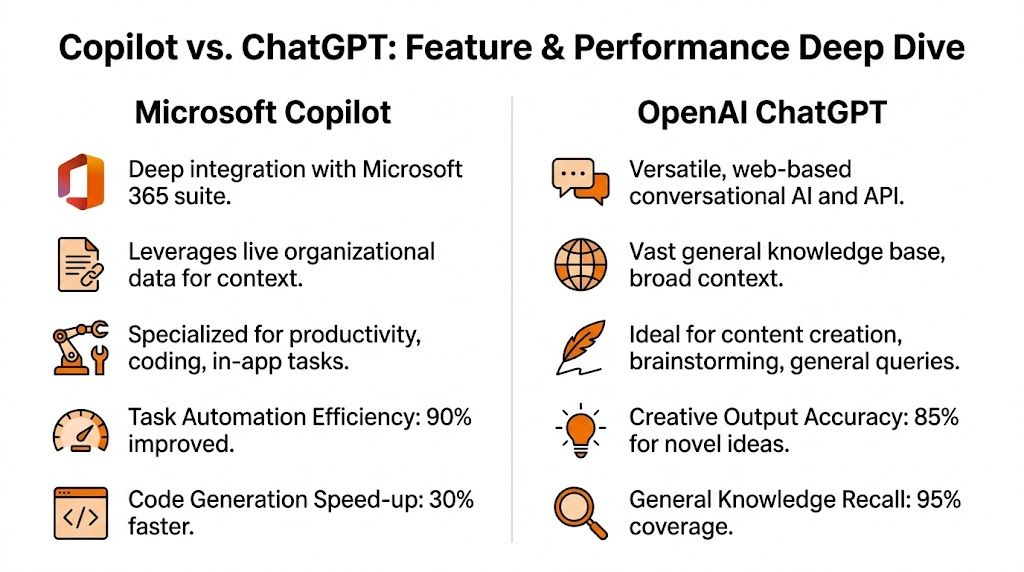
For a UK SME, feature comparisons only matter if they hold up under normal business conditions. That means messy inboxes, shared documents, permission issues, client deadlines, and staff who will use the tool in slightly different ways. In practice, Copilot is stronger inside Microsoft 365 tasks where context already exists. ChatGPT is often stronger where the job needs wider reasoning, drafting flexibility, or work outside the Microsoft stack.
Quick comparison table
| Area | Microsoft Copilot | ChatGPT |
|---|---|---|
| Primary role | Embedded productivity assistant inside Microsoft 365 | Standalone AI assistant for conversation, drafting, research, and reasoning |
| Best context source | Organisational emails, documents, meetings, calendars | Prompted inputs, uploaded files, general knowledge, broader reasoning |
| Best for | Outlook, Teams, Word, Excel workflows | Brainstorming, writing, coding, analysis, prompt-heavy tasks |
| Strength with business context | Strong where Microsoft 365 data is well organised | Depends on what the user provides |
| Creative flexibility | Good, but not its main advantage | Usually stronger |
| Structured office tasks | Usually the better fit | Often possible, but less native |
| Security model | Better suited to businesses already operating within Microsoft controls | Requires closer governance around what users enter and upload |
| Adoption challenge | Data governance and permissions need attention before rollout | User behaviour and prompt discipline need attention from day one |
Where Copilot performs better
Copilot earns its place when staff already live in Outlook, Teams, Word, Excel, and SharePoint.
It is particularly effective for routine knowledge work:
- Email and meeting preparation: summarising long threads, drafting replies, pulling together background before a client call
- Teams follow-up: turning meetings into notes, actions, and first-pass summaries
- Document work: rewriting reports, condensing content, building first drafts in Word
- Excel support: helping users interpret tables, spot trends, and generate formulas from existing spreadsheet data
The productivity gain comes from staying inside the Microsoft 365 environment. Staff do less copying, less tab-switching, and less manual searching across mail, files, and meetings.
For regulated firms, there is another practical advantage. Copilot can fit more naturally into the controls you already use across Microsoft 365, which matters if your IT team is already managing permissions, retention, and document access. That also ties into wider questions around UK data sovereignty and business data security, especially if client information should stay inside governed business systems.
Where ChatGPT performs better
ChatGPT is usually the stronger option for work that starts with a blank page or moves beyond your existing Microsoft estate.
Typical examples include:
- developing ideas from scratch
- rewriting content for different audiences or tones
- coding help and troubleshooting
- analysing uploaded material from different systems
- working through a problem in several prompt-driven iterations
This is often where ChatGPT feels more capable. The interaction is more conversational, the reasoning is often broader, and users can push the tool through multiple angles of the same problem without being tied to one business platform.
That flexibility has a trade-off. The quality of the result depends far more on what the user provides, how clearly they frame the task, and whether they understand what data should stay out of a public or less tightly governed workflow.
Performance in real business conditions
In my experience, SMEs get the best results from Copilot when three things are already true. Microsoft 365 is well adopted, documents are stored in sensible locations, and access permissions are broadly under control. If those basics are weak, Copilot still works, but the value is patchy because it surfaces the same structural problems your staff already wrestle with.
ChatGPT has the opposite pattern. It can produce strong output even in businesses with disorganised internal systems, because it relies less on your existing estate. But that shifts more responsibility onto the user. They have to provide context, judge output quality, and avoid pasting sensitive information into the wrong place.
The real constraint is operational maturity
The limiting factor is rarely model quality on its own.
Copilot exposes gaps in Microsoft 365 governance. ChatGPT exposes gaps in user judgement and AI policy. Both can save time. Both can create risk if deployed casually.
That is why feature comparisons on their own are not enough for UK SMEs. A financial firm, legal practice, healthcare provider, or engineering company should judge these tools by a simple standard. Which one improves output without weakening control over business information, staff behaviour, and auditability?
Security and Compliance for UK Businesses
For many UK firms, this is the section that matters most.
The moment your team starts using AI with live business information, the conversation shifts from convenience to risk, accountability, and evidence.

For SMEs in regulated sectors, Copilot can enforce sensitivity labels and handle encrypted files within a company’s Microsoft tenant, while ChatGPT’s standalone model raises questions around data residency and audit trails that matter for UK GDPR and Cyber Essentials Plus planning (Microsoft).
What regulated firms need to ask first
A legal practice, financial services firm, or engineering business handling client IP shouldn’t start with “Which AI is better?”
Start with these questions instead:
- What data will staff put into it?
- Where is that data processed and stored?
- Can we evidence access controls and usage?
- Does the platform fit our existing compliance model?
- Can we restrict access by role, team, or document sensitivity?
These are governance questions before they’re product questions.
For firms already focused on UK data handling obligations, this guide to https://blowfishtechnology.com/data-sovereignty-and-data-security-in-the-uk/ is a useful companion read because the AI decision sits inside the wider issue of where business data lives and who controls it.
Where each tool creates risk
Copilot’s risk profile is usually easier to manage for businesses already standardised on Microsoft 365. That’s because it operates within the Microsoft environment many firms already govern with identity controls, permissions, and document policies.
But that doesn’t mean it’s automatically compliant. If users already have access they shouldn’t have, Copilot may make that overexposure more visible and more useful. Bad permissions become a bigger problem once AI can surface information quickly.
ChatGPT’s risk profile is different. The issue is less about inherited Microsoft permissions and more about what users choose to submit. If people paste in board notes, client files, contract extracts, or HR records without a clear internal policy, the business has a governance problem immediately.
Security with AI is rarely about the interface. It’s about identity, permissions, data classification, and user behaviour.
What this means for Cyber Essentials and UK GDPR
From a practical SME perspective:
- Copilot often aligns more naturally with businesses that already use Microsoft controls, sensitivity labels, and tenant-based security policies.
- ChatGPT needs clearer rules around acceptable use, approved data types, record keeping, and staff training.
- Both tools require policy work. Neither removes your need for a data protection impact mindset, access reviews, and sensible user guidance.
If your business is regulated, the right approach is to treat AI as a controlled business system, not a clever staff perk.
Real-World Use Cases for SMEs
The easiest way to decide between copilot vs chatgpt is to stop thinking about brands and start thinking about tasks.
Best fits for Copilot
Copilot tends to be the better fit when the work starts inside Microsoft 365 and the user needs help acting on internal business information.
Examples:
- Engineering and manufacturing: a project manager uses Teams and Outlook all day. Copilot helps summarise design meetings, draft client follow-ups, and pull action points from existing documents.
- Legal administration: fee earners and support staff need help with meeting notes, document reshaping, internal summaries, and inbox management, but they also need tighter control around where information sits.
- Finance operations: a team working across Excel, Outlook, and Teams gets more value from in-app assistance than from switching out to a separate AI workspace.
For a practical example of what that can look like in a smaller organisation, this piece on https://blowfishtechnology.com/what-microsoft-copilot-actually-does-for-a-50-person-business/ is a useful reference point.
Best fits for ChatGPT
ChatGPT usually earns its place when the task is less about internal context and more about flexible problem-solving.
Examples:
- Marketing and sales: brainstorming campaign ideas, reworking copy, testing messaging, outlining content, or drafting FAQs
- Software and scripting work: refining logic, testing approaches, or exploring different ways to structure code and documentation
- Training and internal communications: turning rough notes into usable training material or drafting awareness content in different tones
It’s often a strong second tool in businesses that already have Copilot. Staff use Copilot for Microsoft-centric workflow tasks and ChatGPT for exploration, writing, ideation, or more conversational support.
Hybrid and multi-site reality
Many comparisons often get too neat.
For growing multi-site businesses, Copilot’s awareness of who you work with and which files matter is powerful, but performance in hybrid environments with varied connectivity still needs testing. ChatGPT’s web-based model may suit edge locations, but context loss during long interactions can become a problem when coordinating complex work across distributed teams (Corsica Technologies).
That matters if your business has:
- Multiple offices: staff need continuity across Teams, shared files, calls, and meetings
- Hosted desktops or remote users: reliability matters more than feature breadth
- Different working patterns: office staff, field teams, and managers may need different AI tools for different jobs
The practical answer for many SMEs is not universal rollout. It’s role-based adoption.
Cost Licensing and Implementation
A licence price can look tidy on a quote and still lead to a poor buying decision.
The full cost shows up later, in setup work, user training, support tickets, and the risk of staff using AI in ways that create security or compliance problems.

Licence cost is only part of the picture
ChatGPT usually feels easier to buy. The subscription model is familiar, and a team can start using it quickly.
Copilot needs a wider Microsoft conversation. For many SMEs, the question is not just “what does the licence cost?” but “is our Microsoft 365 estate ready for AI access to files, meetings, email, and shared workspaces?” If that foundation is messy, rollout becomes slower, riskier, and more expensive.
That matters even more in regulated sectors. A lower entry price means little if your team needs extra controls, stricter usage rules, and management oversight to stay aligned with UK GDPR and Cyber Essentials expectations.
What implementation involves in practice
For Copilot, implementation usually starts with Microsoft 365 housekeeping and access control:
- cleaning up permissions
- reviewing access across SharePoint and Teams
- checking sensitivity labels and retention settings
- validating data structure, ownership, and document sprawl
- choosing the right pilot group before wider rollout
This work takes time, but it is not wasted effort. It often exposes long-standing permission issues that should have been fixed anyway.
For ChatGPT, the setup burden sits more in policy, governance, and user behaviour:
- choosing the right edition for business use
- defining approved and prohibited use cases
- setting clear rules for prompts and data handling
- training staff not to paste client, employee, or financial data into the tool
- deciding whether use is centrally governed or left to individual departments
In practice, ChatGPT can be quicker to deploy and easier to trial. Copilot can deliver stronger day-to-day productivity if the Microsoft environment is well managed.
The total cost of AI includes licensing, governance work, training, and support.
If your business already runs on Microsoft 365, your existing setup will heavily influence whether Copilot deployment is straightforward or expensive to correct. Our guide to Microsoft 365 for small business gives useful context before you commit.
The safest approach for either platform is a controlled pilot. Start with one team, define what data can and cannot be used, measure time saved, and check whether the benefits justify the support and governance overhead. That is the point where the business case becomes real.
The Blowfish Recommendation Which AI Is Right for You
For most SMEs, the answer isn’t ideological. It’s operational.
Choose Copilot if this sounds like you
- Your staff already live in Outlook, Teams, Word, and Excel
- Your business wants AI inside daily workflow, not as a separate destination
- You handle sensitive commercial or client information
- You need tighter alignment with existing Microsoft identity and document controls
- You want AI to help with meetings, email, document work, and structured internal tasks
Choose ChatGPT if this sounds like you
- Your biggest need is brainstorming, drafting, analysis, or coding support
- The work is often open-ended rather than tied to Microsoft 365 context
- You want a more flexible conversational assistant
- Your team can work within clear rules about what data is safe to enter
- You need a tool that supports wider experimentation across functions
Choose both if your business is mature enough to govern both
This is often the strongest answer.
Use Copilot for Microsoft 365 productivity and internal workflow. Use ChatGPT for creative work, exploratory analysis, and broader problem-solving. Keep the boundary clear. Staff should know which tool is for which job, and what data belongs in neither.
If you want the shortest version of the decision, it’s this:
Copilot is usually the safer strategic choice for Microsoft-centric, regulated SMEs. ChatGPT is usually the stronger tactical choice for creative and prompt-driven work.
The right deployment depends less on the AI model and more on your data controls, licensing position, user behaviour, and appetite for governance.
If you want a practical recommendation based on your Microsoft 365 setup, security posture, and compliance requirements, Blowfish Technology can help you assess whether Copilot, ChatGPT, or a controlled mix of both makes sense for your business.

The Blowfish Technology team. Managed IT, cloud services, software development and connectivity for North West businesses since 1999.