
It usually starts with something small. A fee earner in a legal practice can't open a shared matter folder before a deadline. An engineer working from home loses access to Microsoft 365 just as a project submission is due. A finance team member reports repeated MFA prompts and isn't sure whether it's a glitch or the start of an account compromise.
If your current help desk for IT support only reacts after people are already blocked, you're paying for delay twice. First in lost staff time, then again in rushed fixes, repeat tickets, and avoidable risk. For UK SMEs, especially in legal, engineering, and finance, the help desk now sits much closer to business continuity, auditability, and cyber response than many directors realise.
Table of Contents
- Beyond Break-Fix: What Is a Modern IT Help Desk?
- Choosing Your Support Model: In-House, Outsourced, or Co-Managed
- The Engine Room: Core Features and Technologies Explained
- Measuring Success: Key SLAs, KPIs, and Security Posture
- How to Choose the Right Help Desk Partner for Your SME
- The Help Desk in Action: Scenarios for UK Industries
- From Support Ticket to Strategic Asset
Beyond Break-Fix: What Is a Modern IT Help Desk?
A traditional break-fix model waits for failure. Someone phones up, emails in, or grabs whoever seems technical and asks for help. Work starts late, context is patchy, and the same issues return because nobody is managing patterns, knowledge, or escalation properly.
A modern help desk for IT support is different. It gives users a clear route to request help, logs every issue in a ticket, triages urgency, applies standard fixes quickly, and sends complex work to the right technical level without wasting senior engineer time.
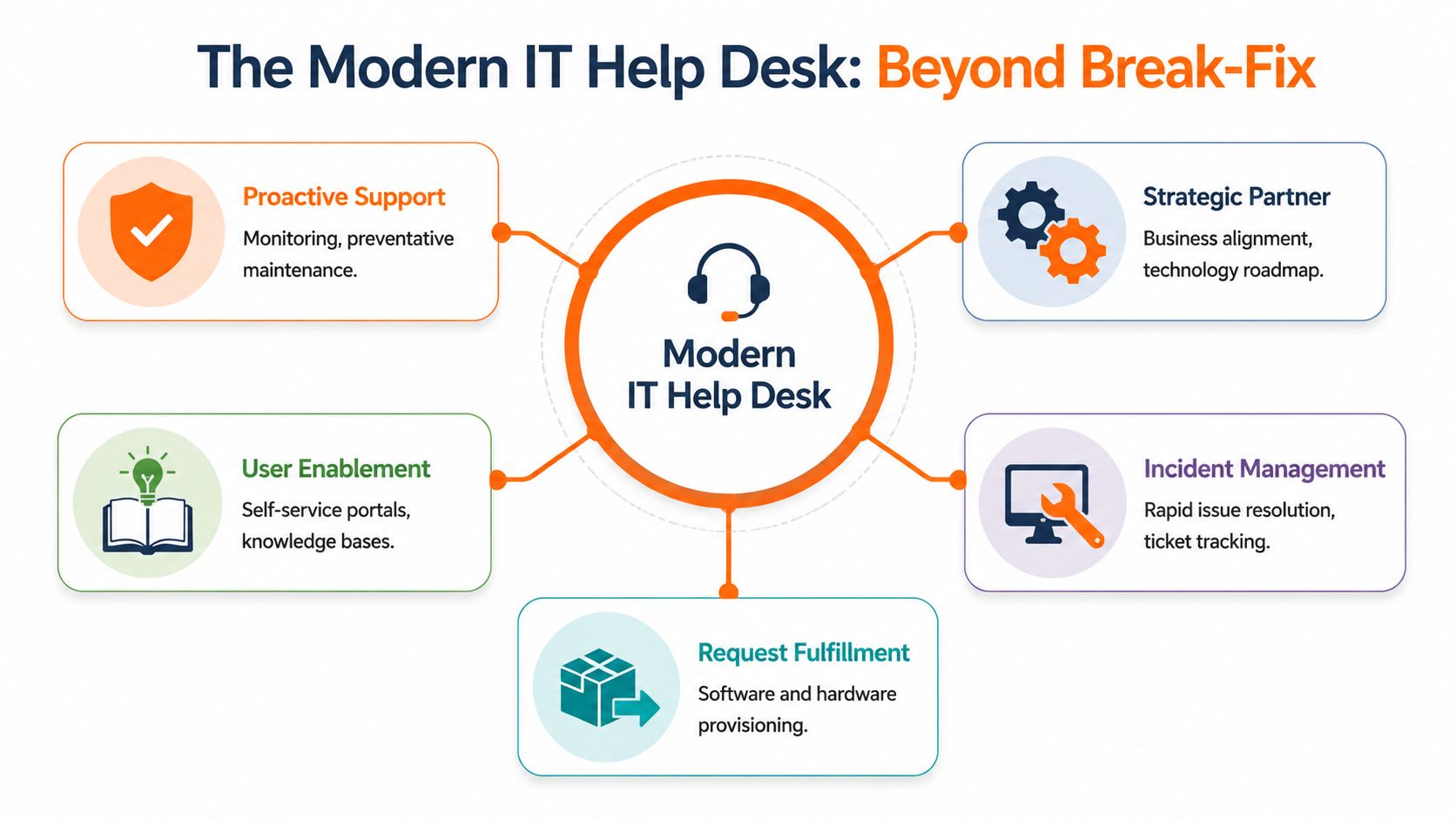
Why break-fix stops working
Break-fix tends to feel cheaper until the business grows, adopts Microsoft 365 more extensively, or adds hybrid working. Then the gaps show up fast. Password resets, mailbox issues, device setup, Teams problems, VPN faults, access changes, and security questions all compete for attention.
The core issue isn't just volume. It's that unstructured support mixes simple admin tasks with incidents that may affect security, compliance, or service delivery.
A help desk should reduce friction for users and noise for engineers at the same time.
Self-service and automation now shape how support should be designed. ServiceNow reports that 81% of consumers expect more self-service options, and 91% will try a knowledge-base answer first when online information is user-friendly and contains the right information. The same source notes a delivery gap, with 40% of businesses believing they provide enough self-service options. ServiceNow also cites BMC's figure that manually handling a ticket costs about $22, while 22% of service desk tickets can be resolved at practically no cost with automation in the help desk statistics summary.
How tiered support changes the outcome
The simplest way to explain a modern help desk is triage. A hospital doesn't send every patient straight to a consultant. IT support shouldn't send every issue to a senior infrastructure engineer either.
Industry guidance consistently separates Tier 1 as initial triage, Tier 2 as deeper technical troubleshooting, and Tier 3 as expert or engineering support in tiered support guidance from SupportYourApp. In practice:
- Tier 1 handles speed: password resets, basic Microsoft 365 issues, access requests, known software faults, ticket categorisation.
- Tier 2 handles depth: mailbox profile issues, policy conflicts, networking faults, remote access problems, device configuration drift.
- Tier 3 handles complexity: infrastructure failures, root-cause analysis, code-level faults, major platform issues.
That structure matters in regulated sectors because it creates a predictable, auditable path from report to resolution. It also keeps your most expensive technical people focused on work that needs them.
Teams building stronger front-line workflows often borrow ideas from customer operations too. Some of the same thinking behind 1chat's customer service automation applies inside IT. Standardise common requests, route them properly, and automate only where the outcome is repeatable and safe.
Choosing Your Support Model: In-House, Outsourced, or Co-Managed
Support delivery isn't just a staffing question. It's an operating model choice. The wrong model creates bottlenecks, unclear ownership, and gaps during holidays, sickness, projects, or security events.
The right model depends on your business size, the complexity of your estate, and how much control you want to keep internally.
What each model looks like in practice
An in-house team gives you direct oversight. Your staff know your users, your line-of-business applications, and your working style. That can work well if you already have enough breadth across Microsoft 365, networking, endpoint security, backups, and user support.
A fully outsourced MSP model puts the service desk, tooling, and escalation path in external hands. This often suits SMEs that need broader expertise, longer coverage, and more formal processes than they can build alone. If you're weighing that route, this guide to what a managed service provider does is a useful starting point.
A co-managed model sits between the two. Your internal team keeps ownership of business-critical systems or strategic decisions, while the provider handles first-line support, overflow, specialist areas, monitoring, or out-of-hours cover.
Practical rule: Choose the model that removes your current failure point. For some firms that's lack of coverage. For others it's lack of specialist depth, inconsistent process, or slow response during busy periods.
A practical comparison for SMEs
| Criteria | In-House Team | Co-Managed (Hybrid) | Fully Outsourced (MSP) |
|---|---|---|---|
| Day-to-day control | Highest direct control over priorities and team habits | Shared control with agreed boundaries | Lower direct control, higher reliance on provider process |
| Access to specialist skills | Depends on who you can hire and retain | Broader than in-house alone | Usually broadest day-to-day access across support disciplines |
| Scalability | Slower to scale during growth or staff absence | Flexible if responsibilities are clearly split | Easier to scale if the provider already has service depth |
| Coverage resilience | Vulnerable if a key person is off | Stronger, assuming good coordination | Strongest when the provider has mature service operations |
| Knowledge of your business | Usually strongest internally | Can be strong with shared documentation and regular reviews | Depends on onboarding quality, documentation, and account management |
| Best fit | Businesses with established internal IT leadership | Firms that want to keep strategy in-house but strengthen delivery | SMEs that need a complete, structured service without building it all themselves |
What doesn't work is the muddled middle. That's where an internal person still fields every query, the provider only appears for emergencies, and nobody owns standards, documentation, or user experience.
A support model should answer three operational questions clearly:
- Who answers the user first?
- Who has authority to change systems?
- Who owns security triage and escalation when an issue looks suspicious?
If those answers are vague, the model isn't ready.
The Engine Room: Core Features and Technologies Explained
At 8:45 on a Monday, a fee earner cannot open a matter file in SharePoint, a design engineer is locked out of Microsoft 365 after an MFA prompt loop, and a new starter still has no access to Teams or the document management system. If support is running from inboxes and memory, those issues compete for attention and nobody can see what is waiting, what is risky, or what has already been tried.
That is the difference between a basic help desk and an operational platform. For UK SMEs in legal, engineering, and finance, the underlying tools do more than speed up fixes. They create auditability, enforce process, and reduce the chances of a small support issue turning into a security or compliance problem.
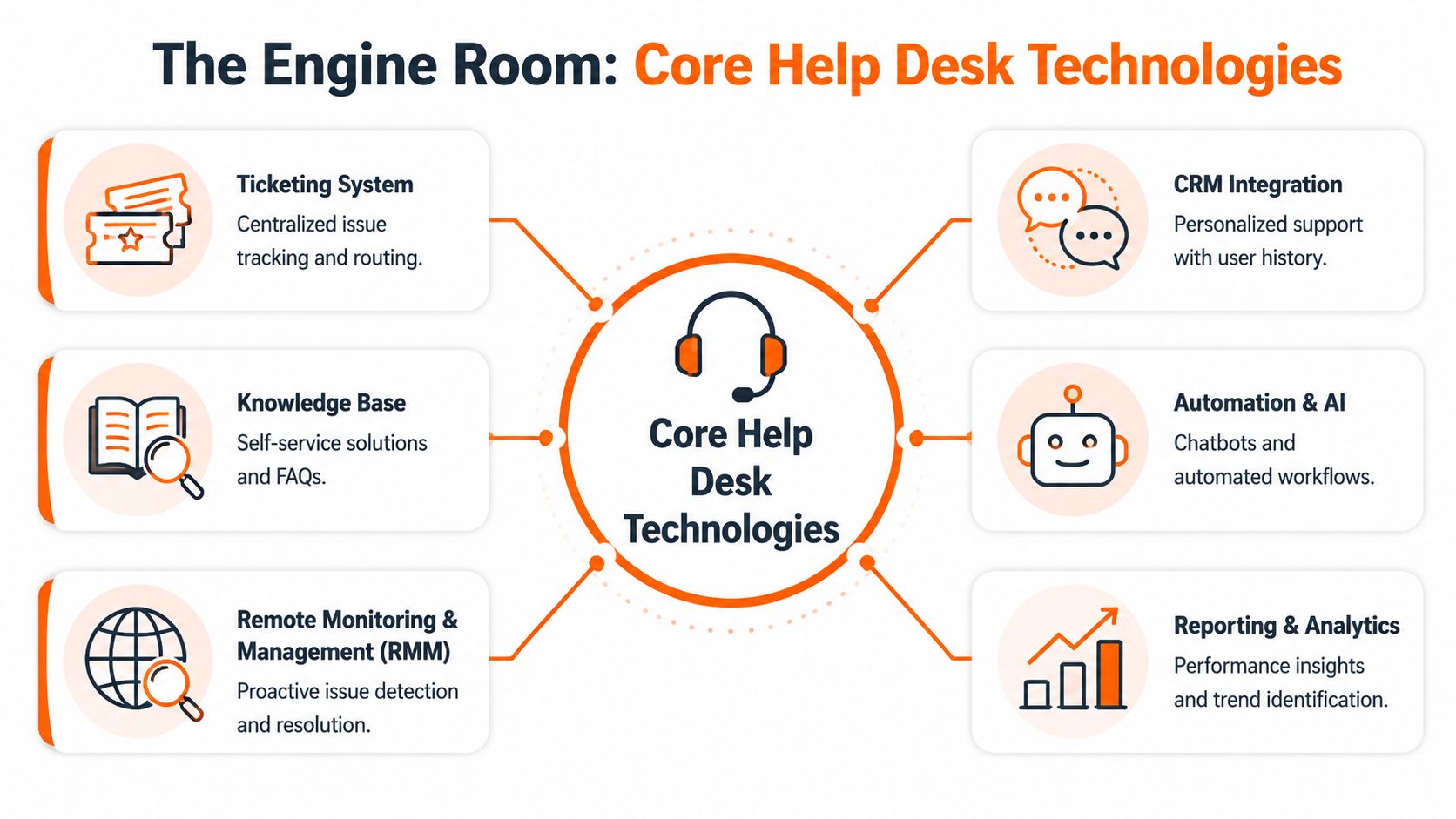
The systems that make support traceable
A ticketing system sits at the centre. Every incident, service request, access change, approval, note, and escalation should be recorded there. In regulated businesses, that record often matters as much as the technical fix because it shows who did what, when they did it, and whether the process matched policy.
A remote support platform gives engineers a controlled way to help staff on office, home, and site-based devices. Used properly, it cuts delay and reduces misunderstanding. Used badly, it becomes a compliance risk. Sessions should be authenticated, logged, and restricted by role, especially where devices are used to access client data, CAD files, or financial records.
Knowledge management is another dividing line. Weak desks solve the same problem ten times. Mature desks turn repeat fixes into approved articles for password resets, new user provisioning, mailbox permissions, Intune-enrolled laptop setup, and common Microsoft 365 support tasks. If you're tightening up your documentation standards, these knowledge management best practices are a sensible reference point.
Where automation earns its place
Automation has a clear job. It should remove routine handling from low-risk tasks and leave judgement calls with technicians.
That means workflows such as request routing, licence allocation, joiner and leaver steps, password or MFA reset processes, and monitoring alerts that raise tickets before users start calling. In a Microsoft 365 estate, it can also enforce approvals for mailbox access, group membership changes, or conditional access exceptions. The trade-off is simple. The more automation you add, the more disciplined your documentation and permissions model need to be.
Good automation usually includes:
- Request routing for access changes, software requests, and hardware issues
- Self-service workflows for passwords, MFA, and standard service requests
- Knowledge suggestions that present approved answers before a ticket is submitted
- Monitoring-driven tickets for backup failures, disk issues, patching gaps, or device health warnings
- Approval steps for actions that touch security, compliance, or billable licences
One option in this space is Blowfish Technology, which includes help desk support within a fixed monthly managed IT service and provides remote assistance for users as part of that operational model.
The point is not to automate everything. I have seen firms push too much into self-service and end up frustrating users, bypassing controls, or creating duplicate tickets when the workflow fails. Automation works best where the rule set is stable and the risk is understood.
The controls that turn tooling into service quality
A modern help desk also needs reporting and analytics. Without them, recurring faults stay buried, line-of-business applications consume support time without challenge, and managers cannot see whether a spike in tickets is tied to patching, onboarding, poor training, or a security event.
For outsourced support, reporting should show more than ticket counts. It should show backlog age, repeat incidents, first-contact resolution trends, escalation reasons, and which Microsoft 365 services generate the most demand. Those measures also give context to your IT support SLA response times and service targets, so you can judge whether the desk is merely closing tickets or improving the user environment.
The tooling itself is not the service. The value comes from how consistently it is configured, governed, and reviewed. In practice, that is what turns an outsourced help desk from a reactive queue into a dependable operating function for security, compliance, and day-to-day productivity.
Measuring Success: Key SLAs, KPIs, and Security Posture
Most SMEs don't need a wall of service desk metrics. They need a short list that tells them whether support is fast enough, effective enough, and disciplined enough to protect the business.
That's where SLAs and KPIs matter. The mistake is treating them as paperwork instead of operational controls.
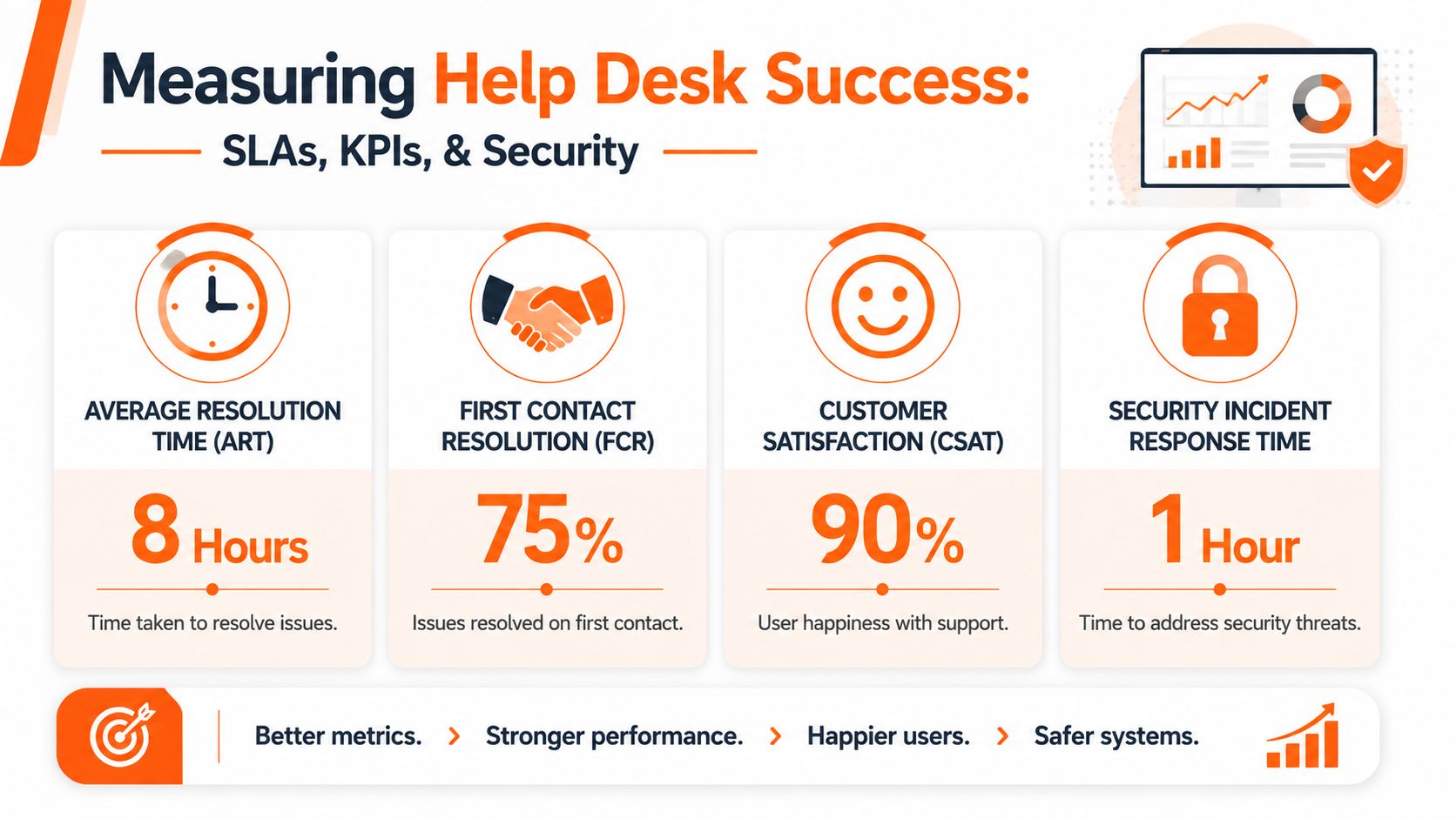
The numbers that matter to the business
An SLA tells you what service level the provider commits to. That usually covers response times, resolution targets, business hours, and severity handling. A KPI tells you how the desk is performing against those expectations.
The most useful support measures tend to be:
- First Contact Resolution: how often the desk fixes the issue at the first interaction.
- Response time: how quickly a user gets a meaningful answer, not just an automated acknowledgement.
- Resolution performance: whether tickets are closed in line with priority and business impact.
- Customer satisfaction: whether users feel support was clear, effective, and easy to deal with.
- Ticket volume and trends: whether recurring issues, onboarding spikes, or a failing system are driving demand.
Best-in-class help desks achieve an FCR rate of 70% or higher and aim for a CSAT score of 90% or higher according to GHDSi's help desk KPI guidance. For UK MSPs, sub-20-second average call waits, 75% same-day ticket resolution, and 98% within SLA are meaningful competitive signals when they are backed by process and reporting. If you want a practical explanation of how service commitments should be read, this breakdown of IT support SLA response times is worth reviewing.
Why security belongs in help desk reporting
For regulated firms, support quality isn't just about convenience. It affects your security posture directly.
The NCSC advises that the service desk is often the first place cyber incidents are detected, and it needs a clear triage route for security-relevant signals such as suspicious MFA prompts or endpoint alerts in this IT help desk tiers article referencing NCSC-aligned practice. That means a good help desk does more than close tickets quickly. It classifies correctly, preserves timestamps and notes, and escalates without delay when the issue may be more than user error.
Fast support is useful. Fast misclassification is dangerous.
For legal and finance firms, those records can feed later forensic analysis and ICO decision-making. That's why I'd always ask to see how a provider handles three specific situations: suspected phishing, impossible sign-in activity, and a device that may need isolation. If the answer is vague, the desk may be operationally tidy but still weak where it matters most.
How to Choose the Right Help Desk Partner for Your SME
Buying support on price alone usually ends badly. The proposal may look tidy, but the critical test is what happens when a director loses mailbox access before a board pack goes out, or when a new starter joins remotely and needs identity, device, apps, and permissions set up properly on day one.
A proper help desk partner should fit your business model, your risk profile, and your working environment. In a Microsoft 365-first SME, that means user support and security administration have to work together.
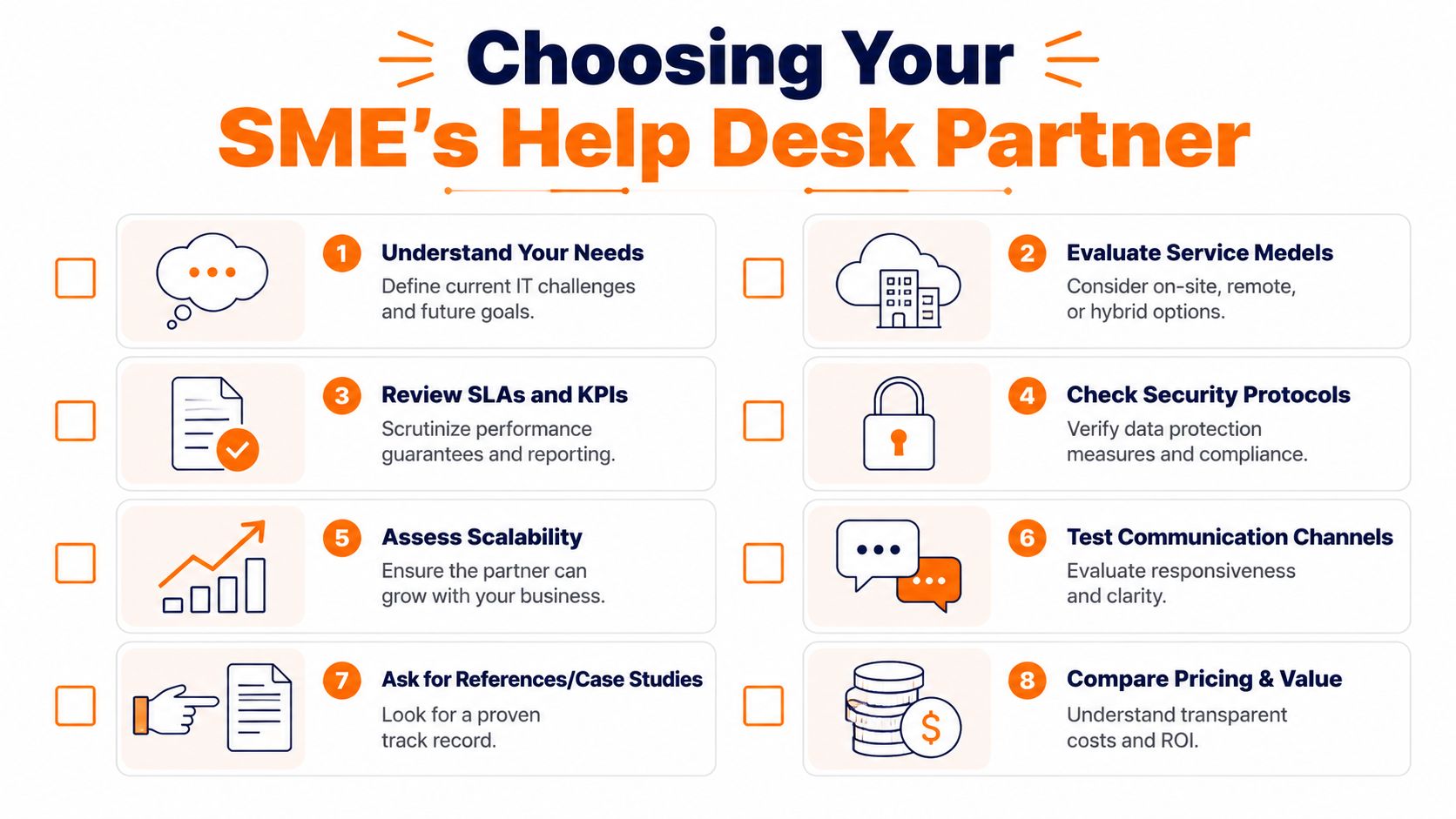
Questions that expose the real service
The UK Government's Cyber Security Breaches Survey 2025 found that 43% of UK businesses experienced a cyber breach or attack in the last 12 months, with phishing the most common type, as referenced in this managed help desk discussion for UK SMEs. Against that backdrop, don't ask only how quickly a provider answers the phone. Ask how they reduce risk in day-to-day support.
These are the questions I'd put on the table:
- How do you support Microsoft 365 administration? Ask about Entra ID user changes, MFA resets, shared mailboxes, conditional access implications, and leaver processes.
- What happens when a help desk ticket looks like a security issue? You want a clear triage path, not a promise to "have a look".
- How do you document and maintain client-specific runbooks? Generic support scripts aren't enough for legal workflows, engineering software, or finance approvals.
- Who handles onboarding and offboarding? Here, support quality meets access control and auditability.
- Can you support hybrid staff consistently? Remote workers need a desk that can deal with devices, cloud identity, connectivity, and user comms without confusion.
A weak provider answers in broad marketing terms. A strong one talks about process, permissions, escalation, and evidence.
What to look for in pricing and scope
Pricing models vary, but the actual issue isn't the label. It's what is and isn't included.
Watch for these points:
- Per-user pricing: often sensible for Microsoft 365-heavy environments where support follows people rather than devices.
- Per-device pricing: can work in fixed environments, but may understate the support load from mobile staff and cloud apps.
- Tiered service bundles: useful only if each tier is clearly defined. "Standard" and "premium" mean nothing without scope.
- Project and change exclusions: many contracts cover support but not structured change work. That isn't wrong, but it must be explicit.
- Security admin boundaries: confirm whether identity tasks, policy changes, mailbox rules, and endpoint actions are included.
Ask for three examples of tickets they would class as standard support, three they would class as security-related, and three they would bill separately. That usually tells you more than a long proposal does.
Good partners also show how they'll scale with you. If you're adding sites, adopting hosted desktops, tightening Cyber Essentials controls, or formalising onboarding, the desk should become more valuable over time, not more restrictive.
The Help Desk in Action: Scenarios for UK Industries
A support model only proves itself when it meets a real working day. In regulated sectors, users don't separate "IT issue" from "business risk". They just know they need the problem fixed quickly and handled properly.
Engineering and manufacturing
An engineer on a client site can't access a SharePoint drawing library through Microsoft 365. At the same time, a laptop is falling behind on updates and a VPN profile has stopped connecting. A basic desk treats these as three isolated faults.
A mature desk sees the pattern. It checks identity, device compliance, remote access policy, and whether the issue affects only one user or a wider group. Tier 1 handles the immediate user checks and logs the context properly. Tier 2 picks up the policy or profile issue. Tier 3 only gets involved if there's a deeper platform fault.
For firms with multiple sites, this matters because downtime isn't abstract. Project delivery stalls, site teams work from the wrong file version, and senior engineers get dragged into routine support. Users can also prepare better before they call. A short checklist like what to do before calling IT support helps reduce wasted time on both sides.
Legal and finance
A solicitor reports repeated MFA prompts late in the day. A fee earner also says Outlook rules look different, and a support ticket mentions an unfamiliar login alert. Treated casually, that can become "user confusion". Treated correctly, it's a possible account compromise.
The NCSC-aligned view is clear. The service desk is often the first point of detection for cyber incidents, and it must escalate suspicious signals such as MFA anomalies or endpoint alerts through a structured triage route. In regulated sectors, ticket notes and timestamps may become part of the incident record for forensic review and ICO notification decisions.
A finance practice has a similar problem set, but with even tighter expectations around availability and change control. If a user loses access to a regulated system, the desk needs to verify identity, restore service, and preserve an audit trail without creating a bigger risk through rushed privilege changes.
The difference between a basic desk and a strategic one is usually visible in the first ten minutes of an incident. One logs a problem. The other starts controlling it.
These scenarios are why help desk design has moved beyond generic troubleshooting. In a UK SME, the service desk now sits at the intersection of productivity, security, and accountability.
From Support Ticket to Strategic Asset
A modern help desk for IT support isn't just there to clear queues. It shapes how quickly your staff get back to work, how safely identity and access are handled, and how well your business copes when something looks wrong.
The pattern is consistent. Basic support reacts. Strategic support triages, documents, automates the repeatable work, escalates accurately, and produces usable evidence. That's particularly important in Microsoft 365 environments where user support, device management, and security administration overlap every day.
If you're reviewing your current setup, focus less on whether tickets are being closed and more on whether the service is reducing risk and operational drag. Workflows, self-service, and reporting all matter, but only if they support the business outcome. For broader thinking on streamlining customer support efficiency, it's useful to compare service desk habits with customer support best practice too.
If your current provider still feels reactive, or your internal team is stuck firefighting, it's worth looking at where delays and repeat incidents start. In many SMEs, the fastest route to improvement is tightening the help desk layer first, because that's where downtime becomes visible. This guide on how to reduce IT downtime is a practical next read.
If your business needs a help desk that supports Microsoft 365, hybrid staff, security triage, and compliance-led operations, speak to Blowfish Technology. The team works with UK SMEs that need structured, responsive IT support across legal, engineering, finance, and other regulated environments, with clear service levels and a focus on resilience rather than reactive fixes.

The Blowfish Technology team. Managed IT, cloud services, software development and connectivity for North West businesses since 1999.