
You usually start asking “How much storage do I need?” when something has already gone wrong. A user can't save a file. SharePoint starts filling with duplicate versions. Your cloud backup bill jumps. Finance wants to know why more storage was approved last quarter and why you need more again.
Most SMEs don't have a storage problem. They have a planning problem. The number that matters isn't just how much live data you have today. It's how much you need to run the business safely, recover it quickly, retain it for the right length of time, and support growth without buying capacity in a panic.
For UK businesses, especially in legal, financial, engineering, manufacturing, and multi-site operations across the North West, generic online calculators miss the factors that drive cost and risk. They rarely account for Microsoft 365 sprawl, retention rules, backup copies, disaster recovery, or the way real teams work once collaboration tools become standard.
Table of Contents
- Why Generic Storage Calculators Fail Your Business
- The Three Building Blocks of Your Business Data
- How to Calculate Your Baseline Storage Requirement
- The Critical Multiplier for Backups and Disaster Recovery
- Forecasting for Business Growth and Compliance
- Choosing Your Ideal Storage Architecture
- Building Your Technology Roadmap with Blowfish
Why Generic Storage Calculators Fail Your Business
A business owner gets a warning that storage is nearly full. They buy more space, move a few files, and carry on. Three months later, the same problem returns, except this time it affects backups, performance, and user access.
That cycle happens because most storage calculators ask the wrong question. They focus on raw capacity, usually by user count or device count, and ignore the factors that turn a manageable estate into a compliance and recovery risk.
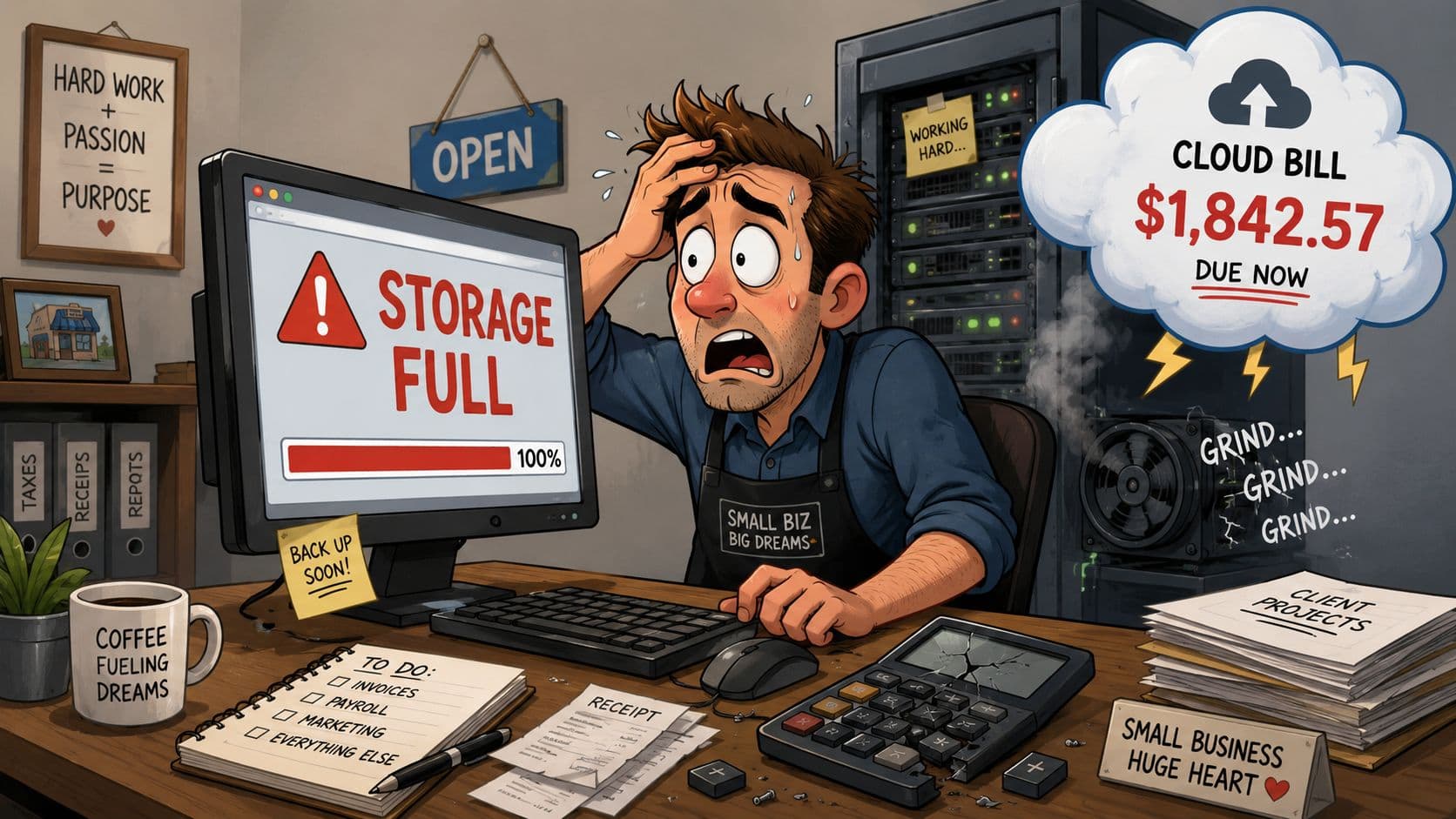
UK SMEs are dealing with fast-moving data growth and many still aren't planning for it properly. UK SMEs face a 45% increase in data volume annually, yet 68% underestimate their storage needs by a factor of 2.3x because they fail to account for sector-specific compliance mandates. A 2025 GOV.UK study also shows 75% of SMEs lack storage roadmaps specific to their needs, as noted in this storage planning research for SMEs.
What generic tools usually miss
- Retention obligations: A legal practice and a design agency can have the same headcount and completely different storage profiles.
- Versioning behaviour: Microsoft 365, Teams collaboration, and shared document libraries create more historical data than owners expect.
- Backup scope: Live data isn't the same as protected data.
- Recovery objectives: Fast recovery often needs different storage design from cheap archive.
- Geography and access patterns: A North West firm with multiple sites won't always get the same experience as a single London office.
Practical rule: If a calculator gives you one neat answer without asking about retention, backups, Microsoft 365, and recovery, it's giving you a budget number, not a business-ready number.
The cost of underestimating storage isn't just buying extra capacity later. It shows up as slower systems, rushed migration projects, failed backup windows, audit headaches, and staff wasting time cleaning up data reactively.
That's why the better question isn't “how much storage do I need”. It's “how much protected, recoverable, compliant storage do I need for the way my business operates”.
The Three Building Blocks of Your Business Data
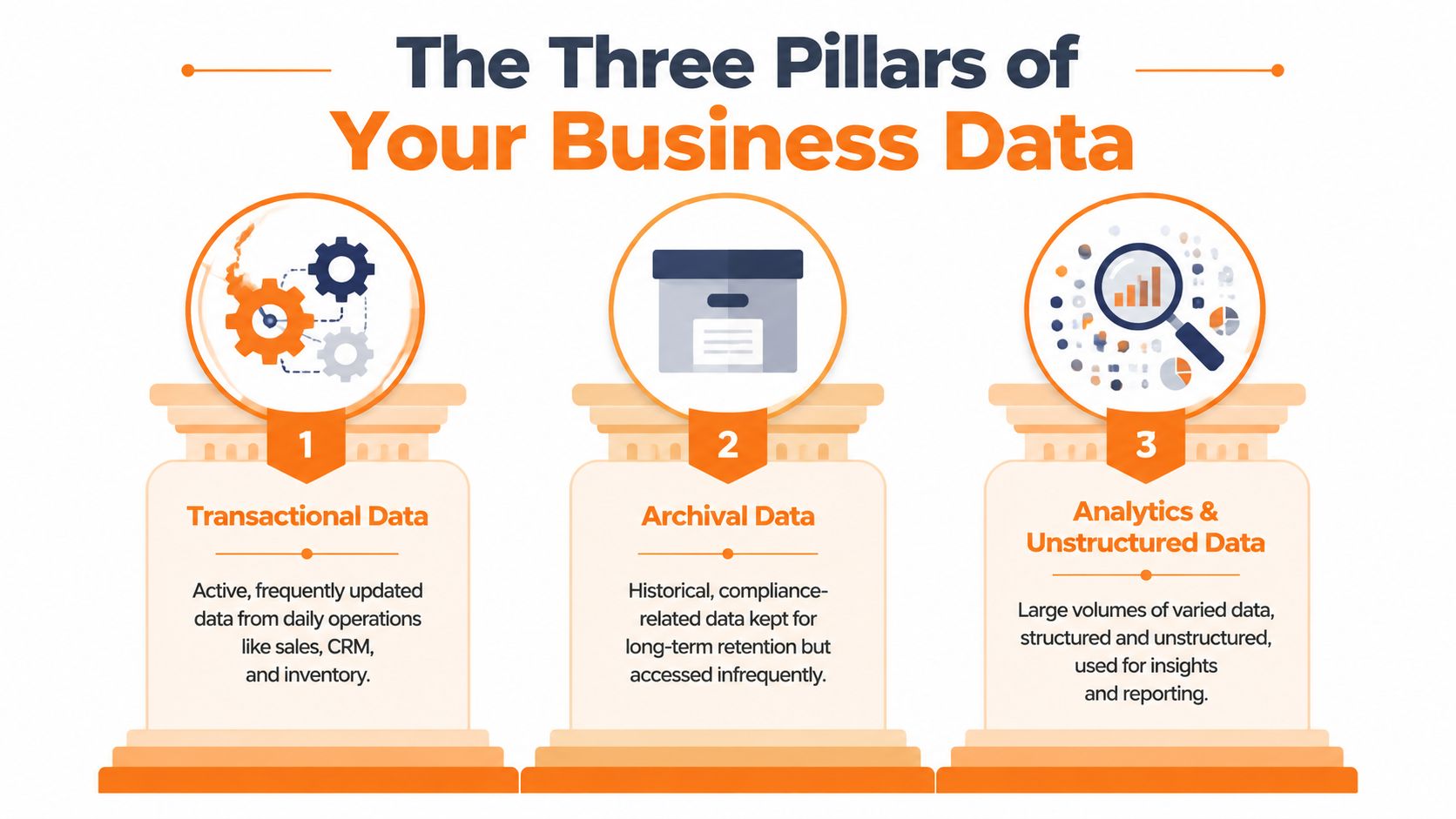
Before you calculate anything, separate your storage estate into parts you can measure. Most SME environments come down to three building blocks. If you lump them together, you miss where the growth is really happening.
Start with where data is created
Endpoints are laptops, desktops, and sometimes mobile workstations. They hold local files, downloaded reports, CAD working folders, PST archives, and user-created content that never made it back to a shared platform. Even in cloud-first businesses, endpoint data still matters because users often work locally first.
Centralised servers include file servers, NAS devices, application servers, and any on-premise line-of-business system storing documents or databases. This is usually where businesses underestimate sprawl. Shared drives tend to keep everything because no one wants to delete something that might matter later.
Treat cloud platforms as primary data stores
Cloud applications now carry far more business data than many firms realise. Microsoft 365 is the main example. Exchange Online, SharePoint, OneDrive, and Teams all generate storage demand in different ways. Email attachments, document versions, meeting files, recordings, and workflow outputs all add up.
That shift is one reason old storage assumptions break so quickly. As of 2021, 79% of small businesses globally store less than 50TB of data, while 78% of mid-sized companies store under 100TB. Yet adopting Microsoft 365 and automated workflows can push a UK SME's data footprint from 50TB to over 150TB within three years due to increased file sharing and version control, according to these data storage statistics for business environments.
If your team has embraced Teams, SharePoint, and workflow automation, your “server replacement” plan probably isn't enough. The data may have moved, but it hasn't disappeared.
A practical way to think about these three areas is this:
| Building block | What to count | What owners often miss |
|---|---|---|
| Endpoints | Local documents, desktop folders, downloads, offline project files | Home working devices and duplicate local copies |
| Servers | Shared drives, application data, scanned documents, department folders | Old archives kept “just in case” |
| Cloud apps | Exchange, SharePoint, OneDrive, Teams, workflow outputs | Version history, shared media, automated file creation |
If you want a usable answer to “How much storage do I need?”, don't begin with total company data. Begin with where data lives, who creates it, and which platform is growing fastest.
How to Calculate Your Baseline Storage Requirement
A baseline is your live operational footprint today. Not backups. Not disaster recovery. Not projected growth. Just the data the business is actively using right now across users, servers, and cloud platforms.
That matters because a lot of SMEs buy storage before they've established a clean baseline. They know their environment feels full, but they can't say what's consuming space or whether it belongs on fast storage, archive storage, or protected backup storage.
Use a simple baseline formula
Use this working formula:
(Average data per user × number of users) + server data + Microsoft 365 data = baseline storage requirement
For a small engineering firm, that might mean:
- User data: Estimate the average local and personal working data each employee holds across desktop folders, local project files, and synced folders.
- Server data: Add shared file stores, drawing repositories, finance data, and department shares.
- Microsoft 365 data: Include Exchange mailboxes, SharePoint libraries, OneDrive, and Teams-related file storage.
A common mistake is mixing “how much is stored” with “how much is useful”. Baseline calculations should include operationally relevant live data, not every historical copy ever created. Archive strategy comes later.
If you're also thinking about physical document overflow, seasonal stock, or records that sit outside your IT estate, it can help to find the right storage space for non-digital assets separately rather than bundling everything into one vague capacity plan.
Another frequent issue is overlap between personal and shared Microsoft 365 storage. Businesses often don't distinguish clearly between OneDrive and SharePoint, which leads to poor forecasting and messy permissions. This comparison of SharePoint vs OneDrive is useful when you're deciding where data should live long term.
Your baseline storage calculation worksheet
Use a worksheet like this with your own figures.
| Data Source | Average Size per Unit (GB) | Number of Units | Subtotal (GB) |
|---|---|---|---|
| User endpoint data | |||
| Shared server folders | |||
| Application server data | |||
| Exchange Online mailboxes | |||
| SharePoint sites | |||
| OneDrive accounts | |||
| Teams file storage | |||
| Total baseline requirement |
Baseline numbers should be boring. If the figure surprises you, the environment probably isn't documented well enough yet.
For a fictional 25-person engineering company, the useful exercise isn't producing a perfect number on day one. It's exposing where storage is fragmented. Once you can see the split between user data, central data, and cloud data, later decisions about backup, retention, and platform design become much easier.
The Critical Multiplier for Backups and Disaster Recovery
Baseline storage is only your first layer. If you size only for live production data, you're planning to run the business until the first deletion, corruption event, ransomware incident, sync issue, or outage.
Your live data is only the first copy
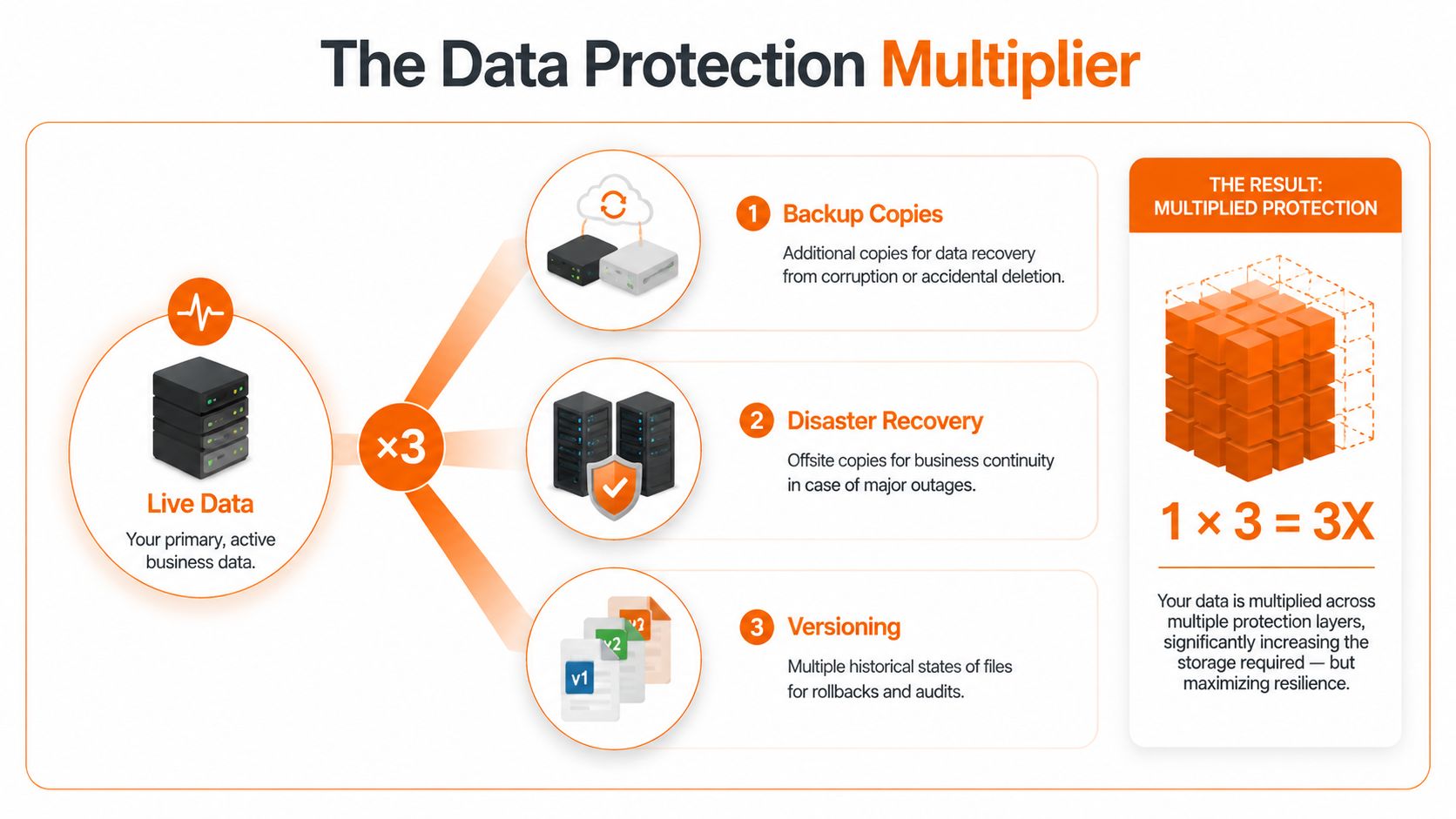
A resilient storage plan needs room for backup copies, offsite recovery copies, and historical versions. That's what turns storage from simple capacity into business continuity.
For reliable disaster recovery, UK SMEs require a minimum 3:1 data redundancy ratio. That means for every 100GB of operational Microsoft 365 data, you need an additional 200GB for managed backup and disaster recovery copies, according to this guidance on redundancy ratio and resilience planning.
In practical terms:
- One copy runs the business: This is your live production data.
- One copy supports recovery from day-to-day issues: Think accidental deletion, overwrite, corruption, or user error.
- One copy supports disaster recovery: This is the copy you can recover from when the primary platform or location is unavailable.
That's the point where many budget calculations fall apart. Owners ask how much storage they need, but the actual requirement is often closer to “how much storage do I need once I protect it properly?”
For a visual explanation, this short video gives a helpful overview of business continuity thinking.
Why Microsoft 365 still needs dedicated backup
Microsoft 365 is resilient as a service. That doesn't mean it replaces your backup strategy. Retention features, recycle bins, and version history are useful, but they aren't the same thing as a dedicated backup and disaster recovery design you control.
Recovery planning fails when businesses assume availability equals backup.
If your organisation depends on Exchange Online, SharePoint, OneDrive, and Teams, you need to decide how long data must be retained, how fast it must be restored, and what happens if an entire dataset needs recovering. This guide on how to create a disaster recovery plan is a good starting point when you're turning storage numbers into an actual resilience plan.
A simple rule works well here. Take your baseline operational storage and multiply it to account for backup and recovery copies before you discuss future growth. If you skip this step, every later number will be wrong.
Forecasting for Business Growth and Compliance
Storage planning goes wrong when firms assume next year will look like this year, only with a few more users. In practice, growth changes the shape of data as much as the volume. New services, acquisitions, automation, collaboration tools, and compliance all push storage in different directions.

Growth changes data shape, not just data size
The broad direction of travel is clear. The global datasphere is projected to hit 163 zettabytes by 2025, based on IDC Data Age 2025 as cited in this SME data revolution article. For SMEs, that doesn't mean you need hyperscale infrastructure. It does mean your storage model should assume sustained expansion rather than static demand.
Three practical triggers usually increase storage faster than expected:
- New hires: More users create more endpoint data, mailbox data, Teams files, and shared documents.
- Process automation: Automated workflows generate additional records, versions, and output files.
- Richer file types: CAD drawings, scanned records, media assets, and reporting datasets consume more space than ordinary office documents.
Compliance keeps data for longer than operations need it
Operationally, a file may be useful for months. Regulators, auditors, insurers, or clients may require you to keep it for far longer. That's why storage planning for regulated sectors must include a lifecycle view, not just active capacity.
The same source notes that for UK SMEs in sectors like transport and storage, compliance with Net Zero objectives means retaining decades of emissions data, effectively tripling archival storage requirements compared to pre-2020 baselines. That's a strong reminder that archive growth often comes from external obligations, not internal choice.
Good storage planning separates active, recoverable, and archival data. Bad planning throws all three into the same pool and hopes the bill stays manageable.
For legal and financial businesses, long retention periods are part of normal operations. For engineering and manufacturing firms, design history, project records, and revision trails often matter just as much. If your business is expanding or modernising its cloud estate, a structured cloud adoption roadmap for growing firms helps tie storage decisions to business change rather than reacting after systems are already under pressure.
A useful forecasting habit is to model storage on three horizons: immediate operational need, medium-term business change, and long-term compliance retention. Those horizons rarely grow at the same rate, and treating them as one bucket usually leads to overspend in one area and risk in another.
Choosing Your Ideal Storage Architecture
Once you know how much storage you need, the next decision is where that storage should live. For most SMEs, the actual choice isn't purely on-premise or purely cloud. It's how to place the right data in the right location for cost, resilience, and performance.
When on-premise still makes sense
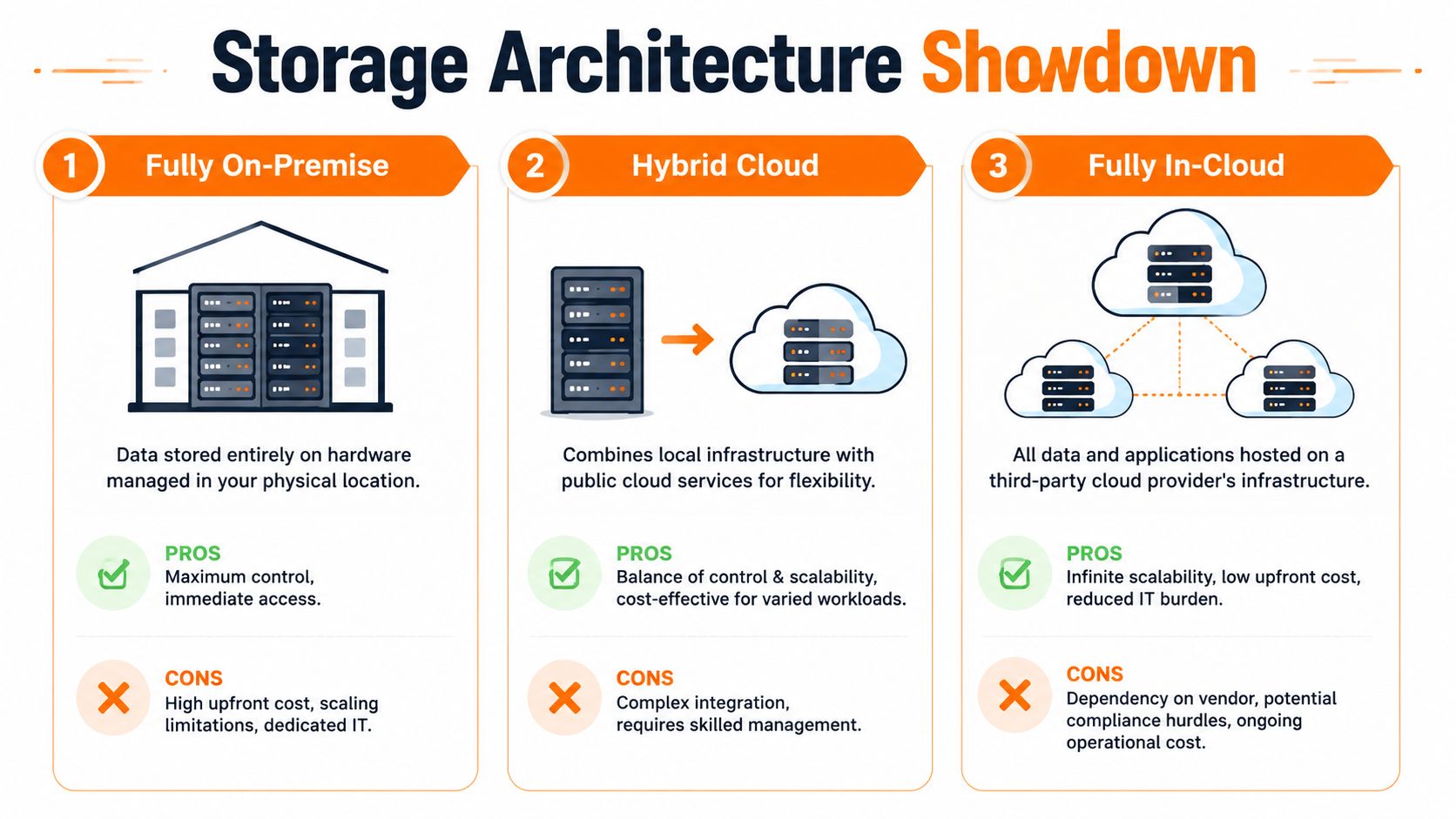
On-premise storage still fits some workloads well. If you need immediate access to large active files, have specialist applications tied closely to local infrastructure, or want tight control over where data resides, local storage can still be sensible.
What doesn't work well is pretending on-premise is simpler by default. Hardware refreshes, capacity planning, power, cooling, resilience, and recovery all become your responsibility.
Why hybrid is often the practical answer
Hybrid architecture is usually the most balanced option for UK SMEs. It lets you keep latency-sensitive or frequently accessed workloads close to users while using cloud platforms for collaboration, remote access, backup, and scalable archive.
That regional performance angle matters more than many guides admit. With 79% of UK battery capacity in England, North West SMEs can face 30% higher latency for cloud storage than London-based peers. That gap drives a 22% increase in storage overprovisioning for edge resilience, according to this analysis of UK battery capacity and related regional infrastructure impact.
For North West businesses with multiple sites, that often means some workloads should stay nearer the user, even if the broader platform strategy is cloud-led.
| Architecture | Best fit | Main trade-off |
|---|---|---|
| Fully on-premise | Specialist workloads, heavy local file access, strict control needs | Less flexible scaling and more infrastructure ownership |
| Hybrid cloud | Mixed workloads, regulated sectors, multi-site operations | More design complexity, but better balance |
| Fully in-cloud | Standardised businesses with strong connectivity and cloud-native tools | Dependence on provider performance and connectivity quality |
When fully cloud-based works best
Fully cloud-based storage can work very well when a business is standardised, mobile, and already committed to Microsoft 365 or hosted desktop platforms. It reduces hardware burden and scales cleanly.
The weak point is assuming cloud performance is identical everywhere and for every workload. Large design files, local application dependencies, and branch-office access patterns can expose the limits quickly.
If you're weighing those trade-offs, this comparison of on-premise vs cloud is worth reading. The right architecture isn't the newest one. It's the one that supports recovery, performance, compliance, and cost in the same design.
Building Your Technology Roadmap with Blowfish
A sound storage roadmap is straightforward in principle. First, calculate your baseline live data. Then multiply for backup and disaster recovery. After that, project for business growth and compliance retention. Finally, choose an architecture that fits how your staff work.
The reason many SMEs still get this wrong is timing. Storage is often reviewed only when users complain, systems slow down, or renewals land. By then, you're buying under pressure. That usually leads to rushed fixes, uneven protection, and poor long-term cost control.
The broader market is moving quickly too. The UK data storage market is projected to grow at a 14.5% CAGR to reach USD 42,593.4 million by 2035. For a typical SME, storage needs could triple within five years, according to this UK data storage market projection. That doesn't mean every business should buy aggressively now. It means storage should be treated as a managed roadmap, not a one-off purchase.
The businesses that handle storage well tend to do three things consistently:
- Review regularly: They don't wait for a full warning or a failed backup.
- Separate workloads: They distinguish active data, backup data, and archive data.
- Link storage to business plans: New hires, acquisitions, compliance changes, and cloud projects all feed into capacity planning.
If you're asking how much storage do I need, the answer shouldn't come from a generic calculator alone. It should come from a documented plan that connects technology decisions to resilience, cost, and growth.
Blowfish Technology helps UK SMEs turn storage planning into a practical technology roadmap. If you need a clearer view of your current data footprint, backup requirements, Microsoft 365 protection, or the right mix of on-premise and cloud storage, speak to Blowfish Technology for an expert review designed for your business.

The Blowfish Technology team. Managed IT, cloud services, software development and connectivity for North West businesses since 1999.