
The average Recovery Time Objective for mature disaster recovery plans is 4 hours, while only 30% of small businesses maintain a tested plan. That gap is where most outages become expensive, because a target on paper means very little if no one has proved the business can meet it.
For UK SMEs, recovery time objective is not a neat IT metric. It is the point where downtime becomes a financial, legal, and operational problem, and it only works if the recovery sequence, dependencies, and testing all line up in the world.
Table of Contents
- What Recovery Time Objective Actually Means for Your Business
- How RTO and RPO Work Together in Practice
- Setting Realistic RTO Targets Through Business Impact Analysis
- Technical Architecture Choices That Determine Your Achievable RTO
- Why Recovery Sequence Matters More Than Your Headline RTO Number
- The Case for Managed Disaster Recovery Services
- Your RTO Audit Checklist and Next Steps
What Recovery Time Objective Actually Means for Your Business
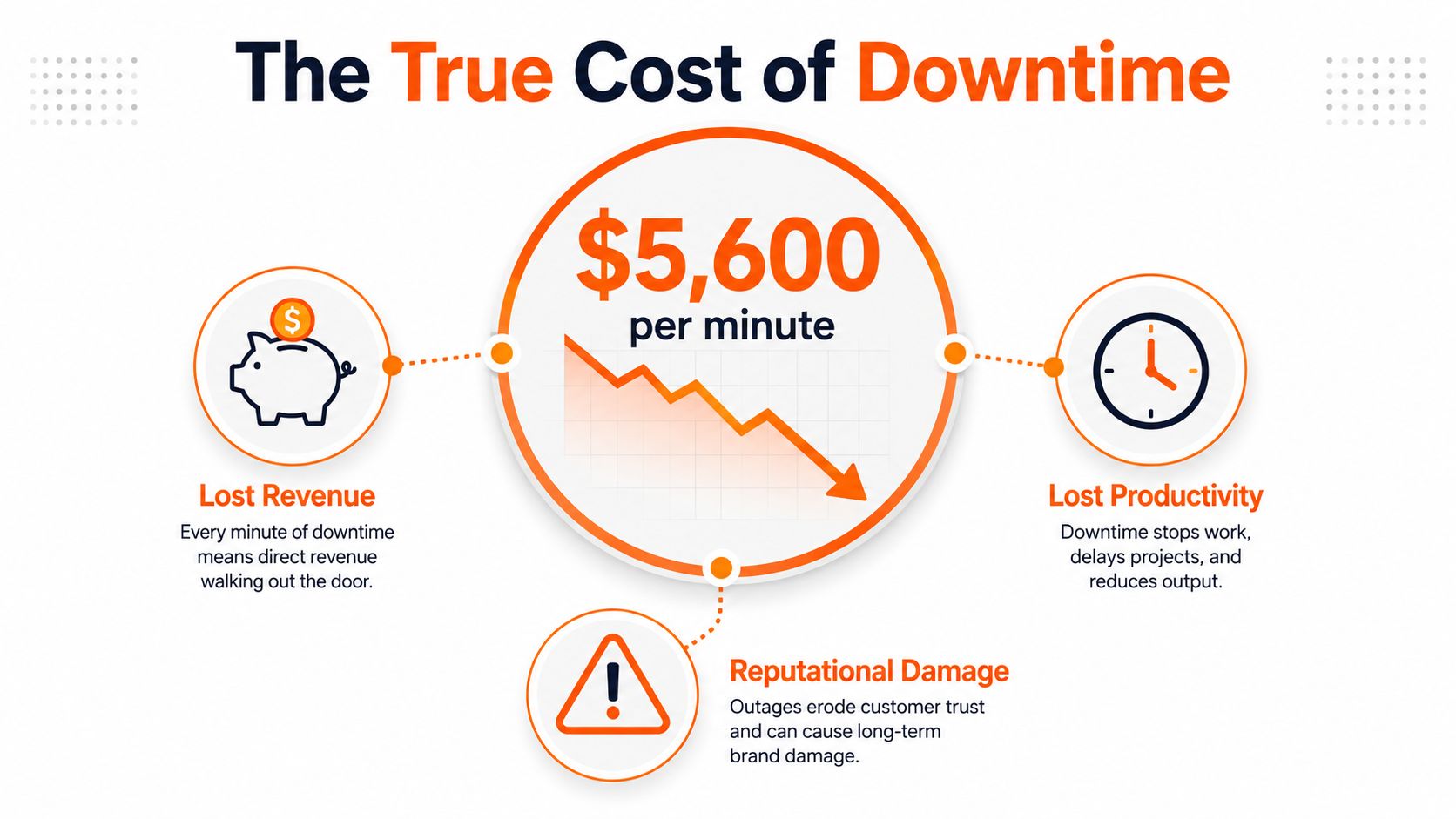
A single hour of downtime can be enough to force decisions at board level. Industry benchmarks put that hour at about $8,000 for small companies, $74,000 for mid-size organisations, and $700,000+ for large enterprises, which is why recovery planning is rarely just an IT conversation anymore (source on downtime cost benchmarks). For UK SMEs, the practical point is straightforward, delay gets expensive fast.
Recovery Time Objective (RTO) is the target time within which a service must be restored after disruption. NIST defines it as the total time components can remain in recovery before harming mission or business processes (NIST glossary entry for recovery time objective). In plain English, it is the longest acceptable gap between failure and usable service.
A Monday morning failure in a manufacturing firm makes that real. If order processing, stock lookup, or production scheduling goes down, the business does not just lose a screen. Staff start improvising, customers wait, and work builds up in the background. A four-hour target only matters if the business can restore identity, network access, application services, data, and user workflows inside that window.
Why UK businesses treat RTO as a board issue
The UK context matters because resilience planning has been formalised for years. The UK Government's publication of BS 25999-1 in 2006 helped shape business continuity practice before the standard evolved into ISO 22301, and RTO became a core planning metric within that framework. That history matters because it pushed continuity out of the server room and into operational planning.
Practical rule: if a service being down for one more hour changes customer commitments, regulatory exposure, or cash flow, its RTO belongs in management planning, not just a technical spreadsheet.
RTOs are often expressed in hours rather than days for critical systems because modern businesses do not absorb long outages well. Mature disaster recovery plans average a 4-hour RTO, but the bigger issue is that many small businesses still have no tested plan at all. That gap is the difference between a target and a capability.
How RTO and RPO Work Together in Practice
RTO and RPO are often mixed up because both sit inside recovery planning, but they answer different operational questions. RTO sets the maximum time a service can stay unavailable. Recovery Point Objective (RPO) sets how much data loss the business can accept. Set one without the other, and you can bring a system back quickly while losing the wrong records, or preserve every record and keep staff locked out for too long.
The trade-off shows up fast in real businesses. A legal practice may accept several hours of downtime on a case management system if the data is intact, because losing a client file causes more harm than waiting for the application to return. A marketing agency may accept some data loss if it gets teams back into shared assets faster, because live collaboration often matters more than a perfect point-in-time restore.
Pairing the two metrics without overpaying
The gap becomes obvious in database workloads. For Oracle MySQL high-availability DB systems, the documented RTO is seconds to minutes with RPO of zero for a single-instance failure, while standalone systems are only minutes to hours to recover and can have up to five minutes of data loss when point-in-time restore is enabled (Oracle MySQL HA recovery objective documentation). As defined by NIST earlier in this guide, that is why architecture choice matters more than any slogan about resilience.
| Typical RTO and RPO Pairings by System Type | Typical RTO | Typical RPO | Cost Implication |
|---|---|---|---|
| Email and collaboration | Hours | Hours | Lower cost, suited to non-transactional work |
| File server | Hours | Hours to minutes | Moderate cost, depends on versioning and sync needs |
| Hosted desktop | Hours to minutes | Minutes | Higher cost because users need a working environment quickly |
| Transactional database | Minutes to seconds | Zero to minutes | Highest cost, because downtime and data loss both hurt |
| Customer portal | Minutes to hours | Minutes | Cost depends on revenue dependence and compliance exposure |
The table shows the budgeting question. Tightening either metric raises cost because you need better backup design, faster failover, more testing, and tighter operational discipline. If the business can live with a longer outage but not with data loss, spend on backup fidelity. If it can tolerate some data replay but not a service outage, spend on failover speed. That's why architecture choice matters more than any slogan about resilience, a legal firm with zero RPO still needs failover speed to meet its RTO.
Setting Realistic RTO Targets Through Business Impact Analysis
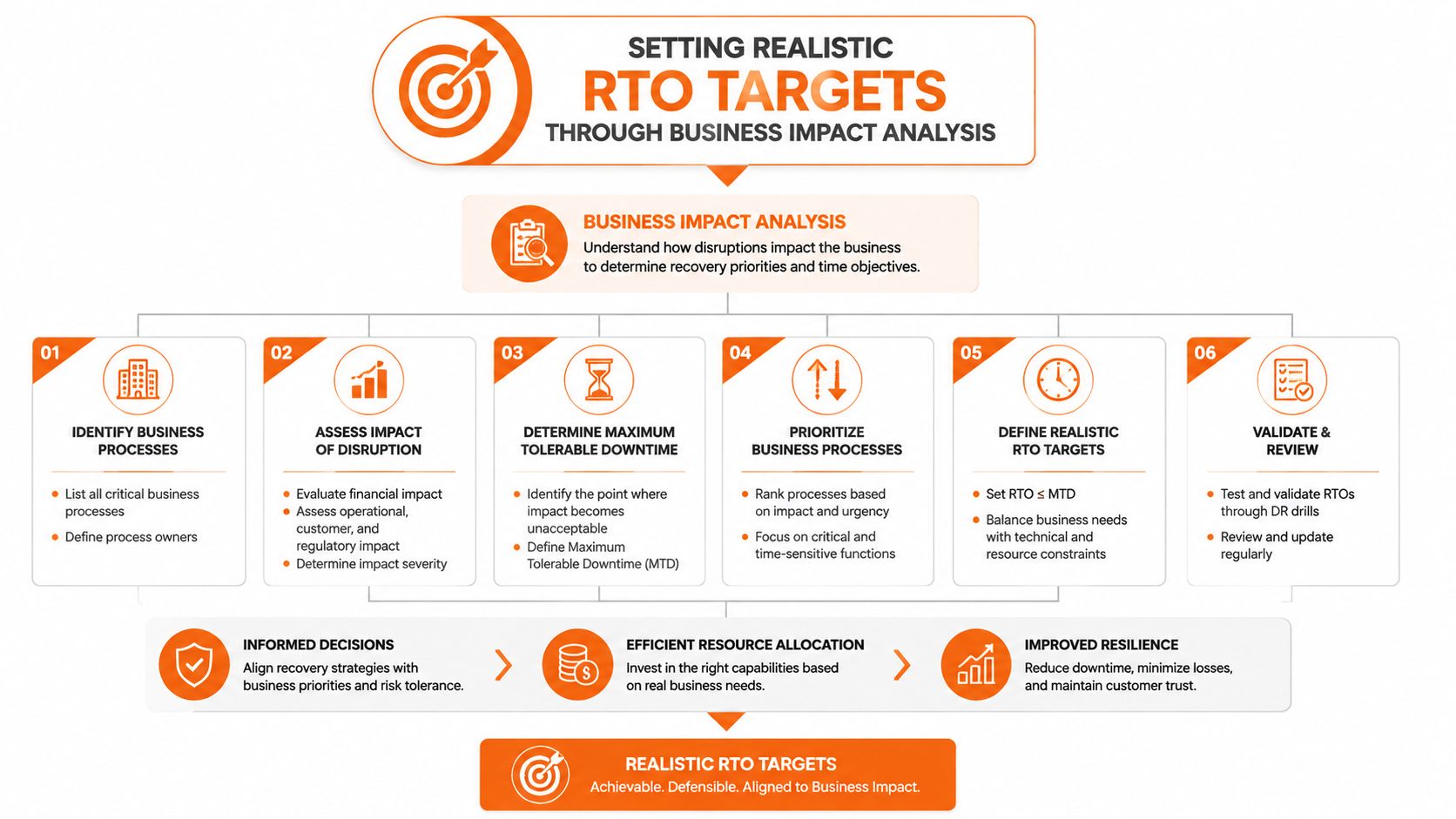
A realistic recovery time objective starts with a business impact analysis, not a wish list. The first mistake I see in UK SMEs is assigning the same aggressive target to every system. That sounds prudent in a meeting, then becomes impossible to fund, impossible to test, and impossible to maintain.
Start by ranking systems by business effect, not by technical elegance. Customer-facing order processing usually sits above internal reporting, while identity services often sit above both because nothing else works without them. If you need a practical structure, think in three bands, mission-critical, important, and deferrable.
A workable tiering model for UK SMEs
Mission-critical systems are the ones that stop trading, stop delivery, or create compliance exposure if they fail. In a legal practice, that often means document access, matter systems, identity, and email. In a financial services firm, it can include client records, authentication, and regulated communications. In engineering or manufacturing, it may be production scheduling, order entry, and design repositories.
Important systems support the business but can wait longer. HR, internal reporting, and some collaboration platforms usually sit here. Deferrable systems are the ones you would restore after the business is stable again.
Recovery objectives should follow business tolerance, not technical preference. If the board cannot explain why a system needs a four-hour target, the target probably isn't ready.
The best way to validate the tiers is to ask a direct question for each system. What happens if this is unavailable for one hour, one working day, and one week? If the answer changes from inconvenience to contractual breach to operational failure, the system belongs in a tighter recovery tier.
Engineering firms often discover that CAD file access is more urgent than their ERP reporting. Legal practices often find that secure email and document management matter more than local desktop recovery. Financial firms tend to discover that identity and audit logging need to come back before many customer-facing tools, because compliance doesn't wait for convenience. The internal logic has to be written down, or the recovery plan will drift.
For a practical planning resource, the how to reduce IT downtime guide is worth using alongside your impact review because downtime reduction and recovery target setting are tied together.
Technical Architecture Choices That Determine Your Achievable RTO
A recovery target is only credible if the technology stack can meet it. A nightly backup with manual restore gives you a very different recovery window from automated failover, and they should never be treated as equivalent. If the business says four hours, the infrastructure, people, and process all have to fit inside that window.
Manual restore is usually the slowest and most labour-heavy route. You validate the backup, identify the right restore point, recover the data, rebuild the server or workload, and then test the application before users can touch it again. That can be fine for lower-priority systems, but it is the wrong model when customers are blocked or compliance deadlines do not stop.
Matching architecture to the time target
Automated backup and recovery platforms cut manual effort and shorten the recovery window, but they still rely on clean orchestration. Active-active and active-passive failover designs go further because they reduce the number of steps people need to complete during an outage. The right choice depends on whether you need to recover in hours, minutes, or seconds.
Microsoft defines RTO as the maximum amount of time available to bring resources online after an outage and notes that it can be set at both the whole-solution level and per component. That matters because a single target for “the system” hides the fact that identity, SQL, Microsoft 365, networking, and endpoints may all recover on different clocks. The operational sequence behind those dependencies is what makes the number realistic or unrealistic.
The practical takeaway is straightforward. Architecture sets the ceiling. If your business needs a short RTO for a hosted desktop estate, you need fast provisioning, network readiness, and user profile handling. If the dependency chain includes a slow database restore or a single VPN appliance, the target slips before users even log on.
A recovery target is only as good as the slowest dependency underneath it.
You can compare on-premises, cloud, and hybrid options for your own estate using this on-premise vs cloud guide. That choice does not just change cost. It changes how much recovery can be automated, how much can be tested, and how much people have to remember under pressure.
Why Recovery Sequence Matters More Than Your Headline RTO Number
A headline RTO can look fine on paper and still fail in a real outage. The problem is usually the order of recovery. If the database is live but identity is still offline, users cannot authenticate. If the application is up but the network path is broken, nobody gets to it. The sequence decides whether the target is achievable.
Dependency mapping is the part many continuity plans miss. CRM relies on data services, data services rely on storage and network, and network services often rely on identity. Once that chain is mapped properly, a “restore everything at once” approach looks less efficient and more like a way to waste time and create confusion.
Recover foundations first, then add the layers
Recovery usually starts with the services other systems depend on. Identity has to come before application access. Core network services have to come before user logon. Databases and storage have to come before the front-end applications people use.
That order matters even more in regulated environments. In legal, financial, and engineering firms, audit, authentication, and compliance-related systems cannot be left to the end of the queue. If those controls are still offline while customer-facing services return, the business may be running but still be operationally unsafe.
The better plans include a written dependency map for each tier. That map should show what has to be up before the next layer can function, and who confirms each step. It also stops the common mistake of asking two teams to recover the same dependency in parallel, which usually slows the process rather than speeding it up.
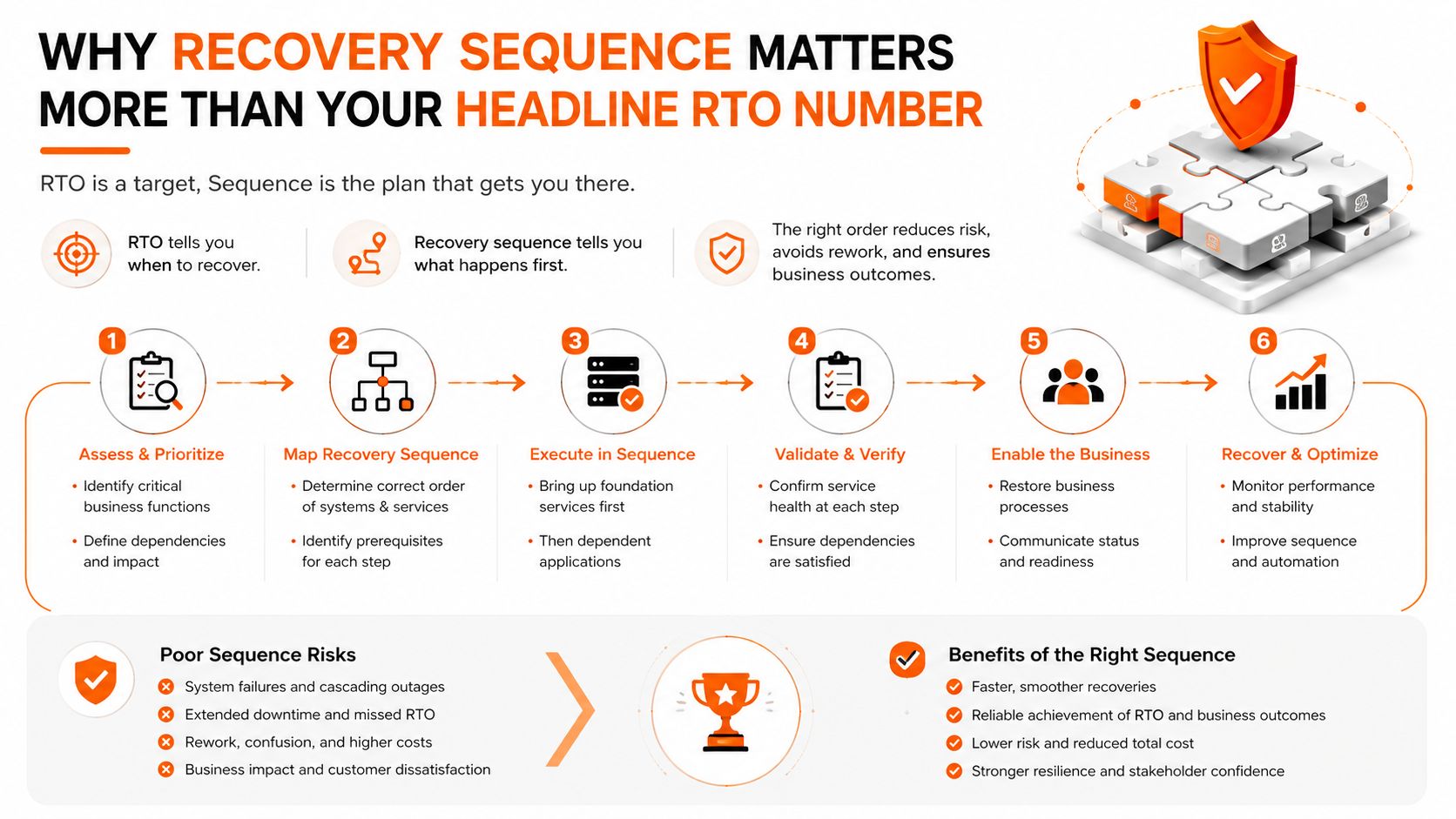
Operational reality: if your sequence is not written down, tested, and signed off by the people who own each dependency, the incident team will invent it under pressure.
The component-level approach described earlier is useful here because it forces recovery by service, not by hope. That is the right model for UK SMEs with mixed estates, because the fastest way to miss a target is to bring back the wrong piece first.
The Case for Managed Disaster Recovery Services
Self-managed disaster recovery often looks cheaper until you count the work. Someone has to maintain backups, test restores, document dependencies, refresh infrastructure, and rehearse the runbooks. In smaller UK teams, that work tends to get squeezed between projects, which is exactly how an untested plan becomes a false sense of security.
A managed service can make sense when the business wants predictable recovery capability rather than improvised recovery effort. The value isn't magic, it's consistency. You get a defined operating model, scheduled testing, and a provider whose job is to keep the recovery process aligned with the current environment.
What to ask before you hand it over
Contract terms matter more than glossy promises. You want to know whether the provider states recovery commitments, how often testing happens, how escalation works, and what evidence you receive after each test. You also want clarity on data location, access, and any compliance reporting needed for regulated work.
For a practical continuity checklist, the leader's guide to continuity services is a useful reference point because it frames continuity as a service discipline rather than a one-off project. If you compare that thinking with your own current setup, the difference between “we have backups” and “we can recover within target” becomes obvious.
Blowfish Technology's managed ITDR service fits this model because disaster recovery is only useful when it is operationally repeatable. The point is not to outsource responsibility, it is to make sure someone is accountable for keeping the recovery path current.
If you stay fully in-house, be honest about the burden. Testing takes time. Monitoring takes time. Evidence gathering takes time. In many SMEs, the hidden cost is staff attention, and the hidden risk is that the plan hasn't been exercised since the environment changed.
Your RTO Audit Checklist and Next Steps
The fastest way to improve recovery time objective planning is to audit what you already have. Most gaps show up quickly once you ask the right questions, and the answers are usually more valuable than another strategy workshop. If the business can't answer these points clearly, the plan still needs work.
Use this checklist on every critical system
- Defined target: Is an RTO written down for each system tier, or is the number still informal?
- Recent test: Has the recovery plan been tested in the last six months?
- Dependency map: Do you know what has to come back first for the service to work?
- Backup integrity: Have restores been verified, not just backup jobs completed?
- Supplier alignment: Do third-party SLAs match the recovery target you've set internally?
- Evidence trail: Can you prove the recovery result to auditors, directors, or clients if asked?
If the answer is “no” to two or more of those, the business is probably relying on assumptions. That's where outages become longer than expected and where confidence in continuity planning starts to wobble.
For a practical starting point, the how to create a disaster recovery plan guide gives you a structured path from inventory to testing. Use it to separate the systems that need urgent attention from the ones that can wait.
If your business has no documented plan, start with one critical service and make it recoverable before you expand. If you already have a plan, tighten the dependency map, test the sequence, and check whether your current recovery target still reflects how the business operates. That's the work that turns RTO from a document into resilience.
If you want help turning recovery time objective planning into a workable disaster recovery strategy, Blowfish Technology can assess your current setup, map dependencies, and align backup and recovery design to the way your business runs. Visit Blowfish Technology to discuss managed backup, disaster recovery, and continuity planning for your SME.

The Blowfish Technology team. Managed IT, cloud services, software development and connectivity for North West businesses since 1999.