
If you're in a UK SME right now, someone on your team has probably already done the thing you're trying to stop. A paralegal forwarded a client bundle to a personal inbox so they could finish work at home. An engineer moved a revised drawing into a personal OneDrive because the shared folder was “too slow”. Finance copied a spreadsheet into Teams to get sign-off faster, and nobody noticed until the file sat in the wrong place with the wrong permissions.
That's the problem with data leakage prevention solutions. The damage usually starts as convenience, not malice. Under the UK GDPR and the Data Protection Act 2018, that convenience can turn into a board-level issue fast, because the legal framework from 25 May 2018 made data protection a compliance obligation rather than just an IT control, with serious infringements carrying fines of up to £17.5 million or 4% of annual global turnover under the UK GDPR, whichever is higher (UK data leakage prevention context). If you want a blunt reminder of what a breach means for an SME, see the real cost of a data breach for SMEs.
Table of Contents
- What Data Leakage Prevention Defends Against
- The Three Layers Every DLP Stack Needs
- The Four Capabilities That Separate Real DLP from Hype
- Managed, In-House, or Hybrid Which Model Fits You
- A Practical Deployment Blueprint for Microsoft 365 SMEs
- Stopping GenAI and Shadow AI Leakage Without Killing Productivity
- How to Choose the Right DLP Stack for Your Sector
- Your 30 60 90 Day DLP Roadmap and Common Pitfalls
What Data Leakage Prevention Defends Against
A Tuesday morning in a regional law firm is enough to make the point. A paralegal drags a client bundle into Outlook, hits send, and realises half an hour later it went to a personal address from the wrong autocomplete suggestion. Nothing was stolen. Nobody hacked anything. The file left the business's control, and that is what leakage is.
Data leakage is any sensitive information leaving the organisation without the right controls, approval, or audit trail. That includes accidental sharing, insider misuse, and external exfiltration through compromised accounts. It does not include planned transfers between trusted systems that are logged, approved, and governed, which is why DLP sits alongside access control and accountability, not above them.
For UK SMEs in legal, finance, engineering, and manufacturing, that distinction matters because leakage is a governance failure before it becomes an IT incident. DLP is the control layer that helps prove the business can stop personal data, client records, and regulated information from being exposed before the incident becomes reportable under UK GDPR and the DPA 2018 (UK data leakage prevention context). A useful audit partner to keep on hand is MD TECH TEAM's security audit checklist, because the right security questions usually expose the weak points before a tool does.
Practical rule: if a file can leave through email, cloud sync, or a browser upload without anyone noticing, you do not have a DLP problem. You have a visibility problem dressed up as policy.
DLP also exists because the most expensive mistake is often quiet. UK firms that process customer, HR, finance, or IP data need something that watches the routes people use, then stops a risky transfer before it becomes a cleanup exercise. If you only think about DLP as a way to block USB sticks, you are looking at the wrong part of the risk surface, especially in cloud-heavy firms where the browser is the exfiltration channel. In those environments, the question is whether the policy stack catches the behaviour before the file leaves Microsoft 365, not whether a single device control fires after the fact.
A stronger approach starts with the data itself. Map where sensitive files live, where they move, and which users need to move them at all. Then set the controls in sequence, first the obvious leaks, then the risky exceptions, then the quiet paths that people use when they want to get work done without waiting on IT. That is the difference between a policy page nobody reads and a DLP programme that changes behaviour in a hybrid tenant.
The Three Layers Every DLP Stack Needs
A DLP stack only works when it covers three different control points. If one is weak, staff find the gap and use it. That is exactly what happens in UK SMEs, where people move files through laptops, browsers, and cloud apps as part of normal work.
Endpoint, network, and cloud are different control points
Endpoint DLP protects data while it is in use on laptops and desktops. It stops copy and paste abuse, USB transfers, uncontrolled printing, and uploads from a device that should not be trusted yet. For SMEs with hybrid working, most accidental leakage starts here, because the user is already signed in and the document is already open. It also needs to sit alongside endpoint detection and response, because blocking a risky action is useful, but seeing the device context around that action is what helps security teams tell noise from real intent.
Network DLP watches data in motion. It sees SMTP email, web uploads, browser-based sharing, and outbound traffic leaving the environment. If you only watch the endpoint, you miss the exfiltration path that runs through a trusted browser session or a cloud app that looks legitimate on the surface.
Cloud DLP covers data at rest and data moving inside SaaS platforms. In Microsoft 365 terms, SharePoint, OneDrive, Exchange, and Teams become part of the control plane, not a blind spot. That matters because a file in the wrong tenant location can cause the same damage as a file sent outside the business.
Good enough for an SME: each layer should enforce policy on the channels your staff actually use, not on theoretical attack paths your vendors like to demo.
A single-vendor pitch for “complete coverage” is usually thin somewhere. That does not mean the product is bad. It means you need to ask which layer is strong, which layer is passable, and which layer is being covered by optimistic marketing. That is the difference between buying a platform and buying a brochure.
The Four Capabilities That Separate Real DLP from Hype
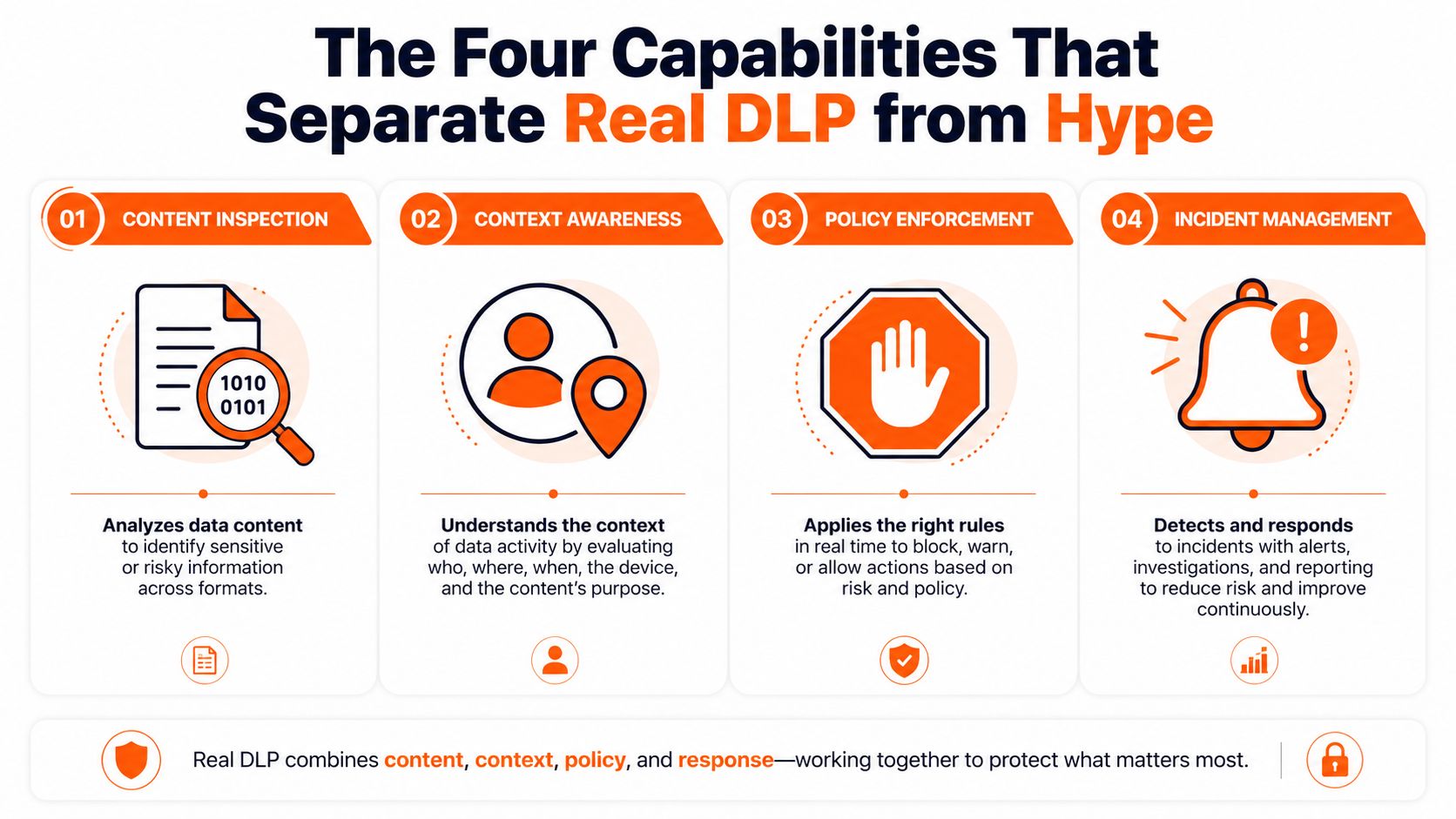
A DLP stack earns its keep through four functions, not one. If a vendor can't show all four in a live demo, you're looking at monitoring software with a security label on it.
Classification and policy are the foundation
Classification is the starting point. If the system can't recognise client data, payroll records, contract terms, CAD drawings, or source code, everything downstream gets noisy fast. DLP without accurate classification is just expensive logging, and SME teams usually feel that pain first as false positives that make users ignore alerts.
Policy enforcement is where the tool acts. Good-enough enforcement for an SME means you can block, quarantine, redact, or warn based on who is sending what, where, and through which channel. That should be usable on day one without writing a policy from scratch for every department.
Monitoring and incident handling have to work together
Monitoring and telemetry need to show context, not just events. A file name alone isn't enough, because the same document can be harmless in one workflow and risky in another. UK SMEs should expect enough detail to answer who did what, from which device, to which destination, and whether the action was allowed.
Incident response is where most tools disappoint. A decent DLP stack should make escalation, review, and exception handling predictable, so that a finance controller or partner can get an approved exemption without forcing IT to disable policy for everyone else.
Benchmark: if a policy change takes a week of admin effort, the system will get bypassed. If an exception workflow is clear, staff stop inventing workarounds.
The infographic above is useful because it captures the core issue nicely, content inspection, context awareness, policy enforcement, and incident management only work when they reinforce one another. Miss one, and the rest become theatre. For an SME buyer, that's the right scorecard to use in every demo.
Managed, In-House, or Hybrid Which Model Fits You
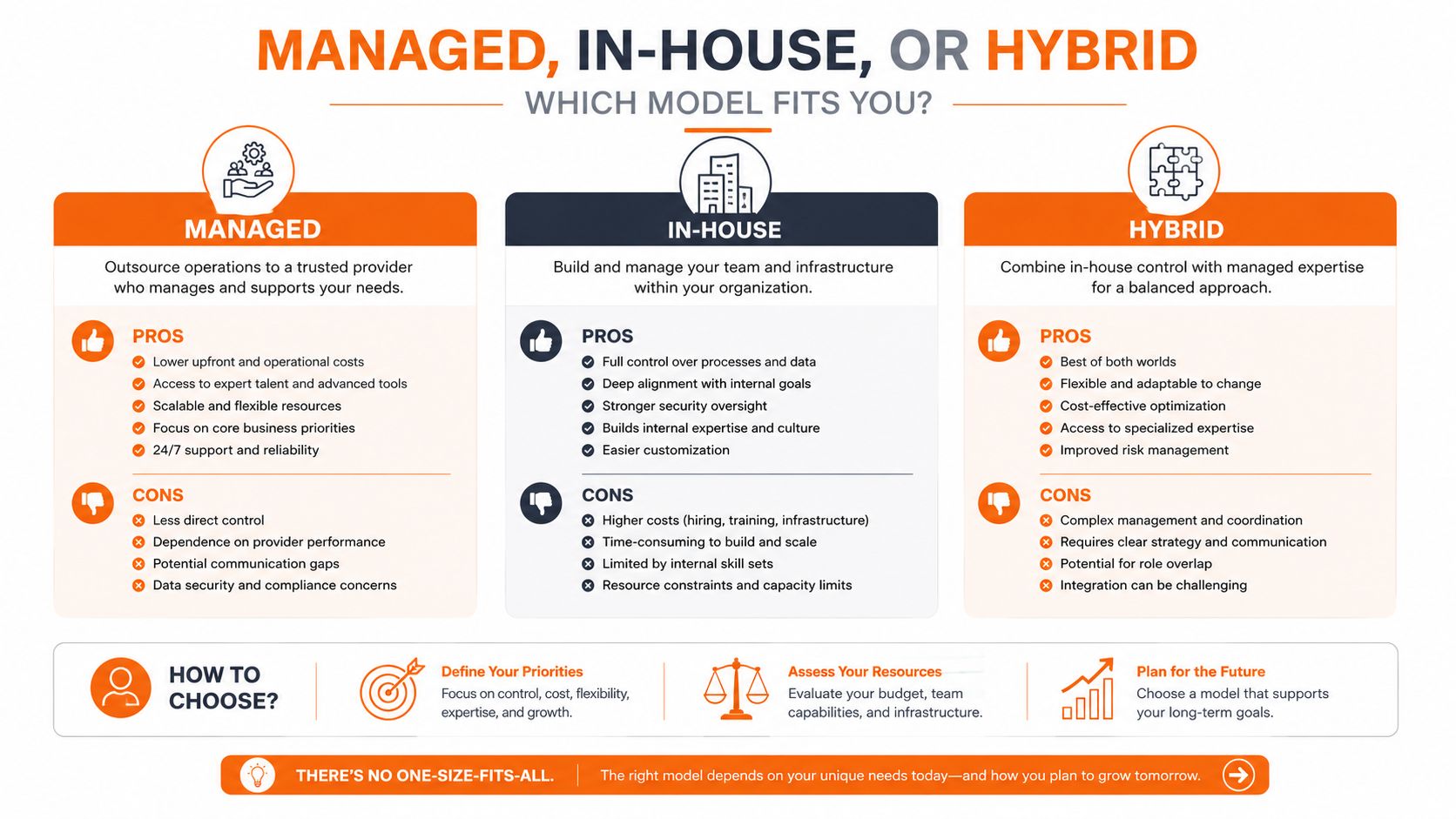
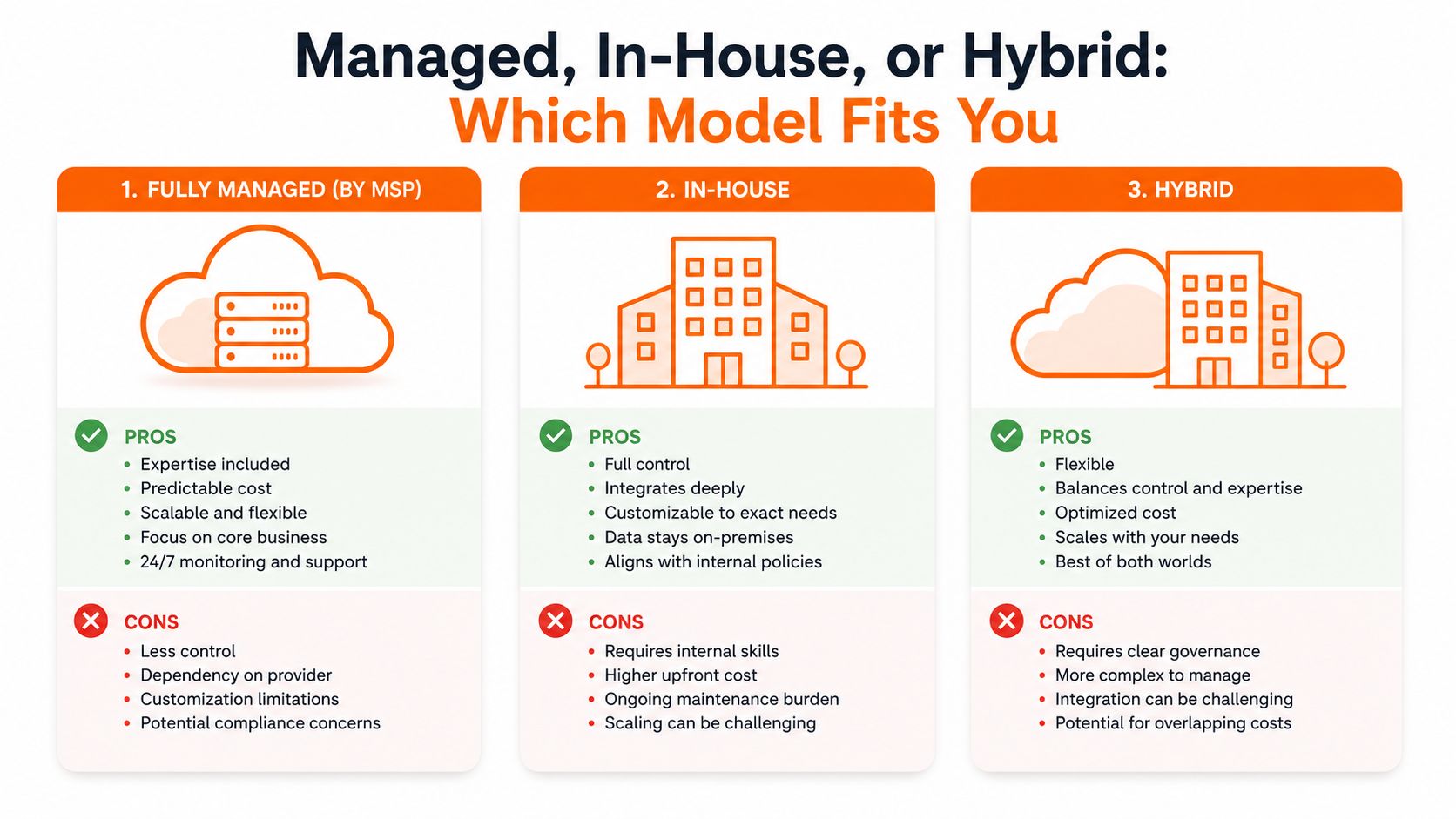
Most UK SMEs shouldn't ask, “Which DLP product is best?” They should ask, “Who is going to run this on a busy Tuesday afternoon?” That question usually decides the operating model faster than a feature checklist.
Managed works when skills are thin
A fully managed DLP model suits smaller firms with limited internal security depth. If you've got a 25-person legal practice or a lean finance team, you usually need someone to own policy tuning, alert review, and exception handling. The trade-off is obvious, you get expertise and predictable delivery, but you give up some direct control.
In-house only works when the team is real
An in-house model makes sense when the organisation already has people who understand Microsoft 365 governance, endpoint controls, and compliance workflows. A 200-person manufacturer with a mature internal IT function can make this work, especially if it already manages security operations. If your “security team” is one generalist and an overloaded infrastructure lead, in-house DLP turns into shelfware.
Hybrid is the practical middle for most SMEs
Hybrid is the model I'd pick for most UK firms in legal, financial, engineering, and manufacturing. The MSP or external partner runs the platform, while the internal team owns policy intent, business exceptions, and sector-specific judgement. That split is usually the least painful way to balance control, speed, and continuity in a Microsoft 365 tenant that's already doing too much.
For firms that need broader resilience beyond DLP, choose integrated security is a useful phrase to keep in mind, because leakage controls rarely sit alone for long. They need to connect with identity, endpoint, backup, and mail security rather than live as a separate island.
A 90-person engineering firm with valuable IP should seriously consider hybrid. A 25-person legal practice should not build a bespoke security operation just to manage DLP. And a multi-site manufacturer needs to think about who handles exceptions when plant users, designers, and office staff all push different kinds of data through the same Microsoft 365 tenant.
A Practical Deployment Blueprint for Microsoft 365 SMEs
A Microsoft 365 tenant is where most DLP projects succeed or fail. If the rollout starts with blanket enforcement, staff find workarounds. If it never leaves audit mode, nothing changes. The job is to move in phases and keep the business moving.
The best deployment pattern starts with visibility, then policy, then enforcement. Microsoft 365 is the right place to begin because SharePoint, OneDrive, Exchange, and Teams are already where the work happens, and those are the channels that need governing first. The right sequence is discovery, classification, pilot, staged enforcement, and exception handling, not “turn it on and pray”.
Start with the data people actually move
Look for the data that matters most, client files, finance records, design documents, HR material, and anything that leaves the tenant through email or browser sharing. Classify at source where possible, then map the normal routes that data should travel.
The practical first month is boring on purpose. Build baseline policies, identify the groups most likely to trigger issues, and run a pilot with a small set of users who touch regulated content. That lets you see how the business really behaves before you make the controls harder.
Rule of thumb: if your pilot doesn't include one or two people who regularly break tidy process in the name of getting work done, the pilot is too comfortable.
A useful reference point for the Microsoft 365 environment is Blowfish Technology's Microsoft 365 for small business, because DLP only works properly when the tenant itself is organised, licensed, and administered with care. Clean tenant hygiene makes policy tuning much less painful.
Keep exceptions narrow and named
Senior partners, finance controllers, and design engineers often need legitimate exceptions. That does not mean policy should be weak. It means exemptions should be tightly scoped, logged, and reviewed so that regulated work can continue without opening the floodgates.
The mistake I see most often is teams leaving everything in audit mode because they're afraid of disruption. That buys temporary comfort and long-term exposure. It's better to block a narrow risk, explain the rule clearly, and keep a controlled exception path than to pretend a noisy audit log is a security control.
Stopping GenAI and Shadow AI Leakage Without Killing Productivity
The wrong way to handle AI leakage is to assume you can inspect every prompt after the fact. By then, client data, contract text, financial detail, or source code may already be in a public model you don't control. The better defence is to stop unsanctioned use at the point of access.
That means governed access first, DLP second. If staff are free to paste whatever they want into consumer AI tools, you've already lost the policy conversation. For UK firms, the cleaner model is approved AI services with tenant controls, classification-aware restrictions, and logging that tells you who used what and why.
Block the tool, not just the prompt
If a marketing team needs AI assistance, give them an approved route with boundaries. If engineering wants help summarising specs, use a controlled tenant or redaction rules so sensitive text doesn't leave the environment raw. That's a more realistic pattern than trying to catch every risky phrase after a human has already exposed the data.
DLP for AI is mostly about preventing the leak before it happens, not cleaning up after the paste.
For governance design, AI governance frameworks are the right companion topic, because shadow AI is as much a policy and identity problem as it is a data problem. If your approved AI controls aren't clear, staff will use whatever is easiest.
The strongest approach for SMEs is usually simple. Define which AI tools are sanctioned, classify the data types that must never leave the tenant, and treat exceptions as a business decision rather than an informal favour. That's how you protect productivity without handing sensitive data to whoever offers the slickest chatbot.
How to Choose the Right DLP Stack for Your Sector
Sector matters because the riskiest data is different in each firm. A legal practice cares about client confidentiality and privileged material. A finance business cares about payment data, audit trails, and tightly controlled sharing. Engineering and manufacturing firms care about IP, design revisions, and commercial know-how that can be copied in seconds.
The starting point should match the data, not the vendor pitch. If your staff live in Microsoft 365, then email, SharePoint, OneDrive, and Teams should be the first control surface. If you have a lot of unmanaged devices or contractors, endpoint control becomes more important. If cloud collaboration is already messy, then you need classification and tenant policy before you think about blocking rules.
| SME profile | Primary data to protect | DLP starting point | Key control to switch on first |
|---|---|---|---|
| Legal practice | Client files, privileged correspondence | Email and Microsoft 365 collaboration control | Outbound sharing restrictions |
| Financial firm | Payment data, finance records, audit evidence | Microsoft 365 plus strict incident logging | Policy-based blocking on sensitive documents |
| Engineering firm | CAD drawings, specifications, commercial IP | Endpoint and cloud DLP together | Control over file sharing and uploads |
| Manufacturing business | Designs, production data, process documents | Hybrid DLP across tenant and endpoints | Classification of regulated and proprietary files |
For regulated buyers, ask for tenant-level audit logging, clear exception handling, and alignment with Cyber Essentials Plus expectations. If the vendor or MSP can't show how they will support your evidence trail, move on. DLP is not just about stopping leakage, it's about proving the business acted with appropriate security.
The useful thing about the Microsoft 365 ecosystem is that it rewards discipline. Clean identity, sensible sharing rules, and good audit logs make DLP workable. Chaos in the tenant makes every control look weaker than it is.
Your 30 60 90 Day DLP Roadmap and Common Pitfalls
The fastest way to kill a DLP programme is to make it too clever on day one. The fastest way to make it useless is to keep it in alert mode forever. The right approach is a short, disciplined rollout with clear ownership.
The first 30 days
Focus on discovery, labelling, and stakeholder buy-in. Identify the business data that needs protection, map where it lives in Microsoft 365, and choose the few policies that matter most. Get legal, finance, engineering, and IT in the room early so nobody can say the rules arrived from nowhere.
The next 60 days
Run pilot policies and tighten exception handling. Watch for false positives, especially in departments that move quickly and use shared folders heavily. If the pilot team can't work normally, the policy needs tuning, not abandonment.
By day 90
Move to staged enforcement and reporting. Pick the channels that are causing the most exposure, then enforce them in a controlled way. Make sure someone owns incident review, because “the system will alert someone” is not an ownership model.
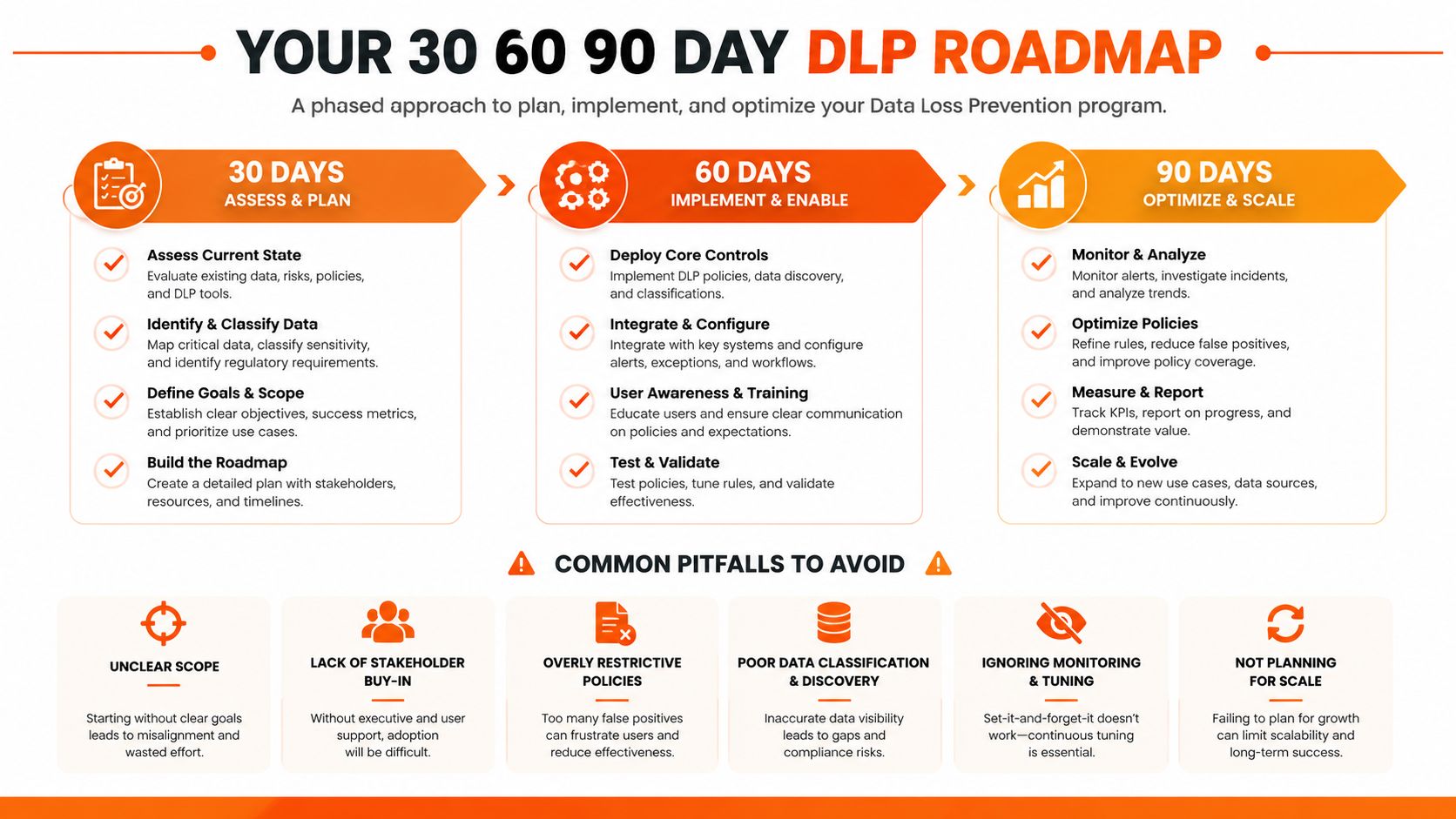
The common pitfalls are predictable. Blocking too much too soon creates revolt. Ignoring user experience leads to shadow workarounds. Treating DLP as a one-off project leaves stale policies behind. Failing to assign an incident owner means nobody closes the loop when something goes wrong.
This week's checklist:
- Name one data owner per department. If nobody owns the classification, nobody will defend it.
- Pick one pilot group. Make it the people who handle the most sensitive files.
- Decide where exceptions live. Ad hoc approvals are how controls decay.
- Choose one reporting owner. Alerts without a named reviewer are noise.
- Set one enforcement date. If you can't name it, you won't reach it.
DLP works when it changes behaviour inside Microsoft 365, not when it sits on a shelf as a compliance badge. If you're serious about reducing leakage in a UK SME, start with the tenant, the channels, and the people who move the data every day.
If you want a practical DLP rollout that fits a real Microsoft 365 environment, Blowfish Technology can help you build the policies, exceptions, and controls without turning collaboration into a mess. Visit Blowfish Technology to talk through managed IT, Microsoft 365, and security support that fits how your team works.

The Blowfish Technology team. Managed IT, cloud services, software development and connectivity for North West businesses since 1999.