
A lot of SME owners are in the same place. You've got antivirus on every laptop, Microsoft 365 in place, a firewall at the edge, and someone in the business assumes that means you're covered. Then a user clicks a convincing email, a malicious script runs inside a legitimate tool, and nothing looks dramatic at first. No big red warning. No obvious crash. Just a quiet compromise unfolding on a device your team uses every day.
That's the gap modern attackers exploit. Traditional antivirus still matters, but it's mostly designed to recognise known bad files and block them. It's a lock on the front door. It doesn't tell you much about what happened after someone got in, whether they moved from one room to another, or which cabinet they opened before anyone noticed.
That's why more firms are shifting from prevention-only thinking to continuous visibility and response. If you're reviewing AccountShare's modern security strategy, you'll notice the same pattern: strong security now depends on verifying behaviour, limiting trust, and responding quickly when something unusual happens. The same principle applies at the endpoint level.
If ransomware is part of what's driving the concern, it's also worth understanding the broader layers involved in protection against ransomware. Endpoint security is one of them, but it only works well when the business knows what it can and can't do.
Table of Contents
- Introduction When Antivirus Is No Longer Enough
- Beyond Alarms What EDR Is and Why It Matters
- The EDR Lifecycle From Telemetry to Investigation
- The Security Stack Explained EDR vs AV XDR and MDR
- Why Your Business Needs EDR Key Benefits for SMEs
- Putting EDR to Work In-House vs Managed Services
- Your Next Step in Endpoint Security
Introduction When Antivirus Is No Longer Enough
Most businesses don't replace antivirus because it failed loudly. They replace the thinking around it because threats changed.
Years ago, a lot of malware arrived as a suspicious file with a recognisable signature. Today, attackers often use normal admin tools, built-in scripting, stolen credentials, and patient movement across devices. To a busy office, that can look like ordinary activity. The machine still turns on. Outlook still opens. Staff keep working while the attacker tests what they can access.
That's where the question what is endpoint detection and response starts to matter. Not as a buzzword, but as a practical answer to a business problem. If a laptop in your office starts running unusual PowerShell commands, connects out in a way that doesn't fit normal behaviour, or launches a process chain that suggests someone is trying to gain control, you need more than a tool that checks file signatures and pops up an alert.
A lot of breaches aren't dramatic at the start. They're quiet, believable, and easy to miss if nobody is watching behaviour in context.
For an SME, the pain isn't only the attack itself. It's the downtime, the uncertainty, the scramble to work out what was touched, and the uncomfortable conversation about whether client data, financial records, or legal documents were exposed.
A basic endpoint tool can tell you something bad might be present. A modern response layer tells you what happened, what to contain, and what to investigate next. That difference is why EDR has moved from an enterprise-only discussion to a real operational decision for growing UK firms.
Beyond Alarms What EDR Is and Why It Matters
Endpoint Detection and Response, or EDR, is a security technology that continuously watches business devices for suspicious behaviour, helps contain threats, and gives security teams the evidence needed to investigate properly.
The easiest way to explain it is this. Antivirus is like a smoke alarm in the kitchen. It's useful, and you still want it there. But it mainly reacts to known signs of trouble. EDR is closer to a monitored security system with CCTV, motion sensors, automatic locks, and a response process behind it.
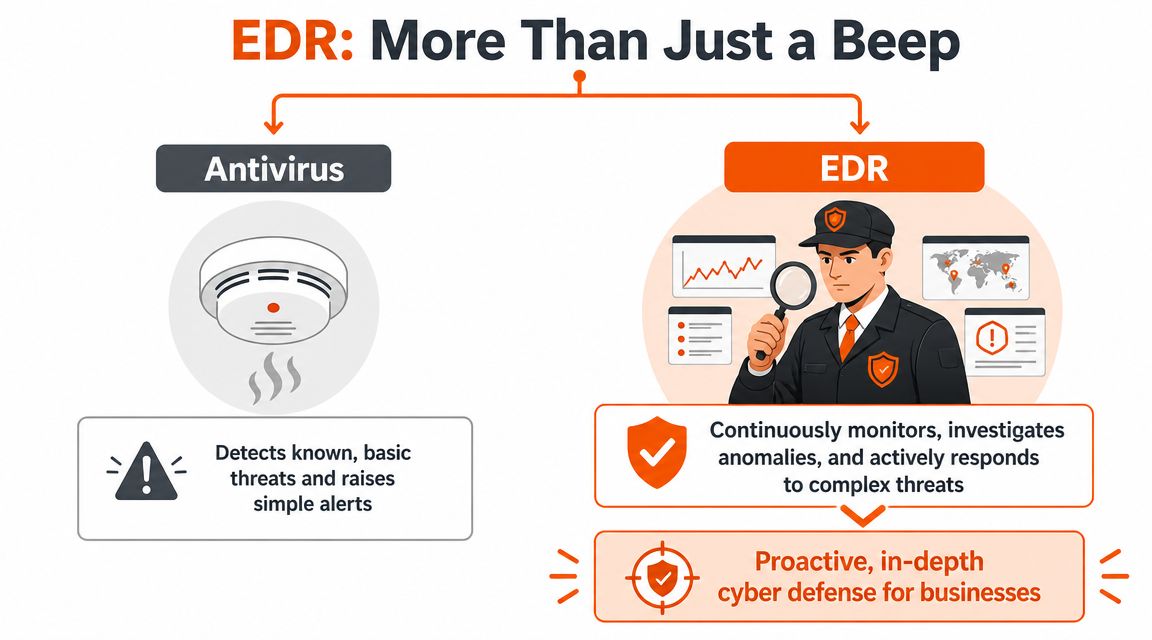
What counts as an endpoint
An endpoint is any business device that people use to access systems and data. In most SMEs, that includes:
- Laptops and desktops used by office staff, managers, and remote workers.
- Servers hosting files, applications, line-of-business systems, or remote desktop sessions.
- Virtual machines and cloud-connected systems that still behave like endpoints from a security point of view.
- Mobile devices in some environments, especially where staff access company email and data on the move.
If it connects to your business environment and can be used as an entry point, it matters.
Why EDR is a different category of tool
Microsoft explains that EDR is most effective as a continuous telemetry layer rather than a point-in-time alerting tool. It collects endpoint-level signals such as process execution, file changes, network connections, and user activity, then correlates them in real time so teams can reconstruct attacker behaviour and isolate compromised hosts before lateral movement occurs. Microsoft also notes that endpoints are common initial access points and that EDR can detect unknown threats by analysing suspicious behaviour rather than relying only on malware signatures, which is why it matters for businesses that need faster containment and a forensic record after an incident (Microsoft on what EDR is).
In plain English, EDR doesn't just ask, “Is this file on a bad list?” It asks, “Why is Word spawning a script interpreter? Why is this device making an unusual outbound connection? Why did a normal user account suddenly start behaving like an admin tool?”
That's the practical shift.
If you want a regional example of how businesses are approaching broader protection work, this guide to cyber security for South Wales businesses is a useful reminder that endpoint protection only makes sense when it sits inside a wider security plan.
Practical rule: If your current endpoint tool can alert but can't show the full sequence of events, isolate the device, and support investigation, you're still relying heavily on luck and speed of human reaction.
The EDR Lifecycle From Telemetry to Investigation
EDR works best when you think of it as a cycle, not a one-off scan. It keeps collecting, analysing, acting, and recording. That's why it can spot threats that don't announce themselves in an obvious way.
A good visual makes that easier to grasp.
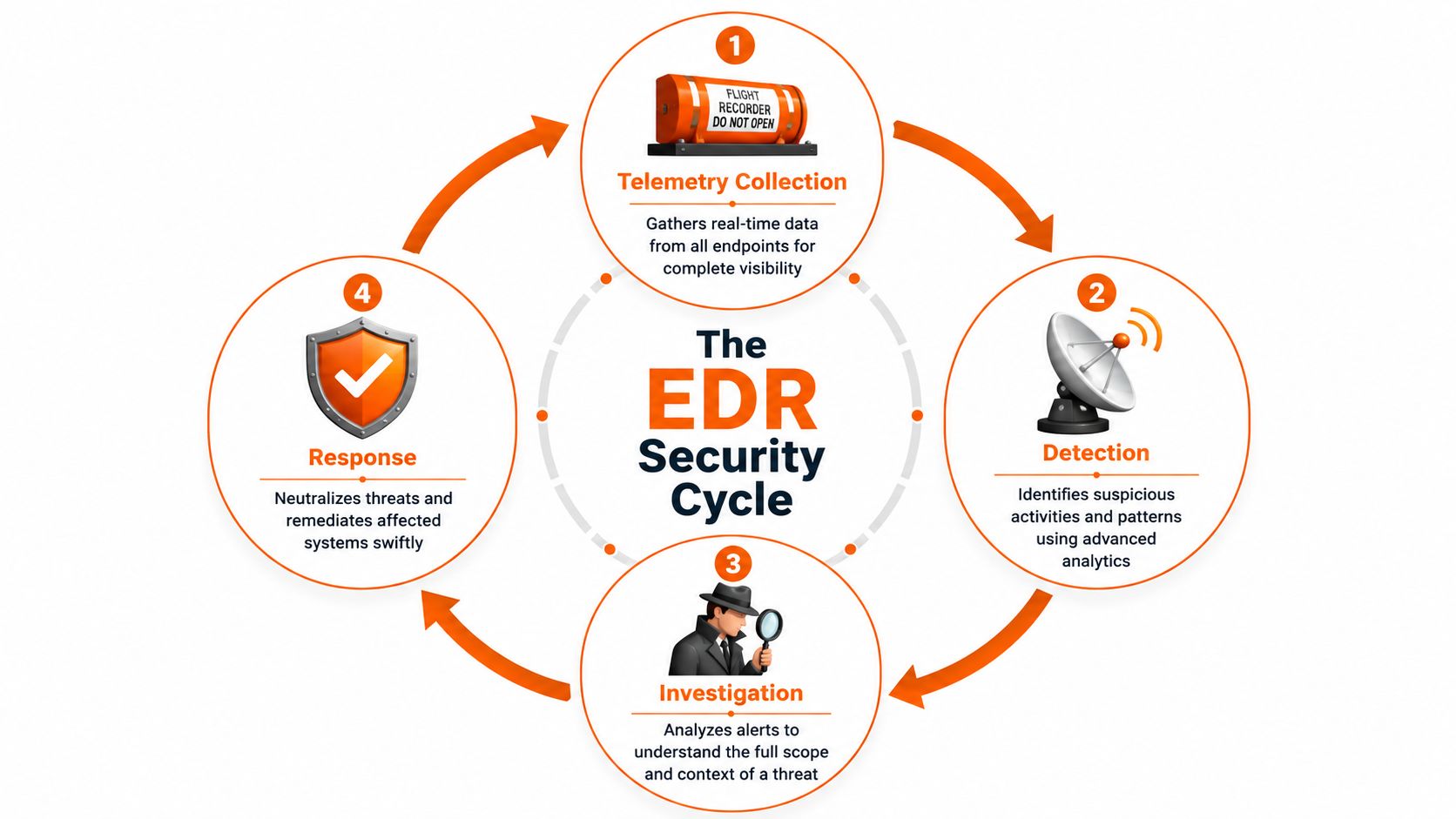
Telemetry as the flight recorder
The first job is telemetry collection. That sounds technical, but the idea is simple. The EDR agent on an endpoint acts like a flight recorder.
It captures activity such as:
- Process execution so you can see what ran, when, and what launched it.
- File changes so unusual edits, drops, or deletions don't disappear into the background.
- Network connections so suspicious outbound traffic has context.
- User activity so investigations can separate normal work from attacker behaviour.
Without telemetry, an incident turns into guesswork. With telemetry, you can build a timeline.
If your concern extends beyond the endpoint itself, dark web monitoring can help add visibility around exposed credentials and account risk, which often sits alongside endpoint compromise.
Detection and response in real time
IBM describes EDR as using real-time analytics and AI-driven automation to continuously collect endpoint data, analyse it for known or suspected threats, and respond automatically to minimise damage. IBM also notes that this richer telemetry helps detect stealthy techniques and allows central teams to manage threats across multiple locations from a single console (IBM on EDR).
That matters because modern attacks often look harmless in isolation. A single script might not look catastrophic. A single outbound connection might not trigger concern. But when the platform correlates those events, the pattern becomes clear.
Automated response earns its keep. A strong EDR platform can isolate a compromised host, stop malicious processes, and preserve the evidence needed for follow-up. Speed matters. If ransomware or an intruder is trying to spread, waiting for someone to notice an email alert isn't a serious plan.
Later in the cycle, human review still matters. This short explainer is worth a watch if you want a visual overview of the moving parts:
Investigation after containment
Containment is only half the job. Once the device is isolated, someone still needs to answer the uncomfortable questions.
- How did it start
- Which accounts or systems were involved
- What data or systems were touched
- Is the threat fully removed
- What does the business need to report or document
For UK organisations preparing for Cyber Essentials Plus or handling sensitive data under UK GDPR, that forensic traceability is operationally important because it supports root-cause analysis, scoping, and evidence retention after a security event. Microsoft also notes that EDR can detect unknown threats by analysing suspicious behaviour rather than relying only on malware signatures.
Good EDR doesn't just help you stop the first machine from getting worse. It helps you explain the incident clearly after the fact, which is often what compliance, insurers, leadership teams, and clients care about next.
The Security Stack Explained EDR vs AV XDR and MDR
Buyers often hear four acronyms in one conversation and leave with less clarity than they started with. The terms overlap, but they are not the same thing.
Security solutions at a glance
| Solution | Primary Focus | Key Capability | Best For |
|---|---|---|---|
| AV | Basic endpoint prevention | Detects known malware and blocks common threats | Every business as a baseline control |
| EDR | Endpoint detection and response | Continuous endpoint monitoring, investigation, and containment | Firms that need visibility beyond antivirus |
| XDR | Wider cross-system detection | Correlates data from endpoints, email, cloud, identity, and network tools | Businesses wanting broader detection across the estate |
| MDR | Managed security service | Human monitoring, triage, and response using tools such as EDR or XDR | SMEs that can't run security operations around the clock |
Where buyers get stuck
The usual question isn't “Which acronym is better?” It's “What problem am I trying to solve?”
If you already have antivirus, you have a prevention layer. Keep it. But antivirus on its own mainly deals with known bad content. It doesn't provide the same level of behavioural monitoring, investigation support, or containment workflow.
EDR adds that endpoint-focused depth. It watches what devices do, not just what files they contain.
XDR goes wider. It's useful when your biggest blind spots sit across systems rather than on the endpoint alone. For example, a suspicious sign-in, a strange email event, and endpoint activity might look unrelated until one platform joins them up.
MDR is different again. It isn't a product category in the same sense. It's a service model. The service provider operates the tooling, reviews alerts, investigates suspicious activity, and takes action when something is real.
A simple way to think about it:
- AV helps prevent common threats
- EDR helps detect and contain endpoint attacks
- XDR helps connect signals across more of the business
- MDR helps when you don't have the people or time to run all of that well
This distinction matters for UK SMEs because the core decision often isn't whether EDR sounds useful. It's whether the business can manage it properly. That's also why a lot of current buyer conversations have shifted from product features to operational maturity. If you've got Microsoft-native tooling already, the question becomes whether your team can tune it, monitor it, investigate it, and respond at the speed required.
Why Your Business Needs EDR Key Benefits for SMEs
The reason to buy EDR isn't to collect another security dashboard. It's to reduce business disruption and make incidents more manageable when prevention fails.

Business outcomes that matter
For SMEs, the most valuable benefits are usually operational rather than theoretical.
- Faster containment of ransomware-style activity. If one laptop starts behaving like the first domino in a wider event, the ability to isolate it quickly can stop a bad day becoming a full business outage.
- Better visibility during an incident. Instead of asking staff what they clicked and trying to reconstruct events from scraps, your team has endpoint records to work from.
- Stronger support for regulated environments. Legal, financial, engineering, and other data-sensitive firms need evidence, scoping, and a more disciplined incident response posture.
- More confidence in hybrid working. Endpoints are now everywhere. Security controls need to travel with the device, not stay at the office perimeter.
If you're trying to assess your business cybersecurity risks, that risk-based view is the right starting point. The point isn't to buy every tool on the market. It's to close the gaps that would hurt your business most.
Where EDR earns its place
EDR tends to make the clearest difference in businesses that have one or more of these conditions:
| Situation | Why EDR helps |
|---|---|
| Sensitive client or case data | It improves investigation and containment when an endpoint is compromised |
| Multi-site or remote users | It gives central visibility across distributed devices |
| Small internal IT team | It reduces blind spots, especially when paired with external monitoring |
| Cyber Essentials Plus or GDPR pressure | It supports more robust incident handling and evidence retention |
For many SMEs, the tipping point comes when they realise antivirus tells them too little after an incident starts.
A practical next read is this small business cyber security guide, especially if you're trying to fit endpoint protection into a broader security plan rather than buying tools in isolation.
The real value of EDR is clarity under pressure. When something goes wrong, you need to know what happened and what to do next. Hope is not a workflow.
Putting EDR to Work In-House vs Managed Services
The true challenge in the buying decision becomes clear. Plenty of businesses can purchase EDR software. Far fewer can run it properly.
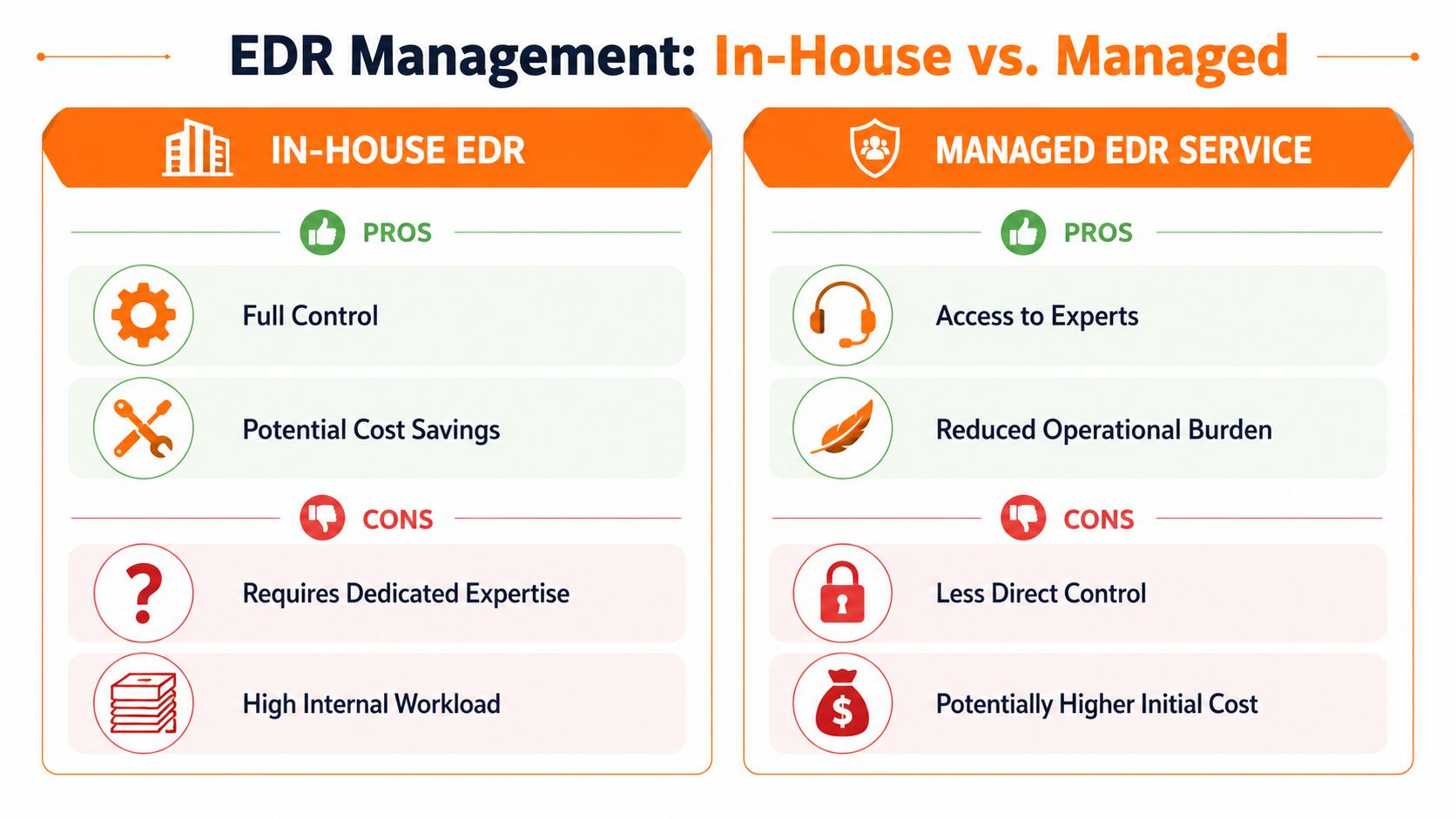
What in-house really involves
Running EDR internally sounds straightforward until alerts start landing at inconvenient times, across multiple devices, with no clear answer about what's urgent.
An in-house approach can work when you have:
- People who understand endpoint telemetry and can separate normal admin activity from attacker tradecraft.
- Time to tune policies and exclusions so the platform doesn't overwhelm staff with noise.
- A response process for isolation, user communication, remediation, and documentation.
- Coverage outside office hours, because attacks don't respect support desk schedules.
The weak point is usually not the software. It's the operating model. Alert fatigue is real. If a system produces constant noise, staff stop trusting it. Then the one alert that matters gets buried among the routine clutter.
Why managed EDR often makes more sense
For most SMEs, a managed approach is the practical route because it turns a tool into an outcome.
Instead of only licensing the platform, you're adding people who monitor alerts, investigate suspicious behaviour, tune the environment, and help with response when something needs action. That is the difference between “we own EDR” and “EDR is protecting us”.
A managed service also fits the current direction of the market. Many UK businesses don't want another console. They want triage, guidance, and fast containment.
One example is managed EDR, where Blowfish Technology provides an endpoint monitoring and response service as part of a managed security model. That approach is common across MSP and MDR providers because it matches the reality most SMEs face. They need coverage and expertise more than they need another login.
A fair summary looks like this:
| Model | Strength | Limitation |
|---|---|---|
| In-house EDR | More direct control and internal ownership | Requires skills, tuning time, and consistent response capacity |
| Managed EDR | Adds expertise and reduces operational burden | Less hands-on control for the client day to day |
Decision test: If your team can't confidently investigate endpoint alerts at short notice and maintain coverage when key staff are off, managed EDR is usually the safer choice.
Your Next Step in Endpoint Security
EDR matters because prevention on its own isn't enough anymore. Devices are common entry points, attackers use legitimate tools to blend in, and the businesses that recover fastest are the ones that can spot suspicious behaviour early, contain it quickly, and investigate with evidence.
That's the practical answer to what is endpoint detection and response. It's not just smarter antivirus. It's a continuous endpoint visibility and response layer that helps your business act before a single compromised device turns into a wider incident.
For most SMEs, the important question isn't whether EDR has value. It's whether you can operate it well enough to get that value in the middle of a real incident. If the answer is “probably not without help”, that's not a weakness. It's a normal conclusion for busy teams with limited security headcount.
The right next step is to review your current endpoint controls, identify where visibility stops, and decide whether you need software, a managed service, or a broader Microsoft-led security stack with human response behind it.
If you want a practical conversation about how endpoint security would work in your own environment, Blowfish Technology can help you review your current controls, the gaps around detection and response, and whether a managed EDR approach fits your business.

The Blowfish Technology team. Managed IT, cloud services, software development and connectivity for North West businesses since 1999.