
Almost half of UK businesses have already had the lesson many owners hope to avoid. The UK Government's Cyber Security Breaches Survey 2025, cited here, found that 43% of UK businesses experienced a cyber breach or attack in the previous 12 months, rising to 70% for medium businesses. Among the businesses that identified a breach or attack, 61% were hit by phishing.
That should reframe cybersecurity for SMEs. This isn't a niche IT issue and it isn't only a problem for banks, hospitals, or global brands. It's an operational risk for accountants, manufacturers, legal practices, retailers, care providers, engineering firms, and any business that depends on email, files, devices, cloud systems, and people making quick decisions under pressure.
Most SME owners already know security matters. The sticking point is execution. Time is tight, budgets are tighter, and most firms can't afford to buy every tool a vendor wants to sell them. What they need is a sequence. What to do first, what can wait, what can be handled in-house, and when outside support becomes the cheaper option.
Table of Contents
- The Reality of Cyber Risk for UK Businesses
- Why SMEs Are a Top Target for Cyberattacks
- Your Essential Cybersecurity Toolkit for 2026
- A Simple Risk Assessment and Implementation Roadmap
- Meeting UK Compliance with Cyber Essentials
- When to Partner with a Managed Service Provider
- Frequently Asked Questions About SME Cybersecurity
The Reality of Cyber Risk for UK Businesses
Cyber risk becomes real for a business the moment someone cannot send email, open files, process payroll, or trust the bank details on an invoice. At that point, this stops being an IT problem and becomes an operations problem, a cashflow problem, and often a customer problem as well.
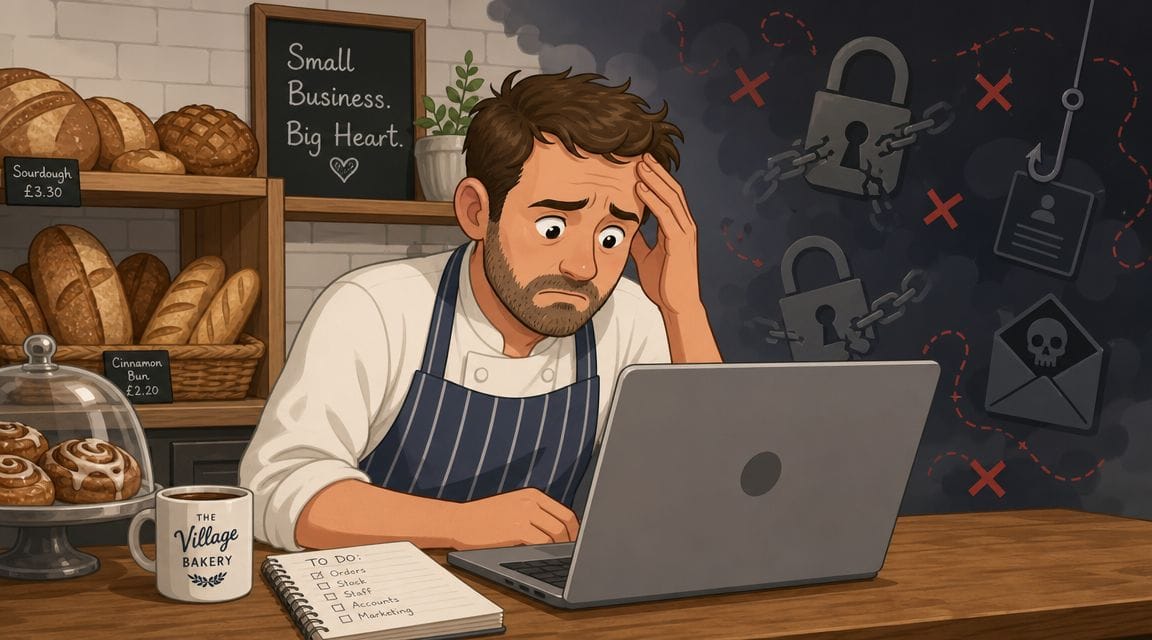
The pattern is usually less dramatic than owners expect. In smaller firms, incidents often start with ordinary gaps in day-to-day control. A convincing email. A reused password. A laptop that missed updates. Remote access left too open. A backup that exists, but has never been tested under pressure.
That matters because the cost is rarely limited to the first mistake. One clicked link can lock up shared files. One compromised mailbox can lead to invoice fraud, data exposure, and hours of chasing what happened. Even when the technical issue is contained quickly, the disruption lands on the whole business.
Practical rule: Favour controls your team will maintain every week over tools that look impressive in a sales demo.
I see the same trade-off repeatedly in SMEs. Owners know cyber security matters, but the business is busy, the internal IT resource is thin, and every new control adds admin. That is why the right approach is not to buy everything. It is to reduce the odds of common failures first, then add more advanced protection where it earns its keep.
For most UK businesses, that means getting the basics into working order. Strong sign-in protection. Reliable patching. Backup isolation. Clear joiner and leaver processes. A simple plan for who does what if systems go down or an account is compromised.
Good security at SME level is disciplined, not flashy. If you can reduce avoidable exposure and recover cleanly when something does go wrong, you are in a stronger position than firms with a longer tool list and weaker day-to-day control.
Why SMEs Are a Top Target for Cyberattacks
A large share of cyber incidents still starts with small, repeatable mistakes. That is exactly why SMEs stay in scope. Attackers do not need a bespoke operation if a copied login page, a stolen password, or a weak supplier process will get them paid.
Attackers look for access and payoff
An SME can hold plenty that is worth stealing or abusing. Payroll data, customer records, invoices, contract details, saved browser passwords, and Microsoft 365 access are enough to support fraud, extortion, or a quiet foothold inside a wider client network.
Company size is often a poor measure of risk. Friction is what matters. If staff can be tricked into approving a login, if old accounts stay active, or if a finance process relies on trust rather than verification, the business becomes easier to monetise.
I see this often in growing firms. The business adds new software, new staff, and new suppliers faster than it tightens account control. Nobody set out to create risk. The gaps appear because day-to-day operations came first.
SMEs are often the easiest route into a bigger target
Many small and mid-sized firms sit inside someone else's critical process. They handle client files, connect to shared systems, support payroll, manage logistics, or provide specialist services into larger organisations. That makes them useful to an attacker even if the SME is not the final target.
A connected business works a bit like a side entrance to a building. The front door may have a guard, a pass system, and CCTV. The side entrance often has fewer checks because it exists to keep work moving. Supplier accounts, shared mailboxes, unmanaged file-sharing links, and long-standing vendor trust can create that kind of side entrance in a business environment.
This is one reason supply chain attacks work so well. The attacker borrows trust that already exists.
The highest-risk SME is often the one with the most third-party connections and the least visibility over who can access what.
Common attack paths stay common because they work
Criminals usually prefer methods they can repeat at scale. That means they keep returning to the same routes into SMEs.
Typical examples include:
- Business email compromise where a fake invoice, urgent bank detail change, or spoofed director request leads to payment fraud
- Credential theft where reused passwords or phishing kits give attackers valid sign-in access
- Supplier impersonation where a real commercial relationship makes a malicious request look normal
- Remote access misuse where an exposed service, stale device, or poorly controlled admin account becomes an entry point
Weak password habits still play a bigger role than many owners expect. Constructive-IT's password advice is a useful reminder that basic account hygiene is not glamorous, but it stops a lot of avoidable trouble.
For SMEs, the practical lesson is simple. Start by removing the easy wins. Lock down identities, review third-party access, tighten finance approval checks, and put detection in place on endpoints. If you need a plain-English explanation of why endpoint monitoring matters, this guide to endpoint detection and response for business owners explains it well.
That is the decision framework many guides miss. Do the low-complexity controls first if they cut off the common attack paths. Bring in a specialist MSP when the business has outgrown what internal staff can monitor and maintain reliably.
Your Essential Cybersecurity Toolkit for 2026
Most SMEs don't need a sprawling security stack. They need a small number of controls that work together and don't create more admin than the team can handle. If I had to prioritise the baseline, it would be these six: EDR, MFA, backups, DNS filtering, password management, and security awareness training.
What each control actually does
EDR stands for endpoint detection and response. Think of it as modern antivirus with memory, context, and the ability to react. Traditional antivirus mainly looks for known bad files. EDR watches behaviour on laptops and desktops, such as suspicious scripts, unusual login activity, or software trying to tamper with core system settings. If you want a plain-English walkthrough, this guide on endpoint detection and response is useful.
For a non-technical owner, the easiest analogy is a guard in a building rather than a lock on the front door. A lock only helps at entry. A guard notices if someone gets inside and starts opening drawers they shouldn't.
MFA is your digital deadbolt. A password alone is one key. Multifactor authentication adds a second check, usually through an authenticator app or secure prompt. If a password leaks through phishing or reuse, MFA can stop that theft from becoming an account takeover.
Backups are the last line of business continuity. The 3-2-1 backup guidance explained here remains one of the few controls that directly turns ransomware from a business-stopping event into a recovery exercise: three copies of data, on two different media, with one copy off-site. The key mistake many SMEs make isn't backup failure. It's restore failure. A backup you haven't tested is just a hopeful theory.
A completed backup job doesn't prove recovery. A successful restore does.
DNS filtering blocks known bad or risky destinations before a user reaches them. The plain-English analogy is a receptionist with a list of unsafe addresses, stopping staff from walking into the wrong building. It won't fix every problem, but it cuts out a lot of obvious malicious traffic and accidental clicks.
Password management reduces the chaos of shared spreadsheets, reused logins, and forgotten credentials. A good password manager helps staff create unique passwords, store them securely, and stop relying on memory. For business owners trying to clean up old habits, Constructive-IT's password advice is a useful practical reference.
Security awareness training gives staff pattern recognition. It shouldn't be annual box-ticking. It should teach people how to spot suspicious invoices, fake login pages, urgent payment changes, and unusual attachment requests. Good training changes small everyday decisions, which is where many incidents start.
SME cybersecurity controls at a glance
| Control | Primary Purpose | Typical Effort / Cost |
|---|---|---|
| EDR | Detects and contains suspicious activity on devices | Moderate effort, moderate cost |
| MFA | Stops stolen passwords becoming full account compromise | Low effort, low to moderate cost |
| Backups | Preserves recovery after ransomware, deletion, or system failure | Moderate effort, moderate cost |
| DNS filtering | Blocks access to malicious or unwanted web destinations | Low to moderate effort, low to moderate cost |
| Password management | Improves credential hygiene and reduces reuse | Low effort, low to moderate cost |
| Security awareness training | Reduces successful phishing and user-driven mistakes | Low to moderate effort, low to moderate cost |
A lot of products promise all-in-one protection. In small environments, that can be useful if it's managed properly. It can also become shelfware if nobody tunes it, checks alerts, or tests recovery. The better approach is to ask one hard question for each control: does this reduce a real business risk with a level of complexity my team can sustain?
A Simple Risk Assessment and Implementation Roadmap
A security plan usually stalls for one reason. There are too many good ideas competing for too little time, budget, and ownership.
For most SMEs, the goal is not to buy every control on a checklist. It is to reduce the chance of a business-stopping incident with the least operational drag. That means ranking risks, choosing the controls that remove the most exposure first, and being honest about what your team can run well without outside help.
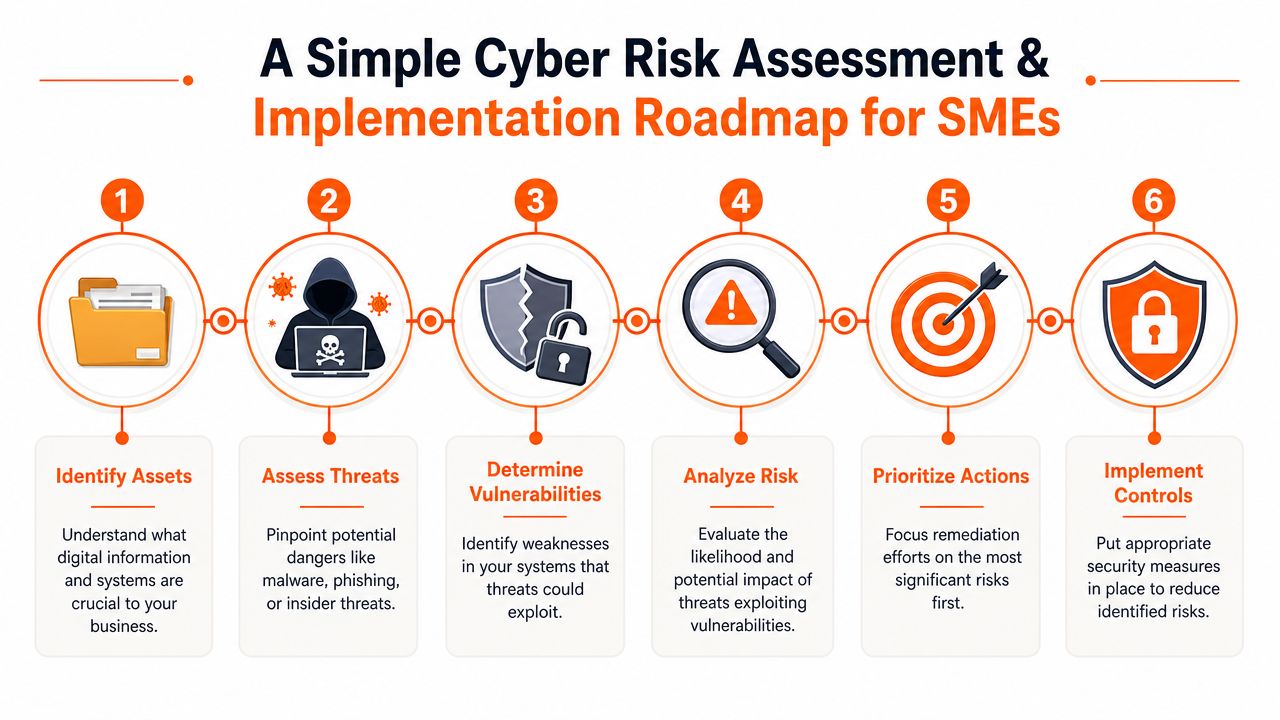
A risk review you can do in an afternoon
Start with business impact, not product categories.
Ask three questions and write the answers down on one page.
What would cause serious disruption if it failed, was encrypted, or became inaccessible?
In most SMEs, that means email, Microsoft 365 or Google Workspace, finance systems, file storage, remote access, line-of-business applications, and a small number of key laptops.What is the most likely way you lose control of those systems?
Focus on common failure points such as phishing, stolen passwords, weak remote access, accidental deletion, supplier compromise, and unmanaged devices.Which control cuts that risk fastest and with the least complexity?
This is the decision point many businesses skip. If stolen passwords are the top concern, MFA comes before EDR. If recovery is weak, tested backups come before another monitoring tool.
That last question matters because every control has an overhead. EDR can spot and contain suspicious behaviour on a device, but it still needs setup, alert handling, and policy tuning. DNS filtering works like a receptionist who refuses to connect calls to known scam numbers. It is simple, effective, and low effort, which is why it often belongs early in an SME rollout.
If your business develops or customises internal applications, secure development practices belong in the same risk conversation. Digital ToolPad's security best practices is a useful reference because it ties security to everyday design and release decisions instead of treating it as a final-stage check.
A practical 30 60 90 day rollout
The first 90 days should create control, not paperwork. A simple technology roadmap that links security priorities to business growth helps keep ownership clear and stops security work becoming a side task no one quite owns.
Days 1 to 30
- Turn on MFA for the systems attackers want first. Start with email, Microsoft 365, remote access, finance platforms, and all admin accounts.
- Sort out identity basics. Deploy a password manager, remove shared logins where possible, and check that every account has a named owner.
- Build a usable asset list. Record laptops, desktops, servers, cloud services, key software, and who is responsible for each one.
- Review joiners, movers, and leavers. Old accounts and excessive access are common gaps and usually easy to fix.
Days 31 to 60
- Get backups into a recoverable state. Follow 3-2-1 where possible, include cloud data if it matters to operations, and test a real restore.
- Add filtering controls. DNS filtering and stronger email protection reduce the number of bad clicks that turn into incidents.
- Set a patching routine with an owner. Good patching is less about tools and more about consistency, visibility, and dealing with exceptions.
- Check remote access and home working exposure. Out-of-date VPNs, unmanaged personal devices, and weak admin controls create avoidable risk.
Days 61 to 90
- Deploy EDR to the highest-risk devices first. If budget is limited, cover leadership, finance, and staff with access to sensitive systems before wider rollout.
- Run short awareness sessions. Use real examples your staff recognise, such as invoice fraud, fake Microsoft sign-ins, and urgent payment change requests.
- Write a basic incident plan. Include who to call, who can approve urgent actions, which systems come first in recovery, and where key contact details are stored.
- Review supplier and third-party access. Give external partners only the access they need, and remove it when the work ends.
This order is deliberate. Identity comes first because attackers regularly get in through accounts, not Hollywood-style hacking. Recovery comes next because every business needs a way back after ransomware, deletion, or a failed update. Detection tools like EDR are valuable, but they deliver better results after the basics are under control.
Decide early what to run in-house and what to outsource
SMEs lose time when they buy tools that nobody has the capacity to manage.
DIY usually makes sense for MFA rollout, password managers, basic asset lists, account reviews, and awareness training. These are process-heavy tasks, but they are still manageable for a small internal team with decent IT support.
Partner support is often the better choice for EDR, firewall changes, log monitoring, vulnerability management, and backup design if no one in-house can validate alerts or test recovery properly. The trade-off is simple. A cheaper tool that goes unchecked is often worse than a smaller set of controls that are actively managed.
A good roadmap gives you order, ownership, and stopping points. It tells you what to do first, what can wait, and where specialist help will reduce risk faster than another month of internal delay.
Meeting UK Compliance with Cyber Essentials
For UK SMEs, Cyber Essentials is one of the most practical security benchmarks available. It gives smaller organisations a recognised baseline without forcing them into an enterprise-grade compliance project.
The UK Cyber Essentials benchmark discussed here has real momentum behind it. The scheme was launched in 2014, and by 31 March 2024 more than 200,000 Cyber Essentials certificates had been issued. The same source notes that 39% of UK businesses had a formal cyber security strategy or policy in place, which means many organisations are still operating without a documented governance approach even while certification uptake grows.
Why Cyber Essentials matters commercially
Good certification should do more than sit on a website footer. Cyber Essentials can help SMEs show customers, insurers, and procurement teams that basic controls are in place and taken seriously. In practice, that can make security conversations shorter, smoother, and more credible.
It also gives owners a concrete target. Instead of asking whether security is "good enough", they can work towards a known standard with a clear scope and a simple pass-or-fix discipline.
For firms that want a plain overview of the process, this page on Cyber Essentials certification is a helpful starting point.
What the scheme pushes you to get right
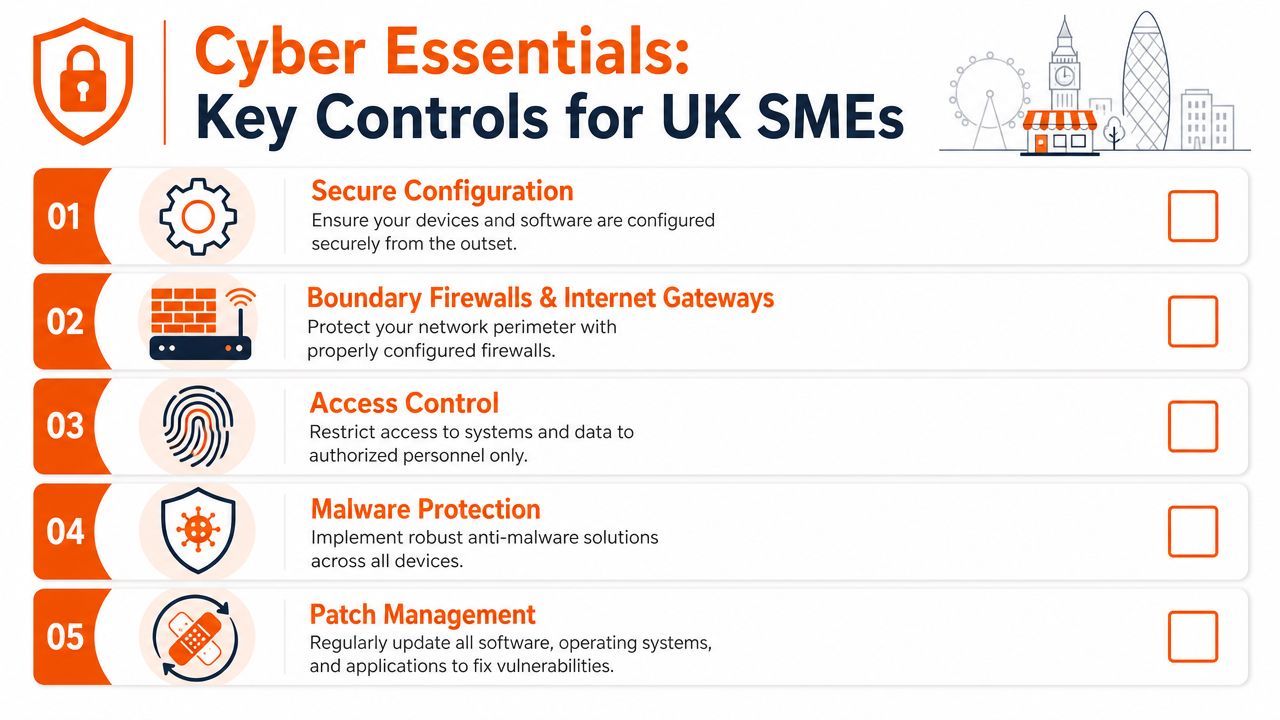
Cyber Essentials is useful because it emphasises sensible fundamentals:
- Secure configuration: Default settings are rarely the safest settings.
- Boundary controls: Internet-facing access needs to be intentional and managed.
- Access control: People should only have access to what they need.
- Malware protection: Devices need layered protection, not wishful thinking.
- Patch management: Known weaknesses shouldn't stay open longer than necessary.
ENISA's SME guidance also stresses patching as a measurable control, especially for remote access software. The practical point for SMEs is simple. Patching can't be an occasional IT chore. It needs ownership, visibility, and a process.
Cyber Essentials and Cyber Essentials Plus differ mainly in assurance depth. The first is self-assessed against the scheme requirements. Plus adds hands-on technical verification. For some businesses, the base level is the right starting point. For others, especially those facing stricter customer scrutiny, Plus gives stronger external assurance.
When to Partner with a Managed Service Provider
Some parts of SME security are perfectly reasonable to handle internally. Others become risky very quickly if no one has time to monitor, maintain, and verify them.
What works well as DIY
A capable office manager, operations lead, or internal IT generalist can often own the early wins:
- MFA rollout: Especially in Microsoft 365 and other core platforms.
- Password manager adoption: Mostly a people and process challenge.
- Basic access reviews: Checking who still has access and why.
- Awareness reminders: Short, regular prompts tied to live risks.
These are good DIY areas because they depend more on consistency than on specialist investigation. If the business is small, systems are simple, and someone takes full ownership of the task, internal delivery can work well.
When outside support is the better decision
The moment your protection depends on ongoing tuning, alert review, patch governance, backup verification, incident response, or compliance evidence, specialist help usually becomes the cheaper route. Not because internal teams aren't capable, but because SMEs rarely have spare depth.
A managed provider also changes the economics. Instead of trying to recruit one person who somehow covers cloud, security, devices, networking, backups, compliance, and user support, you get access to a wider skill set under a predictable service model. That matters when problems happen outside normal hours or when a fast decision is needed under pressure.
If your security depends on one over-stretched internal person, you don't have resilience. You have a single point of failure.
When assessing options, this guide on what a managed service provider does is a useful primer. Beyond that, ask practical questions. Who monitors alerts. Who owns patch policy. Who verifies restores. Who helps with Cyber Essentials evidence. Who answers when a director reports suspicious activity. Who coordinates if ransomware is suspected.
The quality signals are usually straightforward:
- Clear ownership: You know who handles security tasks and escalation.
- Transparent pricing: Security add-ons shouldn't be buried in vague bundles.
- Engineer-led support: You want access to technical people, not endless triage.
- Documented service levels: Speed and accountability matter when incidents interrupt business.
A good provider should also explain what they don't do. That's often a stronger trust signal than an overstuffed sales promise.
A short video can help clarify the managed model in plain English:
Frequently Asked Questions About SME Cybersecurity
Is my five-person business really a target
Yes. Attackers often look for easy access, not prestige. If your business uses email, holds money, stores client data, or depends on cloud accounts, you have something worth exploiting.
What's the single biggest mistake SMEs make
Trying to solve everything at once, then doing none of it properly. Most SMEs are better served by getting a handful of foundational controls fully working than by buying a larger stack they can't manage.
Should we start with tools or policy
Start with controls that reduce immediate exposure, then document how they are managed. In small firms, a short, usable process beats a long policy no one reads.
How much should we expect to spend
There isn't one honest number for every SME. Cost depends on headcount, sector, regulatory pressure, device count, cloud use, and whether you need internal support or outsourced help. The better budgeting method is to fund the baseline first: MFA, password management, backups, patching, endpoint protection, and staff awareness.
Do we need Cyber Essentials if we're not bidding for public work
It can still be valuable. The scheme provides a recognised baseline and forces useful discipline around common controls. Even where certification isn't mandatory, the process can improve client confidence and internal clarity.
What's the first thing to do this week
Turn on MFA for critical accounts, review who has access to what, and confirm that your backups can be restored. Those three checks close a surprising number of common gaps quickly.
If you're looking for practical help rather than another generic checklist, Blowfish Technology supports UK SMEs with managed IT, cybersecurity, backup, Microsoft 365, and Cyber Essentials guidance. It's a sensible next conversation if you want to turn security priorities into a workable plan without overcomplicating your business.

The Blowfish Technology team. Managed IT, cloud services, software development and connectivity for North West businesses since 1999.