
67% of medium-sized UK businesses experienced a cyber breach or attack during the previous twelve months, according to the Government survey summarised by the North West Cyber Resilience Centre. That makes choosing IT support a business-continuity decision, not a way to get laptops repaired.
When comparing managed IT services in Manchester, look beyond the monthly fee and the list of security tools. The stronger test is whether the contract names who will contain a compromised account, preserve evidence and get your essential systems working again. You're buying an operating process, not just access to a helpdesk.
Table of Contents
- What Managed IT Covers at a Glance
- Pricing Models and What Drives Your Monthly Bill
- Security and Resilience Controls That Matter Most
- The First 24 Hours After a Suspected Breach
- Service Level Targets to Ask For and Check
- Questions to Ask Before You Sign
- Sector Needs for Engineering, Legal and Financial Firms
- Plan Your Onboarding and Book a Manchester Review
What Managed IT Covers at a Glance
Manchester's digital economy is worth more than £5 billion and employs over 88,000 people, according to Manchester City Council's digital strategy evidence base. Businesses operating in that environment need more than someone to call when a printer stops working.
Use this coverage table to separate services that sound similar but solve different problems.
| Service area | What it covers | Typical SME need |
|---|---|---|
| Proactive monitoring and helpdesk | Device, server and network checks, with investigation of detected faults | Fewer outages during the working day |
| Patch management | Scheduled operating system and application updates, tested before rollout | Closing known vulnerabilities promptly |
| Microsoft 365 administration | Accounts, licences, email, Teams and SharePoint settings | Keeping office collaboration working securely |
| Backup and disaster recovery | Automated backups, tested restores and a documented recovery plan | Recovering from ransomware or hardware failure |
| Cyber security | Endpoint detection, identity protection, DNS filtering and multi-factor authentication | Reducing breach risk |
| Hardware and software supply | Procurement, setup and licensing | Equipping new starters and replacing ageing equipment |
| Connectivity and telephony | Business broadband, VoIP phone systems and business mobiles | Supporting multi-site and hybrid working |
| Hosted and remote desktops | Centrally hosted working environments accessed remotely | Giving staff access from offices, sites or home |
Managed support versus break-fix
Break-fix support starts when someone reports a problem. Managed support adds ongoing checks and preventive work, so engineers can investigate warnings before users lose access. It doesn't mean every fault is preventable, or that someone watches every alert outside office hours. Your contract must define monitoring coverage and who acts on alerts.
Say a laptop's storage starts failing before a client deadline. Monitoring may identify the warning, but the practical outcome still depends on replacement equipment, a usable backup and an engineer authorised to act.
At Blowfish Technology, our managed IT includes proactive monitoring, patch management, Microsoft Modern Workplace, hardware and software supply, disaster recovery, managed backup, Microsoft 365 backup and account management. Our primary coverage spans Merseyside, Greater Manchester, Lancashire and Cheshire.
Try a coverage check: copy the table and mark each area as covered, partly covered or missing. Record the responsible supplier beside each entry. An installed product isn't proof of a managed service, particularly if nobody checks its alerts or owns the next action.
Pricing Models and What Drives Your Monthly Bill
The headline monthly figure matters less than what the billing unit leaves out. A per-user proposal might include laptop support but exclude servers, while a device-based proposal might charge separately for each supported asset.
| Pricing model | How you are billed | Best suited to | Watch for |
|---|---|---|---|
| Per user per month | Fixed fee for each staff member covered | Stable headcount and predictable budgets | Starter, leaver and minimum-seat terms |
| Per device | Fixed fee for each covered laptop, desktop, server or phone | Firms with shared or kiosk devices | Unused devices remaining on the bill |
| Fixed monthly bundle | One fee for a defined service scope | Businesses wanting a clear package | Excluded projects and incident work |
| Pay-as-you-go | Hourly or per-incident charges | Small teams with limited support requirements | Unpredictable bills during disruption |
| Hybrid bundle | Fixed core fee plus user or device add-ons | Growing multi-site businesses | Add-on rates and overlapping charges |
The visual below also distinguishes tiered service levels and usage-based extras, which can sit within these commercial models.
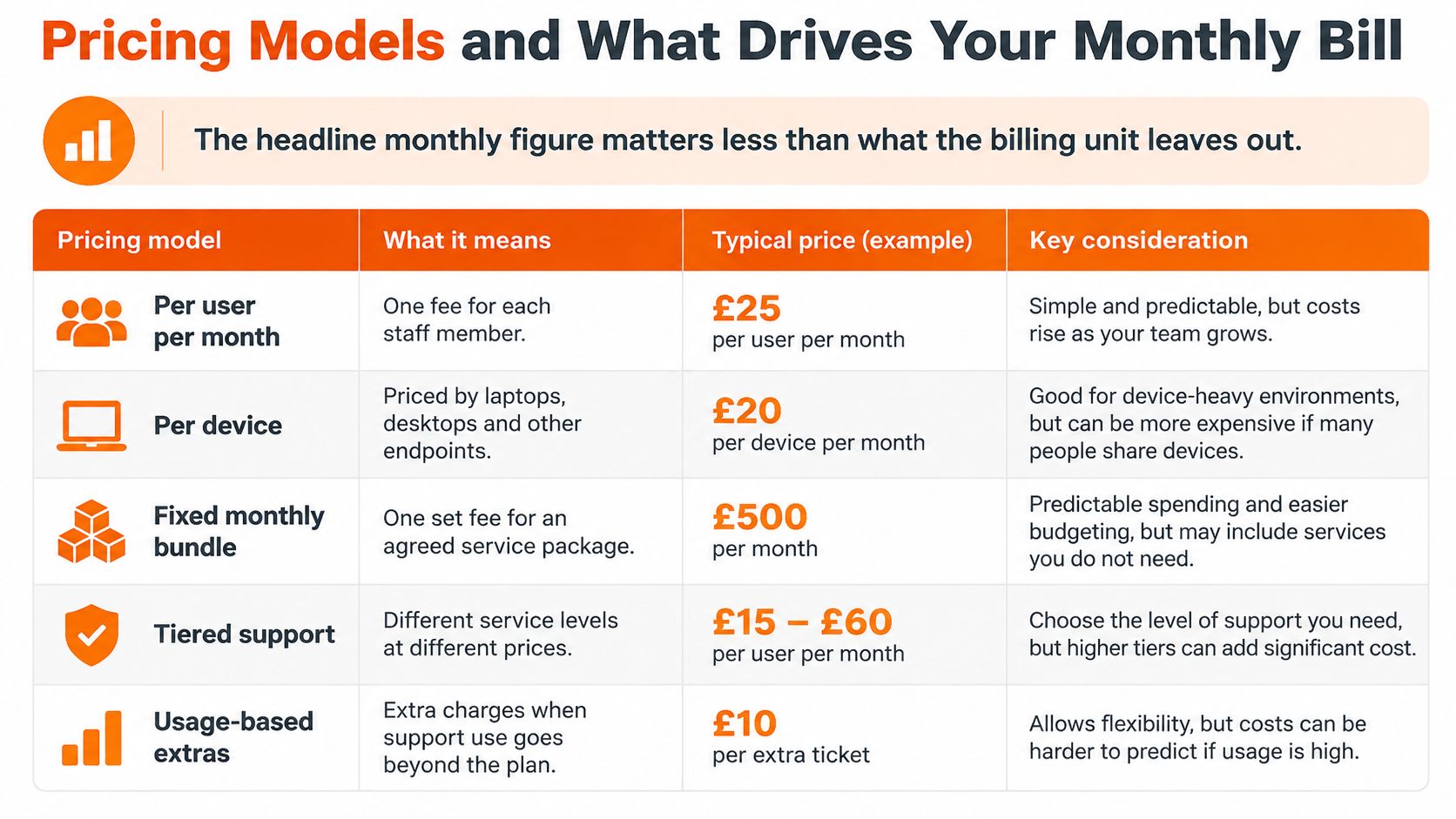
Test the invoice against a staffing change
Consider a hypothetical firm with 25 staff, 30 laptops, four servers and two printers. A per-user quote starts with the covered staff count, but you must establish whether servers and printers are included. A per-device quote requires an inventory showing which assets attract which charges.
If two people join and three leave, that hypothetical firm ends with 24 staff. Its user-based bill might fall, subject to contractual minimums and notice periods. Its device bill won't necessarily change if it keeps the equipment.
Request a sample invoice showing:
- Service coverage: helpdesk hours, on-site attendance and incident-response labour.
- Infrastructure charges: sites, servers, cloud workloads and network equipment.
- Subscriptions and storage: Microsoft 365 licences, backup retention and additional capacity.
- Separate purchases: replacement hardware, software and project work.
Our guide to outsourced IT costs provides further context for comparing proposals. Ask for a written exclusions schedule rather than relying on an all-inclusive label.
Buying rule: a low monthly fee isn't a saving if the incident you most need help with is chargeable extra.
Security and Resilience Controls That Matter Most
The Cyber Security Breaches Survey 2025 found that 43% of UK businesses experienced a cyber security breach or attack during the previous twelve months. Managed IT should therefore operate as a continuous control system, not just a repair service.
Security monitoring needs people who can interpret an alert and take an authorised action.
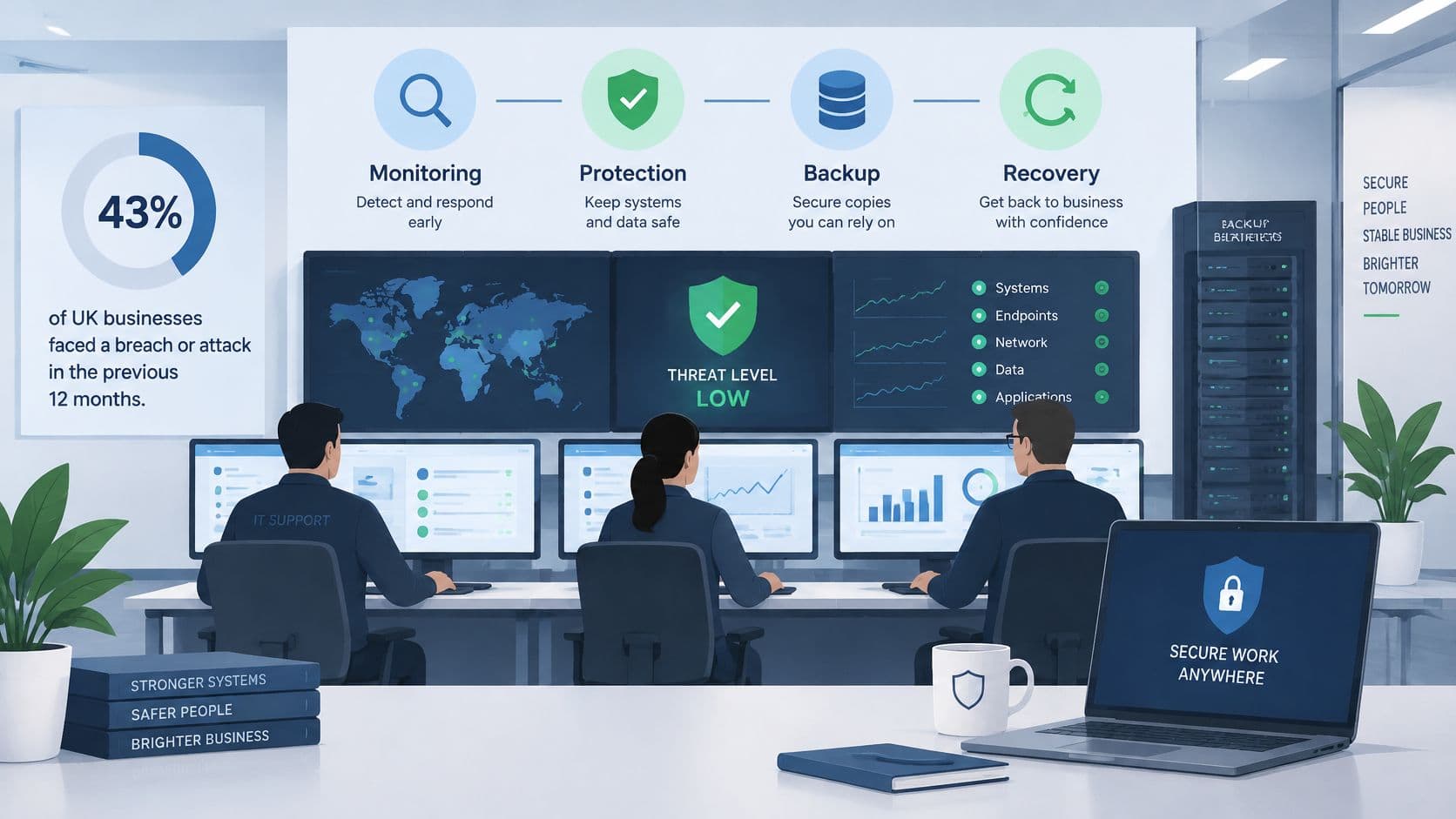
Match each control to an attack path
Consider an attacker trying to compromise a mailbox and forward incoming messages externally. The controls overlap rather than forming a perfect sequence.
- DNS filtering and phishing-resistant MFA help at entry. Filtering can block a known malicious destination, while phishing-resistant authentication makes stolen passwords less useful. Neither guarantees that every malicious message or session will be stopped.
- Endpoint detection and response, or EDR, watches suspicious processes and attempts to move between devices. It can identify malware involved in stealing access, but a cloud-only mailbox attack might leave no obvious endpoint activity.
- Identity threat detection and response, or ITDR, focuses on account misuse, privileged access and suspicious identity activity. For the mailbox scenario, examine unusual sign-ins, new sessions and changes inconsistent with the user's work.
- Patch management and centralised logging address different needs. Patching removes known software weaknesses; sign-in and audit logs help investigators establish who accessed the mailbox and when forwarding changed.
Ask which alerts the provider investigates. A dashboard showing green devices won't prove that someone checked a suspicious forwarding rule.
For a broader explanation of protective measures, Ciphar's guide to data breach protection is a useful companion to a discussion about your own controls.
The following video offers additional context for that security conversation.
Recovery needs separate evidence
Backup is a resilience control, not a substitute for containment. Restoring deleted email won't revoke an attacker's active session or retrieve information already copied outside the business.
Our managed backup is automated, monitored and tested. Your recovery agreement should still identify protected systems, restore priorities, acceptable data loss and agreed restoration targets. Monthly measures should show control coverage and exceptions, including missing EDR agents, overdue patches, MFA gaps and unresolved critical alerts.
The First 24 Hours After a Suspected Breach
Only 25% of UK businesses had a formal incident-response plan, according to the Cyber Security Breaches Survey 2025/26. The important contractual question is whether your provider can demonstrate an agreed process before anyone has to use it.
A slow laptop may be a helpdesk ticket. Suspicious administrator sign-ins or evidence of data leaving the network should trigger an incident escalation, with a technical lead and a business decision-maker.
Use the response flow as a discussion aid, then assign named owners to your own version.
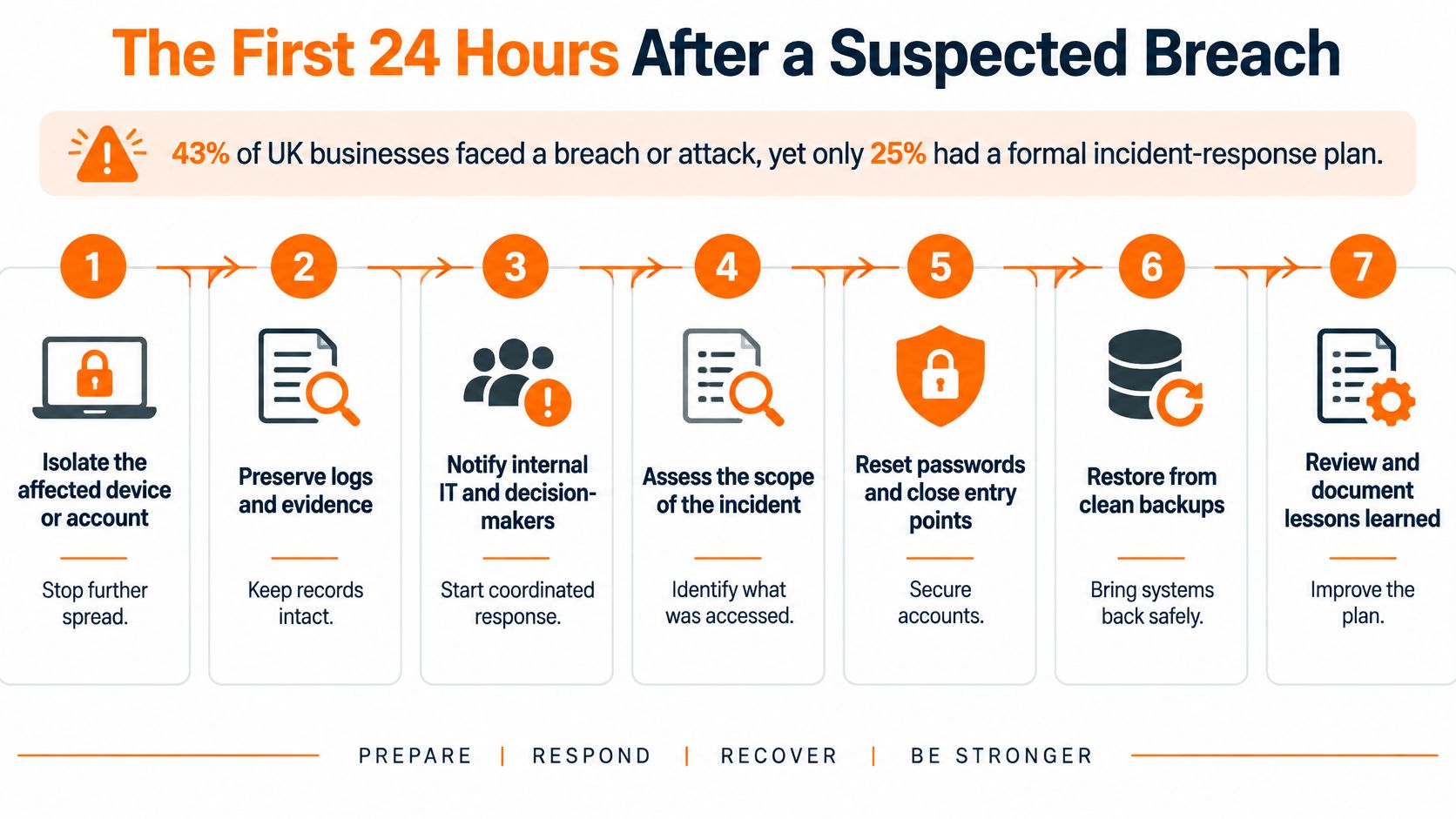
Decisions the contract should assign
- Contain the affected device or account. The provider's incident lead should direct isolation, using endpoint isolation or disconnecting network access where appropriate. Don't routinely switch the machine off, because volatile evidence may be lost; follow the responder's instructions where safety or continuing damage requires a different action.
- Preserve evidence before cleanup. The technical team should secure sign-in logs, mailbox audit records, suspicious messages and inbox-rule details. Record actions and times so investigators can distinguish attacker activity from recovery work.
- Secure Microsoft 365 and establish scope. The provider should investigate forwarding, malicious rules, permissions and possible data access. Reset affected credentials, revoke sessions and remove persistence as appropriate, while preserving evidence of the changes.
- Assign communications decisions. The business owner, supported by legal advisers and the insurer where appropriate, decides customer, regulator and external communications. The provider supplies technical facts rather than guessing what notification is required.
- Authorise recovery in business order. Management identifies essential operations; the provider checks that restoration won't reintroduce compromised accounts or systems. Recovering a file and safely restoring a service are different tasks.
- Schedule the post-incident review. Agree a review within a week as your planning target, with an owner for every corrective action. Keep unresolved investigation work visible rather than declaring success when users can log in.
Rehearse the handover
Use our incident-response planning guide to prepare a tabletop exercise. Present a compromised administrator account, make the usual contact unavailable and ask the provider to walk through escalation without touching production systems.
Can the provider show a rehearsed, documented process for a real local business, with confidential details removed?
Check who answers, who can authorise isolation and how decisions are recorded. Those answers reveal more than a list of security products.
Service Level Targets to Ask For and Check
A service level agreement, or SLA, converts a support promise into a measurable commitment. Start with the measures you can verify, not a reassuring headline.
| SLA measure | What to ask for |
|---|---|
| Average call answer time | Written phone-support target, measurement period and abandoned-call treatment |
| Same-day ticket resolution | Definition of the working day, eligible tickets and exclusions |
| Overall SLA compliance | Separate response and resolution measures, with breached tickets visible |
| Critical incident response | Acknowledgement, engineer engagement and escalation targets for business-wide faults |
| Backup restore testing | Agreed testing schedule, systems tested, outcomes and failed-test actions |
| Monthly reporting | Tickets, availability, patch status, security exceptions and recovery evidence |
Separate answering from fixing
Response time isn't resolution time. An acknowledgement confirms receipt; it doesn't prove an engineer has started work. Likewise, a resolved ticket should mean the service has been restored or the request completed under an agreed closure process.
For a hypothetical SLA, you might request engineer engagement within an hour for an office-wide outage, with continuous work until restoration or an agreed workaround. A routine software request could have a next-working-day response target. These are negotiating examples, not promises about our service.
Our published service figures are a sub-20-second average call wait, 75% same-day ticket resolution and 98% within SLA. They're our stated results, not a guarantee that every individual incident will meet the same outcome. Request the equivalent measures over the last twelve months, together with definitions and exclusions, before using them to compare contracts.
Our service level agreement guidance helps frame that conversation. Make sure the signed schedule distinguishes support availability from monitoring availability.
Read the exceptions, not just the average
A useful monthly report lets you check:
- Ticket movement: opened, closed, still outstanding and reopened.
- Missed commitments: breached tickets, their business impact and corrective action.
- Resolution performance: average time to resolve, broken down by priority.
- Security exceptions: overdue patches, missing protection and critical alerts awaiting action.
- Recovery assurance: completed restore tests and unresolved failures.
Inspect any service-credit clause for claim requirements, exclusions and credit limits. Compare the available credit with your own cost of downtime, rather than treating compensation as a recovery strategy.
Averages can hide a serious unresolved problem. Ask for the oldest open critical issue and the person accountable for closing it.
Questions to Ask Before You Sign
Good answers are specific, written and checkable. Use these questions as a scorecard, and attach important answers to the proposal or contract rather than leaving them in a sales email.
The checklist visual provides a quick prompt for the commercial discussion.
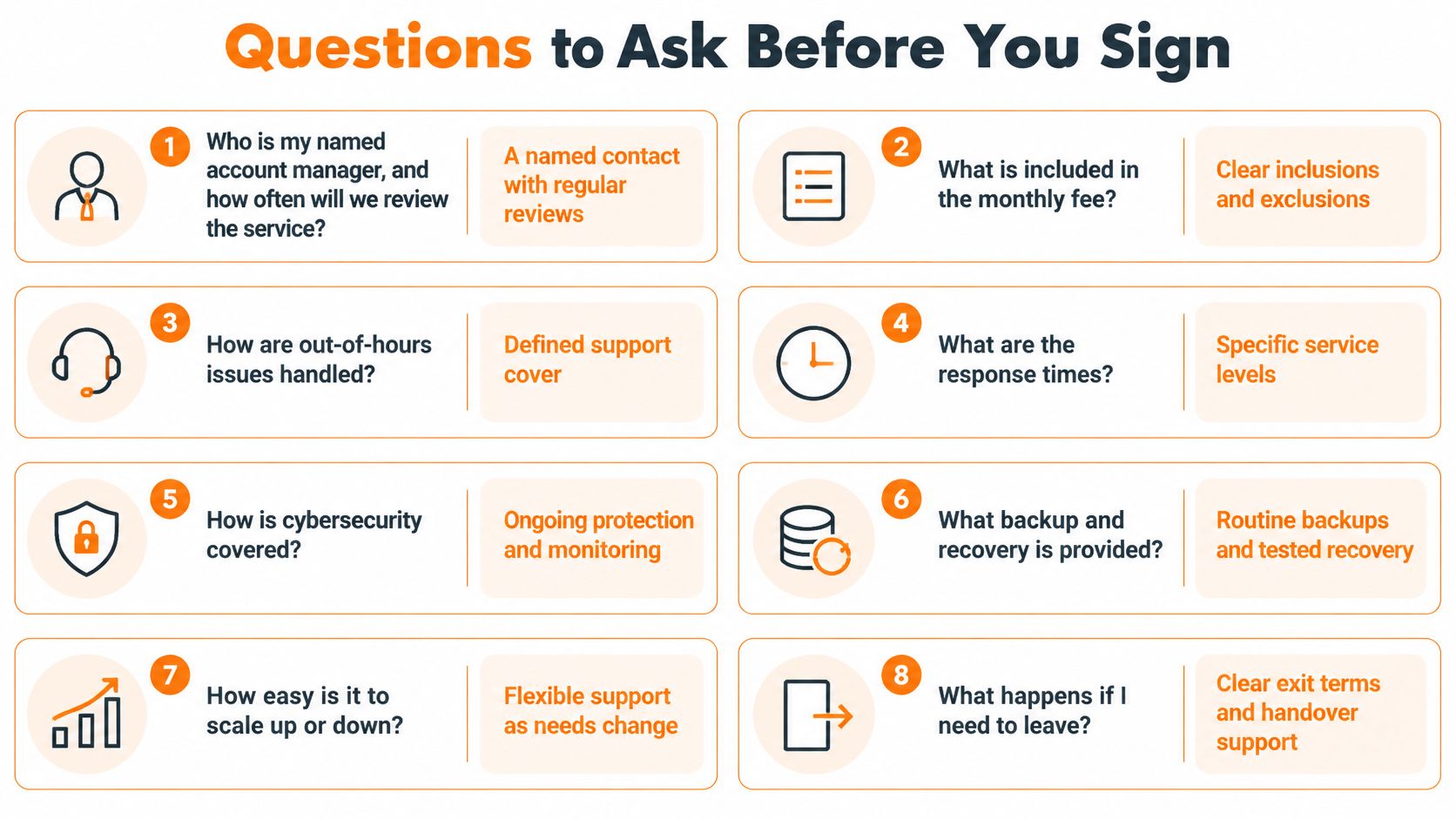
Ownership and commercial boundaries
Who is my named account manager, and when will we review the service?
Our customers have an account manager as their regular contact for reviews, renewals and planning what comes next. Agree the review schedule and who attends from your business.What is excluded from the monthly fee?
Look for a written schedule covering projects, emergency work, travel, supplier liaison and support outside contracted hours. Any additional rates should be visible before approval.How will you take over our existing cloud environment?
We start with a full audit to identify security gaps, misconfigurations and performance issues before taking over management. Establish how findings will become approved remediation work.Where is our data stored?
Our cloud infrastructure is UK-hosted and GDPR-aligned, with all cloud data stored in UK-based datacentres. Your business still needs suitable access, retention and information-handling decisions.
Assurance and exit arrangements
Which Cyber Essentials level will you help us achieve, and what is separately chargeable?
We support Cyber Essentials and Cyber Essentials Plus certification. Request a scope covering preparation, remediation, assessment charges and reassessment, without assuming certification is included.Can you demonstrate a single-file restore?
Ask to see the request, authorisation, restore location and evidence that the recovered file is usable. Include permissions and version selection, not just a successful backup status.What happens when we leave?
Require clear terms for administrative access, configuration records, data export, licence transfer and handover assistance. Your organisation should retain ownership of its accounts and information.Can we see a relevant sample report and speak to a reference?
Request an anonymised report and a permissioned reference from a business of similar size and sector. A useful reference explains how the provider handles disruption, not merely whether staff are friendly.
Treat vague claims about being proactive as an invitation to request evidence. Don't score a capability as confirmed until the proposed service documents support it.
Sector Needs for Engineering, Legal and Financial Firms
Sector knowledge matters when it changes recovery priorities, permissions or evidence requirements. A standard office support package won't automatically address production dependencies, confidential case files or payment-authorisation risks.
Match each requirement to a named control and an acceptance test.
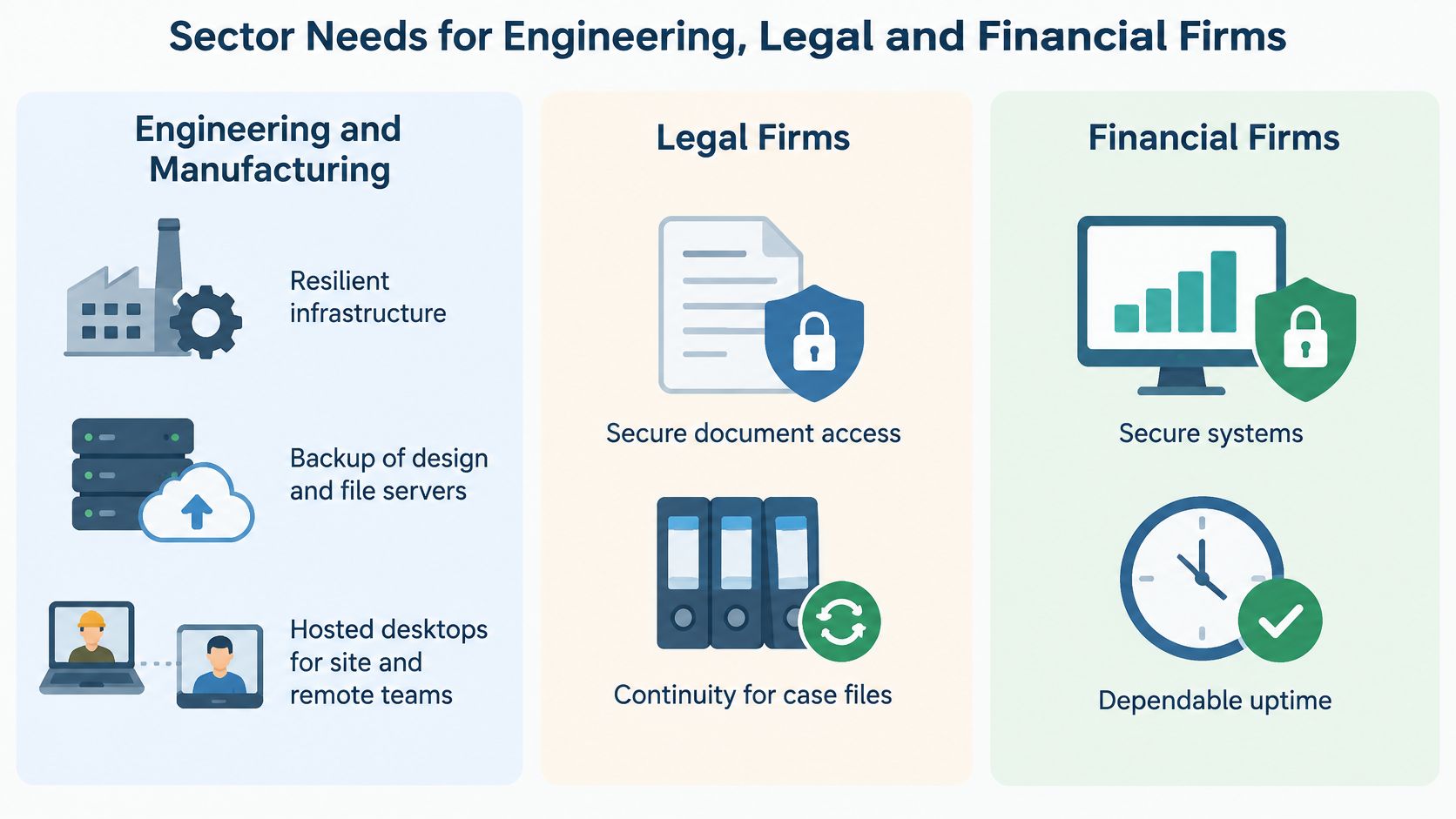
Engineering and manufacturing
Operational continuity should guide the design. Map production dependencies, design-file storage, specialist application licences and the systems staff need to release work to the shop floor.
Ask how office IT is separated from machine networks and who approves access between them. Don't allow routine office patching to trigger unplanned changes to operational equipment without checking compatibility and operational requirements.
Hosted desktops can support staff moving between sites, but confirm that specialist software, graphics requirements and peripherals work acceptably. A hypothetical target of restoring production within a working day is useful only if a practical recovery test supports it.
Legal practices
Client confidentiality and document integrity require more than secure email. Match access to matters and roles, protect accounts with MFA, and configure document storage so users can't casually share sensitive files externally.
Define retention with the practice's responsible people rather than accepting a technical default. Specify the access events that must be recorded and confirm the platform and licence can supply them; don't assume every document opening is automatically visible.
Financial firms, accountancy practices and IFAs
Payment-diversion controls should combine technical protection with a business process. Require staff to verify changed bank details through an independently established contact route, rather than replying to the email requesting the change.
Review privileged accounts, encrypt backups appropriately and retain audit trails that support investigation. Our guidance on IT support for financial services firms provides context for those service requirements.
A sector-specific proposal should name the business action being protected, not just the software being installed.
We serve engineering, manufacturing, legal practices, accountancy and IFAs, and financial services among our core sectors. Cyber Essentials and Cyber Essentials Plus can provide a practical security baseline, but they don't replace sector-specific obligations.
Before signing, identify a missing control that could cause a contractual, professional or regulatory failure in your organisation. Request permissioned Manchester client references where available; treat proposed testimonials as unverified until the approved wording and permission are supplied.
Plan Your Onboarding and Book a Manchester Review
A controlled handover starts with access and ownership, not migration software. Name a business sponsor who can approve changes, identify department contacts and assemble records of your current suppliers.
Our head office is in Ormskirk, and we support businesses from Liverpool out to Manchester, through Preston and beyond. Ask for an on-site or remote audit appropriate to your premises and systems.
Agree the handover gates
Discover the environment. Inventory devices, accounts, licences, networks, backups and business applications. Provide existing diagrams, supplier contacts and secure administrative access. For planning purposes, you could allow a hypothetical week or two for discovery, but agree the actual schedule after scope is understood.
Review the risks and gaps. The incoming provider should distinguish urgent exposure from desirable improvements. Your job is to explain operational consequences, such as which application failure would stop dispatch or client work.
Approve the roadmap. Agree priorities, responsibilities, disruption windows and separately chargeable work. Don't authorise a broad cleanup without knowing which services could be affected.
Migrate in controlled phases. Verify recovery arrangements and administrative identities before moving email or files. Each phase needs acceptance checks and a rollback decision, including who can call a halt.
Prepare users. Tell staff what will change, how to reach support and how to recognise legitimate onboarding messages. Arrange short, task-specific training for changed sign-in or file-sharing processes.
Accept go-live. Confirm monitoring, alert routing, support contacts and essential application access. Keep the outgoing provider's responsibilities explicit until the handover is accepted.
Review the first reporting cycle. Compare the agreed service measures with actual tickets, security exceptions and recovery evidence. Assign outstanding onboarding issues to named owners rather than allowing them to become permanent exceptions.
Remove avoidable blockers this week
Unknown administrator credentials can delay a handover. Identify account owners early, but don't collect passwords in a shared spreadsheet or send them by ordinary email. Agree a secure transfer method with the incoming technical team.
Build a comparison pack containing:
- Current arrangements: providers, contracts, renewal terms and notice requirements.
- Technical records: asset inventories, licence reports and available backup reports.
- Business priorities: essential applications, tolerable interruption and authorised decision-makers.
- Selection evidence: completed questions, sample reports and incident-exercise findings.
Send the same pack and questions to competing providers so you're comparing equivalent scope. Book an audit, approve a documented handover plan and make demonstrated incident readiness part of your acceptance decision, not a promise to revisit later.
Blowfish Technology provides managed IT, Microsoft 365 support, cyber security and backup services for businesses across Manchester and the North West. Visit Blowfish Technology to request an on-site or remote review, and bring your supplier list, backup reports and incident-response questions so the discussion produces a practical scope of work.
