
At 2:07 a.m. on a Friday, the internet connection fails at a Lancashire engineering firm. The production office loses access to cloud drawings, the warehouse scanners stop synchronising, and nobody knows whether the problem sits with the firewall, the broadband supplier, Microsoft 365, or a compromised account. The operations director has one urgent question: who can take responsibility now, not at 9 a.m. on Monday?
That's the test of IT 24 7 support. A phone line that forwards to voicemail is not resilience. You need a defined response, engineers with authority to act, tested backups, clear supplier escalation, and communication that helps people make decisions under pressure.
This guide sets out what genuine round-the-clock support includes, how to choose between delivery models, which service levels matter, and how cyber incidents and cloud outages change the decision. It also explains why 24/7 cover should be judged by measurable incident response rather than by a badge on a sales presentation.
Table of Contents
- The Friday Night Outage That Changes Everything
- What IT 24 7 Support Actually Means
- Delivery Models and How to Choose Between Them
- Five Core Responsibilities of a 24 7 Support Team
- When 24 7 Really Matters – Cyber Incidents and Major Outages
- SLAs, Metrics, and Pricing You Should Expect
- Sector-Specific Needs and How to Evaluate a Provider
- Making the Decision and Answering Common Questions
The Friday Night Outage That Changes Everything
At 11:40 p.m. on a Friday, a manufacturer is finishing an urgent order when its connection fails. The first signs suggest a routine network fault. Minutes later, monitoring shows unusual sign-ins, the file server becomes inaccessible, and a senior manager receives a ransom note.
A basic helpdesk can record the incident. An effective 24/7 operation starts making controlled decisions. It confirms the scope, identifies affected devices, isolates systems within agreed authority, and brings in the right security, network, or cloud specialist. The incident lead keeps the business owner informed while recovery options are assessed.
The question is not whether someone answers the phone. It is whether the response limits operational damage at 2 a.m.
Incidents ignore office hours. The UK Government Cyber Security Breaches Survey 2025 found that 43% of UK businesses experienced at least one breach or attack in the preceding 12 months, equivalent to approximately 612,000 businesses. Phishing affected 37% of businesses, while 3% experienced a ransomware breach or attack.
Supplier dependencies and backup testing decide what happens next. If the provider cannot reach the connectivity supplier, secure compromised accounts, or restore a known-good backup, overnight cover is mainly a sales feature.
Practical rule: Buy 24/7 support for the decisions and actions that protect operations, not for the promise that somebody will answer.
Judge providers by incident ownership, response records, escalation authority, and recovery results. Those measures reveal whether the service can protect production, confidentiality, and continuity after midnight.
What IT 24 7 Support Actually Means
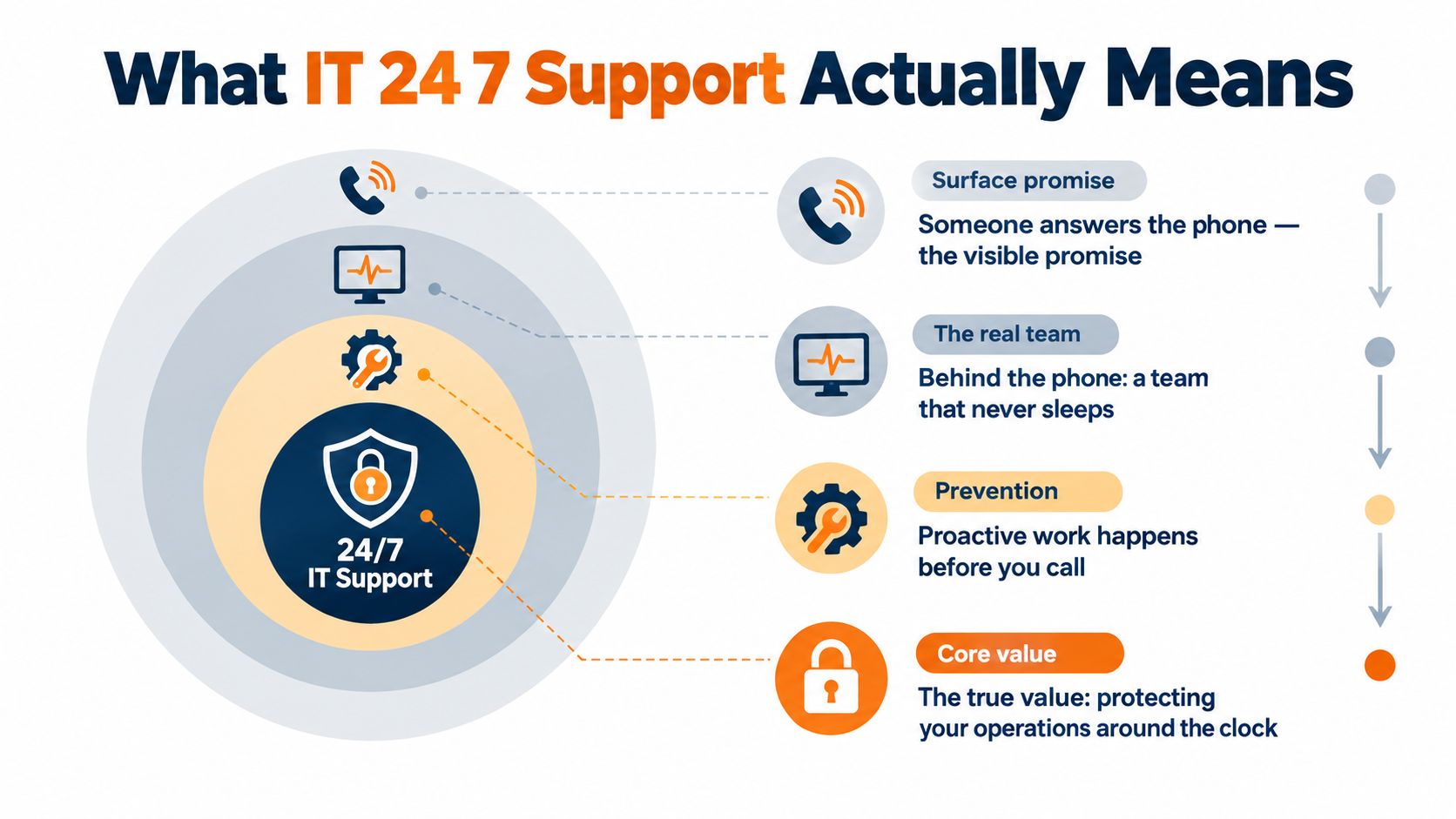
The phrase IT 24 7 support can describe anything from a call-answering service to a fully managed operational capability. Treating those as equivalent is a costly mistake.
Start at the visible layer. Someone receives the call, records the issue, confirms the affected service, and checks whether the incident already matches a known alert. That is useful, but it's only triage. The provider must then have the people, permissions, documentation, and escalation routes needed to do something meaningful with the information.
A genuine service usually contains these layers:
- Continuous monitoring: Tools watch connectivity, servers, endpoints, backups, Microsoft 365 services, security events, and critical applications.
- Triage and prioritisation: An engineer decides whether the issue affects one user, a department, a site, production, client confidentiality, or the whole business.
- Technical intervention: The team performs approved fixes, restores services, applies workarounds, or begins containment.
- Specialist escalation: Complex security, cloud, network, or application problems move quickly to the right engineer or supplier.
- Recovery coordination: The provider helps restore systems from known-good backups, activates continuity procedures, and documents what happened.
The difference between break-fix and managed support
Break-fix cover waits for a problem and responds to a request. Managed support combines user assistance with proactive monitoring, patching, security management, capacity checks, and backup verification. The latter is closer to an A&E department combined with a fire warden. It triages the emergency, then helps prevent the next one.
Ask whether alerts reach a qualified engineer or merely create a ticket in a queue. Ask who can isolate a device, reset a compromised account, contact a cloud supplier, or approve a recovery action. A useful overview of the wider managed service provider role can help separate routine helpdesk work from broader operational responsibility.
A 24/7 service that only accepts calls after hours is a glorified voicemail service. A service that monitors, investigates, escalates, communicates, and supports recovery is an operational safety net.
Delivery Models and How to Choose Between Them
Most SMEs choose one of three delivery models. The right option depends less on headcount alone and more on the complexity of your systems, the cost of downtime, your internal capability, and how much accountability you want from one provider.
| Model | Typical monthly cost per user | Coverage breadth | Best fit |
|---|---|---|---|
| Internal team | Varies with salaries, recruitment, tooling, and on-call arrangements | Strong business context, but specialist coverage can be narrow | Larger organisations with substantial internal IT demand |
| Hybrid | A combination of internal resource and outsourced cover | Internal ownership with external out-of-hours depth | SMEs with a capable IT lead that needs resilience |
| Fully outsourced MSP | Agreed service fee, usually with defined inclusions and exclusions | Broad technical, security, cloud, backup, and supplier expertise | SMEs seeking one accountable operating partner |
The internal model gives your team deep knowledge of the business, but it can create dependence on a few individuals. Holidays, sickness, recruitment gaps, and unfamiliar technologies weaken overnight resilience. You also carry the burden of tooling, training, escalation, and on-call management.
A hybrid service often works well for a multi-site manufacturer or a law firm with an internal IT manager. Your people retain control of architecture and business priorities, while an external partner handles monitoring, first response, specialist escalation, or weekend cover. The contract must define ownership clearly. “We'll help if needed” is not an operating model.
A fully outsourced arrangement gives the SME a single service owner for daily support, security, backups, cloud administration, and incident coordination. It can simplify accountability, but only if the provider documents your environment and gives you access to reporting. Read the guidance on fully managed versus co-managed IT before deciding which responsibilities should stay internal.
For a smaller Lancashire manufacturer, broad expertise and predictable cover may matter more than building an internal rota. For a growing law firm with several offices, confidentiality, identity security, document access, and clear escalation authority may outweigh the appeal of a lower headline price.
Five Core Responsibilities of a 24 7 Support Team
A provider should be able to describe its responsibilities without hiding behind phrases such as “total peace of mind”. Test the service against five practical duties.
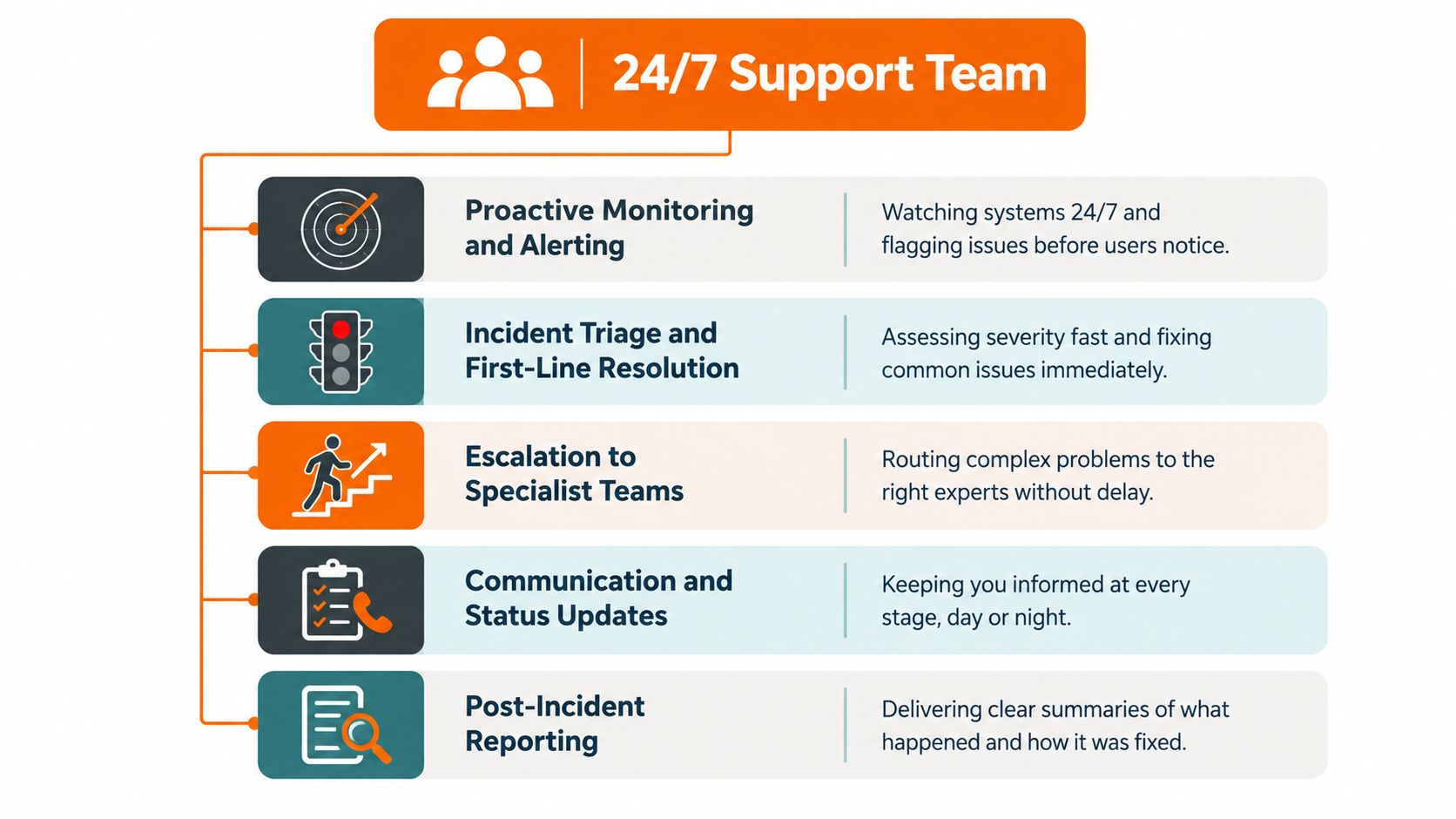
Proactive monitoring and alerting
At 3 a.m., monitoring should identify a failed backup, an offline firewall, unusual endpoint behaviour, storage pressure, or a critical service becoming unavailable. The engineer should assess the alert, remove false positives, and act before users report the failure where the contract permits intervention.
Incident triage and first-line resolution
The first engineer must establish impact and urgency quickly. A single locked account, a failed production system, and suspected ransomware need different treatment. Good triage prevents low-impact tickets from delaying a business-critical response.
Escalation to specialists
First-line staff cannot solve every cloud, network, security, or application problem. The provider needs a named escalation path with clear handover information, not a sequence of unconnected ticket transfers. The on-call engineer should know which specialist owns the next decision.
Patch and vulnerability management
Out-of-hours work may include applying approved patches, addressing exposed vulnerabilities, or changing a control after a security alert. Patching needs testing, change approval, rollback planning, and an understanding of production dependencies. Speed without control can create a second outage.
Backup and disaster recovery verification
A backup job marked “successful” doesn't prove that the business can recover. The team should check backup health, retention, access controls, recovery points, and restoration procedures. Test restores should confirm that files, applications, permissions, and essential data can return in a usable form.
The strongest conversations also cover communication and post-incident reporting. Ask for plain-English summaries, timelines, root causes, actions taken, and recommendations. That record helps management decide whether the problem came from a technical fault, a supplier, a process gap, or an avoidable security weakness.
When 24 7 Really Matters – Cyber Incidents and Major Outages
The most important overnight support call is often the one involving a suspected ransomware attack or account takeover. A person answering the phone doesn't make that person qualified to contain an incident, preserve evidence, contact an insurer, or coordinate recovery.
The Cyber Security Breaches Survey 2025/26 found that only 25% of businesses had a formal incident-response plan, while 45% had none of the surveyed response measures. Among micro businesses, 21% had a formal plan, compared with 57% of medium-sized businesses.
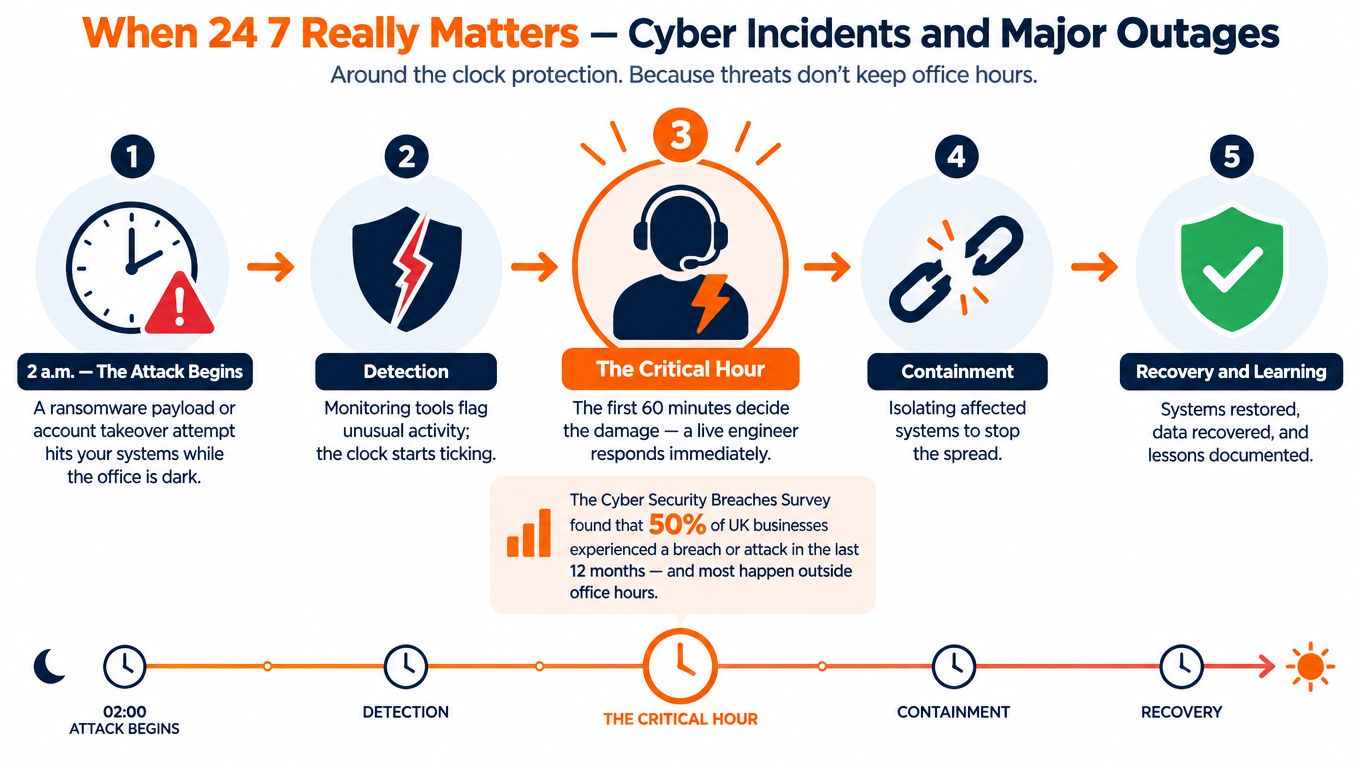
A useful overnight runbook should answer five questions:
- Who can authorise isolation? The provider should know whether it can disconnect an endpoint, disable an account, block access, or segment a network without waiting for a committee.
- Who preserves evidence? Logs, alerts, affected devices, and access records may matter to insurers, investigators, regulators, and legal advisers.
- Who contacts external parties? The plan should identify responsibilities for insurers, specialist responders, software suppliers, connectivity providers, and regulators.
- How does the business continue? Staff need an agreed workaround for production, client communication, document access, payments, or urgent customer service.
- When does recovery begin? The decision should consider the confirmed scope, backup integrity, recovery priorities, and the risk of reintroducing compromised systems.
The UK Government has also reported that the National Cyber Security Centre managed 204 significant or highly significant cyber incidents in the year leading up to September 2025, approximately one every two days, as described in its research on the economic impact of cyber attacks.
For regulated organisations, response planning should also account for proposed UK reporting requirements. Certain entities would need to notify regulators within 24 hours and provide a fuller report within 72 hours, so your provider should explain how its records and escalation process support those obligations. Review incident response planning before an emergency exposes gaps in authority or documentation.
SLAs, Metrics, and Pricing You Should Expect
A promise of “fast support” is not an SLA. Require the contract to define the clock, priority, communication channel, escalation owner, and remedy when the provider misses its commitment. A useful service level agreement gives your team a measurable operating baseline.
For a serious incident, separate first response from escalation and restoration. A supplier delay, failed hardware, security investigation, or recovery decision can prevent final resolution even after an engineer accepts the ticket. The agreement should therefore distinguish response, workaround, service restoration, and closure.
Track measures that show whether the service works at 2 a.m.:
- Acknowledgement time: how quickly an alert or urgent call reaches an engineer.
- Escalation time: how long before a specialist or supplier joins the response.
- Update frequency: how often you receive a meaningful status update.
- Restoration target: when a usable service or workaround should return.
- Backup verification: whether completed jobs and restore tests are reported separately.
- SLA performance: the proportion of tickets handled within the agreed commitment.
These metrics expose weak coverage. A provider can answer every call quickly while failing to restore access, involve the right supplier, or prove that backups can be used.
Pricing may be per user, per device, bundled, or project-based. Compare the scope, not just the headline fee. One provider might include Microsoft 365 administration, endpoint security, backup monitoring, and on-site support, while another bills each service separately.
As a rough planning figure, North West SMEs typically budget £40 to £120 per user per month for managed support. Treat that as an estimate until scope, devices, sites, response targets, security tools, backup responsibilities, and on-site requirements are confirmed. Judge the cost against operational exposure and recovery capability, not the cheapest monthly quote.
Demand a clear schedule of included services, exclusions, after-hours rules, project charges, licensing assumptions, and exit terms. If the supplier cannot explain what happens during a supplier outage or failed restore, the price is not the main problem. The operating model is.
Sector-Specific Needs and How to Evaluate a Provider
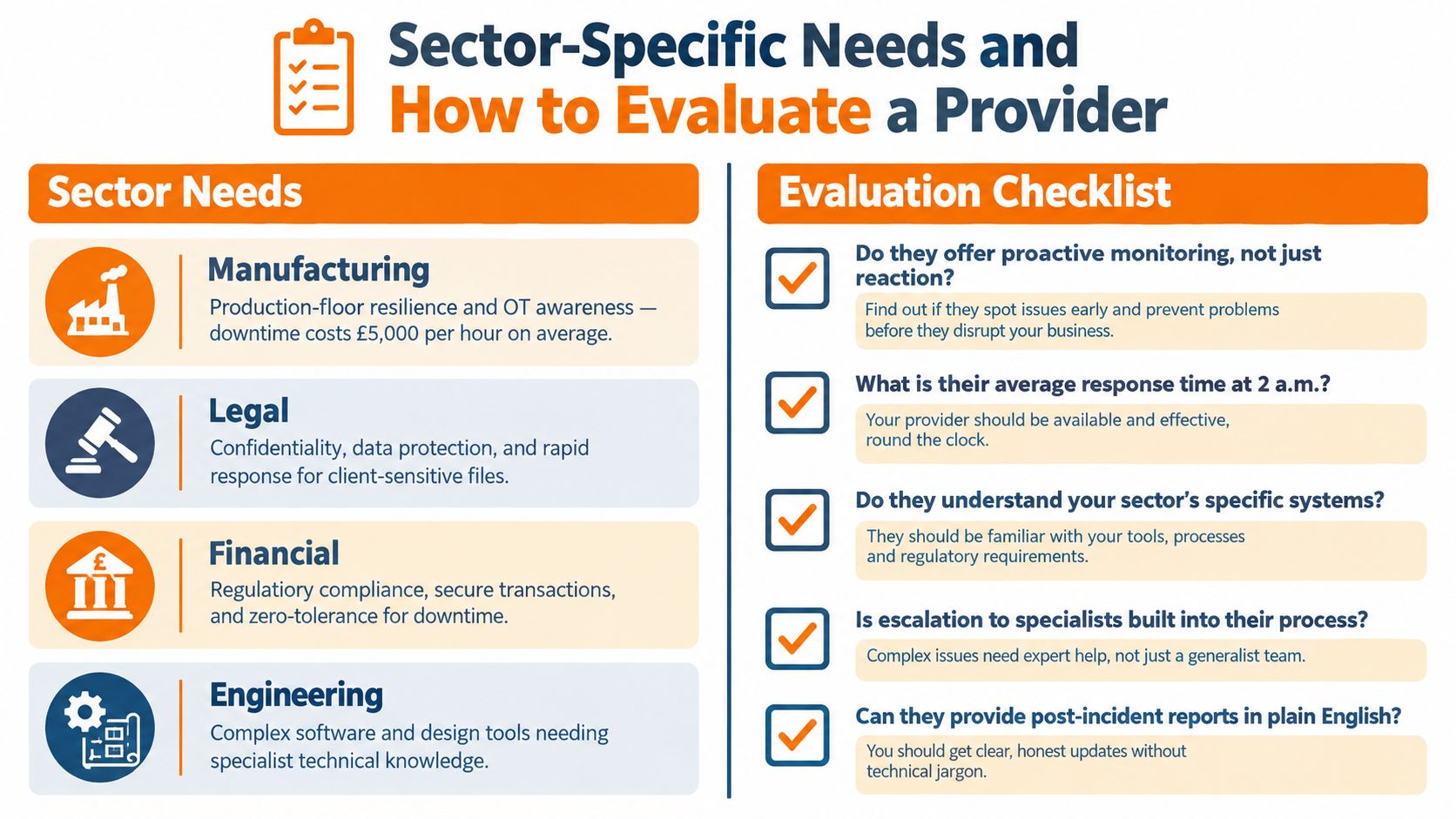
A manufacturer, a law practice, an engineering consultancy, and a financial firm may all ask for 24/7 support, but they don't need the same operating model.
Manufacturing and engineering
Manufacturers need resilient production-floor connectivity, reliable site-to-site links, safe interaction with operational technology, and recovery priorities that reflect machinery and order commitments. Engineering firms often depend on specialist design tools, large files, licensing services, and controlled access to project data. The provider must understand the difference between restarting an office laptop and changing a system connected to production.
Legal
Law firms need strict confidentiality, controlled document access, secure identity management, and a response process that protects client information. The provider should explain how it handles compromised accounts, unusual downloads, remote access, document platforms, and evidence preservation.
Financial
Financial practices need strong access controls, secure transactions, audit-ready reporting, and clear ownership for compliance tasks. A support provider should help maintain controls such as endpoint detection and response, identity threat detection and response, DNS filtering, multi-factor authentication, password management, and Cyber Essentials or Cyber Essentials Plus preparation.
Use this provider checklist:
- Ask about accreditation: Confirm relevant security certifications, policies, and evidence of staff training.
- Test engineer quality: Ask who handles a serious overnight incident and what authority that person has.
- Inspect the security stack: Confirm which tools are managed, monitored, licensed, and included.
- Demand transparent reporting: Request service reviews, incident reports, backup status, and SLA performance.
- Check roadmap ownership: Your provider should identify ageing systems, dependency risks, renewal dates, and resilience priorities.
- Clarify accountability: Make sure one named contact coordinates suppliers, specialists, management updates, and follow-up work.
Sector experience matters, but it doesn't replace process. A provider should demonstrate how its tools and engineers fit your systems, obligations, and business priorities.
Making the Decision and Answering Common Questions
Start with your critical services. List the systems that would stop production, prevent client work, expose confidential information, or block customer transactions. Then identify who can make decisions outside office hours, which suppliers must be contacted, and how the business would operate during recovery.
Choose the delivery model that matches your reality. A small firm may not need a large internal team, but it still needs dependable escalation if one person controls all technical knowledge. A growing multi-site business may benefit from a hybrid arrangement, provided responsibilities are explicit.
Common questions
Is 24/7 support worthwhile for a ten-person firm?
Yes, if one outage could stop the firm, expose sensitive data, or leave staff unable to serve customers. The service should be proportionate. Focus on monitoring, identity security, backups, connectivity, and incident escalation rather than buying an oversized package.
How does it differ from a standard helpdesk?
A standard helpdesk handles user issues during agreed hours. Genuine 24/7 support adds continuous monitoring, out-of-hours engineering, incident coordination, recovery assistance, and supplier escalation.
What happens during a weekend major incident?
The provider should follow a documented runbook, assess severity, contain the problem where authorised, preserve evidence, communicate with decision-makers, and coordinate restoration. If it can only log a ticket, it isn't providing full incident response.
How do we move from break-fix support?
Begin with an infrastructure assessment, asset and dependency register, backup review, security baseline, and incident-response workshop. Move monitoring and documentation first, then agree priorities for remediation and resilience testing.
For North West SMEs, an engineer-led provider such as Blowfish Technology can combine managed monitoring, backup oversight, security management, scheduled patching, helpdesk support, and remote or on-site assistance under defined service arrangements. Evaluate that model against the same criteria as any alternative: authority, transparency, security coverage, recovery capability, and measurable performance.
If your current provider can't explain what happens during a ransomware alert or cloud outage at 2 a.m., arrange a practical review before the next incident. Visit Blowfish Technology to discuss 24/7 monitoring, managed IT support, backup and disaster recovery, security controls, and a service model built around measurable response.
