
A lot of SME leaders only notice IoT risk after something odd happens. A meeting room camera stops responding. A smart printer starts making unexplained outbound connections. A temperature sensor on a shop floor drops offline, and suddenly nobody knows whether the problem is the device, the Wi-Fi, or something much worse.
That's the problem with connected devices. They look small, cheap, and useful, so they rarely get treated like business-critical systems. In reality, every internet-connected camera, door controller, printer, scanner, badge reader, thermostat, and sensor is a computer sitting on your network. If it's badly configured, unsupported, or exposed, it can become an easy doorway into the rest of the business.
For SMEs, the challenge isn't just technical. It's operational. You need practical ways to manage risk without building an enterprise-sized security team. If you're thinking about wider cyber resilience as well as IoT, this guide to protecting your Australian business online is also a useful companion read because many of the same basics apply across devices, users, and cloud platforms. For a broader foundation, this small business cyber security guide helps frame where IoT fits inside your wider security posture.
Table of Contents
- Introduction to IoT Device Security
- Understanding IoT Security Threats
- Assessing the Business Impact of IoT Risks
- Implementing Controls and Policies for SMEs
- Hardening Your IoT Devices with a Stepwise Checklist
- Establishing Monitoring and Incident Response
- Leveraging MSP Support for Ongoing IoT Security
- Conclusion and Next Steps
Introduction to IoT Device Security
IoT device security starts with a simple shift in mindset. Stop thinking of connected devices as accessories. Treat them as network endpoints with privileges, data flows, and failure points.
A legal practice might install smart access control for convenience. A manufacturer might rely on environmental sensors to watch temperature, humidity, or equipment status. A multi-site firm might add IP cameras and connected meeting room systems without much fanfare. Each device solves a real business problem, but each one also introduces software, credentials, and communications that need managing.
The confusion usually comes from ownership. Facilities may buy cameras. Operations may buy sensors. Office managers may buy smart printers or meeting room kit. IT often inherits support responsibility later, after devices are already live.
Practical rule: If a device connects to your network or cloud services, it belongs in your security process, even if IT didn't buy it.
That's why good IoT device security isn't about one clever tool. It's about a routine. Know what's connected. Know who owns it. Know how it authenticates, how long it will receive updates, and what part of the business it could affect if it fails or is compromised.
Understanding IoT Security Threats
IoT attacks usually begin with routine oversights that no one meant to leave behind. A camera keeps its factory password after installation. A smart printer runs old firmware because updates were never assigned to anyone. A sensor exposes a management page to the internet because it was useful during setup and never closed afterwards.
For SME leaders, that point matters. The risk is often less about advanced intrusion techniques and more about ordinary devices being deployed without the same checks you would expect for laptops, servers, or cloud apps.
Four common entry points
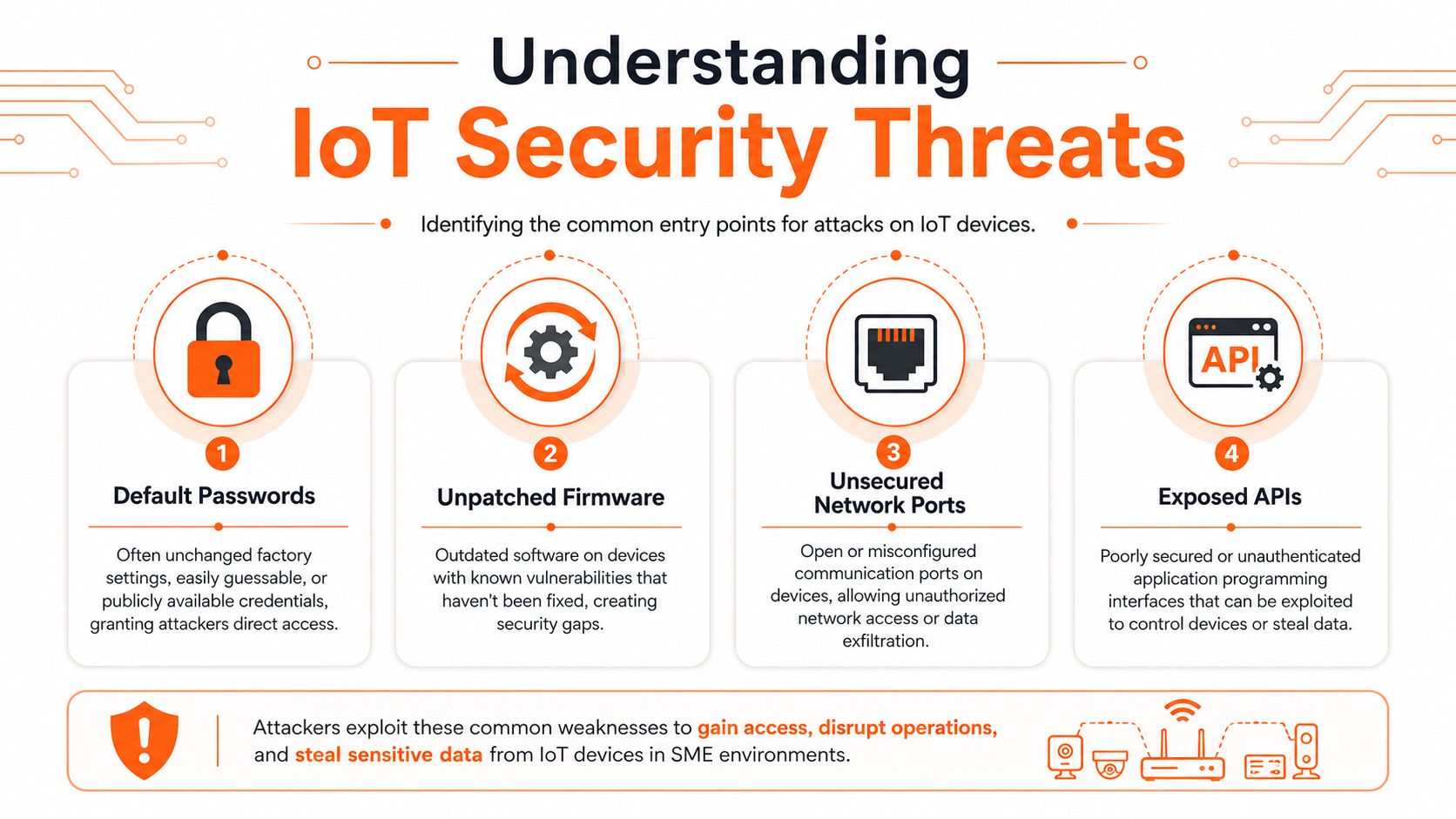
Attackers tend to look for the same weak spots again and again:
- Default passwords. If installers leave vendor credentials in place, attackers can log in using password lists that are widely available online. Shared passwords create the same problem internally. One exposed credential can open multiple devices.
- Unpatched firmware. Firmware works like the operating system for the device. If the manufacturer has fixed a known flaw and the device still runs the older version, attackers can test for that weakness at scale.
- Unsecured network ports. Ports are the device's listening points. Some are needed. Some are left open from installation, remote support, or troubleshooting. If they are reachable when they should not be, they expand the attack surface for no business benefit.
- Exposed APIs. APIs let systems exchange instructions and data. That is useful for dashboards, mobile apps, and automation, but weak authentication or poor input validation can let an attacker query information or send unauthorised commands.
The UK government has focused on these basics in its IoT security rules, particularly around default passwords, vulnerability reporting, and update transparency. That matters for SMEs because legal requirements are starting to mirror the same hygiene steps security teams have wanted for years. It also matters for MSPs, who are often the people expected to turn those rules into purchasing standards, onboarding checks, and support processes.
SMEs get caught out because connected devices often sit between departments. Facilities may own cameras. Operations may own sensors. IT may only find out later, once a problem appears. In that gap, no one confirms who changes credentials, who approves internet access, who tracks firmware support dates, or who removes devices at end of life.
Industrial and operational environments add another layer of exposure. If production equipment, building controls, or telemetry feeds are being connected into business reporting systems, the security discussion has to include data paths, trust boundaries, and remote access methods. That is one reason many firms reviewing PLC and SCADA integration also revisit segmentation and access control at the same time.
A useful rule for SMEs is simple. If a device can store data, send data, or accept commands, treat it as a security-managed asset, not a convenience purchase.
A low-cost connected device can become the easiest route into systems that matter far more.
Assessing the Business Impact of IoT Risks
A failed laptop usually affects one person. A failed connected device can disrupt a room, a site, or a whole process.
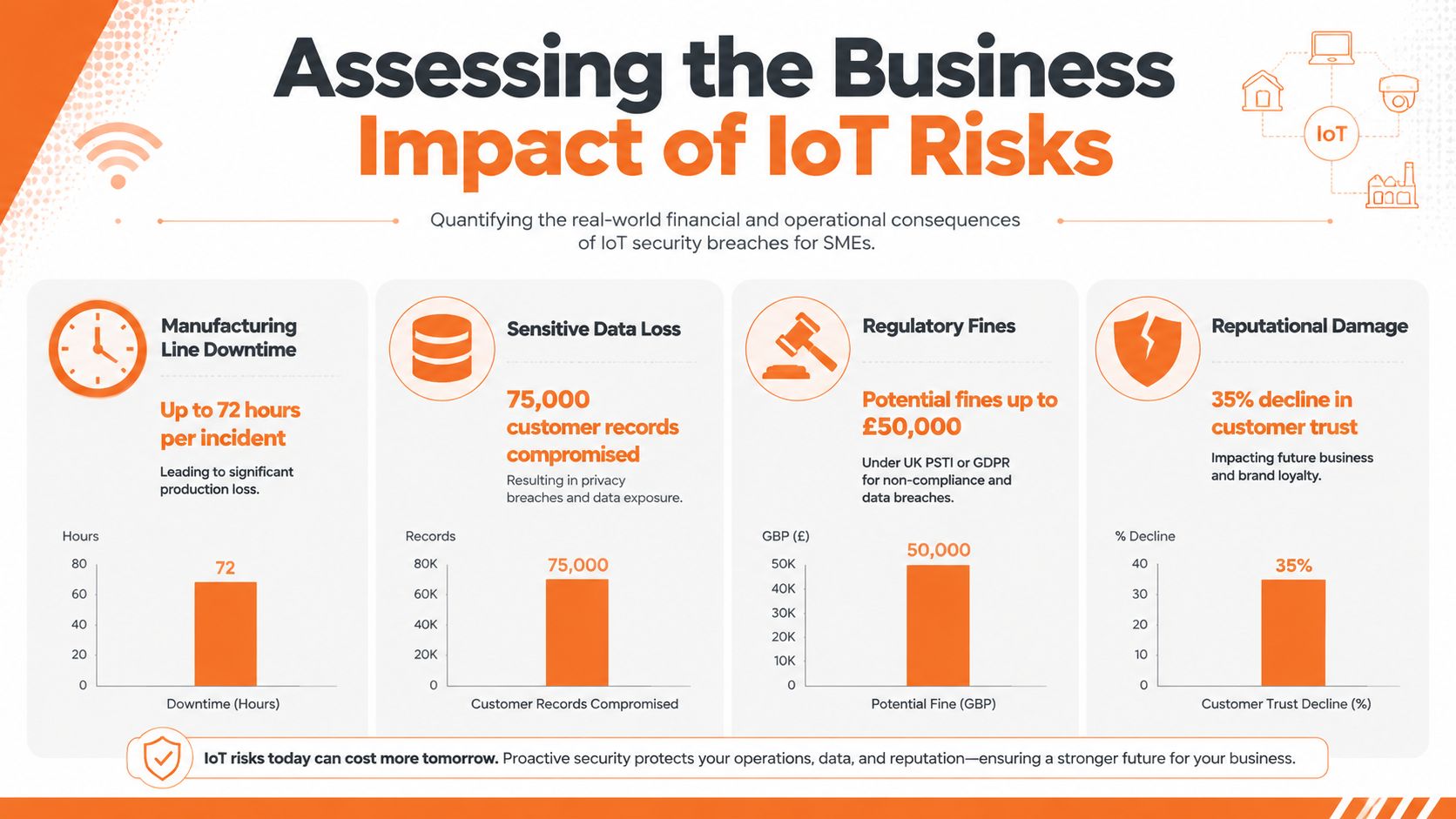
That difference matters for SMEs because IoT risk spreads across operations, compliance, and customer trust at the same time. A compromised camera, badge reader, printer, thermostat, or sensor rarely stays inside the IT team's queue. It can stop a workflow, raise questions about data exposure, and pull managers into urgent decisions about service continuity.
The UK angle matters here too. Security rules often focus attention on passwords, updates, and vulnerability handling, but SME leaders still need to translate those requirements into business terms. MSPs are often the ones doing that practical work, connecting legal duties and supplier promises to device registers, support processes, and escalation paths that staff can follow.
As noted earlier, insecure IoT traffic and weak device protections create opportunities for eavesdropping, misuse, and lateral movement. The business question is simpler. If one small device is abused, what does that interrupt, expose, or call into doubt?
Here's a useful explainer on the wider issue before going deeper:
Turning technical failure into business language
A practical assessment starts with four questions. They help non-technical leaders judge impact without needing to read logs or firmware notes first.
| Business area | What to ask |
|---|---|
| Operations | If this device failed or was isolated, what process stops or slows down? |
| Data | What information does it collect, transmit, or help an attacker reach? |
| Compliance | Who would need to know, and what evidence would you need to produce? |
| Reputation | Would clients, suppliers, or staff lose confidence if this incident became visible? |
Use the table as a triage tool. A warehouse temperature sensor may look minor until you realise it feeds audit records, stock assurance, and customer commitments. A smart door controller may look like a facilities issue until you realise it affects staff safety, contractor access, and incident evidence.
This is also where policy work becomes practical. If your team documents ownership, approval, update responsibility, and incident reporting inside clear IT policy and procedures for connected devices, each device becomes easier to assess before it becomes a problem.
The goal is not to rank devices by price or visibility. The goal is to understand business dependency. Once you know what a device touches, you can judge its real risk with far more accuracy.
Implementing Controls and Policies for SMEs
Most SMEs don't need a giant security programme. They need a short list of controls they can repeat every time a new connected device arrives.
Start with asset visibility
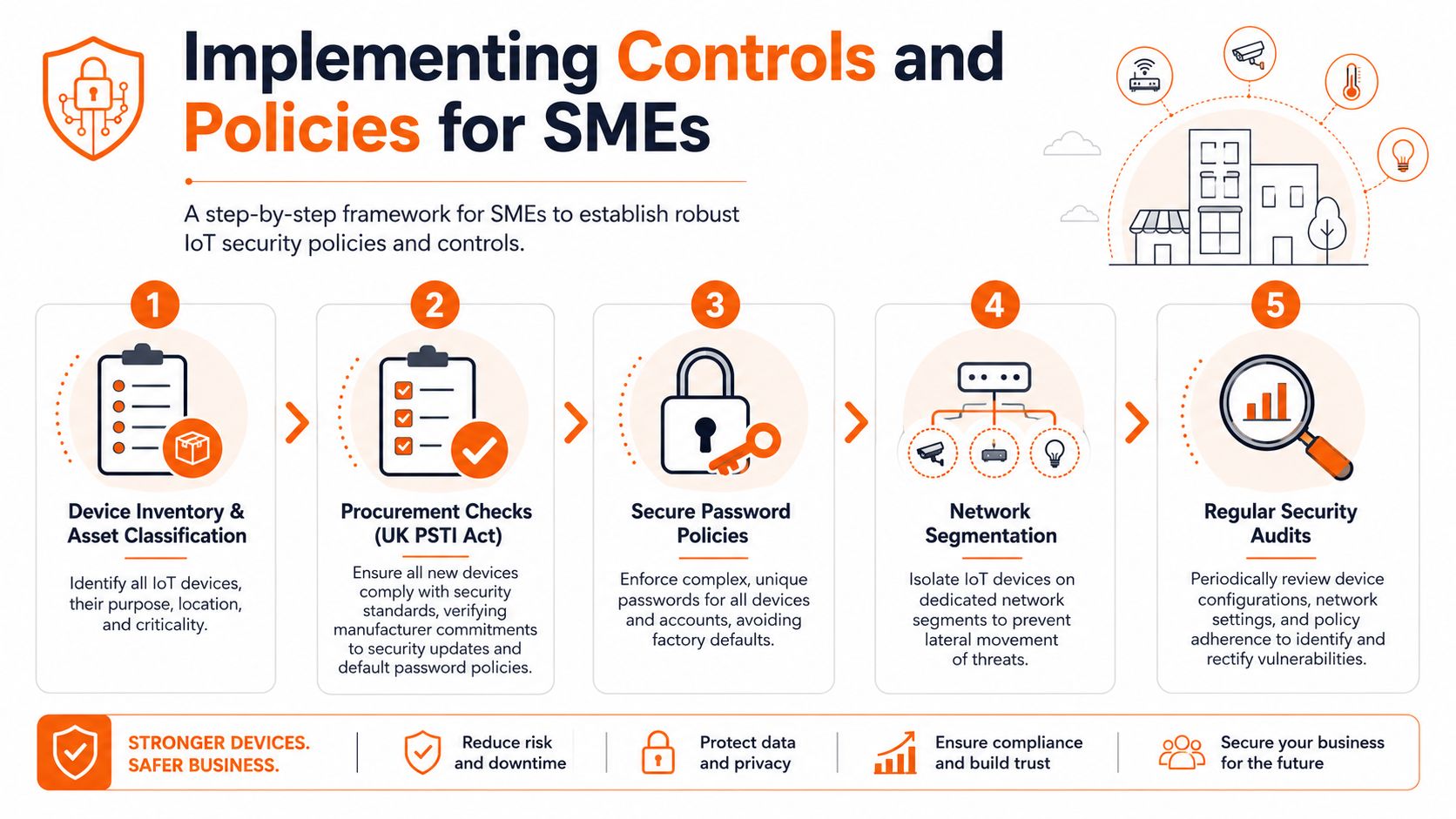
You can't secure what you haven't identified. Build a device register that covers more than model and serial number. Record the owner, location, business purpose, network segment, management interface, support contact, and update commitment.
For SMEs, a spreadsheet is often enough to start, as long as someone owns it and reviews it. The key is consistency. If facilities, operations, and IT all buy devices separately, the register becomes your common source of truth.
Build procurement into security
Many guides often conclude too soon. The UK has moved beyond voluntary good practice. Part 1 of the Product Security and Telecommunications Infrastructure Act 2022 came fully into force on April 29, 2024, creating a legal baseline for consumer connectable products. It prohibits universal or easily guessable default passwords, requires a public vulnerability disclosure policy, and requires manufacturers to state in plain English how long a device will receive security updates and its end-of-support date. Non-compliance can lead to fines of up to £10 million or 4% of a company's global revenue, whichever is higher, enforced by the Office for Product Safety and Standards, as described in the UK Government material on enterprise IoT market definition and PSTI context.
The gap for SMEs is practical verification. Many buyers still struggle to confirm what support a device will receive. Reporting on the UK's first IoT security laws notes that 68% of users can't identify when their devices will stop receiving updates, a situation that highlights the need for procurement teams to have checklists and evidence before deployment, as highlighted in IoT Tech News coverage of the PSTI rules.
Use procurement questions like these:
- Password policy: Does the device require a unique password on setup, or is it shipped with a reusable default?
- Support window: Has the supplier clearly stated the security update period and end-of-support date?
- Vulnerability reporting: Is there a public contact method for researchers and customers to report flaws?
- Administration: Can you disable unused services, restrict admin access, and log security events?
A written policy helps turn those checks into routine practice. If you need a template for documenting ownership, approvals, exceptions, and review cycles, this guide to IT policy and procedures is a sensible place to start.
Keep technical controls simple and repeatable
Once the buying process improves, the core controls are straightforward.
- Segment IoT devices: Put cameras, sensors, printers, and door systems on their own network segments where possible.
- Enforce strong credentials: Remove factory defaults immediately and store device access details securely.
- Control exposure: Disable services and ports you don't need.
- Manage firmware: Set review dates so patching isn't left to chance.
- Review suppliers: Ask for evidence, not assumptions, when vendors claim a device is “secure by design”.
Security policy works best when it removes decisions at the point of deployment. Staff shouldn't have to improvise every time a new device appears.
Hardening Your IoT Devices with a Stepwise Checklist
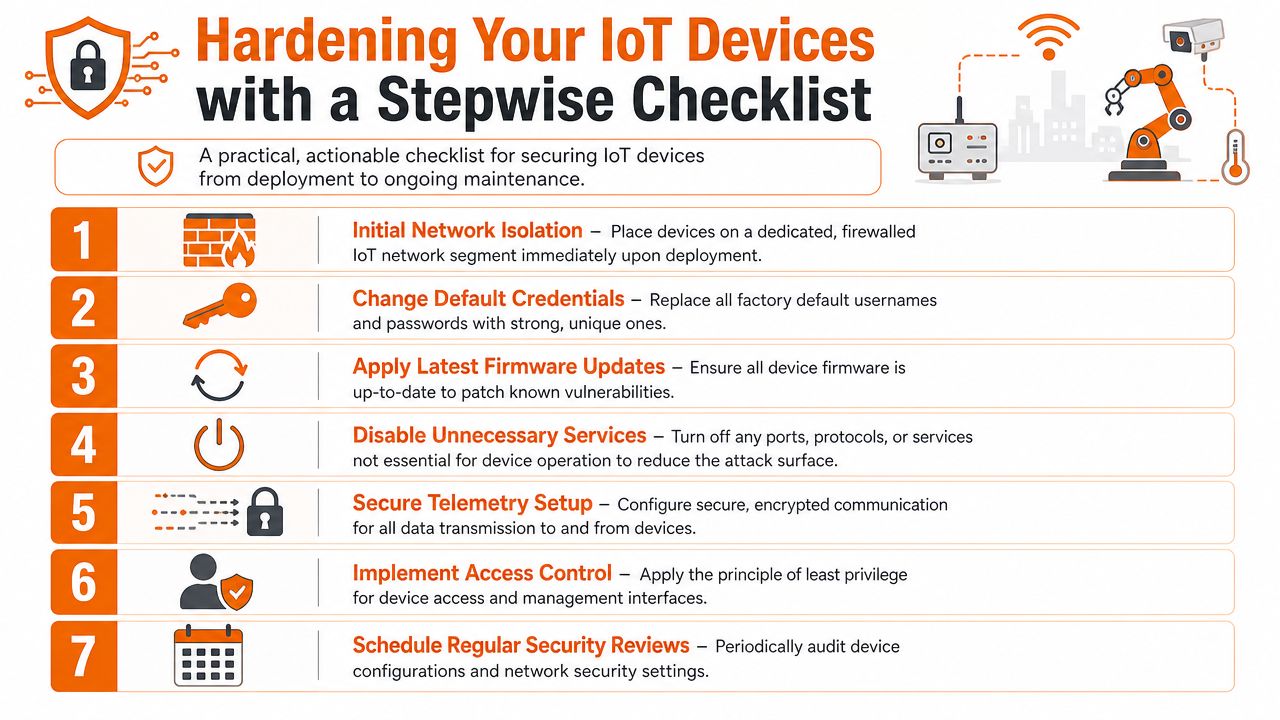
Hardening is where IoT device security becomes practical. You don't need to solve everything at once. You need a repeatable checklist that technicians, office managers, and outsourced IT partners can all follow.
Before the device goes live
Place it on the right network first.
Don't unbox a device and drop it straight onto the same segment as user laptops and servers. Put it on a dedicated IoT network or VLAN with controlled firewall rules.Change every factory credential.
Replace default usernames and passwords during setup. If the product allows role-based accounts, create named admin access instead of shared logins.Update firmware before rollout.
New in box doesn't mean current. Check the vendor portal or management console and apply the latest approved firmware before staff rely on the device.Turn off what you won't use.
Remote management, discovery services, unused protocols, and debugging features should be disabled unless there's a clear business need.
After deployment
Secure telemetry and management traffic.
If a device sends logs, readings, or commands, make sure those flows are protected and only directed to approved systems. Teams often overlook this aspect. They secure the login page but forget the data stream itself.Restrict who can reach the device.
Admin access should be limited to specific users, specific systems, or specific support paths. The receptionist doesn't need access to the camera console, and the camera doesn't need access to your finance platform.Create a review rhythm.
Put the device on a review calendar. Check firmware status, configuration drift, support dates, and unexpected network behaviour.
A quick way to verify hardening is to ask three questions after installation:
- Can the device talk only to the systems it requires?
- Would a leaver's old password still work on it?
- Could you tell, within normal IT operations, if its behaviour changed suddenly?
If any answer is unclear, the hardening process isn't finished.
Physical deployment choices matter too. A gate controller, camera, or remote access point may have very different networking assumptions depending on whether it uses local wireless infrastructure or mobile connectivity. For teams evaluating perimeter devices, this Wi-Fi vs LTE gate security comparison is a useful example of how deployment design affects operational reliability and security planning.
Field note: The safest setup is usually the one that needs the fewest exceptions. Every temporary workaround tends to become permanent.
Establishing Monitoring and Incident Response
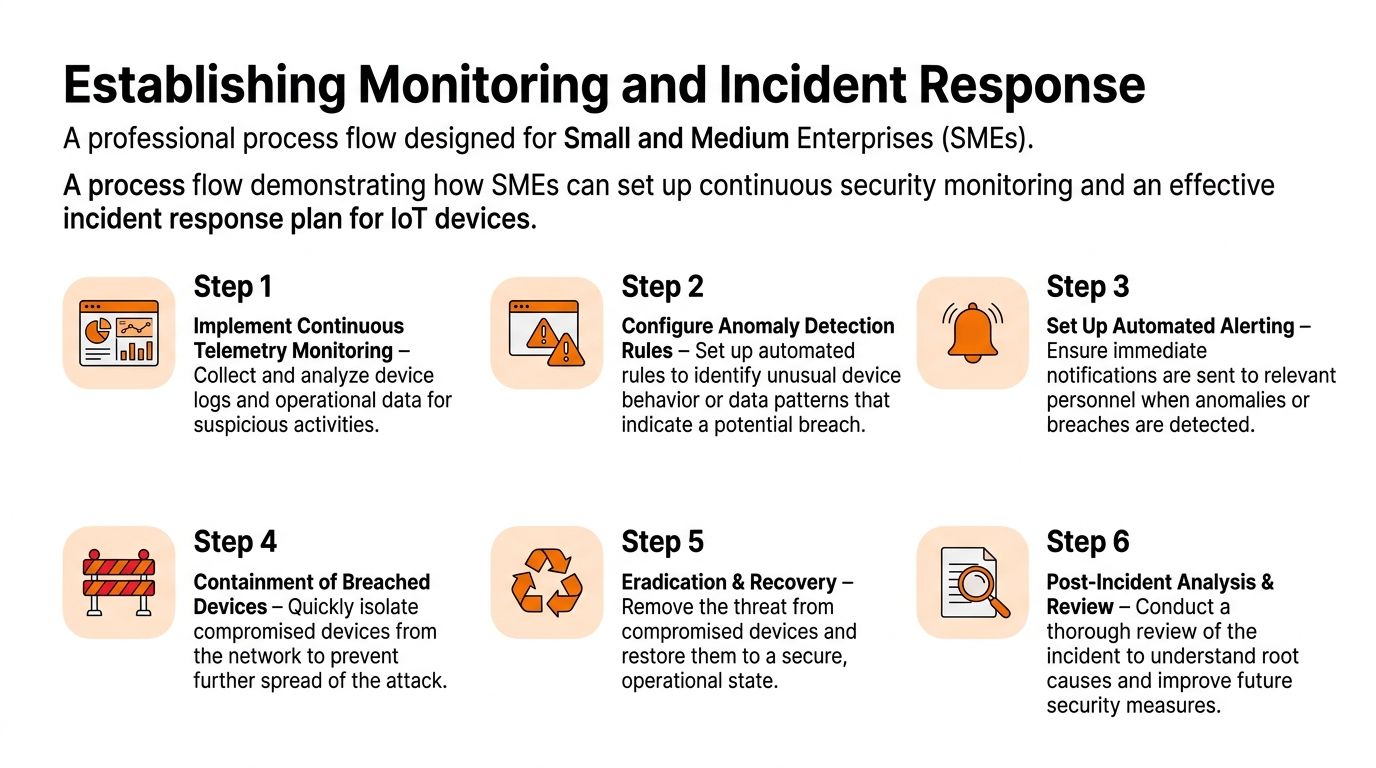
Many SMEs do a reasonable job at setup, then go quiet. That's risky because compromise often shows up first in behaviour, not in a dramatic warning message.
What to monitor
Focus on a small set of signals your team can act on:
- Unexpected communications: A device starts talking to new destinations or systems.
- Configuration changes: Admin settings, firmware version, or service status changes without an approved ticket.
- Usage anomalies: A sensor reports at unusual times, a camera increases outbound traffic, or a controller behaves outside normal patterns.
- Authentication events: Repeated failed logins or new administrative access.
Telemetry matters more than many SMEs realise. UK guidance has stressed the need to monitor device behaviour, and one cited finding states that 74% of UK IoT security incidents in 2025 stemmed from unmonitored telemetry and measurement data exposing device behaviour patterns to attackers, referenced in the UK Secure by Design report material.
What the first hour should look like
When an IoT incident is suspected, speed and clarity matter more than perfect diagnosis.
- Contain the device. Remove it from normal network communication or isolate its segment.
- Preserve evidence. Record time, alerts, recent changes, and relevant logs before wiping or resetting anything.
- Check lateral exposure. Identify what other systems the device could reach and whether it attempted to do so.
- Recover carefully. Rebuild or reset only after understanding what configuration caused the problem.
- Review the lesson. Update the checklist, firewall rules, supplier requirements, or monitoring thresholds.
A good incident process also assigns roles in advance. Someone approves isolation. Someone handles technical triage. Someone owns business communication. Someone keeps the incident log. Without role clarity, teams waste time debating authority.
If your organisation hasn't formalised those steps yet, this guide to incident response planning is a practical reference for setting responsibilities and escalation paths.
Leveraging MSP Support for Ongoing IoT Security
At some point, most SMEs hit a capacity limit. They can inventory devices, set a few policies, and improve deployment standards, but continuous monitoring, vendor chasing, log review, and incident handling still need time and specialist attention.
That's where MSP support can make sense. Not because IoT is impossible to manage in-house, but because it's easy for it to become nobody's full-time job. An MSP can help maintain device inventories, enforce onboarding standards, review support lifecycles, monitor suspicious behaviour, and coordinate response when something looks wrong.
The practical value is consistency. Devices don't get a pass just because they were installed by facilities, inherited through an office move, or added quickly for a project. The same standards can be applied across printers, cameras, sensors, door systems, and edge networking equipment.
For SMEs using outsourced support, it's worth looking for a provider that can combine managed monitoring, vulnerability management, policy support, and escalation handling rather than treating each device issue as an isolated helpdesk call. This overview of managed IT security services shows the sort of broader capability that helps when IoT risk overlaps with user security, cloud services, and business continuity.
The benefit isn't flashy tooling. It's having a repeatable operating model for connected devices after the initial project team has moved on.
Conclusion and Next Steps
IoT device security becomes manageable when you stop treating connected devices as one-off purchases and start treating them as governed business assets. The basics still matter most. Know what you own. Check supplier security commitments. Remove default credentials. Isolate devices from core systems. Monitor behaviour. Be ready to contain and recover quickly.
For most SMEs, the next useful move is simple:
- Audit what's already connected
- Review procurement against UK requirements
- Apply a standard hardening checklist
- Set up monitoring for unusual device behaviour
- Decide who handles incidents before one happens
The businesses that handle IoT well usually aren't the ones with the biggest budgets. They're the ones with the clearest routine.
If you want help turning these steps into an operational plan, Blowfish Technology can support SMEs with practical cyber security, managed IT, policy development, monitoring, and incident response planning that fits real-world business environments.

The Blowfish Technology team. Managed IT, cloud services, software development and connectivity for North West businesses since 1999.