
Monday morning usually exposes the problem.
Someone in accounts can't get into the supplier portal. The office manager has a browser full of saved logins but no one knows which ones are current. A fee earner in a legal practice needs urgent access to a client filing system, but the partner who set it up is in court. In a manufacturing business, the engineer who managed a machine vendor account left months ago, and no one's certain whether that password was ever changed.
That's what password management for teams looks like before it becomes a proper business control. It isn't just messy. It creates downtime, weakens audit trails, and leaves shared access hanging around long after it should've been removed. In regulated UK SMEs, that becomes a compliance issue as quickly as it becomes an IT issue.
A workable fix isn't complicated, but it does need structure. The businesses that handle this well don't start with features. They start by deciding who owns credentials, which accounts should still exist, how access is approved, and what happens when staff join, leave, or change roles.
Table of Contents
- Beyond the Shared Spreadsheet
- Planning Your Password Management Project
- Configuring Your Enterprise Password Manager
- Designing Your Vault Structure and Access Controls
- Automating Onboarding and Offboarding Processes
- Auditing, Reporting, and Incident Response Playbooks
- Building Your Password Management Policy
Beyond the Shared Spreadsheet
Most SMEs don't choose a bad password process. They inherit one.
It starts with a spreadsheet called passwords.xlsx on a shared drive, a notebook in a locked drawer, or a senior member of staff who “just knows” all the important logins. That feels manageable until someone is off sick, leaves the business, or accidentally shares the wrong version of the file.
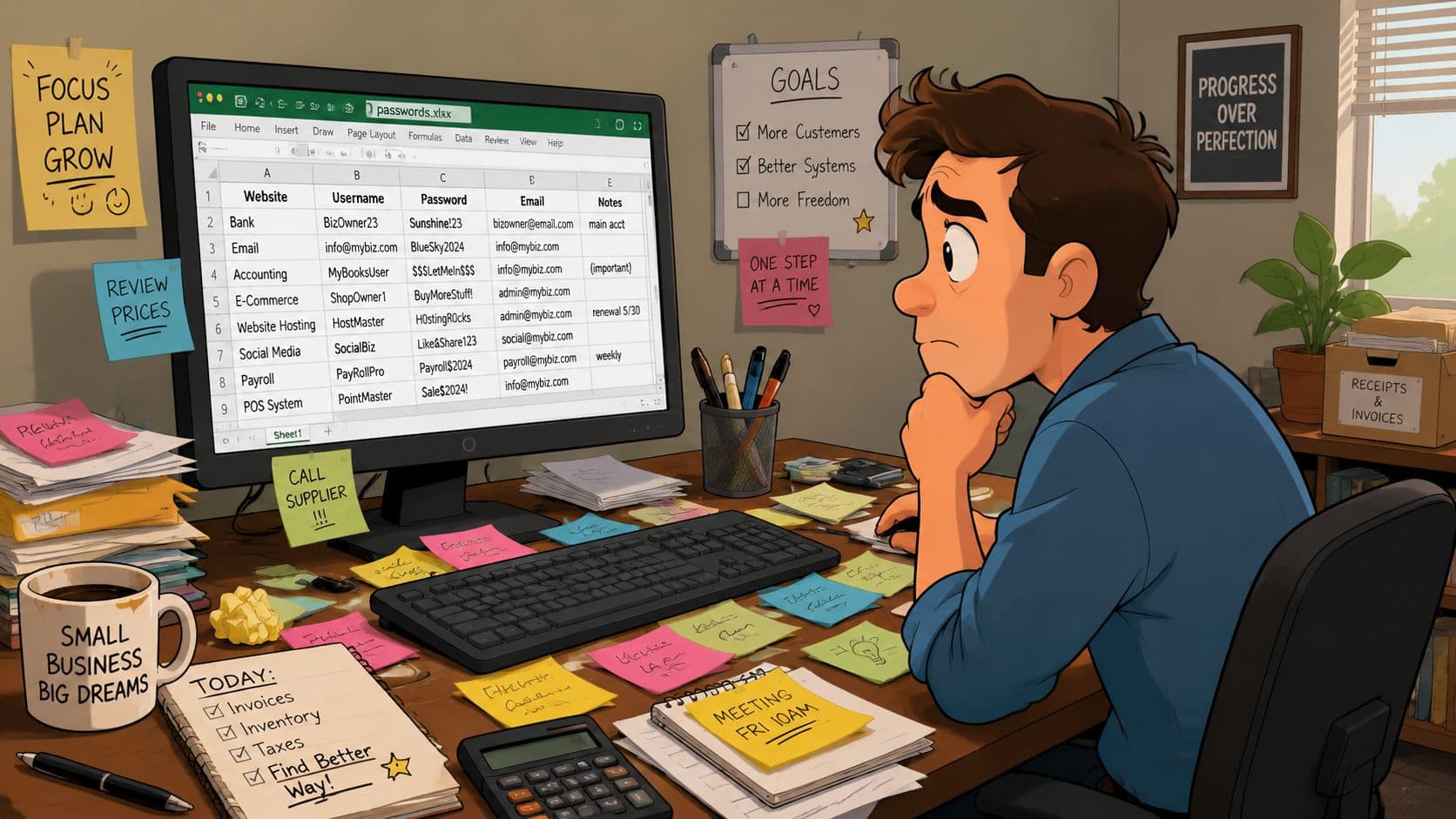
In legal and manufacturing firms, the fallout tends to be practical before it's technical. A case management account can't be accessed when a deadline is looming. A production manager loses access to a supplier portal that controls parts ordering. An external contractor still has a live login to a remote system because nobody owned the offboarding step.
The real risk isn't inconvenience
The UK Cyber Security Breaches Survey 2024 found that 58% of businesses experienced a cyber breach in the last year, and phishing affected 84% of those breached, which is why centralised password management and auditing belong in everyday operations, not a future wish list, as noted in these UK password breach figures.
That matters because messy password storage gives attackers and ex-staff the same advantage. Both benefit from weak ownership, unclear access, and credentials that are shared widely but reviewed rarely.
Practical rule: if nobody can tell you who owns a login, that account is already a risk.
There's also a resilience issue that gets missed. Shared credentials often sit at the centre of payroll systems, vendor portals, bank-related workflows, client extranets, machine dashboards, and Microsoft 365 admin tasks. If one person controls access informally, your business has created a single point of failure.
A better starting point
Good password management for teams isn't just “buy a vault”. It's a phased clean-up project.
A sensible SME approach usually looks like this:
- Find the sprawl: locate spreadsheets, browser stores, notebooks, shared mailboxes, and undocumented admin accounts.
- Sort accounts by business importance: finance, legal matter systems, production systems, supplier portals, and admin identities first.
- Assign ownership: every shared login needs a named business owner, not just an IT custodian.
- Replace informal sharing: move passwords into a managed vault with permissions and activity records.
- Build lifecycle controls: onboarding, offboarding, break-glass access, and periodic review need to be defined from day one.
If you're still relying on staff memory or weak shared passwords, this earlier piece on why business passwords are still too weak is a useful reality check.
Planning Your Password Management Project
The planning stage decides whether the rollout becomes a control or just another app that staff ignore.
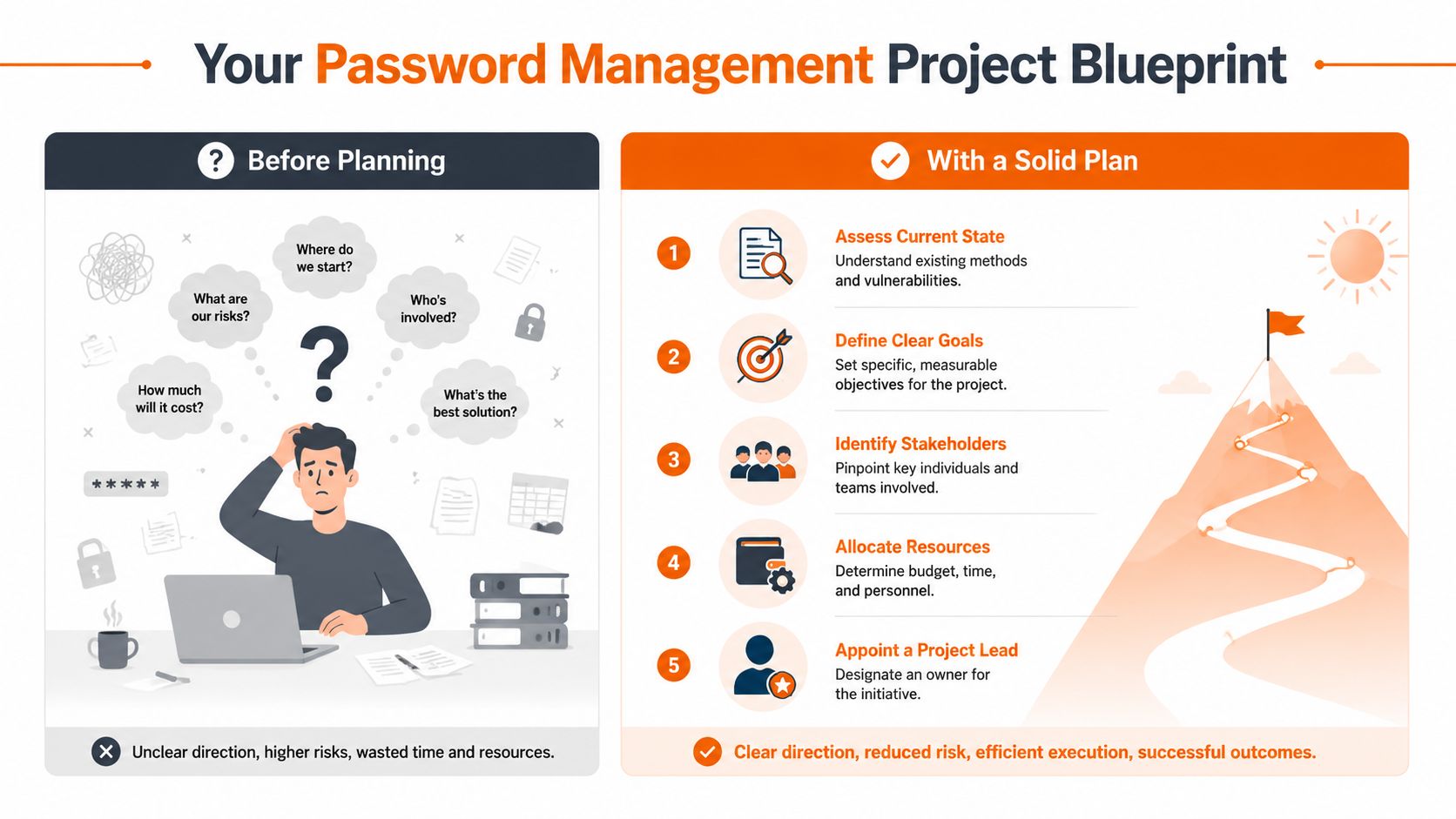
Too many teams start with feature comparisons and miss the harder questions. Which accounts are still shared? Which systems can move to Single Sign-On through Microsoft 365? Which credentials are tied to a person who shouldn't be the long-term owner? In regulated SMEs, those questions matter more than whether a vault has a polished browser extension.
Start with account reality, not vendor demos
Before choosing a platform, map the account types across the business. In most firms, they fall into a few recognisable groups:
| Account type | Typical examples | Better control |
|---|---|---|
| Individual cloud accounts | Microsoft 365, CRM, HR platform | User account with MFA and, where possible, SSO |
| Shared operational logins | Supplier portals, social media, facility systems | Team vault with controlled sharing |
| Privileged admin accounts | Microsoft tenant admin, firewall admin, backup console | Restricted vault access, approval, stronger monitoring |
| Legacy or awkward accounts | Old vendor systems, machine interfaces, niche legal portals | Vaulted temporarily while replacement or rationalisation is planned |
That exercise usually reveals duplicate accounts, stale credentials, and systems nobody has reviewed for years. It also exposes where the business is masking process gaps with password sharing.
Decide where SSO should replace passwords
For teams already built around Microsoft 365, the more useful question isn't “which password manager should we buy first?” It's which accounts should move to SSO or passkeys now, which still need a secure vault, and which should be retired. NCSC-aligned thinking increasingly favours passkeys and MFA as stronger patterns than passwords alone, which makes sequencing important for regulated SMEs, as discussed in this guidance on password management best practices and SSO sequencing.
That leads to a practical split:
- Move to identity-led access first for Microsoft 365-connected apps, line-of-business tools that support Entra ID, and services where staff should never see or share a common password.
- Keep a vault for the accounts that remain shared such as supplier portals, legacy web services, corporate social channels, appliance consoles, and emergency admin logins.
- Remove avoidable shared accounts where accountability matters more than convenience.
The strongest rollout plans reduce the number of passwords people need to handle. They don't just store the chaos more neatly.
Questions that expose the real requirement
In planning workshops, these are the questions that usually surface the actual work:
- Finance asks: who controls bank-adjacent portals, payroll services, and approval workflows if the usual person is absent?
- Operations asks: what happens if a production-critical vendor login is held by one engineer or one site?
- Legal teams ask: can access to client systems be restricted by role and removed cleanly when someone leaves a matter or the firm?
- HR asks: how quickly can access be issued to a starter and revoked for a leaver?
- Directors ask: can we show who had access to what, and when?
A good plan answers those before procurement. It should also name a project lead, identify the initial high-risk accounts to migrate, define the target state for MFA and SSO, and decide how exceptions will be handled. If the answer to every awkward account is “we'll fix it later”, that later rarely arrives.
Configuring Your Enterprise Password Manager
Configuration is where sensible planning either survives contact with reality or falls apart.
A lot of failed deployments have the same pattern. The vault gets switched on, everyone imports whatever they have, and the business congratulates itself for “doing password management”. Then staff carry on sharing credentials over Teams or email, nobody enforces MFA, and admin access remains broader than it should be.
The UK Government's 2025 Cyber Security Breaches Survey found that only 23% of businesses used password manager software in the previous 12 months, while 41% used two-factor authentication. That gap highlights a familiar mistake. Teams introduce password storage without layering MFA and account governance, as noted in this summary of UK business use of password managers and 2FA.
Set identity first
The first configuration decision should be user authentication into the password manager itself. Don't treat the vault as a separate island.
If your business uses Microsoft 365, connect the password manager to your primary identity platform so user access follows your joiner, mover, leaver process as closely as possible. In practice, that means:
- Enable SSO where the product supports it. Staff should authenticate with their managed business identity, not a separate unmanaged vault password where avoidable.
- Enforce MFA for all users. The vault contains the keys to the estate. It should never rely on password-only access.
- Restrict admin roles early. Don't give broad admin rights to the whole IT team out of convenience.
- Define emergency access accounts. These should be documented, limited, and tested.
If you're reviewing your wider controls at the same time, Blowfish's guidance on two-factor authentication for business systems is relevant because MFA is what stops a stolen password from becoming a successful login.
Import with control, not haste
Importing old credentials is usually the messiest phase. Browser exports, CSV files, old spreadsheets, and email chains often contain duplicates, expired logins, and credentials nobody should still be using.
Use a staged approach:
- Create a quarantine area: import discovered credentials into a restricted folder first.
- Review before publishing: confirm the login is still needed, identify the system owner, and check whether a named account should replace it.
- Reset high-risk credentials on migration: shared admin accounts, finance logins, remote access credentials, and supplier portals should be changed as they enter the managed vault.
- Tag entries properly: include system name, owner, renewal contact, and any recovery information in the record.
This takes longer than a bulk import, but it avoids formalising years of bad habits.
Roll out in groups
A clean deployment usually starts with a pilot group that represents different types of access. One department with routine business logins, one group handling sensitive accounts, and one technical admin group is a sensible spread.
The rollout should include:
| Configuration task | Why it matters |
|---|---|
| Group-based access assignment | Keeps permissions consistent as staff move roles |
| Browser extension deployment | Makes adoption easier without encouraging manual copy-paste |
| Mobile access policy | Useful for field staff, but only with device controls in place |
| Shared vault naming standards | Prevents a new form of sprawl inside the tool |
| Activity logging | Supports audit review and incident investigation |
A password manager only improves security when staff can use it easily and management can control it centrally.
One more point matters in regulated environments. Don't let convenience decide default settings. Features like “everyone can share anything” or “all users can export” might reduce helpdesk friction in week one, but they create audit and data handling problems later. Start tighter. Loosen specific controls only where the business case is clear.
Designing Your Vault Structure and Access Controls
A badly structured vault becomes a digital junk drawer. Passwords exist, but finding the right one is slow, ownership is blurred, and access spreads far beyond operational need.
That's why password management for teams has to be designed around how the business operates. Not around the product's default folders.
Build the vault around business function
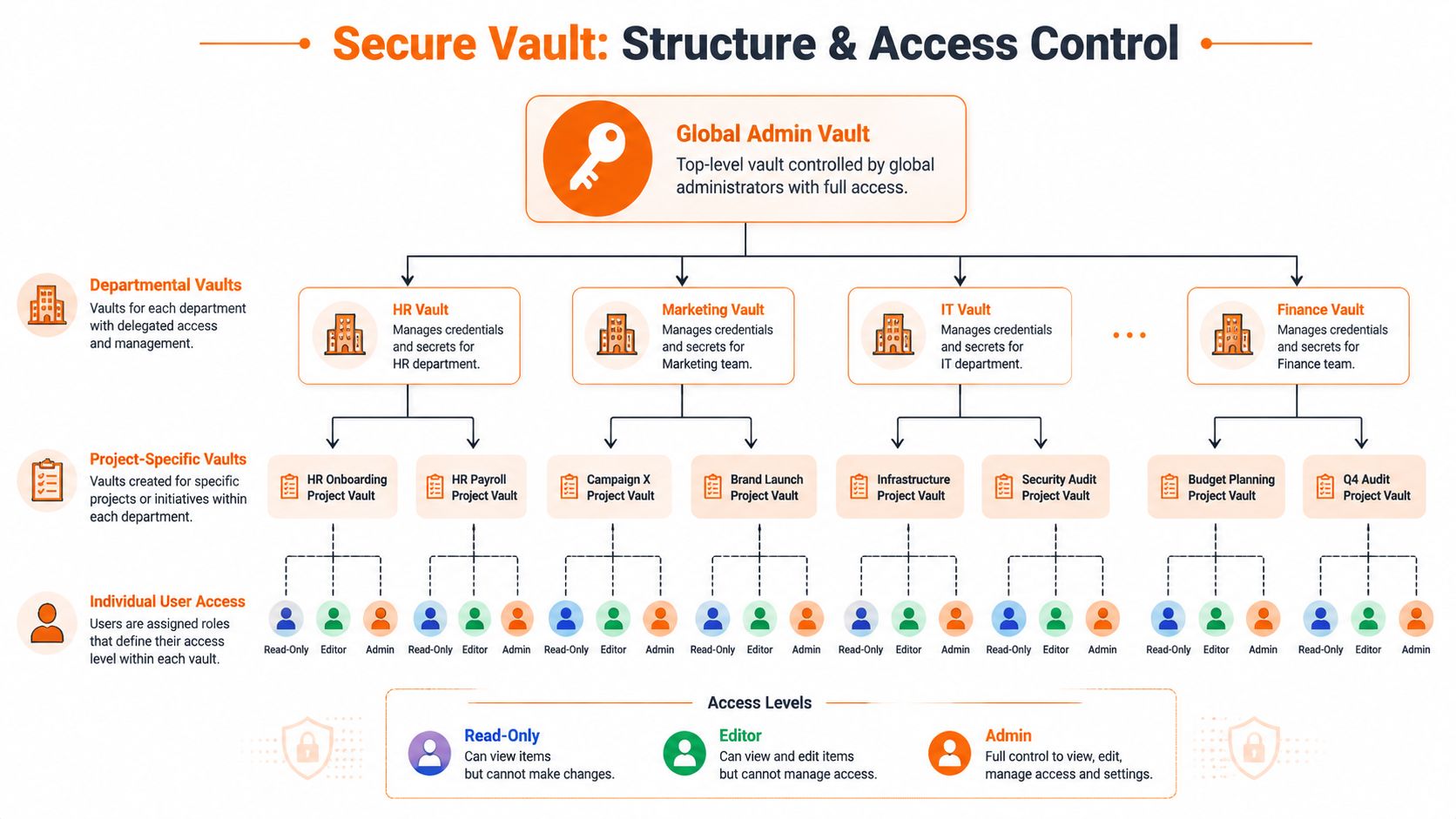
For most SMEs, a simple hierarchy works better than an elaborate one. Start with business-wide administrative areas, then departmental vaults, then project or matter-specific spaces where needed.
A practical model looks like this:
- Global admin vault: tenant admin accounts, backup consoles, security tools, core infrastructure, break-glass credentials.
- Department vaults: finance, HR, operations, sales, legal support, marketing.
- Project or client vaults: temporary access for a manufacturing rollout, a legal matter team, or a supplier collaboration.
- Personal vaults: for individual accounts that still need secure storage but shouldn't be shared.
The rule is simple. Structure should support least privilege without making normal work painful.
Control the shared account problem
The hardest issue isn't storing passwords. It's stopping shared access from becoming permanent access.
That's the part most advice skips. A lot of content focuses on secure storage and sharing, but says far less about offboarding, contractor access, break-glass use, and the controls needed to stop a vault from centralising unmanaged risk, as argued in this discussion of team password governance and permanent shared access.
Shared credentials still exist in real businesses. Supplier systems may not support named user accounts. Some machine interfaces are built around one admin login. Certain portals for legal searches, chambers services, or legacy production tooling weren't designed with modern identity governance in mind.
In those cases, put controls around the exception:
- Set an owner: one business owner and one technical custodian.
- Limit visibility: only the relevant group should even know the credential exists.
- Use alerts for sensitive entries: especially high-privilege or rarely used logins.
- Review periodically: shared accounts should be challenged, not accepted indefinitely.
- Rotate after staff or contractor changes: don't assume revoking vault access is enough if the password was ever revealed.
Use access levels deliberately
Not every user needs the same rights within a vault. Most platforms allow distinctions such as view, edit, share, or admin. Use them deliberately.
| Access level | When to use it | Common mistake |
|---|---|---|
| Read-only or use-only | Staff who need access to log in but shouldn't alter records | Giving edit rights to everyone “just in case” |
| Edit | System owners who maintain credentials and metadata | No secondary review for important shared logins |
| Share | Team leads who need controlled delegation | Allowing broad re-sharing outside the original group |
| Admin | A very small number of trusted operators | Using admin as a shortcut for support convenience |
For organisations that want to combine vault governance with stronger identity control, it's worth looking at tools and appliances that add MFA and user identity enforcement around business systems. The FortiAuthenticator 300F features are a useful example of the kind of capability to evaluate when you need authentication policy, central identity handling, and tighter access governance around shared or sensitive environments.
One final warning. Don't mirror your company org chart too strictly. Departments change. Projects end. People cover for one another. The vault structure should reflect business control boundaries, not just boxes on a slide.
Automating Onboarding and Offboarding Processes
The quality of your password management is tested on ordinary staff changes, not on launch day.
A strong setup should make onboarding dull and predictable. A weak setup turns every new starter into a chain of manual requests, rushed permissions, and improvised sharing. Offboarding is even less forgiving. If a leaver keeps access to the vault, shared credentials, or recovery channels, the process has failed.
Onboarding should be boring
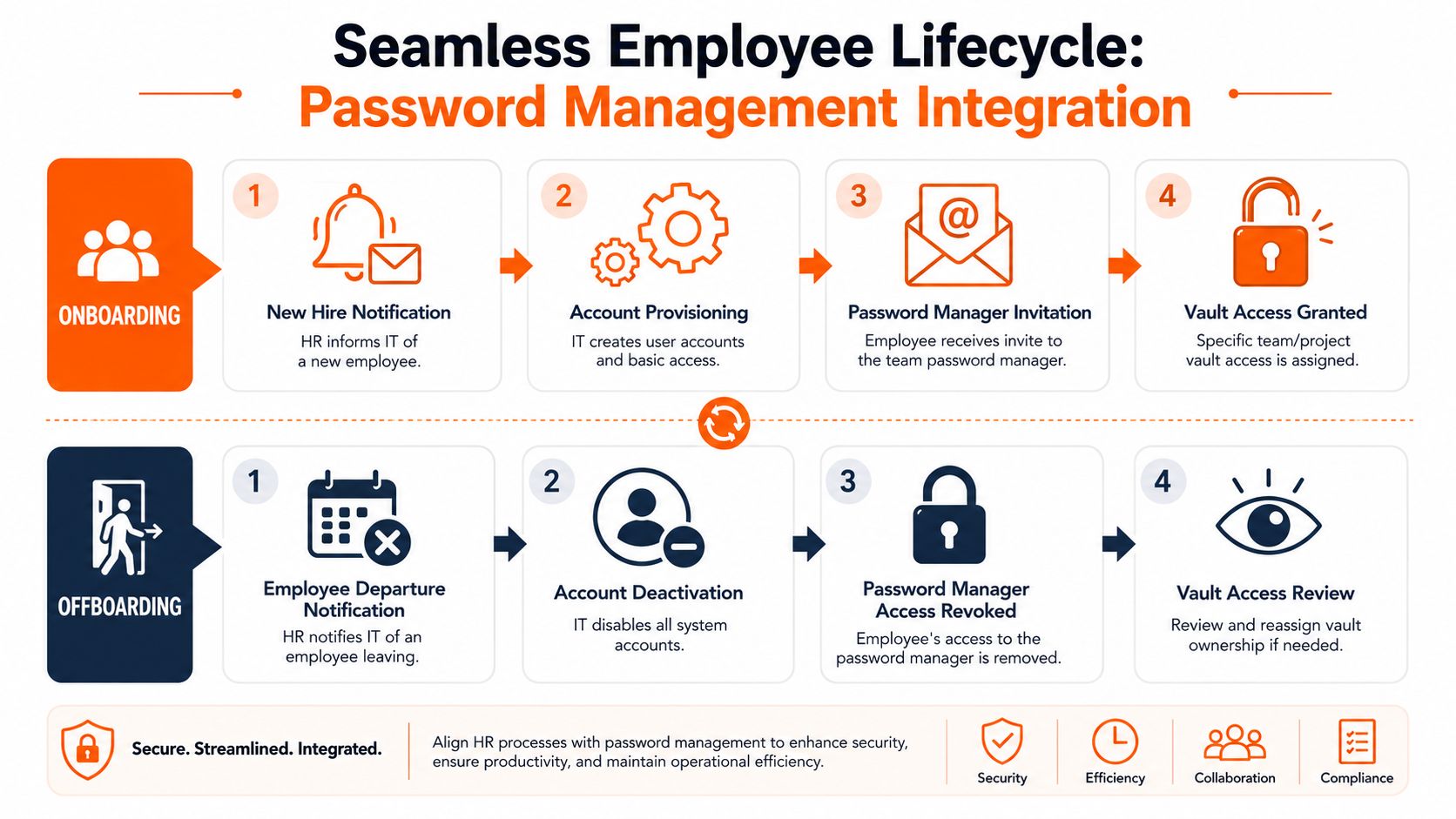
The best onboarding flows are role-based. HR confirms the role, IT assigns the starter to the right identity groups, and the password manager grants the matching vault access automatically or through a controlled approval step.
That means a new finance assistant receives access to the finance vault entries they need, not a generic “finance everything” bundle. A legal secretary joins the correct matter support groups. A manufacturing supervisor gets the supplier and operations portals relevant to their site.
The onboarding checklist should include:
- Identity creation: create the managed user account first, then connect password manager access to it.
- Vault assignment by group: avoid hand-assigning every login where role groups can do the work.
- MFA enrolment: complete this before broad access is granted.
- Owner confirmation: department lead signs off that the user's access is appropriate.
- Starter briefing: show staff how to use the vault, how to request extra access, and how to report a suspected issue.
Many SMEs discover that their real problem wasn't passwords. It was undocumented access decisions.
Offboarding is where governance is tested
When someone leaves, speed matters. So does sequence.
Disable the user's core identity first, revoke password manager access immediately, and then review any credentials or vault items they could access, edit, or share. If they had access to sensitive shared logins, rotate those credentials rather than assuming revocation alone closes the risk.
A strong offboarding flow usually includes:
- Departure notice from HR
- Identity disablement
- Password manager access removal
- Review of owned and shared vault items
- Reassignment of ownership
- Password rotation for sensitive shared credentials
- Check of recent activity where warranted
If your business still has old live accounts hanging around after staff leave, this article on old logins for ex-staff and the risks they create is worth addressing alongside the vault rollout.
When a leaver process depends on someone remembering which passwords were shared informally, you don't have a process. You have hope.
Contractors need the same discipline. Give them time-bound access, keep them out of broad departmental vaults where possible, and review their permissions at the end of each engagement. Temporary access should be temporary.
Auditing, Reporting, and Incident Response Playbooks
At 8:15 on a Monday, a fee earner cannot reach a client portal, or a production manager reports that a supplier account is behaving oddly. The immediate problem looks like access. The underlying question is whether your business can prove who had that credential, what changed, and what you did next.
A password manager without audit discipline leaves a gap in the control set. Many SMEs choose the platform, import passwords, and stop there. In regulated firms, that is not enough. Legal practices need evidence around access to client-related systems and administrative records. Manufacturers need to protect supplier portals, remote support tools, plant interfaces, backups, and finance-linked systems without slowing operations to a crawl.
Audit the activity that changes risk
Good reporting starts with a clear view of what would hurt you most if it went wrong.
For most UK SMEs, that means reviewing the events and records that show whether access is controlled, justified, and still current:
- Shared credential reviews: identify logins used by multiple people, challenge whether they should still exist, and confirm a named owner for each one.
- Privileged access reviews: check access to Microsoft 365 or Google admin roles, firewall and VPN credentials, backup platforms, finance systems, payroll, and any third-party remote administration tools.
- Weak, reused, or duplicate credential reports: use the vault's built-in checks to find entries that need rotation or replacement.
- Dormant vault item reviews: remove or archive credentials that no longer support a live process.
- Export, share, and permission-change events: review these closely because they often show process bypass, over-sharing, or local workarounds.
- MFA and sign-in anomalies: failed logins, unfamiliar devices, disabled MFA, and unusual access times deserve follow-up.
This work supports more than hygiene. It gives you evidence. If an auditor, insurer, or client asks how shared credentials are governed, you need more than a verbal assurance from IT.
Build a response playbook before you need it
Speed matters. So does sequence.
A short incident playbook avoids the usual scramble of emails, Teams messages, and conflicting instructions. Keep it practical and tied to named roles. Who rotates the password. Who checks logs. Who informs the system owner. Who decides whether the issue needs formal incident handling.
| Incident trigger | Immediate action | Follow-up |
|---|---|---|
| Phishing suspicion involving a known account | Reset or rotate the credential, revoke active sessions where possible | Review vault access, check MFA status, and confirm whether the account touched other systems |
| Leaked shared login | Change the password, update the vault record, notify system owner | Check for reuse elsewhere and record who previously had access |
| Unauthorised vault access attempt | Lock or suspend the affected user, investigate sign-in records | Review MFA settings, trusted devices, admin rights, and recent permission changes |
| High-risk leaver or contractor exit | Remove access and rotate sensitive shared credentials | Confirm ownership reassignment, review recent activity, and document exceptions |
Broader visibility also helps in this context. If you are checking for compromised business credentials outside the vault as well, dark web monitoring for exposed business accounts can support the investigation and containment side of the process.
Test the playbook with a tabletop exercise. One compromised supplier login is usually enough to expose weak ownership, unclear escalation paths, and gaps in evidence collection.
Reporting should support audits, insurers, and internal control
Reports should be scheduled, reviewed, and retained. Waiting until a client questionnaire arrives is how businesses discover that no one has checked privileged access for six months.
A sensible cadence for many SMEs is monthly review of privileged access, shared high-risk credentials, and unusual events. Quarterly review works for wider vault structure, stale records, policy exceptions, and access that has gradually expanded beyond the original need. The exact frequency depends on the systems involved, but consistency matters more than ambitious scheduling that no one maintains.
For Cyber Essentials-aligned organisations, firms handling confidential client data, and manufacturers with contractual or insurer scrutiny, reports should answer a few plain questions:
- Who has access to which credentials and vaults?
- Who approved that access?
- When was it last reviewed?
- Which shared credentials still exist, and why?
- Which credentials were rotated after staff changes or suspected compromise?
- Can the business revoke and reassign access quickly if a key person is unavailable?
If your reporting cannot answer those questions clearly, the password manager is installed, but the control is still immature. That is usually where audit pain appears first.
Building Your Password Management Policy
At some point, every SME hits the same problem. A senior fee earner needs access during a client deadline, a production supervisor is off sick, or a long-serving admin leaves with half the account knowledge in their head. If the policy is vague, staff fill the gap with workarounds, and those workarounds become your operating model.
That is a governance issue, not just a user training issue. For regulated UK SMEs, the password manager only proves control if the business can show who owns access, how exceptions are approved, what happens when people leave, and what evidence is kept for audit or insurer review.
The UK's National Cyber Security Centre published its Password Manager: procurement guidance in 2018, which helped formalise the move away from memorised passwords towards centrally managed, unique credentials. A written internal policy aligns your business with that established direction in UK cyber hygiene, as summarised in this note on the NCSC password manager guidance milestone.
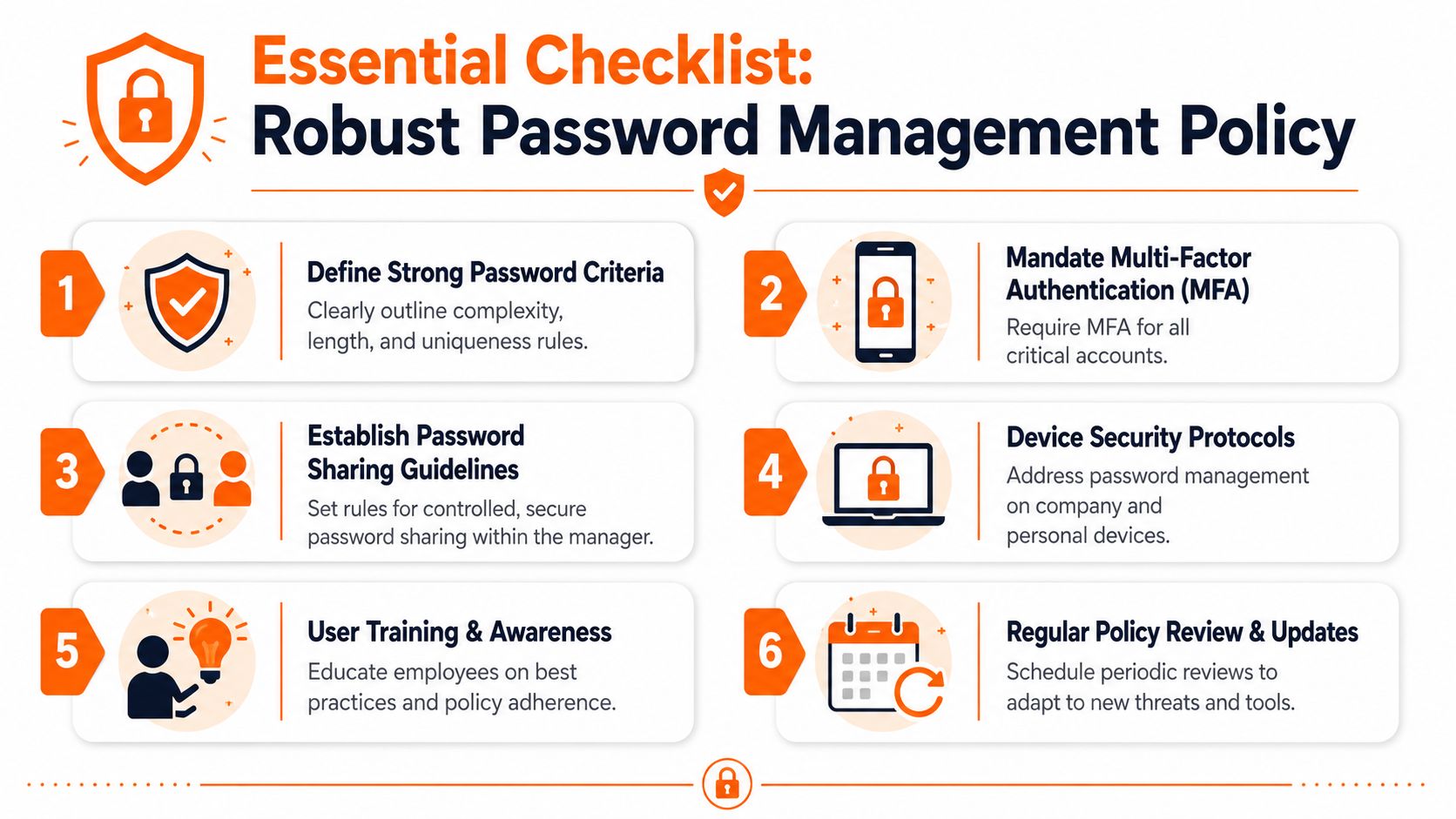
What the policy must say
An effective policy is short enough for staff to follow and specific enough for managers to enforce. If it reads like a generic HR document, people ignore it. If it is too loose, every urgent request becomes an exception.
It should define:
- Where passwords are stored: approved password manager only for business credentials.
- How passwords are created: unique, strong passwords generated by the tool wherever possible.
- How access is shared: through the vault's sharing controls, not by email, chat, or spreadsheet.
- What requires MFA: all business-critical and privileged access, plus the password manager itself.
- Who approves exceptions: named roles, not informal agreement between colleagues.
- What happens on suspicion of compromise: immediate reporting, access review, and credential change.
- What happens when staff leave or change role: prompt removal or adjustment of access, with rotation of sensitive shared credentials where needed.
- How reviews happen: scheduled checks of vault access, shared credentials, privileged entries, and policy exceptions.
- What records are kept: approval logs, access reviews, and evidence of credential changes after leavers or incidents.
That last point is often missed. In legal and manufacturing businesses, audit pressure rarely starts with password length. It starts with missing evidence.
A practical policy template
Below is a plain-English structure many SMEs can adapt.
Password management policy statement
All business passwords and shared credentials must be stored in the approved company password manager. Staff must not store business passwords in spreadsheets, notebooks, personal apps, or unsecured browser stores unless specifically authorised as part of a managed technical process.
Password creation and use
Use the password manager's generator to create unique passwords for business systems. Staff must not reuse passwords across multiple business accounts. Where a service supports MFA, SSO, or passkeys, those controls should be used in line with company IT guidance.
Sharing and shared accounts
Passwords must be shared only through approved vault features. Shared accounts should be used only where named-user access is not practical. Every shared credential must have a named business owner, a stated business purpose, and a review date.
Privileged and sensitive access
Admin credentials, finance-related accounts, legal client systems, remote access tools, backup platforms, OT management consoles, and security systems must be restricted to authorised personnel only. Emergency access credentials must be documented, protected, and reviewed on a defined schedule.
Joiners, movers, and leavers
Access to the password manager must be issued according to role. When a user leaves or changes role, access must be removed or amended promptly. Sensitive shared credentials must be reviewed and changed where required, particularly where the individual had privileged access or handled confidential client, financial, or production systems.
Monitoring and reporting
The business will review password manager access, shared credentials, privileged entries, and approved exceptions on a scheduled basis. Suspected misuse, phishing, or compromise must be reported to IT immediately and recorded for follow-up.
Training points staff can follow
Policy documents fail when they sound like procurement paperwork. Staff need instructions that match the situations they face on a Monday morning.
Use training that tells people what to do in real situations:
- If you create a new account for work, save it in the password manager immediately.
- If a colleague asks for a password, share the entry through the vault, not in a message.
- If a supplier asks to “just use the old login”, check ownership and approval first.
- If you think you entered credentials into a fake page, report it straight away.
- If you can still access something you no longer need, report it.
- If you're leaving a project or role, confirm the access handover and removal.
Review the policy whenever you change major systems, increase SSO coverage, introduce passkeys, or find a workflow that still depends on informal shared access. That review should include operations, compliance, and whoever owns onboarding and offboarding, not just IT.
The goal is simple. Secure behaviour must be the easiest option, and the business must be able to prove that control holds up when staff change, systems change, or an auditor asks for evidence.
If your business needs to move from shared spreadsheets and informal access to a governed, auditable setup, Blowfish Technology can help you design password management for teams around Microsoft 365, MFA, offboarding, and compliance-led operational resilience.

The Blowfish Technology team. Managed IT, cloud services, software development and connectivity for North West businesses since 1999.