
You've been asked to produce an information security policy before a customer review, a supplier questionnaire has landed in the inbox, or an insurer wants evidence of controls. HR has a template. The director has a few opinions. Your IT provider knows where the systems are, but nobody has written down who can approve access, what happens during an incident, or which version staff should follow.
That's the policy development problem for UK SMEs. The document is rarely the hardest part. The difficult work is connecting business decisions to users, devices, cloud services, suppliers, records and technical safeguards, then keeping that connection current.
Official statistics play a similar role in public policy. The Office for Statistics Regulation's literature review describes evidence shaping policy from recognising a need through design, target-setting, monitoring and evaluation. An SME policy should work the same way. It needs a reason, evidence, an owner, a measurable operating expectation and a review route.
Table of Contents
- Why Policy Development Stalls at Most SMEs
- The Core Policy Set Every SME Actually Needs
- Running the Policy Development Lifecycle in Practice
- Mapping Your Policies to GDPR, Cyber Essentials and ISO Controls
- Governance Roles, Training and Day-to-Day Ownership
- Keeping Policies Alive After Launch
- A 90-Day Rollout Plan and Questions for Your IT Partner
Why Policy Development Stalls at Most SMEs
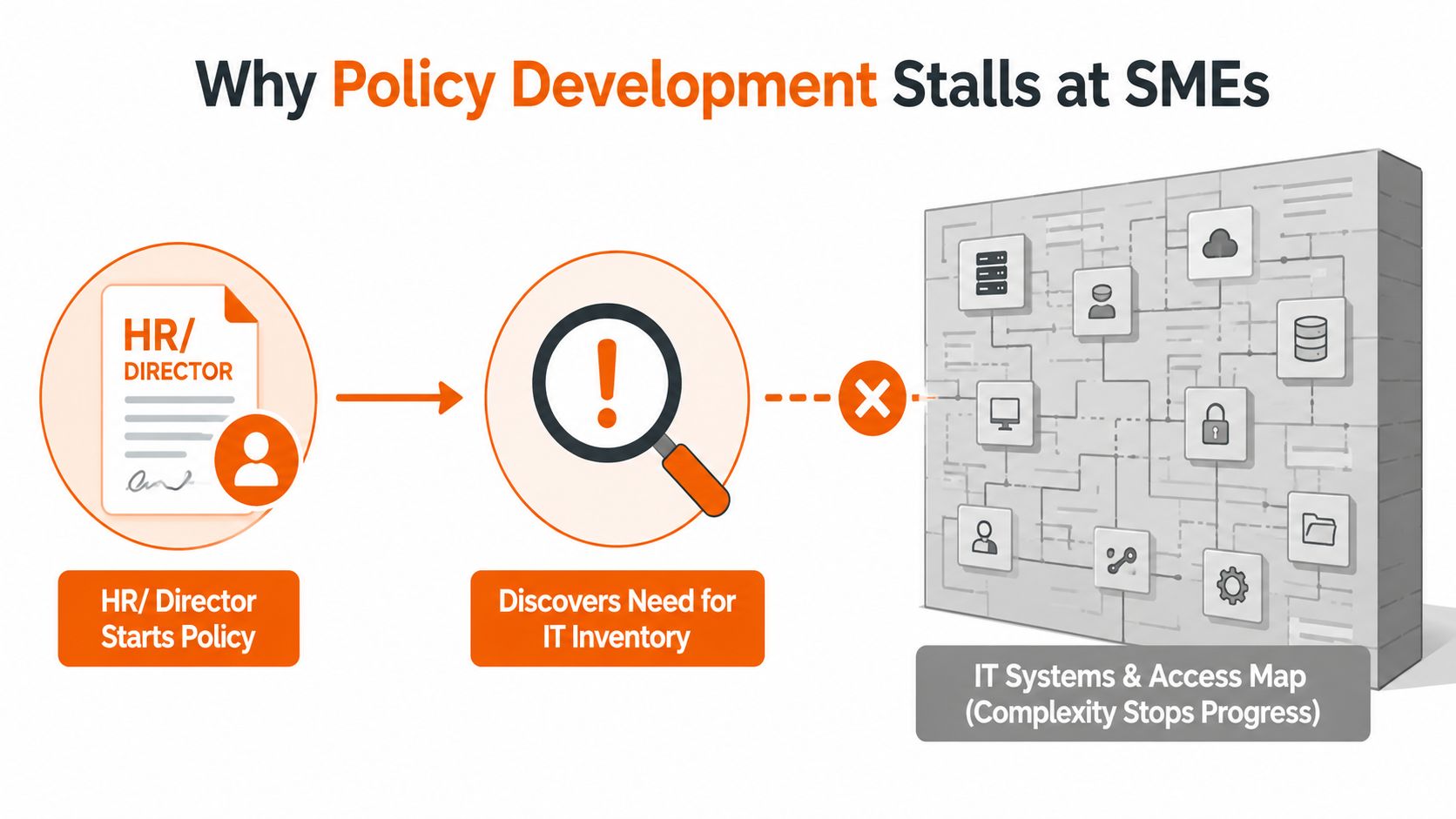
The most common failure starts with the wrong owner. A director or HR lead opens a document, copies a generic policy, adds the company name and sends it for approval. Halfway through, someone asks which systems are covered, whether contractors use personal devices, who can create administrator accounts, how backups are tested and who decides whether an incident must be escalated.
Those answers don't sit in the policy template. They sit in Microsoft 365, endpoint management, supplier contracts, access records, onboarding processes and the memories of busy people. Without that evidence, policy development becomes polished guesswork.
Start with an owner brief
Use a single page before anyone drafts clauses. It should identify:
- Accountable owner: The director remains accountable for business risk, even when an IT partner operates the control.
- Audience: Employees, contractors, temporary workers, suppliers or particular teams.
- Systems in scope: Microsoft 365, line-of-business applications, endpoints, mobiles, hosted desktops, websites and physical records.
- Business objective: For example, reduce unauthorised access, standardise remote working or prepare for Cyber Essentials.
- Evidence required: Access reviews, device records, backup reports, training acknowledgements and incident logs.
- Approval and review: The approver, effective date, next review date and change owner.
The brief stops a policy becoming a document detached from operations. It also exposes gaps early, before a reviewer discovers that the business has no reliable asset list or no record of exceptions.
Build a runnable workflow
A practical sequence is straightforward:
- Scope the risk and name the owner.
- Gather technical and business evidence.
- Draft short, numbered clauses in plain English.
- Consult the IT lead, relevant managers and a sceptical reader.
- Approve and record the decision.
- Publish, train and capture acknowledgement.
- Review against incidents, changes and evidence.
Don't confuse a policy with a procedure. The policy states the rule and accountability. A procedure explains how staff or administrators perform the task. A runbook tells someone what to do during a specific event. Keeping those layers separate makes each document usable.
Practical rule: If a clause can't be tested through a record, configuration, review or observed behaviour, rewrite it until somebody can show how it works.
SMEs also need to address vulnerabilities rather than documenting them. A useful internal prompt is this guide to why businesses take too long to fix vulnerabilities. By the end of the exercise, you should have a usable policy set, a RACI sheet, a review calendar and an audit trail showing what was approved, when and by whom. There isn't a compliance department coming to rescue an undocumented process, so the method must be manageable by one owner with focused input from a technical lead.
The Core Policy Set Every SME Actually Needs
A policy library should reflect the risks the business can face, not the number of documents in a consultant's folder. For a firm with a modest workforce, seven policies usually form a workable foundation. Some can remain separate because they require distinct ownership. Others can be concise and linked to procedures.
The IT policies and procedures guidance is a useful reference point, but the operating test is local: can staff understand the rule, can managers enforce it and can the business produce evidence that it operates?
| Policy | Primary risk | Scope in one line |
|---|---|---|
| IT acceptable use | Unsafe or unauthorised use of company systems | Permitted devices, software, internet, email and communication |
| Information security | Loss, compromise or misuse of business information | Security principles, responsibilities and protective measures |
| Data protection | Unlawful or careless handling of personal data | Collection, use, sharing, retention and disposal |
| Access control and account management | Excessive, stale or untraceable access | Joiners, movers, leavers, authentication and privileged accounts |
| Incident response | Confusion and delay during a security event | Reporting, triage, escalation, containment and recovery |
| Remote and hybrid working | Exposure outside the office environment | Home working, travel, devices, networks and physical privacy |
| Supplier and third-party assurance | Risk inherited through vendors | Due diligence, contracts, access, assurance and offboarding |
What each policy must settle
An acceptable use policy should cover email, web activity, removable media, software installation, business accounts and reporting concerns. If it bans inappropriate use but says nothing about installing browser extensions or unapproved cloud applications, staff may create shadow IT without realising they've breached the rule.
The information security policy sets the management position. It should explain how the firm protects confidentiality, integrity and availability, then point to technical standards rather than pretending that broad statements are controls.
Data protection needs more than a privacy notice. It should connect processing responsibilities to retention, sharing, accuracy, secure disposal and incident handling. The policy should point staff towards the relevant register and procedures.
Access control is where many documents become operational. Define who approves access, how administrators are separated from ordinary accounts, how leavers are removed and how reviews are recorded. An access rule without an owner is only an aspiration.
An incident response policy must name the decision-maker. It should set out reporting channels, initial evidence preservation, technical escalation, communications and post-incident review. During pressure, people follow remembered roles, not elegant paragraphs.
Remote working rules should address company devices, screen privacy, public networks, printing, travel and lost equipment. Supplier assurance should identify what is checked before engagement, which contractual terms matter, how supplier access is reviewed and what happens at termination.
Keep lighter rules inside the right document
Standalone social media and bring-your-own-device policies often become shelf-ware. Fold simple conduct and device requirements into the acceptable use or remote working policy unless the business has a genuine risk, legal or contractual reason to manage them separately.
The stack is only an input. A signed policy that doesn't influence onboarding, access tickets, supplier reviews or incident decisions hasn't delivered control.
Running the Policy Development Lifecycle in Practice
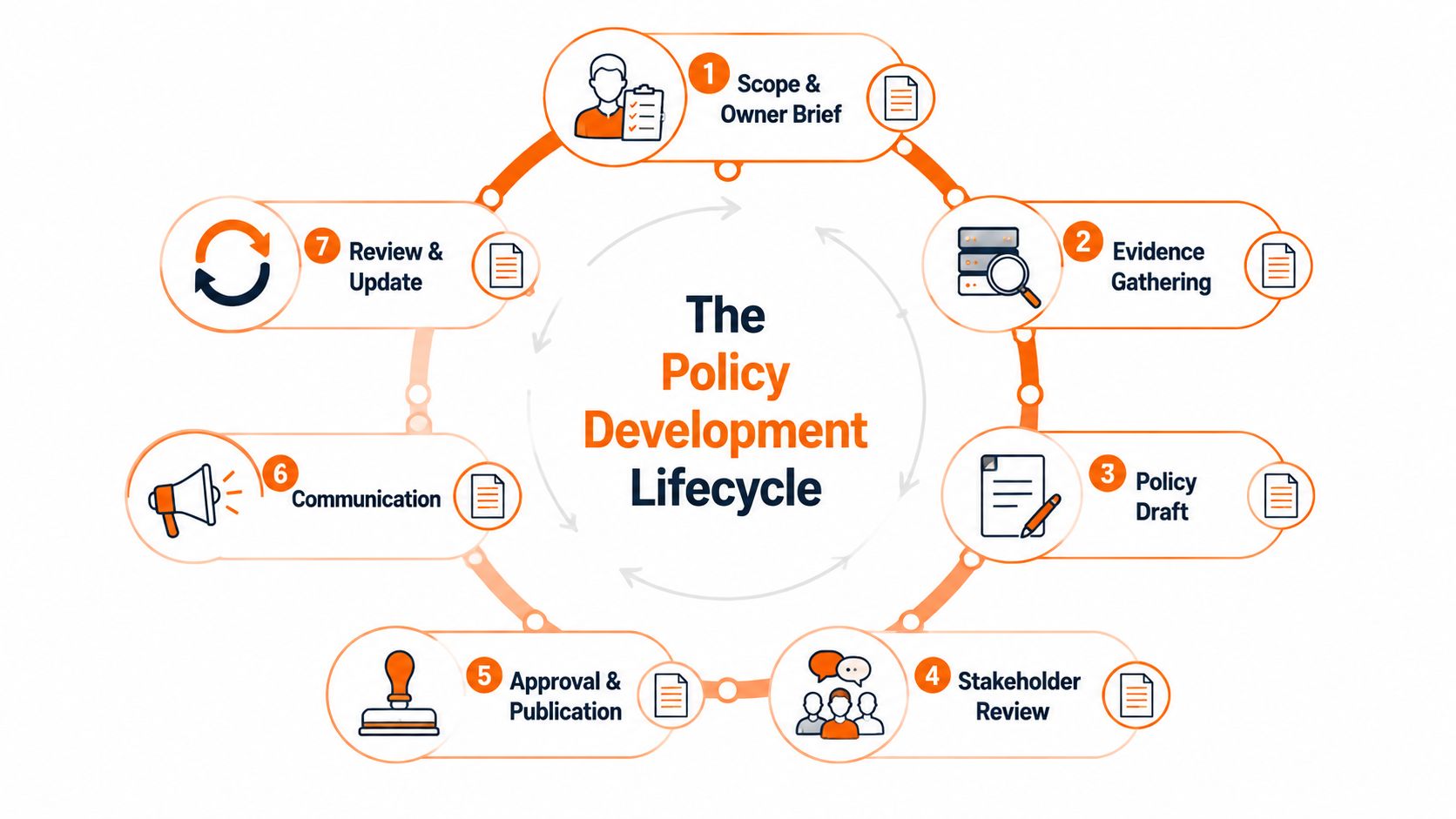
Good policy development produces a trail of decisions, not just a final PDF. Each stage should leave an artefact that another person can inspect.
Seven stages and their outputs
1. Scope and owner brief. Record the accountable owner, audience, systems, objective, exclusions, approval route and review date. Keep it short enough that the owner can challenge it.
2. Evidence gathering. Pull the asset list, user list, access matrix, supplier register and recent incident information. Add existing procedures, insurance requirements, customer commitments and relevant contractual terms. Technical evidence should come from the systems that enforce the rule, not from memory.
3. Drafting. Write one policy at a time, using numbered clauses and plain English. Link detailed evidence in annexes, such as an access review record or backup procedure, so the policy remains readable.
4. Consultation. Ask the IT lead whether the rules are enforceable, the data lead whether they reflect actual processing, managers whether staff can follow them and a hostile reader where ambiguity remains. Legal review matters where employment, contractual, regulatory or data protection consequences arise.
5. Approval. Record the policy name, version, effective date, approver and decision. An email or workflow record can be sufficient if it is retained and clearly tied to the final version.
6. Publication and communication. Store the master copy in one controlled location. Give staff an acknowledgement route, explain what changed and include the policy in onboarding.
7. Review and version control. Use a consistent version scheme, maintain a change log and archive retired documents rather than deleting them. A file called final-policy-v3-really-final.pdf is not version control.
The weak artefacts are predictable: unsigned documents, missing change logs, links to inaccessible folders and PDFs that staff can't locate. Put the register, approval record, training evidence and retired versions somewhere controlled, searchable and backed up.
This short explainer can help teams visualise the lifecycle before they assign tasks:
For organisations with heavier assurance needs, the same discipline supports audit readiness in social care, where policy ownership, evidence and review history need to stand up to scrutiny. The sector may differ, but the underlying lesson applies to any regulated SME: a control without an accountable record is difficult to defend.
Mapping Your Policies to GDPR, Cyber Essentials and ISO Controls
Framework mapping prevents duplicate writing, but it shouldn't become a spreadsheet exercise detached from risk. A single clause can support several obligations, provided the underlying process really operates.
GDPR brings legal requirements around personal data principles, records of processing, security and breach handling. Cyber Essentials focuses on practical technical control areas, including firewalls, secure configuration, user access, malware protection and patch management. ISO 27001 adds a broader information security management system, with control themes covering governance, access, asset management, supplier relationships, incident management, continuity and monitoring. NIST guidance can provide useful ISO-aligned structure for identifying, protecting, detecting, responding and recovering.
| Policy clause | GDPR Article | Cyber Essentials | ISO 27001 / NIST |
|---|---|---|---|
| Personal data is processed lawfully, fairly and transparently | Article 5 | Not a direct control | Information governance and identify functions |
| Personal data is kept accurate and no longer than needed | Article 5 | Not a direct control | Data lifecycle and information classification |
| Processing activities are recorded and maintained | Article 30 | Not a direct control | Asset, data and governance documentation |
| Appropriate technical and organisational measures are applied | Article 32 | Secure configuration, user access and malware protection | Access, technology, protection and risk treatment |
| Suspected incidents are reported through a defined route | Breach response obligations | Malware and access evidence may support investigation | Incident response and detect/respond functions |
| Unauthorised software and unsafe configuration are prohibited | Supports Article 32 | Secure configuration and malware protection | Configuration, change and asset controls |
| Accounts receive only approved access | Supports Article 32 | User access control | Access control and identity management |
| Devices and software are patched through an owned process | Supports Article 32 | Patch management | Vulnerability and technology management |
| Suppliers must meet security and data handling requirements | Controller or processor arrangements where relevant | Supplier evidence may support assurance | Supplier relationships and third-party risk |
GDPR clauses often force statements that a technical framework won't. For example, a firm may have strong access controls but still fail to explain retention or processing accountability. Conversely, Cyber Essentials evidence can support a wider security file, but certification evidence doesn't replace a data protection record.
Make the matrix audit-friendly
Create a spreadsheet with these fields:
- Policy and clause number
- Business risk addressed
- Framework or obligation
- Control owner
- Evidence location
- Evidence date
- Exception reference
- Review status
Use the exact clause number in the policy and the exact file name or system record in the evidence column. Don't claim that a policy satisfies a framework merely because it contains similar words. Test the control, retain the evidence and mark gaps openly.
For a practical introduction to the certification route, review this explanation of what Cyber Essentials certification involves. The point isn't to write three versions of the same rule. It's to maintain one clear requirement and show how it supports the relevant legal, technical and management expectations.
Governance Roles, Training and Day-to-Day Ownership
Consider a representative 40-person North West engineering firm. It doesn't need a compliance department to run policy governance, but it does need named people who understand the boundary between accountability and operation.
The managing director retains accountability for risk and approves the policy position. The IT lead, whether internal or outsourced, owns the technical implementation. A nominated data lead handles privacy responsibilities and records. Line managers reinforce acceptable use, report leavers and challenge unsafe behaviour. No single person should be expected to write, approve and independently assure every control.
A quarter that works in real life
During the first week, every new starter receives a short briefing covering acceptable use, account security, data handling, incident reporting and remote working. The manager confirms completion, while the IT team verifies that the account and device follow the relevant standards.
Each month, the firm sends a focused micro-module. One month might cover suspicious messages, another secure file sharing or reporting a lost device. The training record should show the employee, module, completion date, result where applicable and any follow-up action.
A quarterly phishing simulation can test whether the reporting route is understood, but it shouldn't become a public shaming exercise. The IT lead gives targeted coaching to people who need it, and managers address repeated unsafe behaviour as a normal management matter. The service desk shouldn't become the disciplinary function.
The annual refresher revisits the full policy set and highlights material changes. The quarterly policy meeting is chaired by the MD or a delegated senior manager, with the IT lead, data lead and relevant line managers present.
What the quarterly meeting records
Minutes should capture:
- Changes in systems, suppliers, sites or working practices
- Incidents, near misses and recurring user issues
- Access review outcomes and unresolved exceptions
- Training completion and follow-up actions
- Backup, patching and endpoint evidence supplied by IT
- Decisions, owners and due dates
Training records belong in a controlled shared folder or governance platform, with access limited appropriately. The firm should be able to answer three questions quickly: who approved the policy, who was trained and what changed after the last review.
Good governance is not a meeting-heavy exercise. It is a reliable way to turn recurring evidence into a decision before an incident makes the decision for you.
Keeping Policies Alive After Launch
Publishing a policy is not completion. It's the point at which the business starts testing whether the words match daily work. SMEs often pass the launch milestone, then struggle later because no one owns changes, exceptions or evidence.
Set a recurring annual cycle with a named month for each policy. The owner reviews the content and evidence, the IT lead confirms technical accuracy, the data lead checks privacy implications where relevant and the senior approver records the decision. The register should show the current version, effective date, owner, approver, next review and location.
Triggers for an early review
Don't wait for the calendar when the business changes. Start an out-of-cycle review after:
- A new regulation or contractual requirement: Check whether obligations, wording or evidence have changed.
- An incident or near miss: Amend the rule where the event exposed ambiguity or an impractical step.
- A supplier change: Reassess access, data handling, assurance and termination arrangements.
- A system rollout: Update the policy and linked procedure before users migrate.
- An office move or working-model change: Revisit physical security, connectivity and remote access.
- A material headcount change: Confirm onboarding, manager responsibilities and access workflows still work.
Use a simple major.minor scheme. A major version reflects a substantial change in scope or obligations. A minor version records a limited clarification or operational update. Archive retired versions with their approval record and effective period, rather than overwriting history.
Keep an accessible master register. Log every exception, including an informal approval given in a call or meeting. Convert it into a dated record with an owner, reason, compensating control and expiry or review decision.
An undocumented exception looks like an uncontrolled bypass.
A 90-Day Rollout Plan and Questions for Your IT Partner
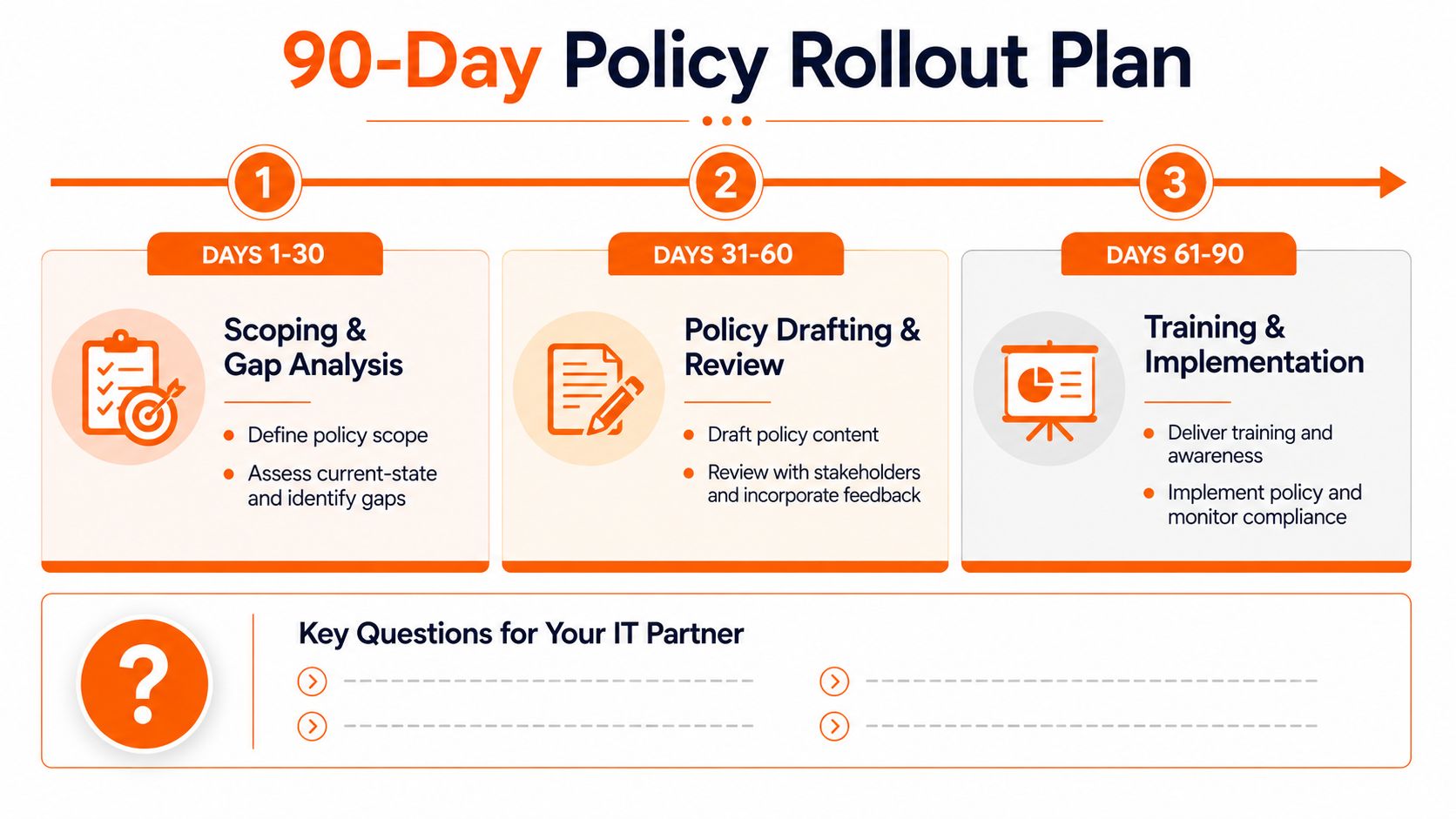
A policy programme can start on Monday without becoming a second business. Divide the work into three practical blocks and protect the evidence from the first day.
Days 1 to 30
Scope the policy set, assign owners and complete a gap review against GDPR responsibilities and Cyber Essentials control areas. Build the asset, user, supplier and access lists. Decide where the master register, evidence and approvals will live.
Days 31 to 60
Draft the policies, consult the people who must operate them and record changes. In parallel, ask the IT lead to address technical gaps such as multi-factor authentication, conditional access, device baselines and backup verification. The policy shouldn't promise a control that the technical team hasn't implemented or scheduled.
Days 61 to 90
Deliver onboarding and staff training, run a phishing simulation, capture acknowledgements and hold the first governance meeting. Record actions and owners instead of treating attendance as evidence of governance.
Owner checklist
- Assign accountability: Name the business owner for every policy and control.
- Control versions: Record approvals, changes, effective dates and retired copies.
- Publish consistently: Give staff one obvious location and an acknowledgement route.
- Maintain evidence: Store access reviews, training, incidents, exceptions and technical reports.
- Set review dates: Add calendar ownership, not just a date in the document.
- Confirm handover: Write down where the IT partner's responsibility ends and the client's begins.
Questions for your IT partner
Ask who owns each control, what evidence the partner supplies for reviews, how exceptions are logged and how incident escalation works outside office hours. Confirm who approves access, who verifies backups, who maintains device baselines and who communicates with the business during a suspected compromise.
If you're changing providers or formalising responsibilities, use an IT managed service onboarding checklist to expose missing information before the handover. Finish with a signed responsibility matrix and a next-review date. That small act prevents policy ownership from disappearing between the SME and its technology partner.
Blowfish Technology helps UK SMEs connect cyber security policy development with managed IT support, Microsoft 365 administration, access controls, backup, user awareness training and Cyber Essentials preparation. If you need to turn policy wording into owned controls and usable evidence, visit Blowfish Technology to discuss the systems, responsibilities and review workflow your business needs.

The Blowfish Technology team. Managed IT, cloud services, software development and connectivity for North West businesses since 1999.