
IT Asset Management, usually shortened to ITAM, is the business practice of tracking and managing all your company's technology, from laptops and software to cloud subscriptions, so you cut costs, reduce security risk, and prove compliance. In UK SMEs, it matters because 62% of cyber incidents in SMEs are linked to unmanaged or outdated assets, and firms with mature ITAM reduce software spend by an average of £15,000 annually per 50 users according to the UK National Cyber Security Centre.
If you run a small or medium-sized business, you've probably felt the problem already. Someone leaves and nobody knows which laptop they had. Finance is paying for software nobody uses. A supplier asks how many licensed installs you have, and the answer is three spreadsheets, two guesses, and a lot of digging through inboxes.
That's where most businesses start asking the actual version of the question: not just what is IT asset management, but why does it suddenly feel essential? The short answer is control. Good ITAM gives you a reliable view of what you own, what you're paying for, who's using it, what's exposed, and what needs to be retired before it creates cost or risk.
Table of Contents
- Your Business Runs on IT So Who Is Managing the Assets
- Understanding Your IT Assets and Their Lifecycle
- The Triple Win Unlocking ITAM Business Benefits
- Core ITAM Processes and Responsibilities
- A Pragmatic ITAM Implementation Roadmap for SMEs
- Common ITAM Pitfalls and How to Avoid Them
- How Blowfish Technology Delivers ITAM as a Service
Your Business Runs on IT So Who Is Managing the Assets
A common SME scenario goes like this. A director approves a few laptops for new starters, somebody signs up for extra Microsoft 365 licences, one engineer keeps an old workstation “just in case”, and a mobile phone gets replaced without the old one being properly signed off. None of those decisions looks serious on its own.
Then the business grows and the cracks join up.
Suddenly, no one can answer basic questions. Which devices are still in use? Which software renewals are active? Which machines are too old to trust? Which users still have access they shouldn't have? If you're trying to bid for work in a regulated sector or prepare for a security assessment, that uncertainty becomes a business problem, not an IT problem.
Chaos usually starts with normal decisions
Most asset sprawl doesn't come from negligence. It comes from speed. Teams buy what they need to get work done, especially when hybrid working, remote onboarding, and cloud subscriptions make procurement easier than ever. That's why ITAM works best when it's treated as an operating discipline rather than a stocktake exercise.
Unmanaged assets rarely stay “small issues”. They turn into avoidable renewals, missing devices, unsupported hardware, and weak audit evidence.
For many business owners, the retirement end of the process is the part they've thought about least. A laptop leaves the building, but has the data been wiped, the asset record closed, the licence reclaimed, and the device disposed of properly? If that area is unfamiliar, this guide to understanding ITAD for businesses is useful because disposal is where cost control and security meet.
There's also a practical human point here. Staff often use more endpoints and services than leadership realises. This short look at how many devices people use in a workday is a reminder that your asset estate probably includes far more than office PCs and a server cupboard.
What ITAM gives you in plain business terms
At its best, ITAM answers five questions clearly:
- What do we have: hardware, software, cloud services, mobiles, peripherals, and accounts.
- Who has it: named users, shared users, departments, and sites.
- What does it cost: upfront purchase, monthly subscription, renewal, and support.
- What risk does it create: unsupported devices, unused licences, unknown owners, weak disposal.
- What should happen next: keep, reassign, upgrade, retire, or remove.
That's why asking what is IT asset management isn't really asking for a definition. You're asking how to stop your IT estate becoming expensive, messy, and difficult to defend.
Understanding Your IT Assets and Their Lifecycle
An IT asset is any technology item your business buys, leases, subscribes to, supports, or relies on to operate. That includes obvious things like laptops, desktops, servers, and phones. It also includes software licences, Microsoft 365 seats, cloud storage, line-of-business applications, firewall appliances, backups, and SaaS subscriptions that someone put on a company card two years ago and forgot.
A simple way to think about it is a company vehicle fleet. You wouldn't run vans without knowing who drives them, when they need servicing, what they cost, and when they should be replaced. IT assets need the same discipline.
What counts as an IT asset now
For most UK SMEs, the asset list is wider than expected:
- End-user devices: laptops, desktops, tablets, mobiles, monitors, docks, and printers.
- Software and licences: Microsoft 365, Adobe, antivirus, CAD packages, finance systems, and specialist industry software.
- Cloud services: Azure, hosted desktops, backup services, and collaboration tools.
- Network and security equipment: routers, switches, Wi-Fi kit, firewalls, and authentication tools.
- Digital entitlements: user accounts, subscriptions, support contracts, and warranties.
One area that often gets missed is licence administration. Businesses may know they “have Microsoft 365”, but not which plan each person has, which seats are unused, or which licences are assigned to leavers. That's why practical licence governance matters, especially for businesses already trying to simplify procurement and renewals. If you want a concrete example, this guide on Office 365 licence management made simpler shows how quickly subscription sprawl can build up.
The lifecycle is the real discipline
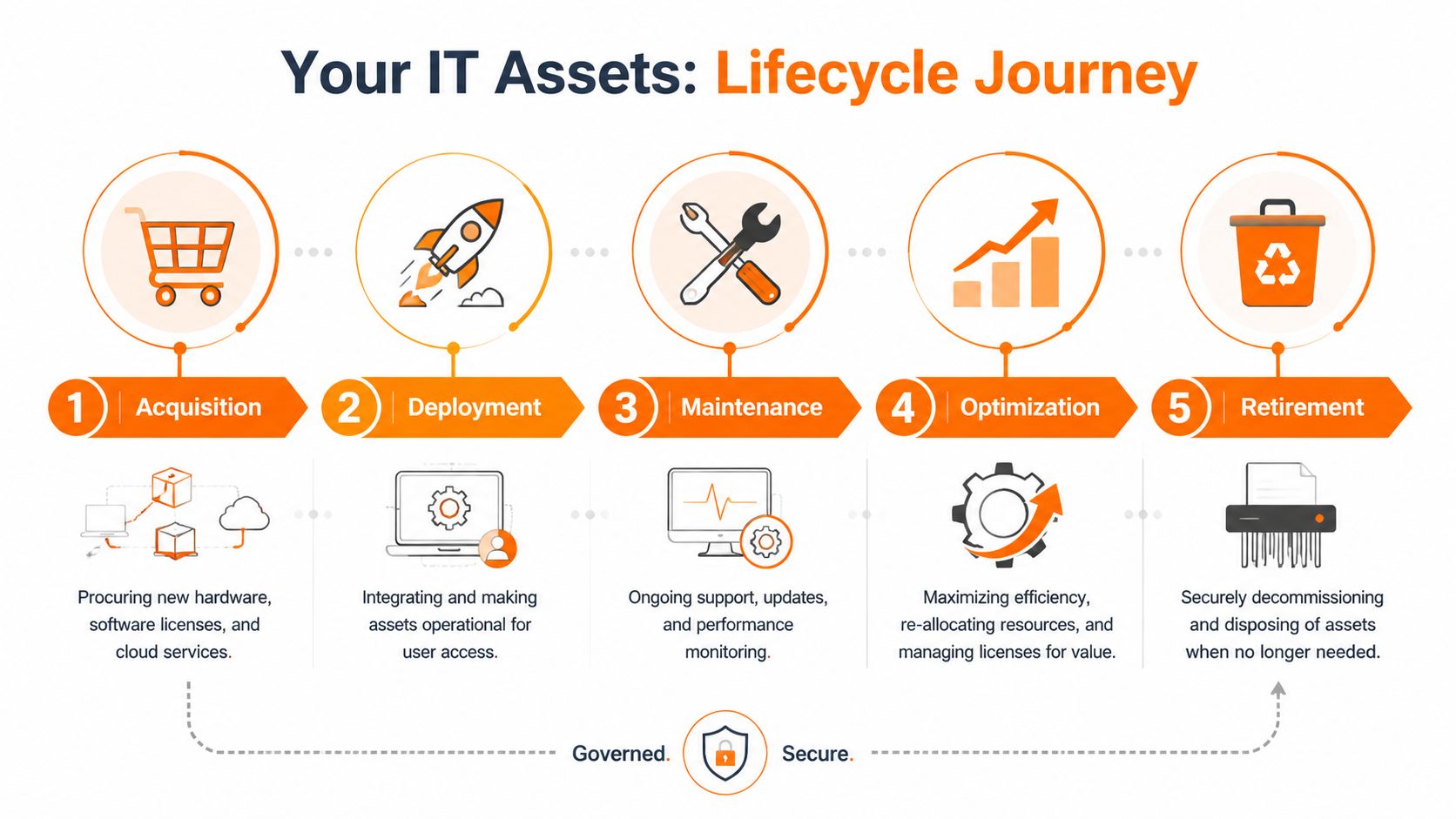
ITAM is not just a list of assets. It's the lifecycle management of those assets from purchase to disposal.
| Stage | Key Activities | Primary Goal |
|---|---|---|
| Acquisition | Selecting suppliers, approving purchases, recording cost and ownership | Buy the right asset with clear accountability |
| Deployment | Configuring devices, assigning users, installing software, documenting setup | Get assets into use securely and consistently |
| Maintenance | Updating, patching, renewing, monitoring, reallocating, reconciling licences | Extend value and reduce operational risk |
| Retirement | Removing access, wiping data, reclaiming licences, secure disposal | Close risk and avoid lingering cost |
A mature business often adds a fifth practical stage between maintenance and retirement: optimisation. That means checking whether an asset is still right for the role, whether a licence can be downgraded, or whether one user's old machine is still suitable for another role.
Practical rule: If you only know what you bought, but not where it is, who uses it, and when it should leave service, you don't have ITAM. You have purchase history.
That distinction matters. A spreadsheet can be enough to start. It just won't stay accurate unless the lifecycle is built into everyday operations.
The Triple Win Unlocking ITAM Business Benefits
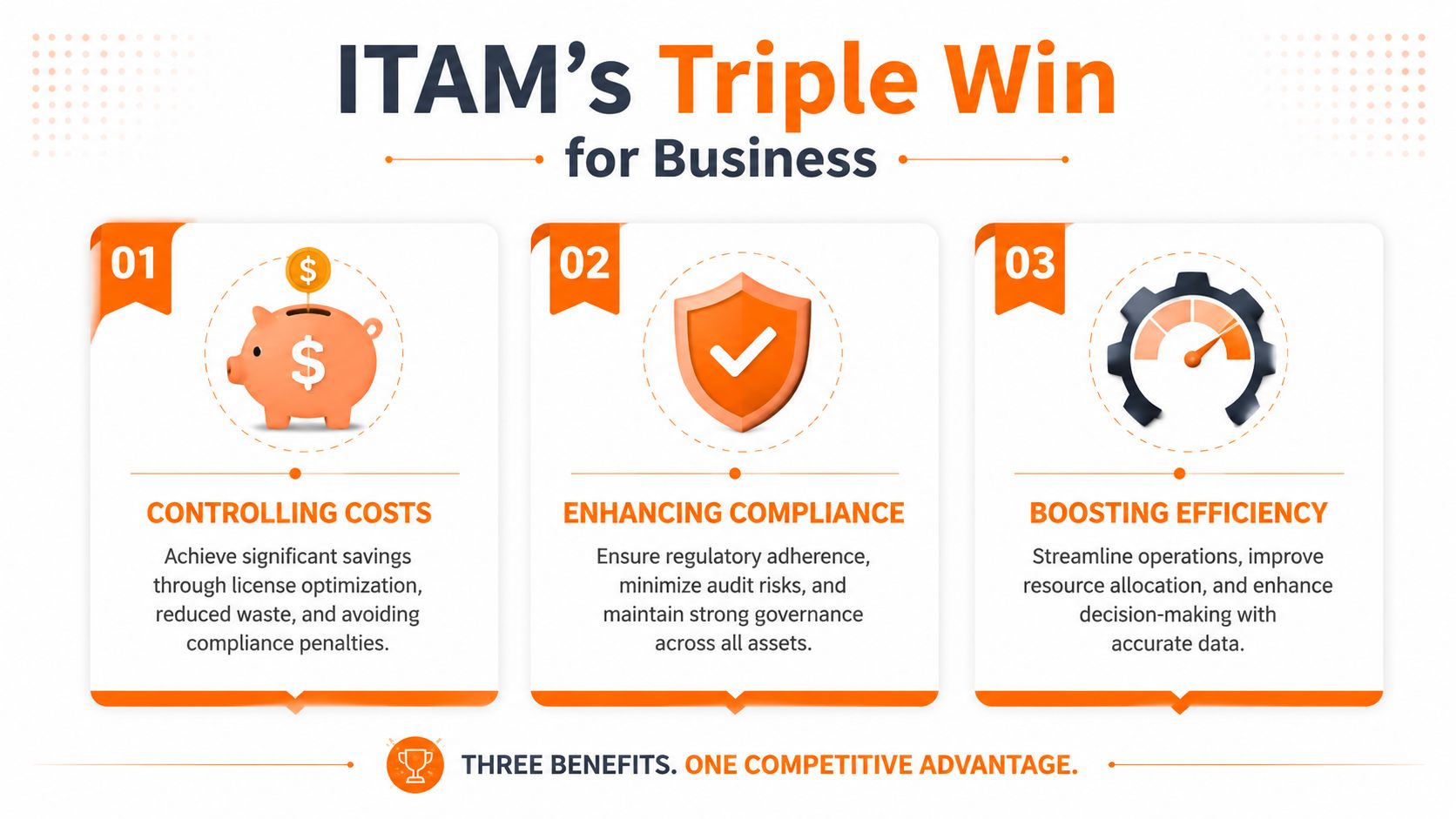
Owners usually back IT asset management when they see one thing clearly. It protects margin, reduces avoidable risk, and makes compliance far less painful.
Better cost control
The first financial gains rarely come from a major technology change. They usually come from tidying up what the business already pays for.
In practice, that means finding Microsoft 365 licences still assigned to leavers, specialist software bought twice by different departments, or laptops replaced early because nobody can confirm age, warranty, or condition. I see this a lot in growing SMEs. Spend rises in small monthly amounts, so the waste is easy to miss until renewal season arrives.
A useful ITAM process helps you:
- Recover licences quickly: remove and reassign software when staff leave or change role.
- Delay unnecessary hardware purchases: replace devices based on support status and performance, not guesswork.
- Bring supplier spend under control: stop ad hoc buying that leads to overlapping renewals and inconsistent pricing.
- Spot duplicate tools: identify where different teams are paying for similar services.
This is one of the few IT disciplines that can improve service and cut cost at the same time.
Lower security risk
Security problems often start with poor visibility. An untracked laptop, an old workstation on the shop floor, or a cloud account nobody owns can all become weak points.
That matters even more in engineering, manufacturing, and multi-site firms across the North West. These businesses often run a mix of office devices, shared terminals, specialist machines, and older systems kept in service for operational reasons. The trade-off is real. Replacing every legacy asset overnight is rarely practical, but leaving those assets undocumented creates risk you cannot assess properly.
A current asset register gives the business a way to make sensible decisions:
- Which devices are still supported
- Which systems are overdue for patching or replacement
- Who owns each asset and access account
- Which assets still need access to business systems
- Which older devices need tighter controls because they cannot be upgraded
For Cyber Essentials, this matters more than many owners expect. Before you can prove devices are secure, you need to know which devices are in scope. Good ITAM turns that from a scramble into a routine.
Stronger compliance evidence
Compliance work becomes expensive when staff have to reconstruct records from inboxes, finance reports, and memory. That is a common problem for SMEs dealing with Cyber Essentials, customer due diligence checks, insurance questionnaires, or sector-specific requirements.
ITAM gives you evidence you can use. You have a current list of devices, assigned users, software in use, support status, and retirement history. That makes it easier to answer auditor and customer questions with confidence rather than approximation.
For regulated firms, the benefit goes beyond passing an assessment. It reduces the chance of giving the wrong answer to a customer, keeping unsupported devices in service too long, or missing a leaver account that should have been removed. A documented process for joins, moves, and leavers is a big part of that. Our guide to an IT support onboarding checklist for new starters and leavers shows how quickly gaps appear when those handovers are informal.
The commercial value is straightforward. Better records mean fewer surprise costs, fewer avoidable security gaps, and less time wasted proving control after the fact.
Core ITAM Processes and Responsibilities
Once ITAM is established, the primary challenge is keeping it accurate. Many businesses falter at this stage. They do an initial stocktake, feel organised for a month, then drift back into the same old pattern of ad hoc purchases and half-updated records.
The operational routines that keep ITAM accurate
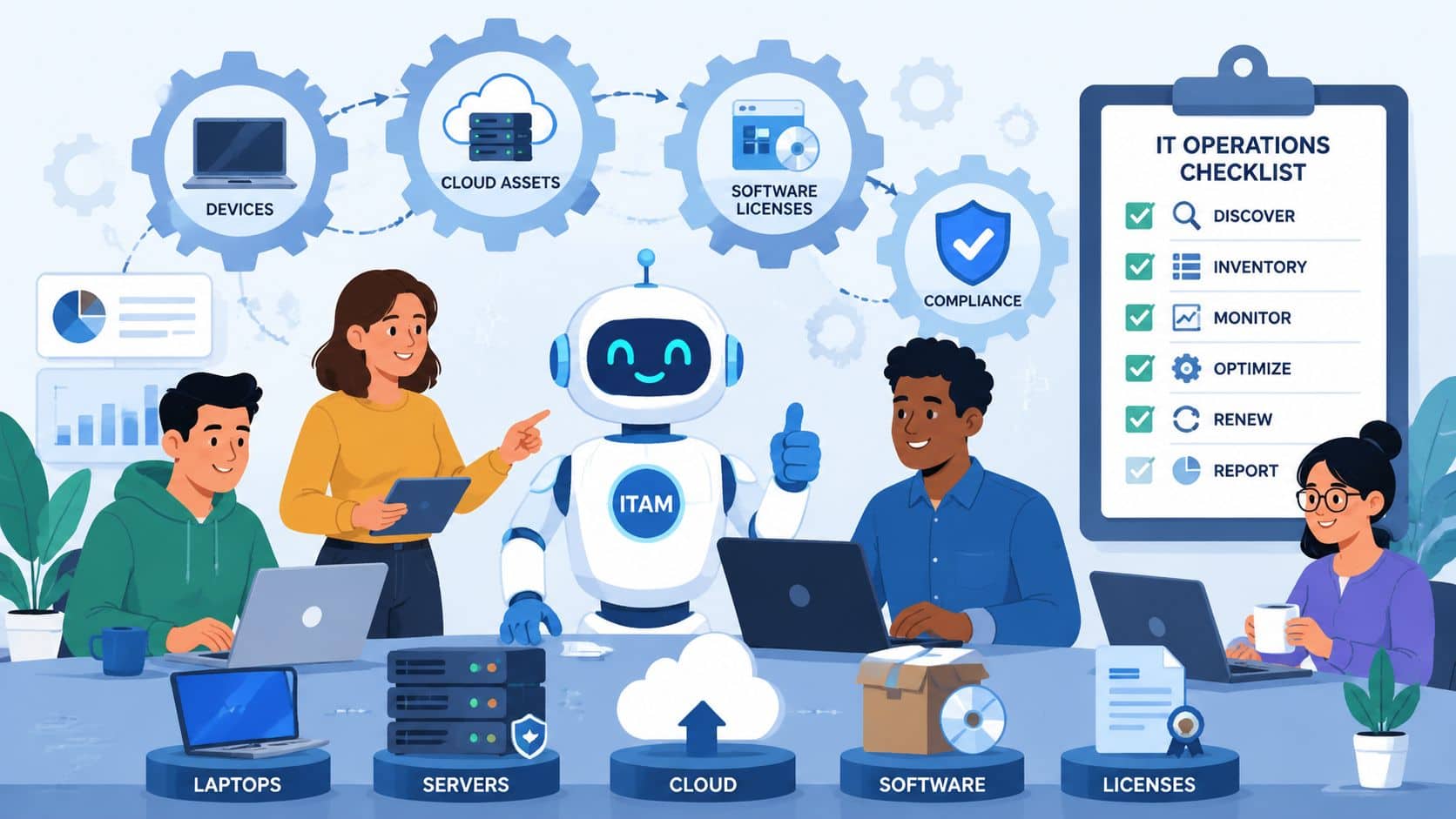
A functioning ITAM programme runs on repeated routines rather than one big annual exercise.
The core activities usually include:
- Continuous discovery: finding devices, software, and services that are in use across the business.
- Asset registration: recording owner, location, role, purchase date, warranty, and support status.
- Licence reconciliation: comparing what you bought against what is deployed and assigned.
- Change tracking: updating records when people join, leave, move department, or swap devices.
- Review and optimisation: checking whether assets are still appropriate, supported, and cost-effective.
- Retirement control: decommissioning devices properly, wiping data, removing access, and reclaiming licences.
One of the easiest places to build discipline is onboarding and offboarding. If HR, IT, and line managers don't work from the same checklist, assets fall through the gaps. This is why a clear IT support onboarding checklist helps more than people expect. It turns asset assignment from an informal handover into a repeatable process.
Who owns what inside the business
ITAM works best when responsibility is shared, but ownership is clear.
| Role | Typical ITAM responsibility |
|---|---|
| IT | Discovery, records, deployment standards, patching, retirement |
| Finance | Purchase approval, contract visibility, renewal tracking |
| HR | Joiners, movers, leavers, user status changes |
| Department managers | Confirming who needs which assets and software |
| Leadership | Backing policy and enforcing approved buying routes |
What doesn't work is assuming “IT handles it” while other departments buy software, authorise devices, or keep separate records. That creates fragmented data and arguments about which version is correct.
Good ITAM is less about technology than decision ownership. Somebody must approve, somebody must record, and somebody must close the loop when an asset changes hands.
If you're wondering what is IT asset management in operational terms, this is the answer. It's a set of business habits that keep your technology estate visible and governable.
A Pragmatic ITAM Implementation Roadmap for SMEs
If your current setup is messy, don't start by buying the biggest platform you can find. Start by getting the basics visible. The businesses that make progress quickest usually begin with a workable inventory, a few firm rules, and a narrow scope they can keep up to date.
That matters even more in sectors with older or specialist equipment. The Institution of Engineering and Technology found that 32% of UK manufacturing firms in the North West operate with unmanaged legacy IT assets, costing an average of £18,500 annually per firm in unplanned downtime and security incidents. For engineering and manufacturing businesses, unmanaged legacy kit isn't just untidy. It becomes an ongoing financial drag.
Phase 1 quick wins
Start with a manual baseline. A spreadsheet is fine if it's structured properly.
Capture the essentials first:
- Asset type and model
- Serial number or unique identifier
- Assigned user or owner
- Location or site
- Purchase date if known
- Warranty or support status
- Installed key software
- Planned review or replacement date
Don't wait for perfect data. If you hold out for complete records before starting, you won't start.
Focus first on the assets that matter most to risk and spend. That usually means laptops, desktops, mobiles, Microsoft 365 licences, security tools, and any line-of-business systems that would disrupt operations if lost or unsupported.
Phase 2 put basic rules in writing
Most SMEs don't need a heavyweight policy set. They do need a few critical elements written down and followed.
Those rules should cover:
- How assets are approved and purchased
- How new devices are recorded before issue
- Who can authorise software subscriptions
- How leavers return equipment and lose access
- How retired assets are wiped and disposed of
A simple policy beats a polished document nobody uses. If the rule can't be followed during a busy week, it's too complicated.
Phase 3 choose tools that match your size
Once the basics are stable, then look at tooling. For many SMEs, the right approach is a combination of systems rather than one “magic” platform. You may use Microsoft 365 admin tools for account visibility, an RMM platform for device discovery, your PSA or service desk for user context, and procurement records for financial tracking.
The important question isn't “what has the most features”. It's “what will our team keep current”.
If you're refreshing hardware as part of tidying your estate, it helps to standardise around a sensible shortlist instead of letting every purchase become a one-off exception. A buying guide such as find your business laptop can help frame what to compare, especially around portability, durability, and role suitability.
Phase 4 automate the high-friction tasks
Automation makes sense once your rules are clear. Before that, it only helps you scale bad data faster.
Good candidates for automation include:
- Device discovery and inventory sync
- Licence assignment and reclamation workflows
- Leaver checklists
- Warranty and renewal reminders
- Retirement approval and wipe confirmation
This is also the point where SMEs should think about exceptions. Which devices can't follow the normal refresh cycle? Which machines support specialist software? Which assets are business-critical enough to justify tighter tracking and documented replacement planning?
Start with the estate you can control this quarter. Expand after the process proves itself.
That's the practical route. Shortlist what matters. Record it properly. Put simple rules around movement and disposal. Then automate the repeatable parts.
Common ITAM Pitfalls and How to Avoid Them
A familiar SME scenario goes like this. A laptop fails, someone buys a replacement quickly, a user leaves before their software is reclaimed, and six months later nobody is fully sure which devices, licences, and admin rights are still live. The business still has IT in place, but control has slipped.
That is how ITAM problems usually start. Not with one big failure, but with small gaps in purchasing, user changes, software control, and disposal. For UK SMEs, those gaps show up quickly during Cyber Essentials preparation, insurance reviews, customer security questionnaires, and audits in regulated sectors such as engineering and manufacturing.
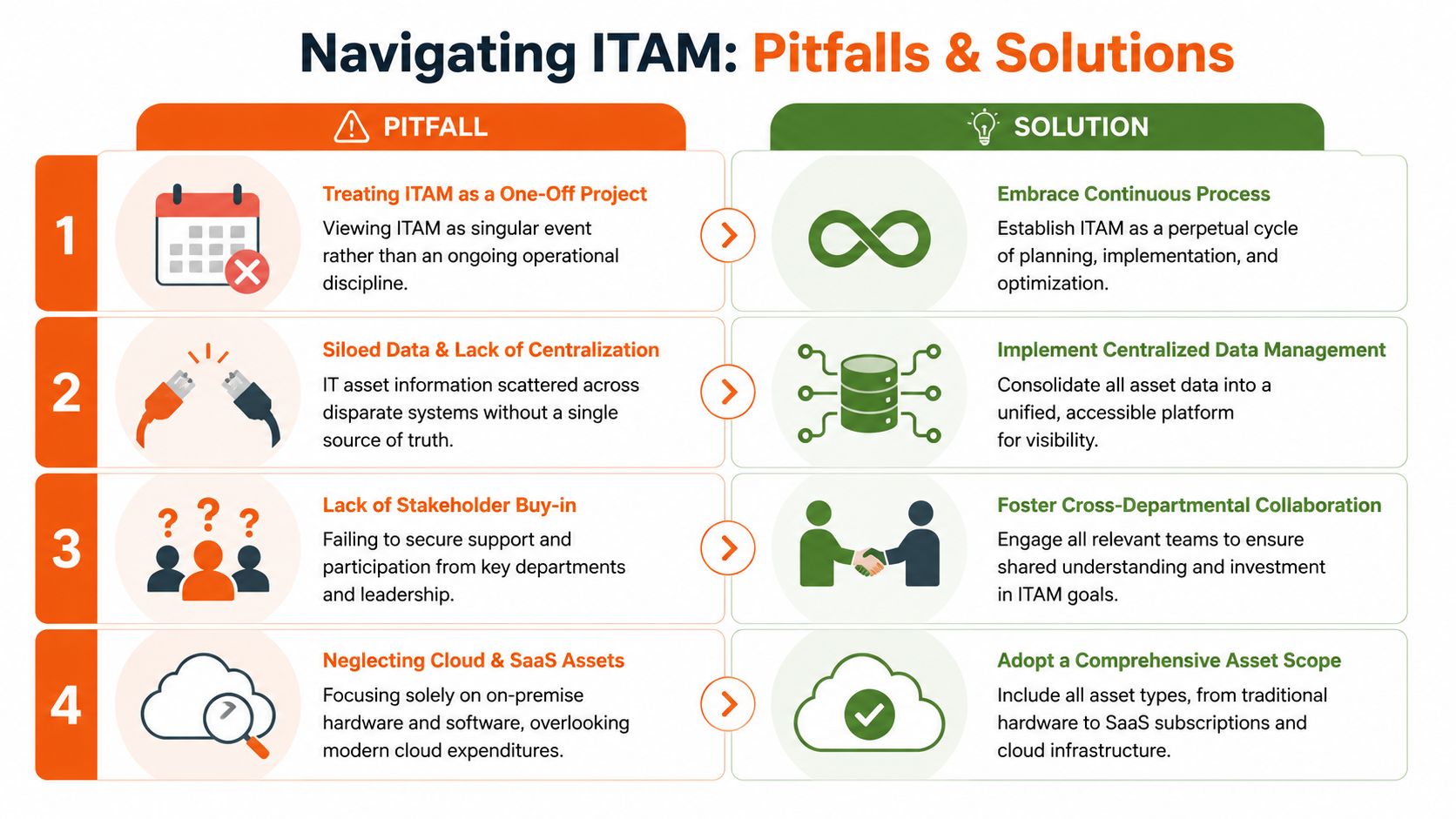
Four mistakes that create avoidable cost and risk
- Treating ITAM as a one-off tidy-up: Asset records need updating as part of joiners, leavers, swaps, repairs, renewals, and disposals. If updates only happen during an annual review, the register is already behind.
- Buying a tool before setting the rules: Software helps, but it does not decide who approves purchases, who assigns devices, or who signs off retirement. Those decisions need clear ownership first.
- Tracking laptops but ignoring SaaS and cloud services: For many SMEs, the bigger overspend now sits in Microsoft 365 licences, design software, backup tools, and specialist engineering applications. If those are not tracked, spend drifts and former staff can keep access longer than they should.
- Leaving ownership vague: Every asset should point to a named user, team, site, or business function. “Shared” and “spare” are useful operational labels, but they are poor accountability labels.
A common problem, especially for SMEs working toward Cyber Essentials, is underestimating how quickly a weak asset register becomes a compliance issue. If a business cannot say which devices are in scope, what software is installed, and who is responsible for each system, certification work becomes slower, more expensive, and less predictable.
I see this a lot in North West engineering and manufacturing firms. They often manage a mix of office devices, workshop machines, shared terminals, and specialist systems that cannot be refreshed on a normal cycle. The trade-off is real. You cannot always standardise everything. But you can still record exceptions properly, document why they exist, and put tighter controls around the assets that carry the most operational or regulatory risk.
A few habits prevent most of the trouble:
- Keep one source of truth: Other systems can feed data in, but one register should hold the accepted record.
- Review after business events: Staff changes, supplier changes, office moves, and contract renewals are the points where records usually drift.
- Track retirement properly: Devices do not stop being a risk when they leave someone's desk. Data wipe status, collection, disposal, and licence recovery all need recording.
- Control exceptions: One-off devices and legacy software should be listed, justified, and reviewed. Otherwise they become permanent blind spots.
- Get outside help if internal ownership is weak: A provider that combines support, security, and asset control can keep records current as part of daily operations. That is often more practical than expecting busy staff to maintain ITAM manually. Here is a clear explanation of what a managed service provider does in that model.
Good ITAM does not depend on perfect paperwork. It depends on repeatable habits. When asset changes are tied to normal operational work, SMEs spend less on waste, reduce audit friction, and cut the chance of old devices, unused licences, or unknown systems creating expensive problems later.
How Blowfish Technology Delivers ITAM as a Service
For many SMEs, the challenge isn't understanding ITAM. It's having the time, tools, and internal discipline to keep it working month after month. That's where a managed service approach changes the picture.
What that looks like in practice
Blowfish Technology builds asset visibility into day-to-day managed IT support rather than treating it as a separate paperwork exercise. That means device estates are tracked as part of onboarding, support, procurement, security management, and replacement planning.
In practical terms, that includes:
- Hardware and software procurement with clearer standardisation and purchasing control.
- Managed support and monitoring so device context doesn't sit in disconnected systems.
- Security services such as managed EDR, ITDR, DNS filtering, password management, and two-factor authentication that rely on accurate asset knowledge.
- Microsoft 365 and cloud administration where licence and user changes are handled in step with support activity.
- Cyber Essentials support where inventory quality and software control are often the difference between confidence and confusion.
For SMEs, that's usually more realistic than trying to design a mature ITAM practice alone while also running the business. If you're still weighing up what an outsourced partner should own, this explanation of what a managed service provider does is a useful place to start.
Consistency is the value. Assets get tracked when they're bought, assigned, supported, changed, and retired. That reduces drift. It also gives leadership a clearer view of spend, risk, and refresh planning without turning internal teams into part-time asset administrators.
If you want a practical conversation about getting control of your devices, licences, cloud services, and Cyber Essentials readiness, speak to Blowfish Technology. They help UK SMEs, especially in the North West, turn ITAM from a loose spreadsheet exercise into a managed, supportable part of day-to-day operations.

The Blowfish Technology team. Managed IT, cloud services, software development and connectivity for North West businesses since 1999.