
A major UK-wide study found that 48% of small and medium-sized businesses had lost, or lost access to, company or customer data within the previous five years. That affected about 800,000 UK businesses and cost UK companies more than £5.3 billion since 2019. Commercial data loss alone exceeded £1 billion a year, according to Beaming's UK SME data loss research.
Those figures change the conversation. Data loss isn't an occasional technical inconvenience, and it isn't limited to ransomware. It stops people working, delays invoices, disrupts customer service, creates compliance exposure and forces managers to make decisions with incomplete information. The recovery bill is often the smallest part of the damage.
Table of Contents
- The Scale of Data Loss for UK Businesses
- Financial and Operational Consequences of Data Loss
- Why Backups Alone Do Not Guarantee Recovery
- How Data Loss Affects Different Business Types
- Building a Layered Data Recovery Strategy
- Choosing the Right Managed IT Partner for Data Protection
The Scale of Data Loss for UK Businesses
For UK businesses, cyber incidents are common. The Cyber Security Breaches Survey 2025 reports that 45% of businesses and 32% of charities experienced a cyber security breach or attack in the previous 12 months. Only 19% of businesses and 11% of charities reported a negative outcome, but that does not make the remaining incidents harmless.
SMEs feel data loss more sharply than large enterprises because they have less spare capacity. A larger organisation may shift work to another team, site or platform. A small business often relies on one accounting system, Microsoft 365 tenant, file server, line-of-business application and a small group of staff who know how everything fits together.
If one system becomes unavailable, work stops in several places at once. Sales may lose customer histories, finance may be unable to raise invoices, and operations may not know which orders are ready to ship. Directors then spend time coordinating recovery rather than managing customers, staff and cashflow.
The cause is not always a cyberattack. Hardware failure, accidental deletion, failed migrations, incorrect permissions, power disruption and corrupted synchronisation can all remove access to information. A backup that has failed for months creates the same operational exposure as a dramatic attack, without the warning that might prompt action.
The UK evidence is hard to dismiss
The government research places the average cost of a significant cyber attack at almost £195,000 per business, or £14.7 billion annually across the UK. An SME director should not treat that as a standard invoice. It shows how quickly a technical incident can become a material resilience problem.
The hidden cost is often harder to see. Staff work around unavailable systems, managers postpone projects, customers wait longer for answers and finance teams rebuild records manually. Payroll continues while output falls, invoices go out late and cash arrives later than planned. Customers who experience repeated delays may move to a competitor before the technical issue is fully resolved.
| Metric | Statistic |
|---|---|
| Businesses reporting a breach or attack in the previous 12 months | 45% |
| Average cost of a significant cyber attack per business | Almost £195,000 |
| Charities reporting a breach or attack in the previous 12 months | 32% |
| Businesses reporting a negative outcome | 19% |
| Charities reporting a negative outcome | 11% |
| Annual cost across the UK | £14.7 billion |
Treat data loss as an operational risk
Ask how long each business function can operate without trustworthy data. Then identify the systems supporting invoicing, payroll, production, scheduling, legal work, customer delivery and compliance reporting.
Set a tolerable data-loss limit for each system and define how quickly it must return. Test those assumptions in practice. A backup that exists but cannot be restored, or restores too slowly, does not protect the business when revenue and customer commitments are at risk.
This analysis of the real cost of a data breach for SMEs reinforces the practical point. Data protection belongs in business continuity planning, with tested recovery procedures and clear ownership, not only in the IT budget.
Financial and Operational Consequences of Data Loss
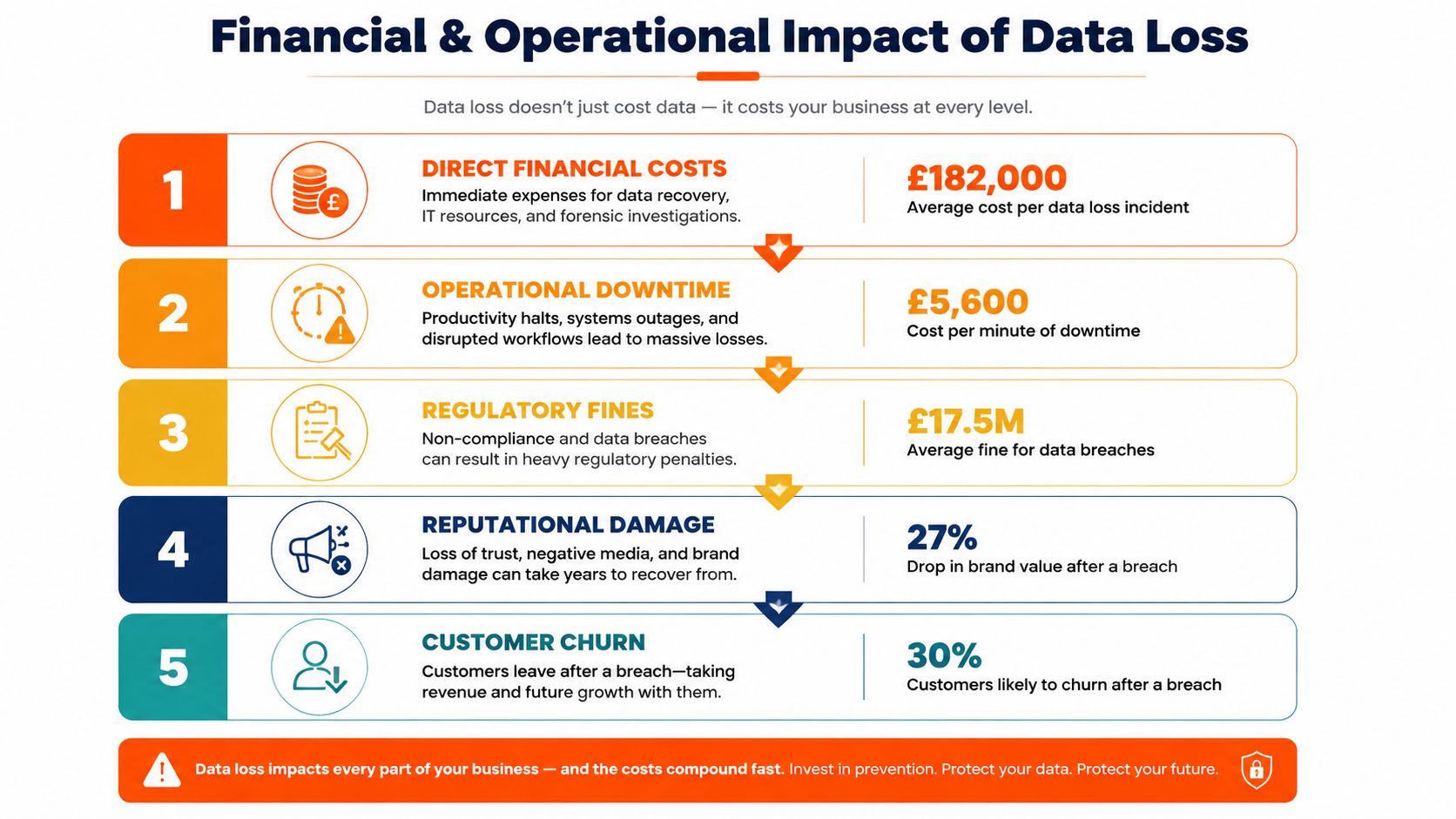
The consequences of data loss rarely arrive in a neat sequence. A lost database can create downtime, which delays invoicing, which tightens cashflow, which forces staff to prioritise urgent customer work, which creates missed commitments. At the same time, the business may need legal advice, forensic investigation and regulatory support.
Direct financial costs are only the starting point
The direct bill can include emergency IT labour, replacement hardware, specialist recovery work, external legal advice and temporary systems. A major breach can cost far more. Independent UK reporting puts the average cost of a data breach at £3.58 million in 2024, up 5% year on year, with especially high impacts in financial services, professional services and technology, as reported by IBM's UK breach cost coverage.
That figure isn't a sensible budget assumption for every SME, but it demonstrates the scale of the exposure. A smaller organisation can still suffer a disproportionate hit if the unavailable data supports every important process.
Downtime interrupts the money-making machinery
During an outage, employees may remain paid while producing little or no billable output. A manufacturer may have people waiting for production instructions. A field service company may have engineers sitting idle because schedules and job details are inaccessible. A professional firm may be unable to complete work because it can't retrieve evidence, correspondence or client records.
Finance suffers in a particularly predictable way. If staff can't access the accounting platform or order information, they may not raise invoices on time. Customers don't always pay late because they're unwilling. Sometimes the supplier hasn't sent an accurate invoice.
Practical rule: Calculate the cost of unavailable business functions, not just the cost of restoring servers.
The real cost of an hour's IT downtime for a North West business should be assessed against your own workflows. Separate payroll cost, lost billable work, delayed cash collection, contractual exposure and recovery labour. That produces a far more useful figure than a generic downtime calculator.
Compliance and reputation compound the disruption
Data loss can trigger obligations under the UK GDPR, especially where personal data is unavailable, altered, exposed or accessed without authorisation. The business may need to establish what happened, preserve evidence, assess risk to individuals and communicate with the Information Commissioner's Office where the legal threshold is met.
The regulatory question is only one part of the problem. Customers may tolerate a short service interruption if communication is clear and records remain accurate. They become less forgiving when the organisation can't explain what happened, gives inconsistent answers or misses commitments repeatedly.
Customer churn is often delayed. A client may stay through the immediate incident but review alternatives when the next renewal arrives. Staff confidence can also fall, particularly when people have to recreate work or tell customers that records are unavailable.
For a practical prevention checklist, Finchum Fixes IT's data protection guidance offers useful operational prompts, including access control, backup discipline and staff awareness.
The most dangerous cost is business interruption
UK SME reporting that includes downtime, recovery, regulatory costs, customer churn and increased cyber insurance premiums puts the average breach cost at £6,400, according to AMVIA's UK SME Cybersecurity Report 2026 coverage. The technical distinction matters. The cost isn't confined to the information itself. It grows while people rebuild systems, verify records and restore confidence.
A director should therefore track:
- Cashflow delay: Which invoices, orders or claims can't be processed?
- Customer impact: Which services become unreliable while systems are unavailable?
- Staff recovery time: How many people must reconstruct records or work manually?
- Contract exposure: Which deadlines or service levels become difficult to meet?
- Compliance workload: What evidence, notifications and remedial actions are required?
The event is over only when normal service, accurate records and reliable management information have returned. Restoring a file server doesn't necessarily restore the business.
Why Backups Alone Do Not Guarantee Recovery
“ We have backups” is not a recovery plan. It's a statement about storage, not proof that the business can return to work.
A backup may exist but contain the wrong data, miss a critical application, depend on unavailable credentials or take too long to restore. It may also be corrupted, encrypted alongside the live environment or impossible to use because nobody has documented the recovery sequence.
Backup success and recovery success differ
Recent UK coverage reports that 57% of organisations recovered from backups after ransomware, while another survey found that 31% of organisations relying on backups couldn't recover all data or failed completely, as summarised in the UK backup recovery reporting.
Those findings should unsettle any business that checks only whether a backup job completed. A green status message may confirm that data was copied. It doesn't confirm that applications, permissions, dependencies and business records can be reconstructed in a usable state.
Common failure points include:
- Untested integrity: The backup completes, but files or databases fail validation during restoration.
- Incomplete scope: The organisation protects documents but misses Microsoft 365 mailboxes, application data, credentials or configuration.
- Ransomware exposure: Attackers reach backup repositories and encrypt or delete recovery copies.
- Outdated documentation: The only person who knows the restore process has left, or the instructions no longer match the environment.
- Unacceptable recovery time: The data can technically be restored, but not quickly enough to prevent serious operational damage.
The difference between backup and disaster recovery is the difference between possession and capability. Backup stores information somewhere. Disaster recovery defines who restores what, in which order, using which dependencies, within an agreed timeframe.
Test the business, not just the backup job
A proper exercise should involve a real workload. Restore a database, open it through the application, check user access, validate recent transactions and confirm that staff can follow the process without relying on one engineer's memory.
Test scenarios should include accidental deletion, ransomware, hardware failure, loss of a site and compromise of administrator credentials. Microsoft 365 restoration deserves separate attention because native retention and recycle features aren't the same as an independent, point-in-time business backup.
Blowfish Technology's guidance on outdated backups reinforces a basic operational truth. A backup that hasn't been tested against current systems is an assumption, not an asset.
Recovery test: Ask a user from finance, operations or client service to complete a realistic task using the restored environment. If they can't, the test has found a business failure, not merely an IT issue.
How Data Loss Affects Different Business Types
The same outage produces different consequences depending on how a business makes money. A generic backup policy often protects files while ignoring the workflow that turns those files into regulated advice, manufactured goods or completed customer visits.
Consider three common SME environments.
Legal practice
A legal firm loses access to case files, correspondence and document management. The immediate concern is confidentiality, but availability creates the sharper operational problem. Solicitors may be unable to prepare for hearings, check instructions or provide accurate updates. Staff may recreate documents from email, while partners decide which matters can proceed safely.
The recovery challenge involves more than restoring folders. The firm must validate matter histories, access permissions, version integrity and audit records. It may also need to assess professional obligations, client notification and potential claims arising from missed deadlines or incomplete advice.
Manufacturer
A manufacturer loses access to CAD drawings, production specifications and ERP information. The factory floor may still have machines and materials, but production can't continue safely if operators lack the approved files or order details.
The business then faces idle labour, delayed shipments and pressure from customers and suppliers. Restoring a file share isn't enough. The recovery team must confirm that drawings are current, bills of materials are accurate and ERP transactions haven't been duplicated or lost.
Multi-site service business
A facilities management company or care provider loses central scheduling, customer instructions and compliance records. Each site may hold fragments of information, but the central system coordinates people, visits and evidence.
Missed appointments affect customers directly. Managers then spend time calling sites, reconstructing rotas and checking whether required records exist. Recovery becomes harder because each location has different connectivity, devices and local workarounds.
| Business type | Primary data at risk | Key consequences | Estimated cost range |
|---|---|---|---|
| Legal practice | Case files, correspondence, document versions and matter records | Missed deadlines, client disruption, confidentiality concerns and professional liability exposure | Not stated, assess against billable work, claims and remediation |
| Manufacturer | CAD files, production data, ERP records and order information | Production stoppage, delayed deliveries, idle staff and supply chain penalties | Not stated, assess against halted output and contractual commitments |
| Multi-site service business | Scheduling, client instructions, staff records and compliance evidence | Missed visits, fragmented service delivery and contract or regulatory exposure | Not stated, assess across every affected site and working day |
A recovery design must mirror the business. Legal firms need matter-level integrity and access control. Manufacturers need application dependencies and production validation. Multi-site operators need resilient communications and a way to operate safely when central systems are unavailable.
Businesses developing their wider controls can also use this guide for businesses on breach prevention as a supplementary governance resource. The key decision remains internal: identify the records and systems that keep customers served, products moving and obligations met.
Building a Layered Data Recovery Strategy
A credible recovery strategy must keep the business operating when one control fails. Backups are only one layer. You also need tested restoration, defined priorities, controlled access, an incident process and people who know their responsibilities. The goal is repeatable recovery under pressure, not a document that sits untouched.
Start with copies you can restore
Automated backups should cover servers, workstations, cloud services and the applications holding operational records. Keep protected copies separate from production, use immutable or offline storage where appropriate and restrict administrative access. A backup that attackers can alter, or staff cannot locate, offers little protection during an incident.
A completed backup job is not proof of recovery. Restore individual files, complete folders, databases and application workloads. Confirm that files open correctly, permissions remain usable and the recovered version stays within the business's tolerance for lost transactions. Record failures and assign someone to correct them.
Set recovery targets and priorities
Set a recovery point objective, the amount of recent data the business can afford to lose. Set a recovery time objective, the time a service can remain unavailable. Apply these targets system by system. Payroll, a production control platform and a customer scheduling system may require different recovery sequences.
Document restoration order, system dependencies, responsible owners and fallback procedures. A customer-facing service may depend on identity, networking, databases and third-party platforms, so restoring the application alone will not bring operations back. Use this disaster recovery planning resource to structure the plan, then test it with the people expected to respond.
Add response and insurance controls
Cyber insurance may contribute to eligible investigation, legal, notification and interruption costs, but policy terms vary. Insurers may request evidence of patching, multifactor authentication, privileged access controls, backup isolation and recovery tests. Treat insurance as financial support, not as a replacement for sound engineering.
During an incident, the response team should:
- Contain carefully: Isolate affected systems without destroying evidence or spreading the attack.
- Assign ownership: Name an incident lead, technical lead, communications owner and business decision-maker.
- Preserve evidence: Record timelines, alerts, system states and actions taken.
- Assess impact: Identify affected data, services, customers and legal obligations.
- Communicate consistently: Give staff and customers accurate updates through approved channels.
- Restore in sequence: Recover identity, core infrastructure, applications and data according to the documented plan.
The ICO's reporting requirements depend on the nature and risk of the personal data incident. Involve your data protection lead or legal adviser early rather than guessing.
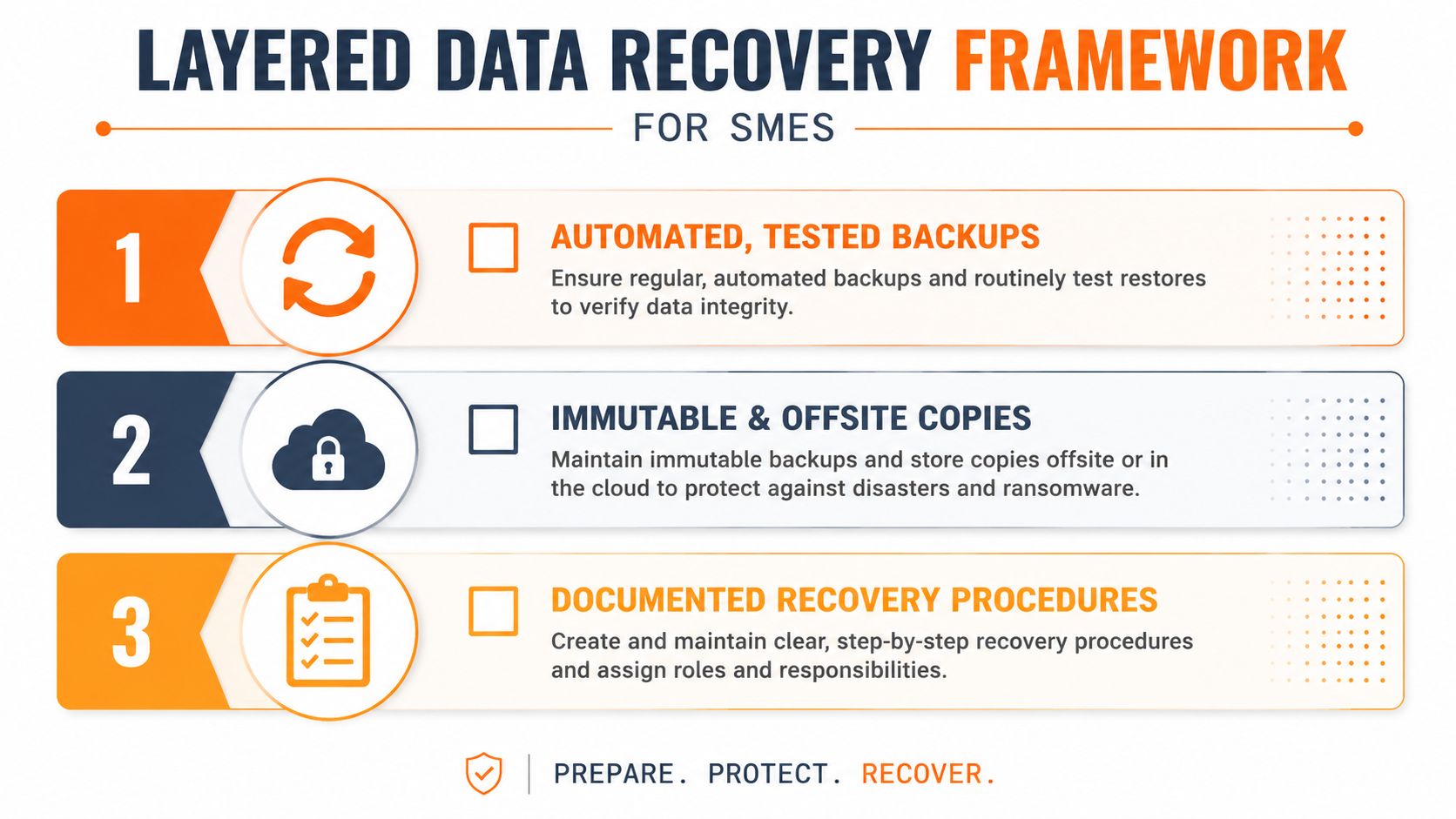
Start implementation with visibility and quick corrections. Review backup scope, administrator access, retention, restore evidence and recovery contacts. Then address immutable storage, standby capacity, application failover and regular exercises. Every test needs an action list, an owner and a completion date.
Watch the following overview for a concise introduction to recovery planning:
Choosing the Right Managed IT Partner for Data Protection
A managed IT provider should be judged by recovery evidence, not by the length of its service catalogue. If a supplier only confirms that backup jobs ran, it's monitoring a process. It isn't proving that your business can recover.
Look for a partner that can connect protection to operational priorities. That means mapping critical applications, identifying dependencies, maintaining documented recovery procedures and testing restoration against realistic workloads.
What capable support should include
- Continuous monitoring: Detect unusual activity, failed jobs, privilege changes and system health issues before they become an outage.
- Recovery testing: Restore real files, databases and services, then record the result and fix failures.
- Protected storage: Use encrypted, immutable or otherwise isolated copies that attackers can't alter through ordinary administrator access.
- Sector-aware continuity: Build procedures around legal matters, production systems, Microsoft 365, scheduling platforms or regulated records.
- Clear accountability: Define response contacts, escalation paths, recovery targets and reporting obligations in the service agreement.
Ask prospective providers direct questions:
- How often do you test restores, and what exactly do you restore?
- Can you show anonymised evidence of successful recovery exercises?
- Which Microsoft 365 workloads and business applications are covered?
- Where are immutable copies stored, and who can alter retention?
- What recovery targets do you commit to for businesses of our size?
- How do you support incident containment, investigation and communications?
- What evidence will you provide for insurers, auditors and compliance reviews?
Providers such as Blowfish Technology offer managed backup and disaster recovery services covering servers, workstations and Microsoft 365, with encrypted immutable cloud backups and automated recovery testing. That's the type of capability to assess, regardless of which supplier you choose.
Decision test: If a provider can't explain how it would restore your most important business function after an identity compromise, keep looking.
Start with a data risk assessment, review the current backup configuration and schedule a recovery readiness audit. Find the gaps while the business is operating normally, then assign owners and deadlines. Waiting for an incident turns a manageable engineering project into an urgent commercial crisis.
Blowfish Technology provides managed IT support, backup and disaster recovery services designed to help UK SMEs protect data and restore essential operations after disruption. Visit Blowfish Technology to arrange a practical review of your current recovery capability and identify the gaps that could prolong downtime.

The Blowfish Technology team. Managed IT, cloud services, software development and connectivity for North West businesses since 1999.