
In 2024, 52% of UK primary schools identified a cybersecurity breach or attack during the previous year, according to the Department for Science, Innovation and Technology's Cyber Security Breaches Survey education institutions annex.
Ask most headteachers how their IT is performing and you'll get a ticket count. Ask how long it would take to get the shared drive, the management information system and the safeguarding records back after a ransomware attack, and the room goes quiet. That silence is the core procurement problem, and it's the one a provider contract either solves or hides.
This guide is for school business leaders, bursars, governors and IT leads buying managed IT services for schools. It judges providers on two things that rarely appear in a sales deck: what they can recover, and how well they help you govern what staff and pupils do online. Everything else, including helpdesk speed, is a supporting detail.
Table of Contents
- What Managed IT Means for a School
- Core Services Every School Should Expect
- Backup and Disaster Recovery That Survives an Incident
- Cyber Security, Filtering and Compliance Requirements
- Governing AI Tools and EdTech Without Blocking Learning
- What Managed IT Costs and Which Service Levels to Expect
- Provider Selection Checklist for School Leaders
- Plan Your First 90 Days With a Managed Provider
What Managed IT Means for a School
Managed IT is an ongoing agreement with an external technical team to operate and support a school's systems. The provider monitors services, applies patches, manages accounts and responds to faults, while the school retains control of its budget, data and decisions about acceptable use. The practical test is not how quickly a helpdesk answers. It is whether responsibilities are clear and critical services can be recovered when they fail.
The Cyber Security Breaches Survey 2025 findings for education institutions reports that 79% of primary schools used an external provider to manage their cybersecurity, compared with 57% of secondary schools, 33% of further-education colleges and 41% of higher-education institutions. It also found 83% of primary schools had a governor or senior manager with specific responsibility for cybersecurity, up from 71% in 2024. These figures distinguish delivery from accountability: a provider can operate technical controls, but school leaders still need to govern risk and know who is responsible for decisions.
The right comparison: a managed provider is a facilities contractor on a retainer, inspecting the boiler room regularly, not a handyman called after a pipe bursts on a Friday afternoon.
A school's IT function has three parts: strategy, operations and security. Strategy covers what to buy, what to retire and which risks to address. Operations covers devices, accounts, printing, software and faults. Security covers monitoring, filtering, patching and incident response. A small school may be able to set priorities and handle routine operations internally. Round-the-clock monitoring, specialist security work and holiday cover require additional capacity; assigning them to an already stretched business manager or part-time technician leaves gaps.
A repair-only arrangement or a hardware reseller that takes no ongoing responsibility leaves the school managing the risks between visits. That can mean no clear owner for patching, account changes or recovery planning. Before signing, check who monitors systems, who acts on alerts and how the school can verify that agreed work has been done. Ask for responsibilities and reporting to be written into the service agreement, not left as informal expectations.
Three questions should guide the decision: What should the service include? What must be protected and governed, whoever delivers it? How will you prove the arrangement is working before renewal, rather than after an incident? Comparing providers is useful only when the school has agreed what it is judging; that same preparation helps when you compare school and tutoring options.
Core Services Every School Should Expect
A service list is useful only if it sets out who owns each task and how the school can check that work is being done. Compare every proposal against a common baseline, then ask providers to show how they deliver and report each service.
| Service | What It Covers | What the School Gets |
|---|---|---|
| Helpdesk and proactive support | Ticket logging, remote fixes, on-site visits, monitoring alerts | A clear route to support and visibility of unresolved faults |
| Device management | Enrolment, imaging, patching, app deployment | Consistent, maintained staff and pupil devices |
| Microsoft 365 for Education | Email, Teams, SharePoint, licensing, account lifecycle | Managed accounts and access to core collaboration tools |
| Hosted desktops | Multi-user remote desktop servers | Access to software from shared or low-specification machines |
| Managed backup | Automated, monitored and tested copies of data | A defined backup service with evidence of monitoring and testing |
| Disaster recovery | Documented recovery of critical systems | Agreed responsibilities and recovery timescales |
| EDR and ITDR | Endpoint and identity threat detection and response | Detection and response for threats to devices and identities |
| DNS filtering | Category-based web filtering at the network level | Web access controls for pupils and staff |
| User training | Phishing simulations and awareness sessions | A way to build staff awareness and assess training needs |
Ask providers to show what sits behind each promise. For support, check the hours covered, how urgent faults are prioritised, and when an issue moves from remote support to an on-site visit. For device management, ask who approves updates and how failed patches or devices that stop reporting are handled. A list of services without named responsibilities and reporting gives the school little basis for holding the provider to account.
The phishing row needs a practical measure, not an annual session that staff can miss without follow-up. Ask how awareness activity is delivered and how the provider reports participation and areas needing further attention. The aim is to make training part of ongoing security work, rather than treating attendance as proof that risk has been addressed.
If connectivity is the weak link, connect the classroom explains the separate work of planning and delivering the classroom network. The provider should be able to distinguish a fault in the network from a problem with a laptop or an online service, then show how each is escalated. That distinction helps staff understand who is responsible when a lesson cannot proceed.
Three questions the service list should answer
- Who holds administrator rights, and how is access audited? Ask the provider to explain which accounts have privileged access, how activity is logged, and how the school can review those records.
- How are joiners and leavers handled during term time? Agree who notifies the provider and how quickly accounts are changed or disabled. A former member of staff retaining access creates an avoidable security risk.
- Does the provider support the management information system and curriculum software? Confirm which systems are covered and who takes responsibility when the fault sits with a software supplier. Otherwise, the school may be left coordinating between providers.
Ask for a named contact and reports that school leaders and governors can understand. Ticket counts show activity, but not whether important services could be restored or whether identified problems were resolved. Request evidence against the outcomes in the agreement, including open risks, recurring faults and any actions still awaiting the school's decision.
Before approaching providers, record which services the school already has, which are missing, and which depend on one staff member. Use that list to test proposals line by line. The strongest offer is not necessarily the longest: it is the one that makes ownership, escalation and evidence clear enough for the school to govern the service.
Backup and Disaster Recovery That Survives an Incident
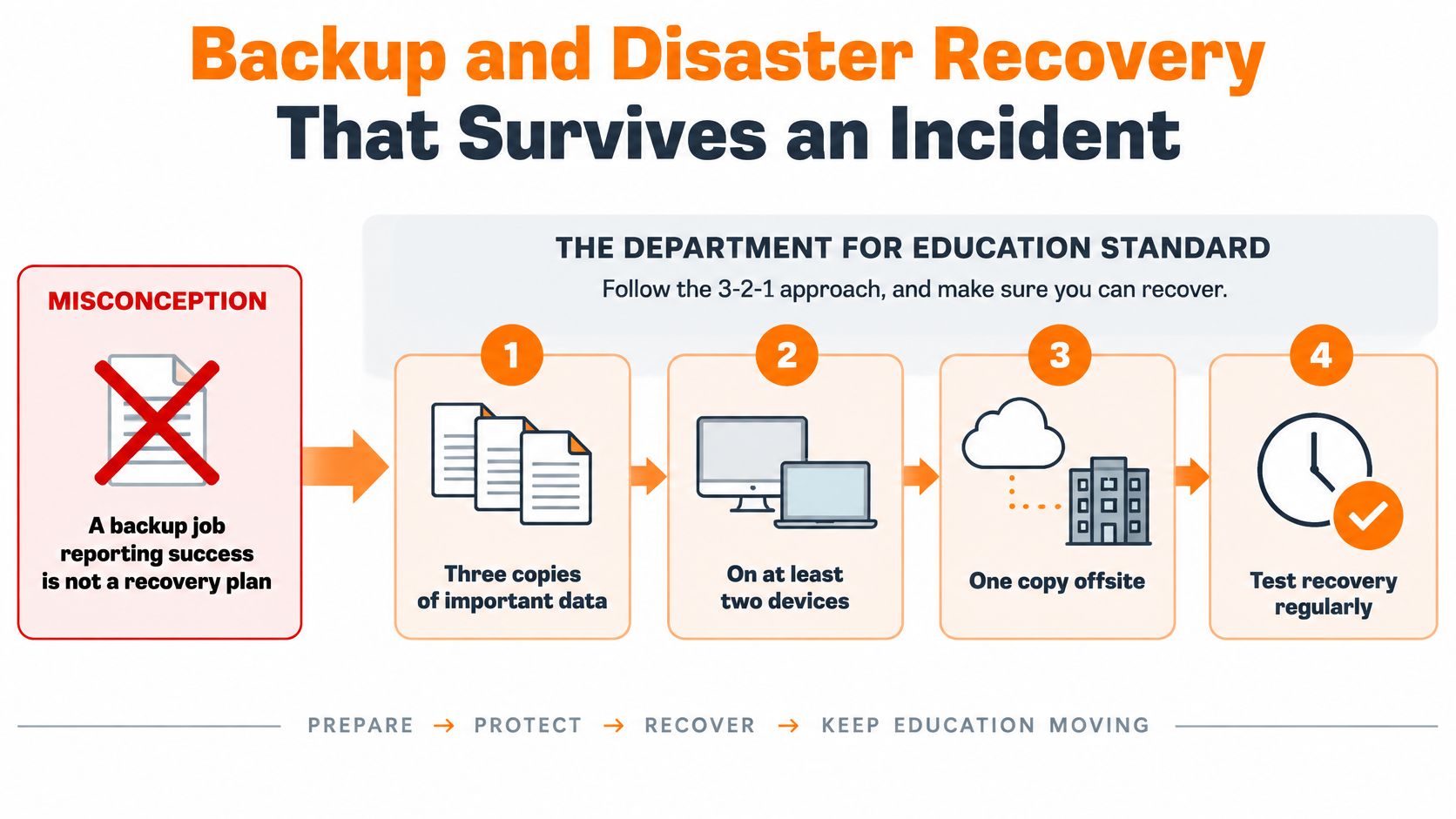
A backup job reporting success is not a recovery plan. Those two things get confused constantly, often by the people selling the backup system. A school can hold a green tick on every job for three years and still fail to restore a single shared drive, because nobody ever tried.
The Department for Education's cyber security core standard for schools and colleges sets the baseline: at least three copies of important data, on at least two separate devices, with at least one copy off-site, tested termly, reviewed annually or after major system changes, and integrated into business-continuity and disaster-recovery plans.
Turning the standard into a process
- Map the critical services. Microsoft 365, the management information system, safeguarding records and shared drives. Not every file in the school, because priorities you can't rank are priorities you can't defend.
- Set a recovery-point and recovery-time objective for each. How much data loss is tolerable, and how long the service can be down before teaching, attendance or safeguarding breaks.
- Place three copies, one of them off-site. Cloud replication counts, provided it isn't running under credentials an attacker can reach from the same account.
- Restore something real every term. Sample files, user accounts and a complete workload, into an isolated environment, recording elapsed time and checking that permissions survived.
- Record the results and review the plan annually, or after any major system change such as a new MIS or a trust merger.
What to write into the contract
Push for immutable or otherwise ransomware-resistant copies, because a backup that can be deleted by the same compromised admin account is decoration. Insist on separate backup administrator credentials, encryption in transit and at rest, and retention rules that cover coursework and safeguarding records for as long as your obligations require.
| Critical service | Recovery point objective | Recovery time objective |
|---|---|---|
| Microsoft 365 | Copy interval agreed in the contract, from continuous to nightly | Same working day for the mailboxes and files staff teach from |
| Management information system | The last completed data entry, captured at an agreed interval | Restored before the next register, or the school cannot operate |
| Safeguarding records | No loss accepted; the copy must exist separately from the live system | Restored and access-checked before any other system |
| Shared drives | The last nightly copy, plus file version history where the platform provides it | Within the working day, starting with the drives teachers use |
Many schools find that a managed provider will write these numbers down only when asked, and that the asking sharpens everyone's thinking. Managed backup should be automated, monitored and tested, not purchased. If you're drafting the document from scratch, how to create a disaster recovery plan walks through the structure.
What governors should see each term
Five items, no more: backup success rate, the date of the last successful restore, the result of the latest test, remediation of any failed jobs, and remaining storage capacity. A provider that can't produce those five is asking you to take recovery on trust.
That list is also the easiest way to explain to a governing body why a green tick in a console proves almost nothing. Here's a short walkthrough of how a tested recovery differs from a completed backup job.
Cyber Security, Filtering and Compliance Requirements
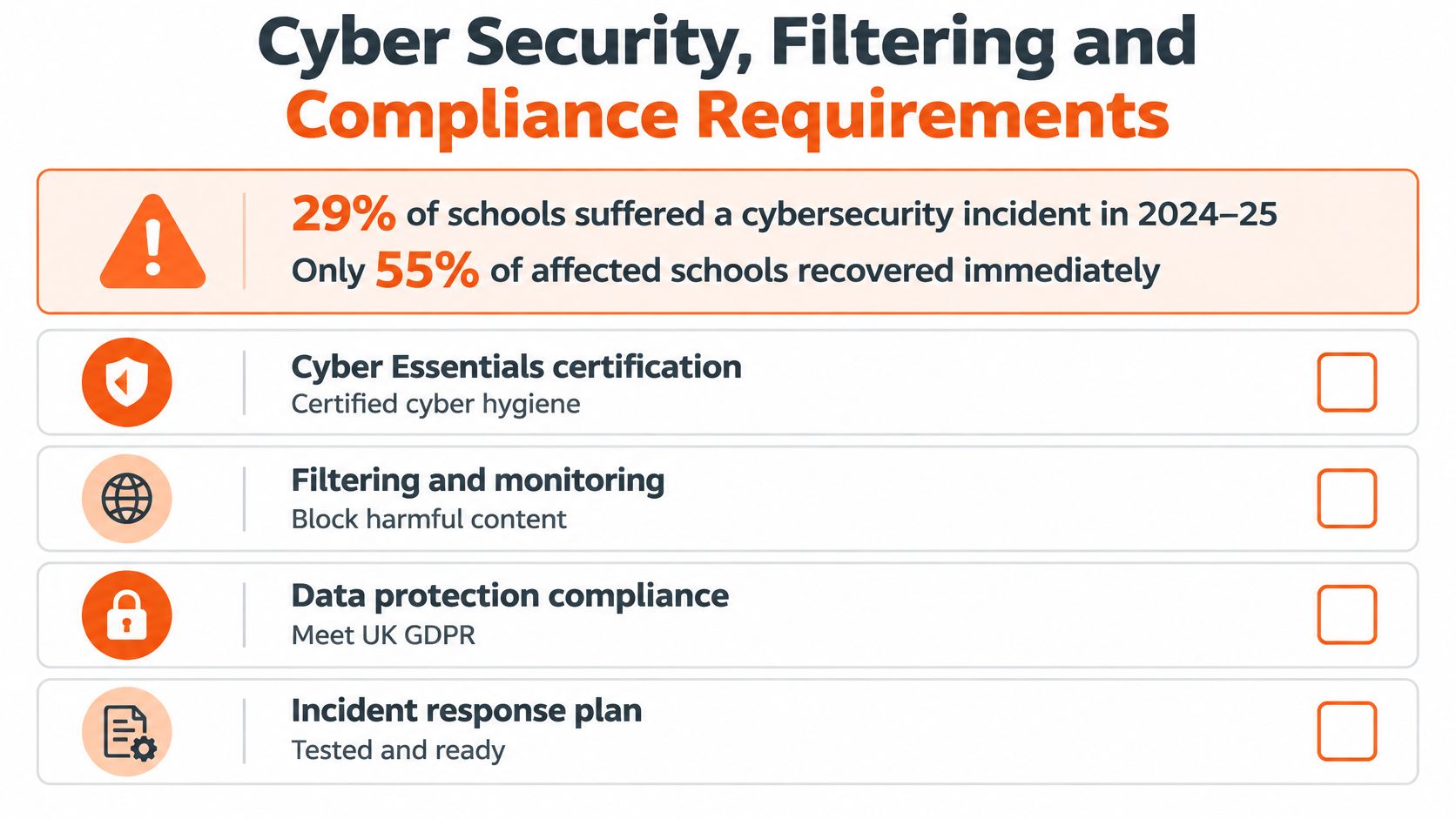
Schools need more than a fast helpdesk response when an incident disrupts teaching. The provider must be able to show which controls are in place, who acts when they fail, and how the school will recover. A UK Government survey summary reports that 29% of schools experienced a cybersecurity incident during the 2024–2025 academic year, down from 34% the year before. The Department for Education's summary of the survey also reports that just 55% of affected schools recovered immediately, down from 63%, while teacher training rose from 61% to 72%. The figures make the practical point: awareness helps, but it cannot restore files or contain a compromised account.
The baseline to hold a provider to
- Multi-factor authentication for staff accounts, and without exception for administrator accounts.
- Endpoint detection and response across staff and pupil devices and servers. Ask which systems are covered and how an alert is handled.
- DNS filtering with safeguarding reports routed to the designated safeguarding lead, with a clear process for reviewing them.
- Patching within an agreed window, backed by reporting that shows what was applied and what failed.
- A written incident-response plan that sets out who can suspend accounts and who communicates with parents. Confirm how the plan is tested.
- Cyber Essentials certification, and Cyber Essentials Plus where the school's risk and requirements warrant it. Check that certification is current.
These controls sit alongside the DfE cyber security standard, filtering and monitoring duties in Keeping Children Safe in Education, and UK GDPR. Leadership and the data protection officer own policy; the provider should implement agreed controls and supply evidence of their operation. Ask to see sample reports before signing, then agree how often the school will receive them and who reviews exceptions.
Blowfish Technology's cloud infrastructure is UK-hosted and GDPR-aligned, with cloud data stored in UK-based data centres. That can simplify questions about where data is held, but it does not replace the school's responsibility to assess each system and its use. Schools with international partnerships or overseas campuses may also need to consider the rules applying in those jurisdictions, including safeguarding pupil records under Kenyan law.
A useful test is simple: which controls can the provider show in a report this term? Before signing, agree the evidence and reporting cadence. After signing, check that the reports identify gaps, owners and follow-up actions, not just green status indicators.
Governing AI Tools and EdTech Without Blocking Learning
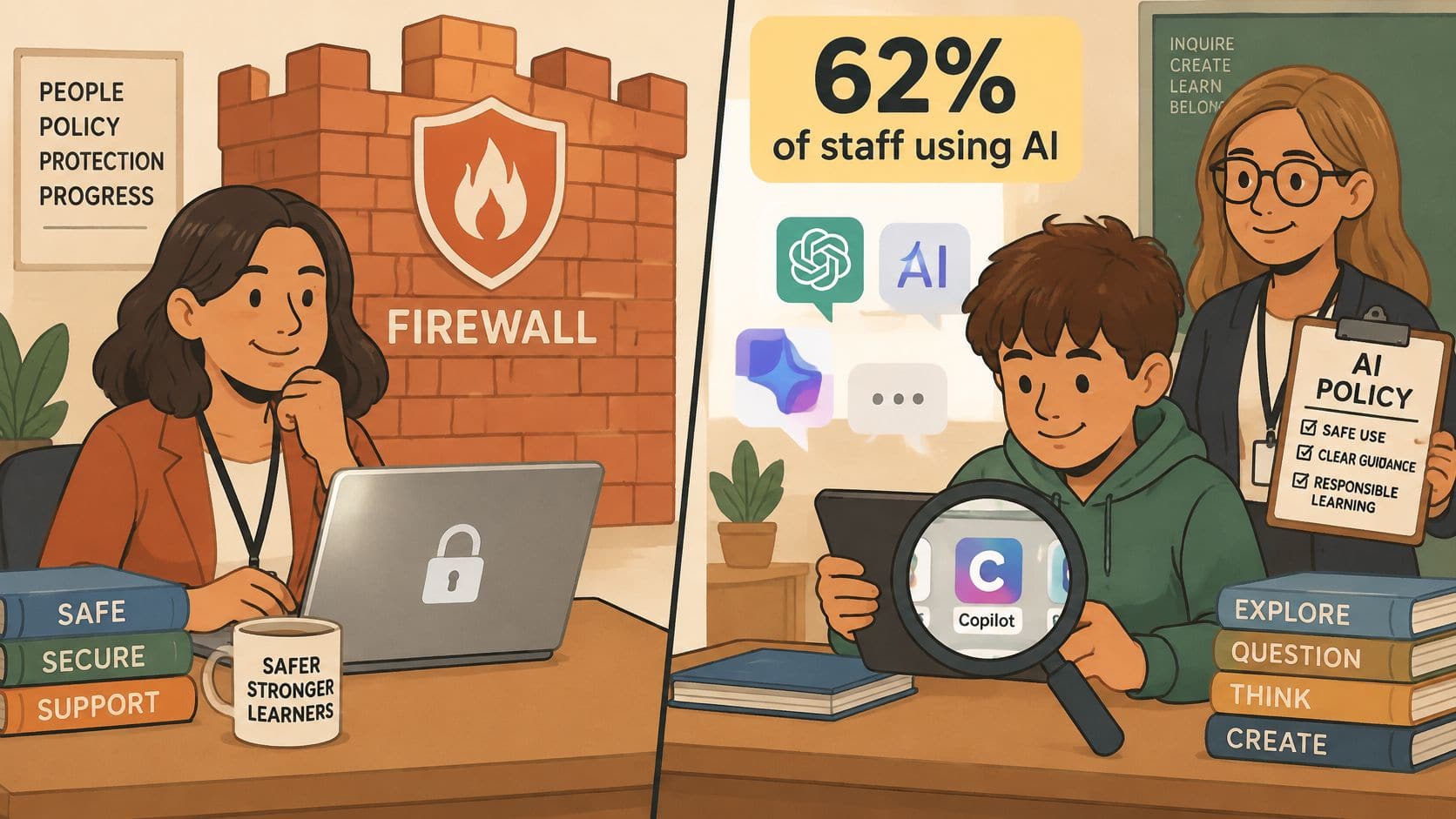
A managed firewall and content filter cannot make AI use safe on their own. They can block categories and websites, but risks also arise inside approved tools: what a teacher enters, whether a pupil's work is used for training, and whether anyone checks AI-generated homework.
AI use among school staff is growing. Surveys of school staff point to the need for approved-tool lists, GDPR and safeguarding checks, and established procurement and data protection impact assessment routes. The governance and implementation of AI in schools report discusses these governance and implementation issues.
Controls that work without stopping lessons
- An approved-tool list, reviewed regularly, with the data each tool may receive recorded beside its name.
- Identity-based access, so staff and pupils use managed accounts that can be audited, suspended and reported on, rather than personal logins.
- Device policies and audit logs, recording who used what and when. These records help schools respond if a safeguarding concern arises.
- A shadow AI process, because a blanket ban can push use onto personal phones. Blowfish Technology's shadow AI control identifies which AI tools a client's team is using and brings them into a managed environment.
Responsibility needs to be assigned clearly. Leadership sets policy, the data protection officer reviews impact assessments, and teachers decide classroom use within the policy. The provider manages access, filtering and logging, and reports on those controls. AI governance frameworks can help schools document policy, responsibilities and review processes.
The four questions to settle before approval
- What data may be entered? Pupil names, safeguarding details and assessment data are usually excluded.
- Who checks outputs for accuracy? Name a person, so errors do not pass unchecked into reports or learning materials.
- What age restrictions and consent rules apply? Check the tool provider's terms and record the school's decision.
- What happens when a tool is flagged? Agree suspension, review and escalation steps before an incident occurs.
Device and access management also support inclusion. Where lessons use hosted desktops or shared devices, inclusive virtual learning for SEN pupils highlights the needs a virtual classroom must meet. Accessibility settings rely on the same consistent device and account configurations that a provider can manage. Blowfish Technology delivers AI services through a client's managed IT relationship and stays involved as the technology evolves, helping schools review their approach rather than rely on a one-off project.
What Managed IT Costs and Which Service Levels to Expect
Nobody can give you a price before they've seen your devices and accounts, so treat any figure quoted on a first call as a placeholder. What you can compare is the billing model, because each one pushes risk to a different party.
| Model | How It Is Billed | Best Fit | Check Before Signing |
|---|---|---|---|
| Per-user per month | Fixed fee for each staff member or pupil account | Schools with stable headcount and Microsoft 365 | Costs rise with pupil numbers unless capped |
| Per-device per month | Fixed fee for each managed laptop, tablet or desktop | Schools with large device fleets | Whether spares and loan devices are included |
| Fixed-fee bundle | One annual price covering agreed services and hours | Trusts wanting budget certainty | Project work, hardware and out-of-hours cover may be excluded |
| Pay-as-you-go | Hourly or ticket-based billing | Small schools with light needs | Costs are unpredictable during an incident |
Service levels worth having in writing
- Response targets by priority, with each priority defined in plain English rather than by adjective. "P1: a safeguarding or exam-related system is down for multiple users" beats "urgent".
- Resolution targets, because a fast first reply that leads to a three-day fix isn't support.
- A 99.9% uptime commitment for hosted desktops and servers, which is the standard we hold our own hosted desktop and server infrastructure to.
- Out-of-hours cover for safeguarding-related incidents and for anything that stops a school opening.
- Monthly reporting against each target, and service credits when targets are missed. Credits are a weak remedy but a strong signal that the provider expects to hit them.
- An exit clause that returns your data in a usable format, with a named date and a named owner.
Contract rule: if a promise isn't accompanied by a report you'll receive automatically, it isn't a service level. It's a sentence.
Ask for the price per term rather than per month, since that's the figure your budget carries, and ask for the service levels in writing alongside the quote. Providers who operate this way won't hesitate. Our own commitments are published in our service level agreement, and that's the standard you should expect from anyone pitching for your contract.
Provider Selection Checklist for School Leaders
A checklist is only useful if it produces a number you can defend to a governing body. Group the questions into four areas, and remember that a friendly sales meeting is not evidence of anything.
Credentials. Microsoft Solutions Partner status for Microsoft 365 work, current Cyber Essentials certification, and insurance certificates that haven't expired. Ask to see each one rather than accepting a logo on a slide.
Education experience. References from schools of similar size and phase, not a primary school served by a team that usually does law firms. Familiarity with your management information system, your safeguarding reporting route and the realities of September intake.
Service and contract. A named account manager rather than a shared inbox. Written priority definitions, service credits, monthly reports a governor can read, and an exit plan that hands back data in a format the next provider can use.
Evidence. A recovery test report from last term, a clear statement of where your data is held, and a current risk register for your environment. Any provider can produce a template. Only a working one can produce last term's results.
Here's where a takeover usually begins. When Blowfish Technology takes over management of a cloud environment that was set up by another provider or built internally, the work starts with a full audit to find security gaps, misconfigurations and performance problems. Ask every candidate whether you'll see that audit before you sign, and whether the findings will be written in language a non-technical governor can act on. Blowfish Technology is a Microsoft Solutions Partner managing Microsoft 365 for businesses across the North West, which is the kind of verifiable claim worth checking against the register.
Score each provider from 0 to 2 on every item: 0 for no answer, 1 for a partial or verbal answer, 2 for documentary evidence. Compare totals, then look at where the differences sit. A provider that scores well on credentials but poorly on recovery evidence is selling you confidence, not resilience.
Plan Your First 90 Days With a Managed Provider
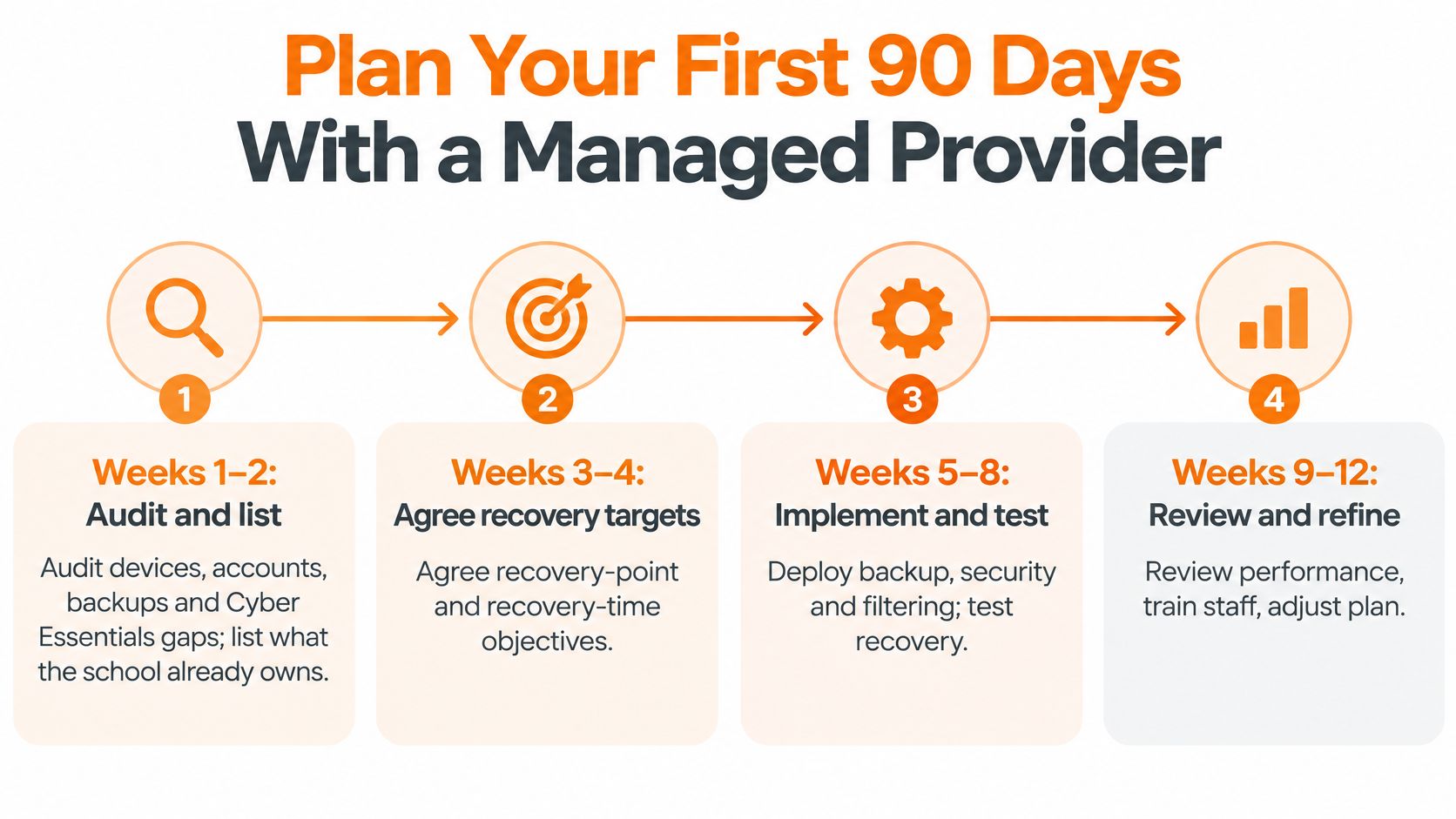
Set the first 90 days by the evidence the school needs, not by how quickly the helpdesk answers. Each phase should finish with a signed-off output. That gives leaders a record to test against the provider's promises and a clear basis for deciding whether recovery and governance are working.
Weeks 1 and 2, audit and list. Record devices, accounts, administrator rights, backup jobs, Cyber Essentials gaps and existing subscriptions. Deliver a written inventory, including systems that were not identified at the outset. Check who owns each account and whether backup jobs are completing, rather than relying on a list of installed tools.
Weeks 3 and 4, agree objectives. Set recovery-point and recovery-time objectives for each critical service, alongside filtering rules and the initial approved-tool list. Leadership and the data protection officer should agree the targets. The output is a signed statement of what will be protected and how quickly the school expects it to be restored.
Weeks 5 and 6, score and sign. Compare providers using the selection checklist, then put service levels, exit terms and the termly reporting schedule in the contract. Keep recovery evidence and governance requirements explicit. The output is a signed contract with its reporting schedule attached.
Weeks 7 to 10, implement. Move accounts into managed Microsoft 365, enrol devices, configure filtering and endpoint protection, and bring new hardware into service. The provider should supply, deliver and configure devices, including network setup, driver installation and user training where needed. Confirm that every device and account is within the managed estate.
Weeks 11 and 12, test and report. Restore data in an isolated environment, record the elapsed time and give governors the results. The output should be a recovery test report with a date, duration and named owner. A successful backup job alone does not show that the school can recover its data.
Before the next governors' meeting, book a restore test and an AI-tool review. These give the school evidence on recovery and governance before it commits to a full contract renewal. Each needs an agreed date and someone accountable for the output.
After day 90, maintain a regular review cycle. Monthly service reports should measure performance against agreed response and resolution targets. Test restores termly and include the results in the same governor pack as safeguarding and attendance. Review the approved-tool list, recovery plan and provider fit annually. These checks make it possible to test whether the contracted service is delivering the recovery capability and oversight the school needs.
Blowfish Technology provides managed IT, cloud services and cyber security for businesses across the North West, including multi-site organisations, with proactive monitoring and Microsoft 365 account management through to tested backup, disaster recovery and Cyber Essentials support, UK-hosted infrastructure and a 99.9% uptime commitment on hosted desktops and servers. Ask for the audit and restore test report before signing, and assess the evidence against the school's recovery objectives. Learn more about Blowfish Technology.
